
MOUNT PRO Freelift Pro Single
MOUNT PRO Freelift Pro Single Monitor Desk Mount Instruction Manual
Model: Freelift Pro Single
1. Маҳсулот ба охир расидview
The MOUNT PRO Freelift Pro Single Monitor Desk Mount is designed to provide an ergonomic and space-saving solution for your workspace. This adjustable monitor arm supports a single screen, offering flexibility in positioning for optimal viewбароҳатӣ ва ҳосилнокӣ.
Хусусиятҳои асосӣ:
- Мутобиқати универсалӣ: Fits most flat or curved LCD/LED screens from 13 to 32 inches, with a maximum load capacity of 22 lbs. Supports VESA patterns of 75x75mm and 100x100mm.
- Танзими пурраи ҳаракат: Offers 360° rotation, +/-90° swivel, and +85°/-45° tilt for versatile screen positioning.
- Оптимизатсияи фазо: Frees up desktop space with two mounting options (clamp or grommet) and integrated cable management.
- Сохтмони устувор: Features an aluminum arm and a gas spring counterbalance system for stable and long-lasting performance.
2. Маълумот оид ба бехатарӣ
Please read and understand all instructions before installation and use. Failure to do so may result in personal injury or property damage. If you have any questions, contact customer support.
- Иқтидори ҳадди аксар аз 22 фунт (10 кг) зиёд набошад.
- Ensure the mounting surface (desk) is strong enough to support the combined weight of the mount and monitor.
- Use only the provided hardware. If any parts are missing or damaged, contact customer support for replacement.
- Keep children away from the product during installation.
- Adjust the gas spring tension carefully. Improper adjustment may cause the monitor to fall or spring up unexpectedly.
3. Мундариҷаи баста
Пеш аз идома додани насб санҷед, ки ҳамаи ҷузъҳо мавҷуд ва осеб надидаанд.
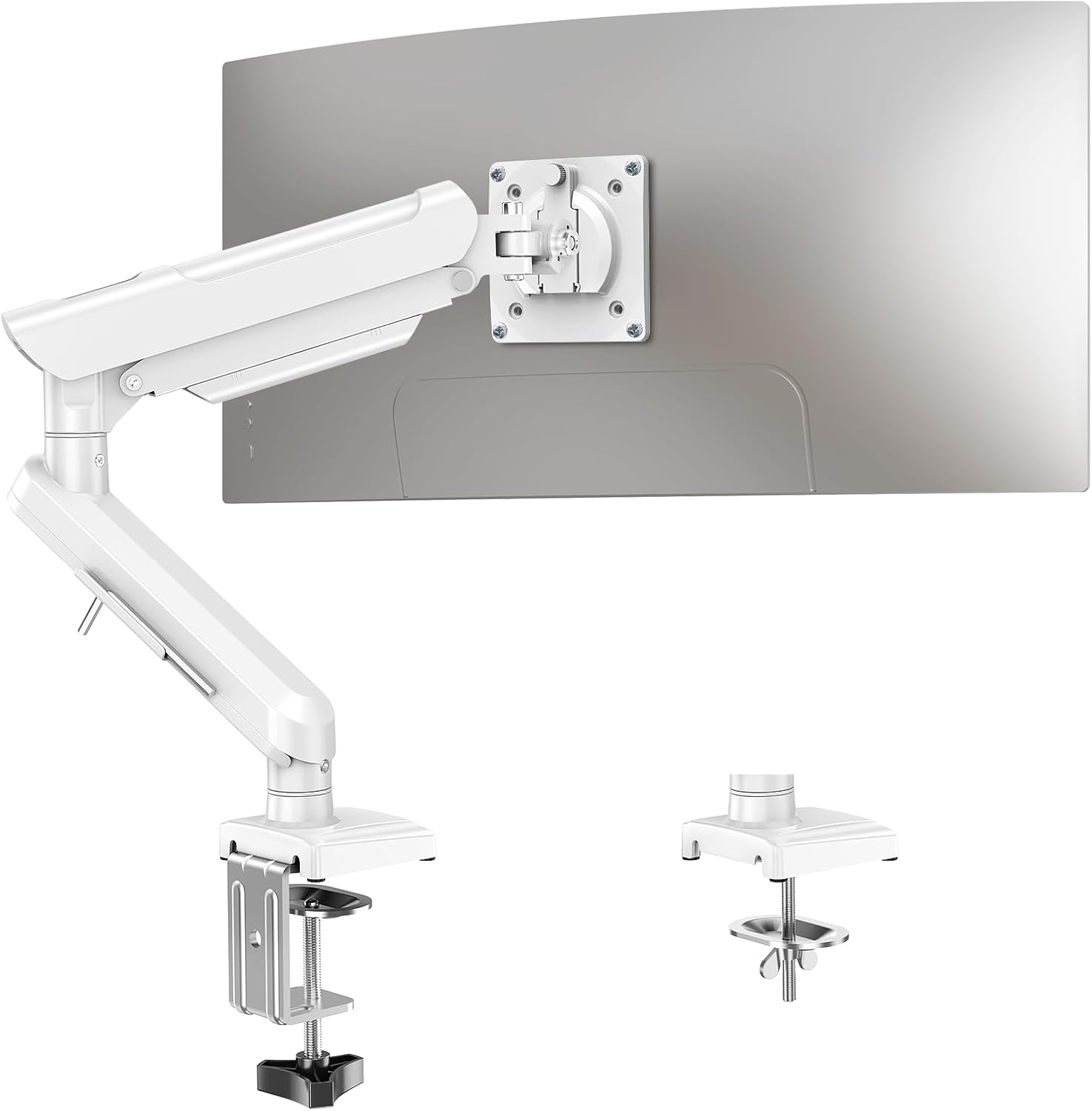
Image: All components of the MOUNT PRO Freelift Pro Single Monitor Desk Mount, including the arm, base, VESA plate, and hardware.
The package includes the monitor arm, desk clamp, grommet base components, VESA plate, and various screws and tools for assembly.
4. Танзим ва насб
4.1 Имконияти васлкунии худро интихоб кунед
The monitor mount offers two installation methods: C-clamp or Grommet base. Select the option that best suits your desk.

Image: Illustration showing the C-clamp mounting method on the right and the grommet mounting method on the left, with desk thickness requirements.
C-Clamp Насбкунӣ:
- Suitable for desk thicknesses from 0.39 to 2.76 inches (10-70mm).
- C-cl-ро замима кунедamp to the base using the provided bolts and tighten securely.
- Ҷойгир кардани clamp on the edge of your desk and tighten the knob until the base is firmly secured.
Ҷойгиркунии пойгоҳ:
- Suitable for desk thicknesses from 0.39 to 2.76 inches (10-70mm) and hole diameters from 0.39 to 2.36 inches (10-60mm).
- C-cl-ро ҷудо кунедamp ҷузъҳо.
- Insert the long bolt through the base, then through the grommet hole in your desk.
- Secure the base from underneath the desk using the clip plate and wingnut.
4.2 Install the Monitor Arm
- Slide the lower arm onto the base pole.
- Slide the upper arm onto the lower arm.
- Secure the arms by tightening the internal screws with the provided Allen key.
4.3 Пласти VESA-ро ба монитор замима кунед
- Remove any existing monitor stand.
- Пластинаи VESA-ро бо сӯрохиҳои васлкунӣ дар қафои монитори худ (75x75 мм ё 100x100 мм) ҳамвор кунед.
- Secure the VESA plate to the monitor using the appropriate screws.
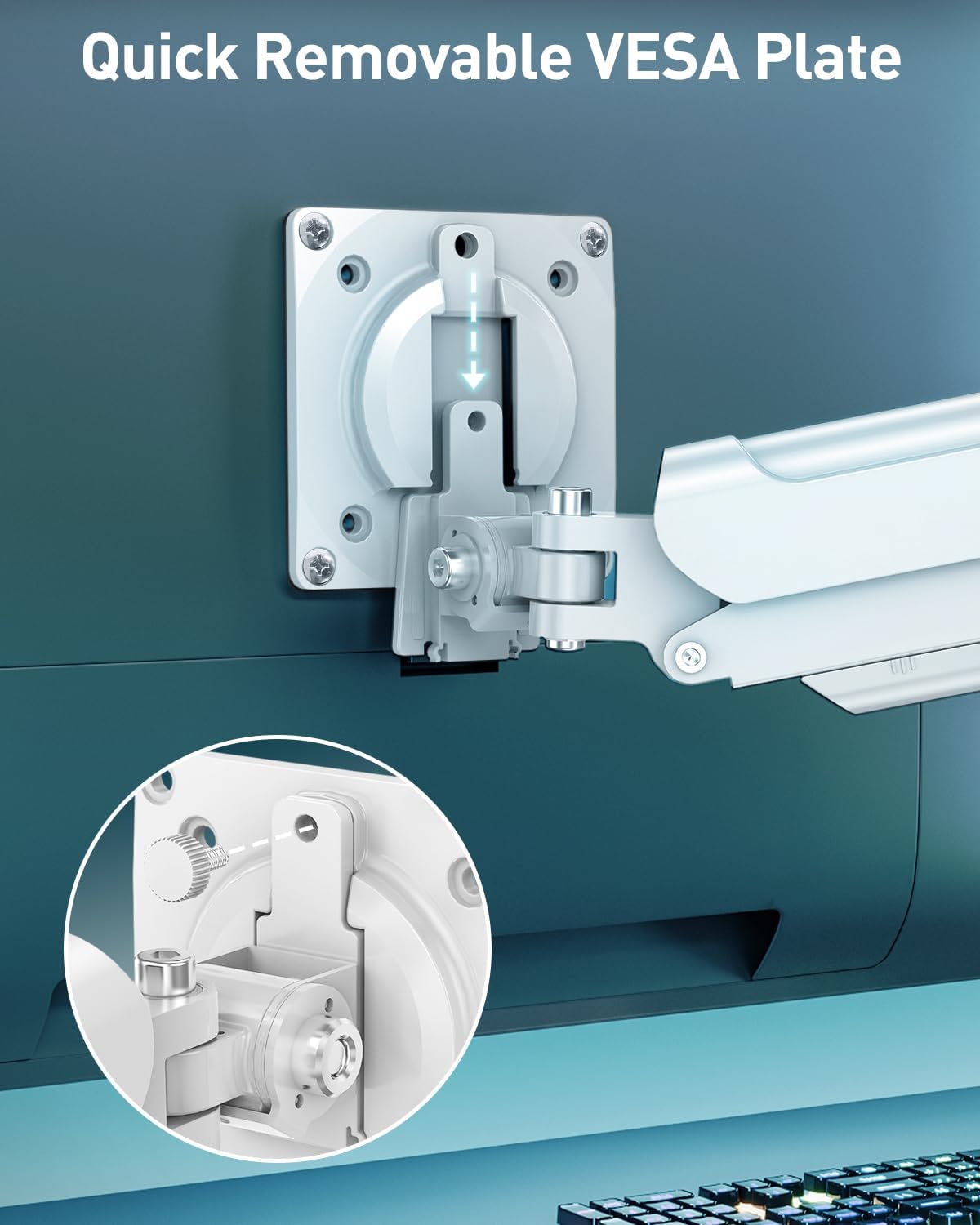
Тасвир: Наздик view of the quick-release VESA plate being attached to the back of a monitor with screws, highlighting the ease of installation.
4.4 Мониторро ба дастак насб кунед
- Carefully slide the monitor (with attached VESA plate) onto the end of the monitor arm.
- Install the security bolt to prevent accidental detachment.
4.5 Идоракунии кабел
Route your monitor cables through the integrated cable management channels on the arm to maintain a tidy workspace. Allen keys can be stored in the designated slot on the lower arm for easy access.

Image: The monitor arm showing cables routed through its internal channels and a close-up of the Allen key storage slot.
Видео насб:
Video: Official installation guide for the Freelift Pro White Single Monitor Arm, demonstrating step-by-step assembly.
5. Фаъолият ва танзимот
The monitor arm features a gas spring system for smooth and effortless adjustments.
5.1 Gas Spring Tension Adjustment:
The gas spring tension needs to be adjusted to match the weight of your monitor. This ensures the monitor stays in place at any height.

Image: Diagram showing how to adjust the gas spring tension. Turn clockwise towards '-' to reduce tension for lighter monitors, and counter-clockwise towards '+' to increase tension for heavier monitors. Hold the arm horizontally during adjustment.
- If the monitor rises too easily or does not stay down, turn the adjustment screw clockwise (towards '-') to reduce tension.
- If the monitor falls or is difficult to raise, turn the adjustment screw counter-clockwise (towards '+') to increase tension.
- Hold the arm in a horizontal position while adjusting the tension.
5.2 Tilt, Swivel, and Rotation:
Худро танзим кунед viewтаҷриба бо доираи васеи ҳаракат.

Image: Visual representation of the monitor arm's adjustable features: tilt (+85° to -45°), swivel (180° at two points), and 360° rotation.
- Ҷома: Adjust the monitor angle +85°/-45° to reduce glare and find your ideal viewкунҷи дохилӣ.
- Чарх: Swivel the monitor +/-90° at the VESA plate and +/-180° at the arm joints for easy screen sharing.
- Ротатсия: Барои гузаштан байни самтҳои манзара ва амудӣ, мониторро 360° гардонед.
5.3 Height and Extension Adjustment:
Easily position your screen at the optimal height and distance.

Image: Diagram illustrating the maximum extension of 19.7 inches (50cm) and a height range from 5.1 to 17.3 inches (13-44cm) above the desk surface.
- The arm can extend up to 19.7 inches (50cm) to bring the screen closer.
- Adjust the height from 5.1 inches (13cm) to 17.3 inches (44cm) above the desk surface.
6. Нигоҳдорӣ
Regular maintenance ensures the longevity and optimal performance of your monitor mount.
- Тозакунӣ: Монтажро бо нарм тоза кунед, гamp матоъ. Аз тозакунандаҳои абразивӣ ё ҳалкунандаҳо худдорӣ кунед.
- Санҷиш: Барои боварӣ ҳосил кардан, ки ҳамаи винтҳо ва пайвастҳо маҳкам ва мустаҳкаманд, мунтазам тафтиш кунед. Дар ҳолати зарурӣ, онҳоро дубора маҳкам кунед.
- Баҳори газ: If the monitor's weight changes (e.g., replacing the monitor), re-adjust the gas spring tension as described in Section 5.1.
7. Баррасии мушкилот
Агар шумо бо ягон мушкилот дучор шавед, ба мушкилот ва роҳҳои ҳалли маъмулии зерин муроҷиат кунед:
- Monitor sags or does not stay at desired height: The gas spring tension is too low for your monitor's weight. Increase tension by turning the adjustment screw counter-clockwise (towards '+').
- Monitor springs up or is difficult to push down: The gas spring tension is too high for your monitor's weight. Decrease tension by turning the adjustment screw clockwise (towards '-').
- Monitor is wobbly: Боварӣ ҳосил кунед, ки ҳамаи винтҳои васлкунӣ (мизи корӣ) мустаҳкамандamp/grommet and VESA plate) are securely tightened. Check that the desk surface is stable.
- Difficulty with movement (tilt/swivel): Check if any adjustment bolts are overtightened. Loosen slightly if necessary.
Агар мушкилот идома ёбад, лутфан барои гирифтани кӯмаки бештар бо дастгирии муштариён тамос гиред.
8. Мушаххасоти
| Хусусият | Мушаххасоти |
|---|---|
| Бренд | MOUNT PRO |
| Модели | Freelift Pro Single |
| Мутобиқати андозаи экран | 13-32 инч |
| Иқтидори вазн | 4.4 to 22 lbs (2-10 kg) |
| Мутобиқати VESA | 75х75мм, 100х100мм |
| Кунҷи майл | +85° то -45° |
| Кунҷи гардиш | +/-90° (at VESA plate), +/-180° (at arm joints) |
| Ротатсия | 360° |
| Дастрасии ҳадди аксар | 19.7 инч (50см) |
| Диапазони баландӣ | 5.1 to 17.3 inches (13-44cm) |
| Имконоти васлкунӣ | C-Clamp, Grommet Base |
| Ғафсии миз (Cl)amp) | 0.39 to 2.76 inches (10-70mm) |
| Ғафсии мизи корӣ (Grommet) | 0.39 to 2.76 inches (10-70mm) |
| Диаметри сӯрохи Grommet | 0.39 to 2.36 inches (10-60mm) |
| Материал | Алюминий |
| Ранги | Сафед |
9. Кафолат ва дастгирӣ
For warranty information or technical support, please refer to the product packaging or contact MOUNT PRO customer service directly. Keep your purchase receipt for warranty claims.
Ask a question about this manual
Ask about setup, troubleshooting, compatibility, parts, safety, or missing instructions. Manuals+ will review the question and use this page’s manual context to help answer it.