1. Муқаддима
This manual provides detailed instructions for the setup, operation, and maintenance of your GIEC G5300 4K Ultra HD Blu Ray Player. Designed for an enhanced home entertainment experience, this player supports true 4K ultra-high-definition picture quality, HDR10, Dolby Vision, BT.2020 color spaces, and Dolby audio decoding for immersive visuals and sound.
2. Маълумот оид ба бехатарӣ
- Ensure proper ventilation around the player to prevent overheating.
- Барои кам кардани хатари сӯхтор ё зарбаи барқ, дастгоҳро зери борон ё намӣ нагузоред.
- Avoid placing heavy objects on top of the player.
- в-ро кушоедasinг; тамоми хизматрасониро ба кормандони соҳибихтисос фиристед.
- Keep the player away from direct sunlight, heat sources, and strong magnetic fields.
- Танҳо адаптери барқро, ки бо дастгоҳ дода мешавад, истифода баред.
3. Мундариҷаи баста
Лутфан тафтиш кунед, ки ҳамаи ҷузъҳои дар поён овардашуда ба бастаи шумо дохил карда шудаанд:
- GIEC G5300 Blu-ray Player (x1)
- Кабели HDMI (x1)
- Идоракунии дурдаст (x1)
- Дастури корбар (x1)
4. Маҳсулот ба охир расидview
4.1 Панели Асосӣ

Расми 4.1: Пеш view of the GIEC G5300 Blu Ray Player, showing the disc tray, display, USB port, and control buttons (power, play/pause, eject).
- Табақи диск: Insert Blu-ray or DVD discs here.
- Панели намоиш: Shows playback status and time.
- USB 3.0 порт: Дастгоҳҳои нигаҳдории USB-ро барои бозикунии медиа пайваст кунед.
- Тугмаҳои назорат: Power On/Off, Play/Pause, Eject.
4.2 Панели қафо ва Пайвастшавӣ

Расми 4.2: Қафо view of the GIEC G5300 Blu Ray Player, highlighting various input/output ports including LAN, HDMI 2.0, HDMI 1.4, USB 3.0, Coaxial, and Optical outputs.
- Порти LAN: For network connection (e.g., firmware updates).
- HDMI 2.0 Output (Video/Audio): Primary HDMI output for 4K video and audio.
- HDMI 1.4 Output (Audio Only): Dedicated HDMI output for audio to an AV receiver.
- USB 3.0 Input: Дастгоҳҳои нигаҳдории USB-ро барои бозикунии медиа пайваст кунед.
- Натиҷаи коаксиалӣ: Баромади аудио рақамӣ.
- Натиҷаи оптикӣ: Баромади аудио рақамӣ.
5. Танзимот
5.1 Насби батареяи идоракунии дурдаст
Insert two AAA batteries (not included) into the remote control, ensuring correct polarity.
Video 5.1: This video demonstrates how to install batteries into the remote control and connect the Blu-ray player to a TV using an HDMI cable.
5.2 Connecting to a Display Device (TV/Projector)
- Як нӯги сими HDMI-ро ба сими додашуда пайваст кунед HDMI 2.0 Output (Video/Audio) port on the rear of the Blu-ray player.
- Connect the other end of the HDMI cable to an available HDMI input port on your TV or projector.
- For separate audio output, connect another HDMI cable from the HDMI 1.4 Output (Audio Only) port to your AV receiver, or use the Coaxial/Optical outputs.
5.3 Пайвастшавии барқ
- Connect the power cable to the power input on the rear of the Blu-ray player.
- Нӯги дигари сими барқро ба васлаки деворӣ пайваст кунед.
- Turn on your TV/projector and select the correct HDMI input source corresponding to the port you connected the Blu-ray player to.
- Press the Power button on the Blu-ray player or remote control to turn on the unit.
6. Дастурҳои истифодабарӣ
6.1 Бозии диск
- Ensure the player is powered on and connected to your display device.
- -ро пахш кунед БАРОРЕД тугмаи дар панели пеши ё идораи дурдаст барои кушодани табақи диск.
- Carefully place a Blu-ray or DVD disc onto the tray with the label side facing up.
- -ро пахш кунед БАРОРЕД button again to close the tray. The player will automatically begin loading and playing the disc.
- Use the remote control for playback functions such as Play, Pause, Stop, Fast Forward, and Rewind.
6.2 Бознавозиши медиаи USB
The GIEC G5300 supports playback of various media fileс аз дастгоҳи нигаҳдории USB.
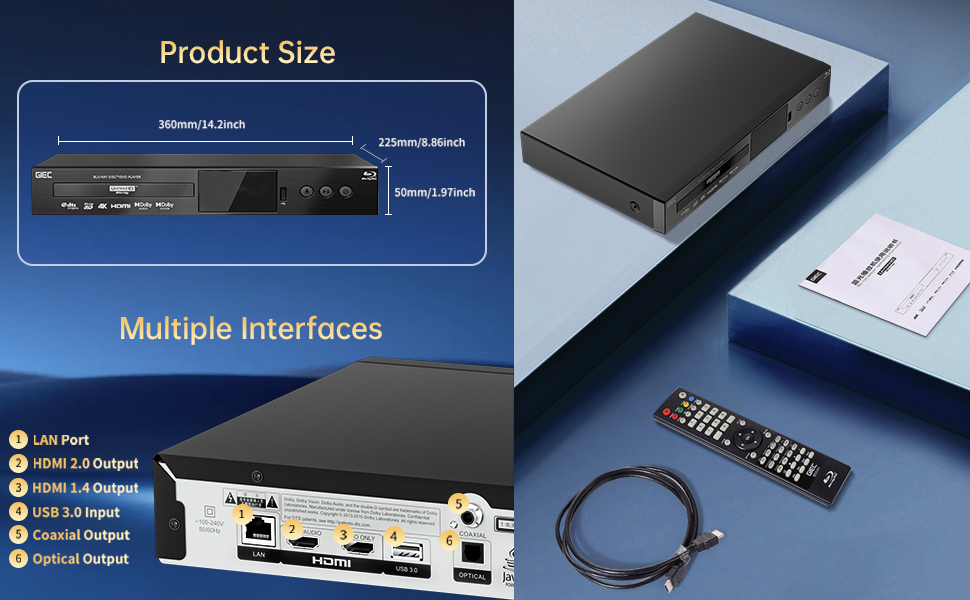
Figure 6.1: Illustration of the multiple disc, video, and audio formats supported by the player.
- Insert your USB storage device into the Порти USB 3.0 on the front or rear panel.
- Navigate to the "Video," "Music," or "Photo" section on the player's main menu using the remote control.
- Хоҳиши худро интихоб кунед file from the USB device to begin playback.
Форматҳои дастгирӣшаванда:
- Намудҳои дискҳо: BD, BD-R, BD-RE, DVD-R/RW, DVD+R/RW, DVD-Video, VCD, CD, CD-R/RW.
- Форматҳои видео: MPEG-1, MPEG-2, MPEG-4, VC1, H.264, MOV, MKV, AVI, TS.
- Форматҳои аудио: AAC, APE, CUE, FLAC, OGG, MP3, WAV.
7. Хусусиятҳо
- 4K Ultra HD Playback: Experience movies and shows in stunning 4K resolution with clearer images and richer colors.
- Дастгирии HDR10: Enjoy a wider range of brightness and contrast, revealing more detail in both dark and bright scenes.
- Dolby Vision: Enhances image quality by dynamically adjusting brightness and expanding dynamic range for more detailed and vivid pictures.
- BT.2020 Color Spaces: Provides a broader color gamut than standard 1080p Blu-ray, resulting in purer, more natural, and realistic colors.
- Dolby Sound & DTS Decoding: Supports Dolby audio decoding and DTS effects for an immersive 5.1 stereo surround sound experience.
- 3D Blu-ray Playback: Compatible with 3D Blu-ray discs for an immersive three-dimensional viewing experience (requires a 3D-compatible TV and glasses).
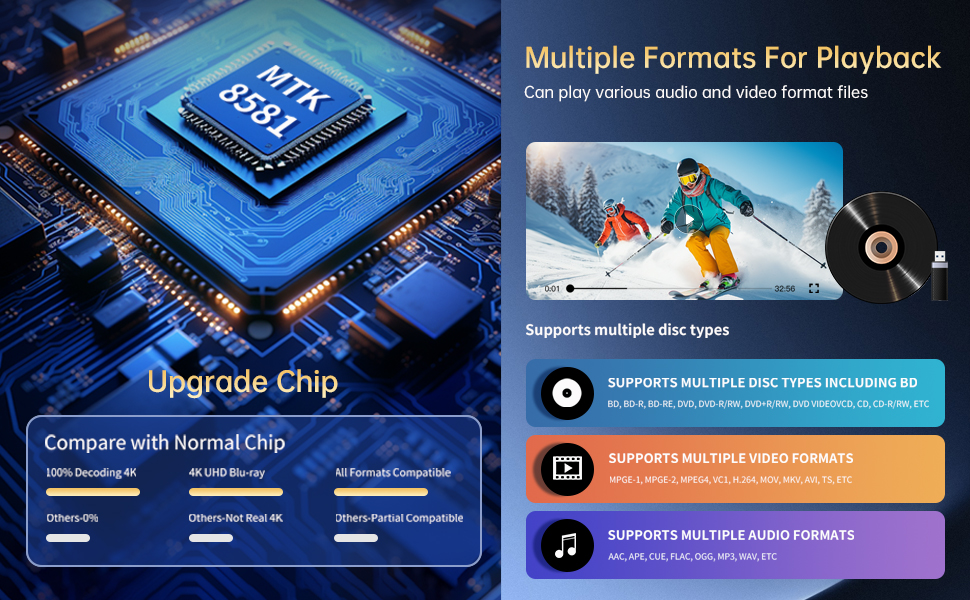
Figure 7.1: Visual comparison illustrating the difference between 8-bit (16.67 million colors) and 10-bit (1.07 billion colors) color depth, highlighting the enhanced detail and delicacy of 10-bit color.

Figure 7.2: The GIEC G5300 Blu Ray Player connected to a TV, showcasing its support for 4K UHD, 3D, HDR, HDR10+, Dolby, and Dolby Vision technologies.
8. Нигоҳдорӣ
- Тозакунӣ: Барои тоза кардани берунии плеер аз матои нарм ва хушк истифода баред. Аз тозакунандаҳои моеъ ё аэрозолӣ истифода набаред.
- Нигоҳубини диск: Дискҳоро аз кунҷҳои худ нигоҳ доред. Дискҳоро бо матои мулоим ва бе пахта тоза кунед ва аз марказ ба берун тоза кунед.
- Вентилятсия: Ensure the player's ventilation openings are not blocked to prevent overheating.
9. Баррасии мушкилот
If you encounter issues with your Blu-ray player, please refer to the following common solutions:
- Не қудрат: Check if the power cable is securely connected to both the player and the power outlet. Ensure the outlet is functional.
- Тасвир/садо нест: Verify that the HDMI cable is correctly connected to both the player and the TV/receiver. Ensure the correct HDMI input is selected on your TV/receiver.
- Диск бозӣ намекунад: Check if the disc is clean and free of scratches. Ensure the disc is inserted correctly with the label side up. The player supports Region A Blu-ray discs and all region DVD discs.
- Идоракунии дурдаст кор намекунад: Check the batteries in the remote control and replace them if necessary. Ensure there are no obstructions between the remote and the player.
10. Мушаххасоти
| Хусусият | Тафсилот |
|---|---|
| Номи бренд | GIEC |
| Номи модел | G5300 |
| Вазни ашё | 4.18 фунт (1.9 килограмм) |
| Андозаҳои маҳсулот | 14.2 x 8.9 x 2 инч |
| Ранги | Сиёҳ |
| Навъи медиа | Диски Blu-Ray, DVD |
| Резолюция | 3840x2160 (4K Ultra HD) |
| Хусусиятҳои махсус | Anti-Shock, Compact, Dust Proof, Multi-Format Playback, Surround Sound, HDR10, Dolby Vision, BT.2020 Color Spaces |
| Навъи пайвасткунанда | HDMI (Dual Outputs), USB 3.0, Coaxial, Optical, LAN |
| Технологияи пайвастшавӣ | HDMI |
11. Кафолат ва дастгирӣ
For warranty information or technical support, please refer to the documentation included with your purchase or contact GIEC customer service. Keep your proof of purchase for warranty claims.