
1. Муқаддима
This manual provides comprehensive instructions for the safe and effective use of your SUUNTO Aqua Open-Ear Bone Conduction Headphones. Please read this manual thoroughly before using the device and retain it for future reference.
2. Дар қуттӣ чӣ мавҷуд аст
The SUUNTO Aqua package includes the following components:
- SUUNTO Aqua headphones
- Сими пуркунандаи барқ
- Powerbank
- SUUNTO storage bag
- Гӯшмонакҳо
- Printed user quick guide
- International warranty leaflet
- Варақаи бехатарӣ

3. Маҳсулот ба охир расидview
The SUUNTO Aqua headphones are designed for sports enthusiasts, offering open-ear bone conduction technology, 32GB of internal MP3 storage, and IP68 waterproofing. They feature head movement control and dual microphones for clear communication.

4. Танзимот
4.1. Пур кардани гӯшмонакҳо
The SUUNTO Aqua headphones come with a portable power bank that extends their battery life. To charge:
- Place the headphones into the power bank.
- Connect the power bank to a USB power source using the provided charging cable.
- The headphones charge in approximately 1 hour for a full charge, providing 10 hours of playtime. The power bank provides an additional 20 hours, totaling 30 hours of playtime. A 10-minute fast charge provides 3 hours of endurance.

4.2. Фурӯзон/хомӯшкунӣ
- To power on, press and hold the power button until the indicator light illuminates.
- Барои хомӯш кардани барқ, тугмаи барқро то хомӯш шудани чароғи нишондиҳанда пахш карда нигоҳ доред.
4.3. Music Transfer (32GB MP3 Mode)
The headphones feature 32GB of internal storage for offline music playback, supporting MP3, FLAC, WAV, AAC, M4A, APE, and WMA file formats. This allows for music playback without a connected phone, ideal for swimming.
- Place the headphones into the power bank.
- Connect the power bank to your computer or USB-C compatible mobile phone using the charging cable.
- Open the headphones' music folder on your device.
- Copy your desired audio files into this folder. The headphones can store approximately 8,000 songs (based on 4MB per song).
4.4. Ҷуфт кардани Bluetooth (ба телефон)
To connect your SUUNTO Aqua headphones to your smartphone via Bluetooth:
- Наушникро кушоед.
- Keep the power button pressed for 5 seconds to enter pairing mode. The indicator light will flash.
- Дар телефони худ ба Танзимотҳо > блутуз.
- Select "SUUNTO Aqua" from the list of available devices.
- Once connected, the headphones will play a prompt tone.
4.5. Pairing to SUUNTO Watch
To connect your SUUNTO Aqua headphones with a compatible SUUNTO watch (e.g., 9 Peak Pro, Race, Race S, Vertical, Ocean), you must first install the "SUUNTO Aqua Swimming" app from the SuuntoPlus™ Store on your watch.
- Switch the SUUNTO Aqua headphones on.
- Open the SUUNTO app on your phone and navigate to your watch's profile.
- Go to the SuuntoPlus™ Store and search for "Aqua". Install the "SUUNTO Aqua Swim" app on your watch.
- Sync your watch with the SUUNTO app.
- From the exercise start screen on your watch, scroll down and select SuuntoPlus™.
- Интихоб кунед SUUNTO Aqua Swim аз рӯйхати дастгоҳҳо.
- Ensure the watch is close to your headphones. The watch will automatically connect.
- Follow the on-screen instructions for visual calibration.
- Go back and press Оғоз to begin swimming with data tracking.
5. Дастурҳои истифодабарӣ
5.1. Switching Music Modes
You can switch between offline music mode (MP3) and Bluetooth music mode:
- Press and hold the Play/Pause button for 3 seconds on the headphones.
- Alternatively, use the SUUNTO app to switch between "Bluetooth music" and "Offline music" modes under the "Music mode" setting.
5.2. Head Movement Control
The SUUNTO Aqua headphones feature intuitive head movement controls for hands-free operation:
- Ҷавоб додан/Занги хотимавӣ: Nod your head twice.
- Рад кардани занг: Shake your head twice.
- Суруди навбатӣ: Shake your head twice (during music playback).

5.3. Усулҳои садо
The headphones offer different sound modes optimized for various activities:
- Normal Sound Mode: Барои истифодаи умумӣ.
- Outdoor Sound Mode: Enhances awareness of surroundings.
- Underwater Sound Mode: Optimized for clear audio during swimming.
These modes can be selected via the SUUNTO app under "Sound mode".
5.4. Идоракунии зангҳо
The built-in dual microphone with ENC (Environmental Noise Cancellation) technology ensures clear voice calls. Use head movement controls or physical buttons to manage calls when connected via Bluetooth.
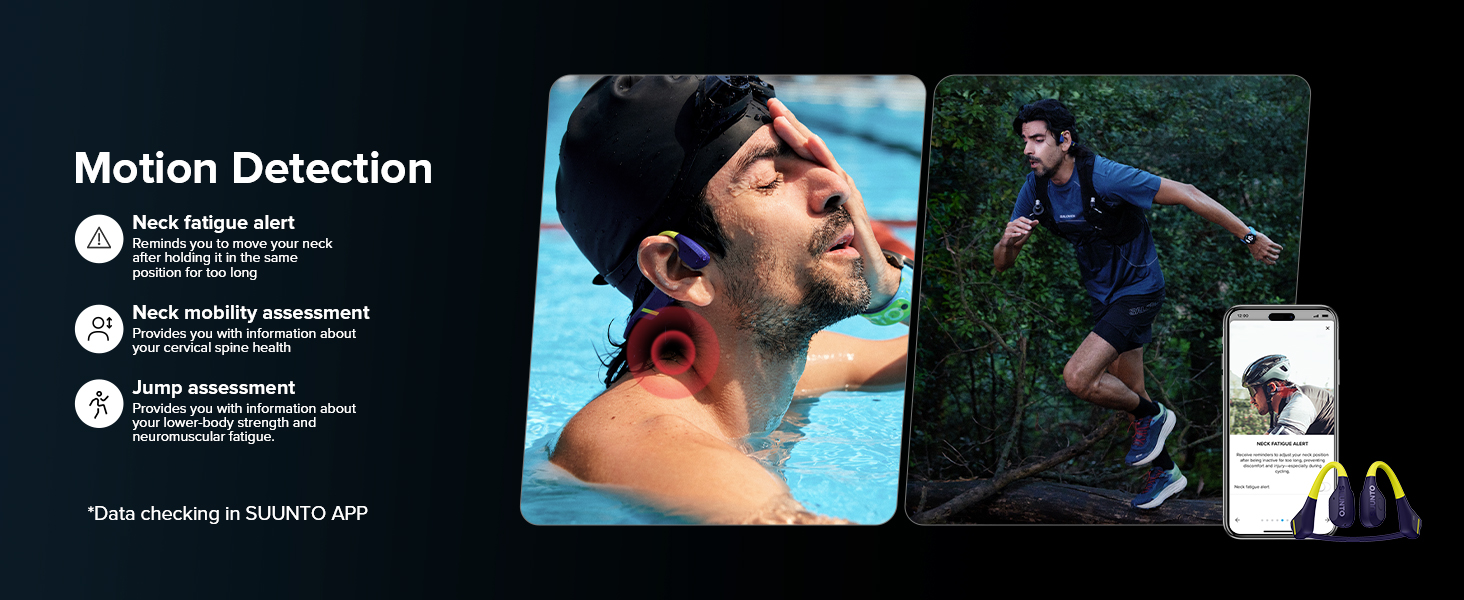
6. Motion Detection & Analysis
The SUUNTO Aqua headphones integrate with the SUUNTO app to provide advanced motion detection and analysis for various sports activities:
- Swim Posture Identification: Recognizes breaststroke and freestyle.
- Swim Metrics: Records glide time, head pitch angle, breath frequency, and angle.
- Neck Fatigue Measurement: Provides alerts to adjust neck position during prolonged activity.
- Neck Mobility Measurement: Assesses cervical spine health.
- Jump Test Assessment: Evaluates lower-body strength and neuromuscular fatigue.

7. Нигоҳдорӣ
7.1. Тозакунӣ
Regularly clean your headphones with a soft, damp cloth. Avoid using harsh chemicals or abrasive materials. Ensure the charging contacts are dry and clean before charging.
7.2. Муқовимат ба об
The SUUNTO Aqua headphones are IP68 waterproof, allowing submersion up to 5 meters for up to 2 hours. They are resistant to water, sweat, and dust. Always ensure the charging port is dry before connecting the power bank.

7.3. Нигоҳдорӣ
Store the headphones in the provided SUUNTO storage bag when not in use to protect them from dust and scratches. Avoid storing in extreme temperatures.
8. Баррасии мушкилот
| Мушкилот | Сабаби эҳтимолӣ | Ҳалли |
|---|---|---|
| Гӯшмонакҳо фаъол нестанд. | Батареяи кам. | Charge the headphones using the power bank. |
| Unable to pair via Bluetooth. | Гӯшмонакҳо дар ҳолати ҷуфтшавӣ нестанд; Bluetooth дар дастгоҳ хомӯш аст; дастгоҳ аз ҳад дур аст. | Ensure headphones are in pairing mode (flashing light). Turn on Bluetooth on your device. Keep devices within 30 meters. |
| Дар ҳолати MP3 садо нест. | Мусиқӣ нест files transferred; incorrect mode selected. | Интиқоли мусиқӣ files to the 32GB storage. Ensure offline music mode is selected. |
| Sound quality issues underwater. | Реҷаи нодурусти садо. | Switch to "Underwater Sound Mode" via the SUUNTO app. |
| Watch not connecting to headphones. | SUUNTO Aqua Swimming app not installed on watch; watch not synced. | Install "SUUNTO Aqua Swimming" app on your watch and sync. Ensure watch is close to headphones. |
9. Мушаххасоти
| Хусусият | Тафсилот |
|---|---|
| Номи модел | Suunto Aqua |
| Рақами модел | SS051108000 |
| Технологияи пайвастшавӣ | Бесимӣ (Bluetooth 5.3) |
| Навъи драйвери аудио | Ронандаи гузаронандаи устухон |
| Захираи дохилӣ | 32GB (up to 8,000 songs) |
| Сатҳи муқовимат ба об | IP68 (5 meters for up to 2 hours) |
| Муҳлати батарея | 10 hours (headphones), 20 hours (additional with power bank) - Total 30 hours |
| Вақти пуркунии барқ | 1 hour (full charge), 10 minutes (for 3 hours endurance) |
| Материал | Silicone, Titanium |
| Вазни ашё | 0.06 Килограмм (2.11 унсия) |
| Андозаҳои маҳсулот | 5.04 x 3.78 x 1.85 инч |
| Усули назорат | Button, Head Movement, App Control |
| Назорати садо | Active Noise Cancellation (ENC for mic) |
10. Кафолат ва дастгирӣ
For warranty information and customer support, please refer to the International Warranty Leaflet included in your package or visit the official SUUNTO website. You can also find additional support and resources on the SUUNTO Brand Store on Amazon.