
Муқаддима
Thank you for choosing the Casio MWA-300H Series watch. This manual provides essential information regarding the setup, operation, and maintenance of your new timepiece. Please read this manual carefully to ensure proper use and to fully understand the features of your watch.
The Casio MWA-300H is an analog watch featuring a chronograph, 100-meter water resistance, and luminous hands for enhanced readability. It is designed for versatile wear, suitable for both daily use and recreational water activities.
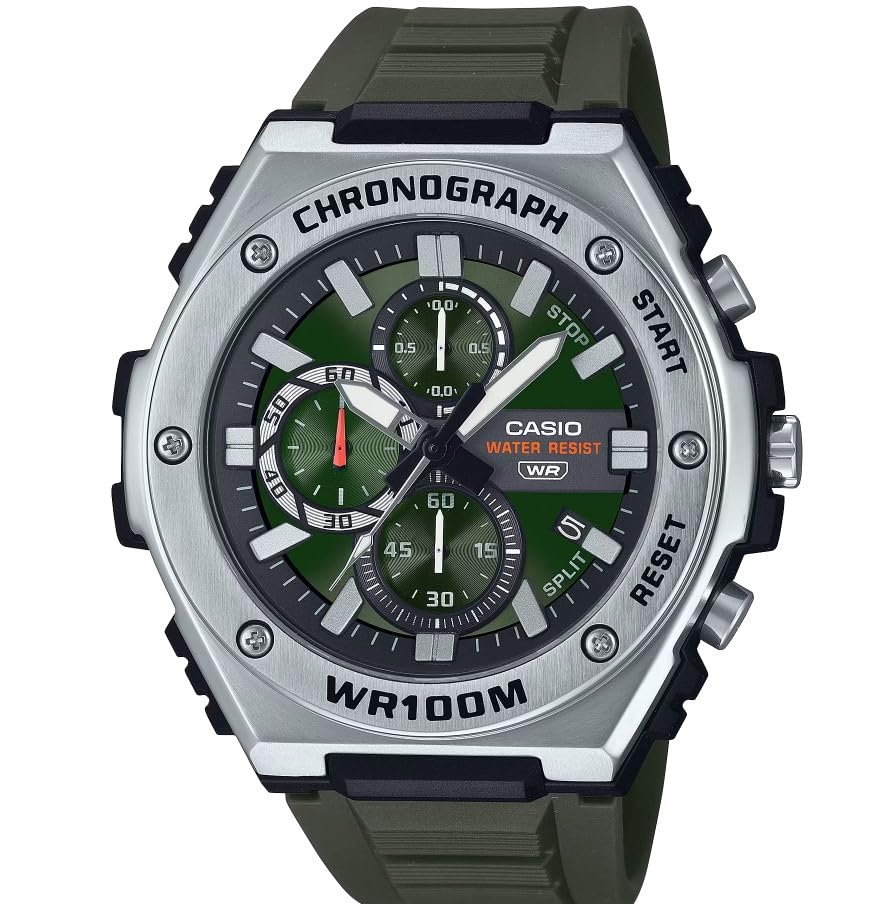
Тасвир: Пеш view of the Casio MWA-300H Series watch, highlighting its green dial, chronograph sub-dials, and black resin band.
Setup: Initial Settings
Муқаррар кардани вақт
- Pull the crown out to the second click (time setting position). The second hand will stop.
- Rotate the crown to set the hour and minute hands. Ensure the AM/PM setting is correct if your watch has a 24-hour indicator or date changes at midnight.
- Тоҷро ба ҳолати муқаррарӣ баргардонед. Дасти дуюм ҳаракатро аз нав оғоз мекунад.
Муқаррар кардани сана
- Pull the crown out to the first click (date setting position).
- Rotate the crown to set the date. Avoid setting the date between 9:00 PM and 1:00 AM, as this may interfere with the automatic date change mechanism.
- Тоҷро ба ҳолати муқаррарӣ баргардонед.
Маълумот дар бораи батарея
Your Casio MWA-300H watch is powered by 1 LR44 battery, which is included. The battery life is approximately 3 years. When the battery runs low, the watch may exhibit irregular movement or stop. It is recommended to have the battery replaced by a qualified watch technician to maintain water resistance.
Operating: Watch Functions
Истифодаи хронограф (сониясанҷ)
The chronograph function allows for precise timing of events. Your watch features a 1/10-second stopwatch that captures elapsed, split, and 1st/2nd place times across three dedicated sub-dials.
- Starting the Stopwatch: Press button A (typically the upper right button) to start the stopwatch.
- Stopping the Stopwatch: Press button A again to stop the stopwatch.
- Resetting the Stopwatch: After stopping, press button B (typically the lower right button) to reset the stopwatch hands to zero.
- Андозагирии вақт: While the stopwatch is running, press button B to measure split times. The stopwatch hands will momentarily stop to indicate the split time, then resume timing. Press button B again to release the split time and display the current elapsed time.
Note: Refer to the specific button layout on your watch for exact button assignments.
Water Resistance (100 Meters)
Your Casio MWA-300H watch is water resistant up to 100 meters (330 feet). This rating means the watch is suitable for swimming, showering, and recreational water activities. It is not suitable for diving or snorkeling where significant water pressure changes occur.
- Вақте ки соат тар ё зери об аст, тоҷ ё тугмаҳоро истифода набаред.
- Пас аз дучор шудан ба оби шӯр, соатро бо оби тоза бишӯед ва хушк кунед.
Luminous Hands and Markers
The watch features luminous hands and markers that absorb light and glow in the dark, providing readability in low-light conditions. The intensity and duration of the glow depend on the amount and type of light exposure.
Нигоҳдорӣ
Нигоҳубини умумӣ
- Барои тоза кардани лой ва намӣ соатро мунтазам бо матои нарм ва хушк пок кунед.
- Аз таъсири ҳарорати аз ҳад зиёд, нури бевоситаи офтоб барои муддати тӯлонӣ ё майдонҳои қавии магнитӣ худдорӣ намоед.
- Keep the watch away from solvents, detergents, perfumes, and cosmetics, as these can damage the resin materials.
Иваз кардани батарея
When the battery needs replacement, it is highly recommended to take your watch to an authorized Casio service center or a reputable watch repair shop. This ensures that the watch is properly sealed and its water resistance is maintained after battery replacement.
Санҷишҳои муқовимат ба об
To maintain the water resistance of your watch, it is advisable to have it inspected periodically (e.g., every 2-3 years) by an authorized service center, especially if it is frequently exposed to water.
Мушкилкушо
| Мушкилот | Сабаби эҳтимолӣ | Ҳалли |
|---|---|---|
| Watch hands do not move or move irregularly. | Батареяи кам. | Батареяро иваз кунед. Ба мутахассиси соатшинос муроҷиат кунед. |
| Вақт нодуруст аст. | Time not set correctly; watch has stopped and restarted. | Reset the time according to the "Setting the Time" instructions. |
| Сана ба ҷои нисфи шаб соати 12:00 тағйир меёбад. | Танзими саҳар/PM нодуруст аст. | Вақтро то 12 соат пеш кунед. |
| Дастҳои хронограф ба сифр баргардонида намешаванд. | Chronograph hands misalignment. | Consult the full Casio module manual for chronograph hand adjustment procedures, or contact customer support. |
| Moisture inside the watch. | Crown or buttons operated underwater; seals compromised. | Immediately take the watch to an authorized service center for inspection and repair to prevent further damage. |
Мушаххасоти
| Номи модел | MWA-300H |
| Навъи намоиш | Аналогӣ |
| Навъи ҳаракат | кварц |
| Амиқии муқовимат ба об | 100 метр (330 фут) |
| Хусусиятҳои иловагӣ | Chronograph, Date Display, Luminous Hands |
| Манбаи нерӯ | Battery Powered (1 x LR44 included) |
| Маводи парванда | Қатрон |
| Маводҳои банд | Қатрон |
| Маводи кристалл | Қатрон |
| Диаметри парванда | 50.9 миллиметр |
| Ғафсии парванда | 14.3 миллиметр |
| Паҳнои банд | 22 миллиметр |
| Навъи бастабандӣ | Бастан |
Кафолат ва дастгирӣ
Кафолати маҳдуд
Your Casio MWA-300H watch comes with a limited warranty. Please refer to the warranty card included with your purchase for specific terms, conditions, and duration of coverage. The warranty typically covers manufacturing defects under normal use.
Дастгирии муштариён
For further assistance, technical support, or warranty claims, please contact Casio customer service. You can find contact information on the official Casio webсайт ё дар ҳуҷҷатҳое, ки бо соати шумо пешниҳод шудаанд.
For more detailed information, including specific module operations or advanced settings, please visit the official Casio support website or refer to the full module manual for your watch.