
Муқаддима
This manual provides essential information for the proper use and maintenance of your Maxcom MM835 4G VoLTE Flip Phone. Please read these instructions carefully before using your device to ensure optimal performance and longevity. This phone is designed for ease of use, featuring large displays and a simplified interface.
Маҳсулот ба охир расидview
The Maxcom MM835 is a 4G VoLTE flip phone designed for clear communication and user convenience. It features a dual-screen design, large backlit keys, and essential functions like an SOS button and HAC (Hearing Aid Compatibility).
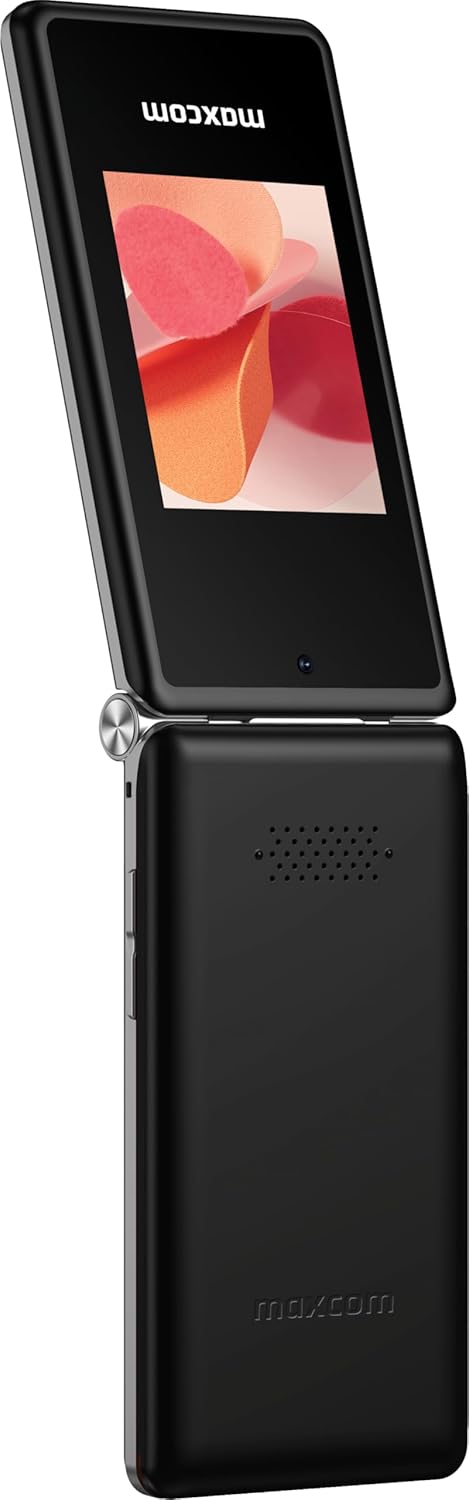
Расми 1: Maxcom MM835 Flip Phone (Closed View). The external 2.4-inch screen displays time, date, battery status, and missed calls without opening the phone.
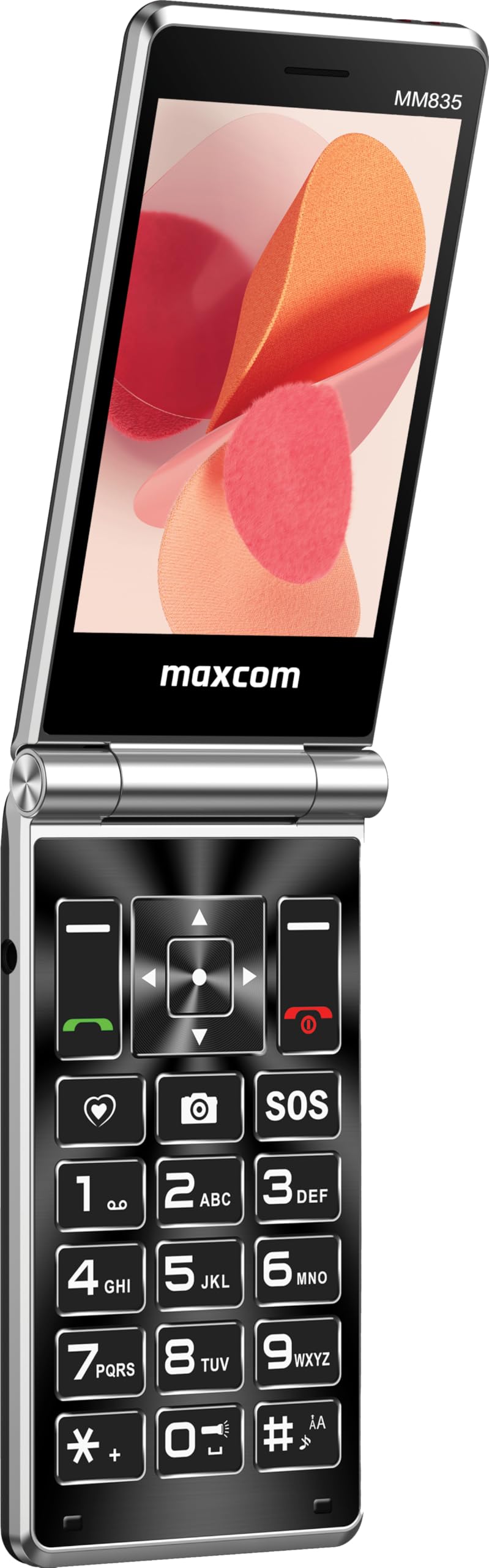
Расми 2: Maxcom MM835 Flip Phone (Open View). The internal 3.5-inch screen provides a clear interface for contacts and messages, complemented by large, comfortable keys.

Расми 3: Тараф view of the Maxcom MM835, illustrating the volume control buttons for easy audio adjustment.

Расми 4: Поён view of the Maxcom MM835, highlighting the USB-C charging port for convenient power connection.

Расми 5: Detail of the Maxcom MM835 keyboard, featuring the prominent SOS button for emergency contacts.

Расми 6: The Maxcom MM835 is Hearing Aid Compatible (HAC), ensuring clear audio for users with hearing aids.
Ташкил кардан
1. Насб ва пуркунии батарея
- Сарпӯши қафоро кушоед: Сарпӯши қафои телефонро нарм бардоред.
- Батареяро гузоред: Place the included Lithium-ion battery into its compartment, ensuring the contacts align correctly.
- Сарпӯши қафоро иваз кунед: Сарпӯши қафоро бехатар пайваст кунед.
- Телефонро пур кунед: Connect the provided USB-C cable to the phone's charging port (Figure 4) and to a compatible USB power adapter (not included). Allow the phone to charge fully before first use. The external screen will indicate charging status.
2. Насби SIM корт
The Maxcom MM835 supports dual SIM cards.
- Remove the back cover and battery: Follow the steps above to access the SIM card slots.
- SIM-кортҳоро ворид кунед: Carefully slide your SIM card(s) into the designated slot(s). Ensure the gold contacts face downwards and the notched corner aligns with the slot.
- Reinstall battery and cover: Батарея ва сарпӯши қафоро иваз кунед.
3. Фурӯзон/хомӯшкунӣ
- Барои фаъол кардан: Тугмаи Фаъолсозӣ/Анҷоми занг (тугмаи сурх)-ро то равшан шудани экран пахш карда нигоҳ доред.
- Барои хомӯш кардани барқ: Тугмаи Фаъолкунӣ/Анҷоми зангро то пайдо шудани имконоти хомӯшкунӣ пахш карда нигоҳ доред ва сипас "Хомӯш кардан"-ро интихоб кунед.
Дастурҳои амалиётӣ
1. Навигатсияи асосӣ
- Намоиши дохилӣ: The 3.5-inch internal screen is your primary interface for menus and content.
- Намоиши беруна: The 2.4-inch external screen shows essential information like time, date, battery, and caller ID when the phone is closed.
- Тугмаҳои навигатсионӣ: Use the directional keys (up, down, left, right) and the central OK button to navigate through menus.
- Тугмаҳои нармафзор: The keys directly below the screen perform functions indicated on the display (e.g., "Menu", "Back").
- Call Keys: The green button initiates calls, and the red button ends calls or powers the phone on/off.
2. Зангҳо ва қабули зангҳо
- Барои занг задан:
- Open the phone.
- Рақамро бо истифода аз клавиатура занг занед.
- Барои оғози занг тугмаи сабзи зангро пахш кунед.
- Барои ҷавоб додан ба занг:
- When the phone rings, open the flip or press the green Call button.
- Барои анҷом додани занг: Тугмаи сурхи хотимаи зангро пахш кунед.
3. Фиристодан ва қабул кардани паёмҳо
- Ба менюи "Паёмҳо" гузаред.
- Барои навиштани матн "Паёми нав"-ро интихоб кунед.
- Рақами қабулкунандаро ворид кунед ё аз мухотибон интихоб кунед.
- Паёми худро бо истифода аз клавиатура нависед.
- Тугмаи "Фиристодан"-ро пахш кунед.
4. SOS Button Functionality
The SOS button (Figure 5) is located on the main keypad and is designed for emergency situations.
- Ташкил кардан: Before use, configure emergency contacts in the phone's settings. Refer to the "SOS Settings" section in the phone's menu.
- Фаъолсозӣ: In an emergency, press and hold the SOS button. The phone will automatically send pre-defined notifications to your emergency contacts and may initiate calls to them.
5. Камера
The phone includes a basic camera for capturing photos.
- Ба камера тавассути менюи асосӣ дастрасӣ пайдо кунед.
- Акси худро бо истифода аз дисплейи дохилӣ чаҳорчӯба кунед.
- Press the central OK button to take a picture.
6. Радиои FM
Enjoy listening to FM radio stations on your device.
- Navigate to the "FM Radio" application in the menu.
- Connect headphones (not included) to act as an antenna for optimal reception.
- Барои ҷустуҷӯи истгоҳҳо ё танзими дастӣ аз тугмаҳои навигатсия истифода баред.
Нигоҳдорӣ
- Тозакунӣ: Барои тоза кардани беруни телефон аз матои нарм ва хушк истифода баред. Аз тозакунандаҳои моеъ ё маводҳои абразивӣ худдорӣ намоед.
- Нигоҳубини батарея: To prolong battery life, avoid extreme temperatures. Charge the phone regularly, but do not leave it fully discharged for extended periods.
- Нигоҳдорӣ: Ҳангоми истифода нашудан, телефонро дар ҷои хунук ва хушк, дур аз нури бевоситаи офтоб ва намӣ нигоҳ доред.
- Нармафзор: While software updates are not explicitly guaranteed, ensure your phone's settings are optimized for performance.
Мушкилкушо
If you encounter issues with your Maxcom MM835, refer to the following common solutions:
| Мушкилот | Ҳалли имконпазир |
|---|---|
| Телефон фаъол нест | Ensure the battery is correctly installed and fully charged. Connect the charger and try again. |
| Занг задан ё қабул карда наметавонад | Check if the SIM card is properly inserted. Verify that you have network signal. Contact your service provider if the issue persists. |
| Муҳлати батареяи бад | Ensure the phone is fully charged. Reduce screen brightness or close unused applications. Battery performance can degrade over time. |
| "Emergency Call Only" message | This indicates a lack of network signal or an issue with your SIM card/service. Try moving to an area with better reception or reinserting your SIM card. |
| Калидҳо ҷавоб намедиҳанд | Restart the phone. If the issue continues, ensure no debris is obstructing the keys. |
Мушаххасоти
| Хусусият | Тафсилот |
|---|---|
| Бренд | Макском |
| Номи модел | MM835 |
| Навъи маҳсулот | Флип телефон |
| Ранги | Сиёҳ |
| Низоми амал | Maxcom OS |
| Internal Screen Size | 3.5 инч |
| External Screen Size | 2.4 инч |
| Пайвастшавӣ | 4G, VoLTE |
| Хусусиятҳои махсус | Dual SIM, SOS Button, HAC (Hearing Aid Compatible), Large Keys |
| Таркиби батарея | Литий-ион |
| Иқтидори батарея | 1400 мАч |
| Порти пуркунандаи барқ | USB Type C |
| Иқтидори нигаҳдории хотира | 32 ГБ |
| Модели CPU | ARMv7 |
| Ҳалли экран | 640 х 360 |
| Интиқолдиҳандаи бесим | All carriers (Unlocked) |
Кафолат ва дастгирӣ
For warranty information and customer support, please refer to the documentation provided with your purchase or contact the seller directly. Maxcom strives to provide reliable products, and support is available for any manufacturing defects or operational queries.
- Истеҳсолкунанда: Макском
- Фурӯшанда: You Get - Innovation & Technology
- Шеваи Бозгардон: Typically 30 days for refund/replacement (check with seller for specifics).