
1. Маълумоти муҳим оид ба бехатарӣ
Лутфан, пеш аз насб ва истифода ин дастурро бодиққат хонед. Ин дастурро барои истинод дар оянда нигоҳ доред.
- Иқтидори вазн: Do not exceed the maximum weight capacity of 33 lbs (15 kg) per arm. Exceeding this limit may result in serious injury or product damage.
- Андозаи монитор: Ин васл барои мониторҳои аз 13 то 39 дюйм пешбинӣ шудааст.
- Мутобиқати VESA: Ensure your monitor has VESA mounting patterns of 75x75 mm or 100x100 mm. If your monitor does not have these patterns, a VESA adapter (sold separately) may be required.
- Ғафсии мизи корӣ: C-clamp is suitable for desks 0.39"-1.77" thick. The grommet mount is suitable for desks 0.39"-1.77" thick with a hole diameter of 0.39"-2.36".
- Desk Material: Do not install this product on tempered glass desks or other fragile table tops. Ensure your desk is structurally sound to support the combined weight of the mount and monitors.
- Маҷлис: Assemble the product according to the instructions. Incorrect assembly can lead to product failure or injury.
- Қисмҳои ҳаракаткунанда: Ҳангоми танзим дастҳо ва ангуштонро аз қисмҳои ҳаракаткунанда дур нигоҳ доред, то аз фишурдан пешгирӣ карда шавад.
2. Маҳсулот ба охир расидview
The MOUNT PRO Dual Monitor Desk Mount provides an ergonomic solution for mounting two monitors, offering extensive adjustability and integrated features for an organized workspace.
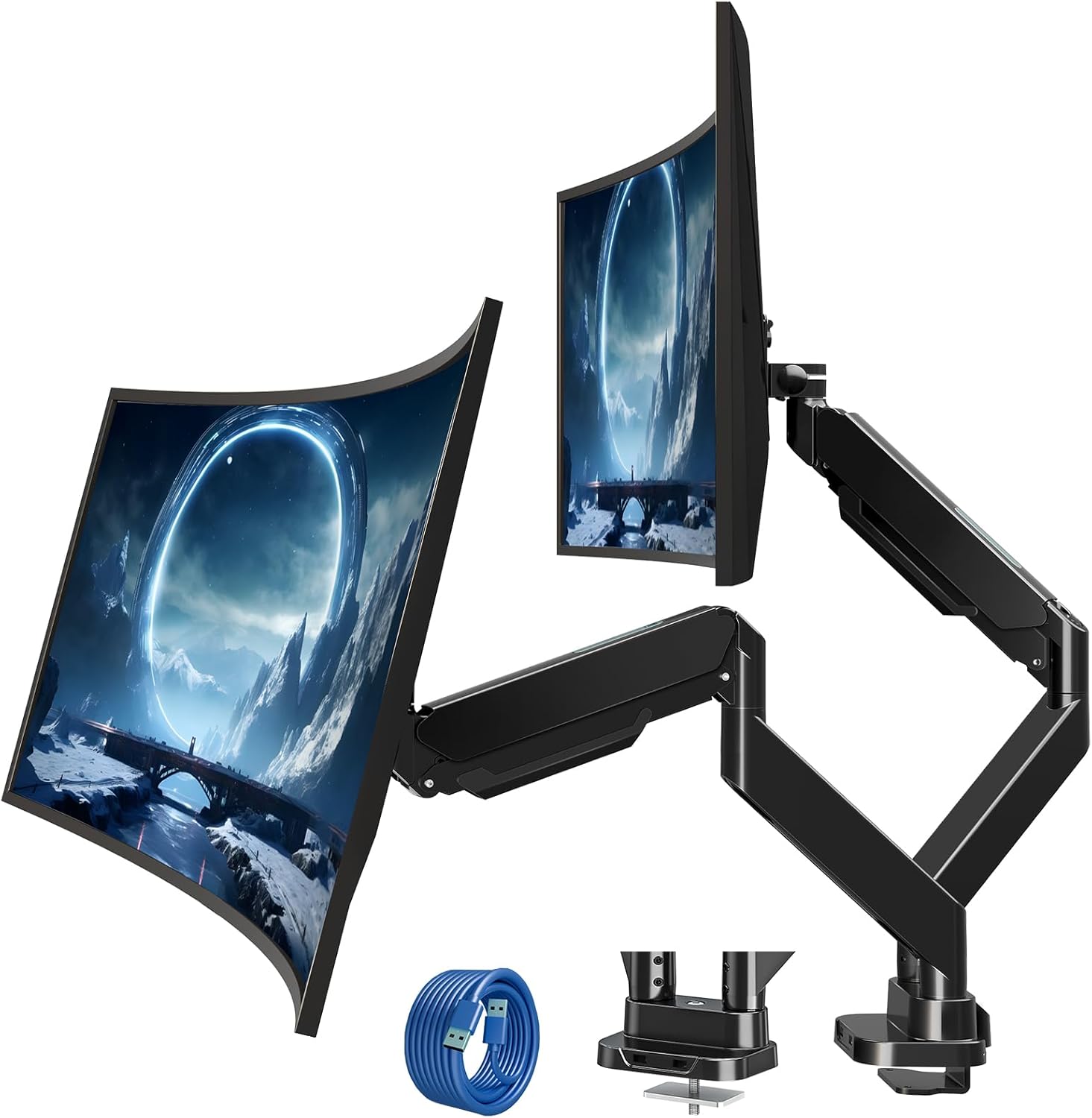
Figure 2.1: MOUNT PRO Dual Monitor Desk Mount with two monitors.
2.1 Хусусиятҳои асосӣ
- Supports two flat or curved monitors from 13" to 39" in size.
- Each arm supports monitors weighing between 4.4 lbs (2 kg) and 33 lbs (15 kg).
- Compatible with VESA patterns 75x75 mm and 100x100 mm.
- Full range of motion: tilt +90°/-45°, swivel 180°, rotation 360°.
- Adjustable height and extension for optimal viewкунҷҳо.
- Integrated cable management system.
- Two USB ports at the base for convenient charging and data transfer.

Figure 2.2: Compatibility details for monitor size, weight, and VESA standards.

Figure 2.3: The mount's capability to support large and heavy monitors, up to 33 lbs per arm.
3. Мундариҷаи баста
Verify that all components are present and undamaged. If any parts are missing or damaged, please contact customer support.
- Monitor Arms (x2)
- Мизи Clamp База
- Grommet Mount Hardware
- VESA Plates (x2)
- Сими васеи USB
- Маҷмӯи сахтафзор (винтҳо, шайбаҳо, фосилагузорҳо)
- Калидҳои Аллен (андозаҳои гуногун)
- Дастури дастурӣ
4. Дастури насб
4.1 Санҷиши пеш аз насб
Before beginning installation, confirm your monitor and desk meet the following requirements:
- Андозаи монитор: 13"-39"
- Монитор вазни: 4.4-33 lbs (per arm)
- Намунаи VESA: 75x75 mm or 100x100 mm
- Ғафсии мизи корӣ (C-clamp/Grommet): 0.39"-1.77"
- Grommet Hole Diameter (Grommet mount only): 0.39"-2.36"

Figure 4.1: Compatibility requirements for monitors and desk.
4.2 Мутобиқати мизи корӣ
Ensure your desk edge or grommet hole is suitable for installation. Avoid installing on desks with fragile materials like tempered glass.

Figure 4.2: Desk edge requirements for secure clamp насб.
4.3 Имкониятҳои васлкунӣ
Ин васлкунӣ ду усули насбкуниро пешниҳод мекунад: C-clamp ё васлаки громмет.
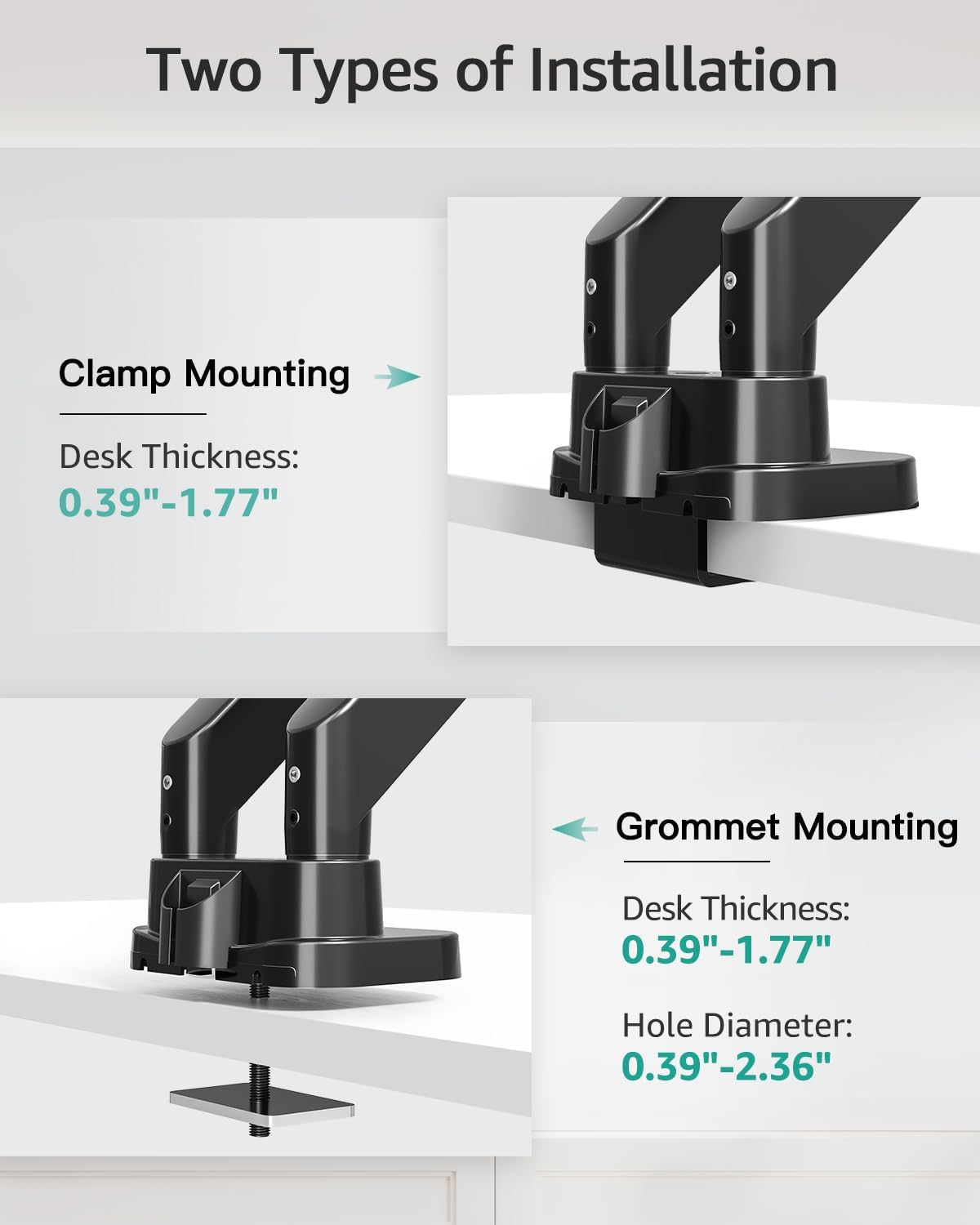
Figure 4.3: Visual representation of C-clamp and grommet mounting methods.
4.3.1 C-Clamp Насбкунӣ
- C-cl-ро замима кунедamp to the desk base.
- Position the base on the desired location on your desk.
- C-cl-ро пурзӯр кунедamp то он даме ки васлкунӣ ба мизи корӣ мустаҳкам мустаҳкам шавад, винт кунед.
4.3.2 Grommet Installation
- C-cl-ро ҷудо кунедamp from the base and attach the grommet plate.
- Insert the grommet bolt through the desk hole.
- Secure the mount from underneath the desk using the provided washer and nut.

Figure 4.4: Steps for easy base installation using either C-clamp or grommet method.
4.4 Пайваст кардани мониторҳо
- Attach the VESA plate to the back of your monitor using the appropriate screws and spacers from the hardware kit. Ensure the screws are tightened securely.
- Slide the monitor with the attached VESA plate onto the monitor arm's VESA head. The quick-release design allows for easy attachment.
- Ensure the monitor is securely locked in place.

Figure 4.5: Detail of VESA quick release boards and monitor locking mechanism.
5. Амалиёт ва танзимот
The MOUNT PRO Dual Monitor Desk Mount offers a wide range of adjustments to customize your viewтаҷрибаи ғанӣ.
5.1 Monitor Positioning (Tilt, Swivel, Rotation)
Each monitor arm allows for flexible positioning:
- Ҷома: Adjust the monitor angle up to 90° upwards and 45° downwards.
- Чарх: Rotate the monitor horizontally up to 180° left or right.
- Ротатсия: Барои гузаштан байни самтҳои манзара ва амудӣ, мониторро 360° гардонед.

Figure 5.1: Illustrates the full range of motion including swivel, tilt, and 360° rotation.
5.2 Height and Extension Adjustment
The gas spring arms allow for smooth vertical and horizontal adjustments.
- Баландии максималӣ: Monitors can be raised up to 21.5 inches from the desk surface.
- Максимум тамдид: Arms can extend up to 20.9 inches.

Figure 5.2: Maximum height and extension capabilities of the monitor arm.
5.3 Танзими шиддати пружинаи газӣ
The gas spring tension must be adjusted to match the weight of your monitor for optimal stability and ease of movement. Hold the arm in a horizontal position during adjustment.
- For lighter monitors (monitor raises up): Turn the adjustment screw clockwise towards the "-" symbol to reduce tension.
- For heavier monitors (monitor drops down): Turn the adjustment screw counter-clockwise towards the "+" symbol to increase tension.
A scale line on the arm indicates the approximate gas spring force value, with each division representing about 2 lbs. Adjust until the arm holds the monitor's position stably.

Figure 5.3: Gas spring tension adjustment mechanism with a visual scale.
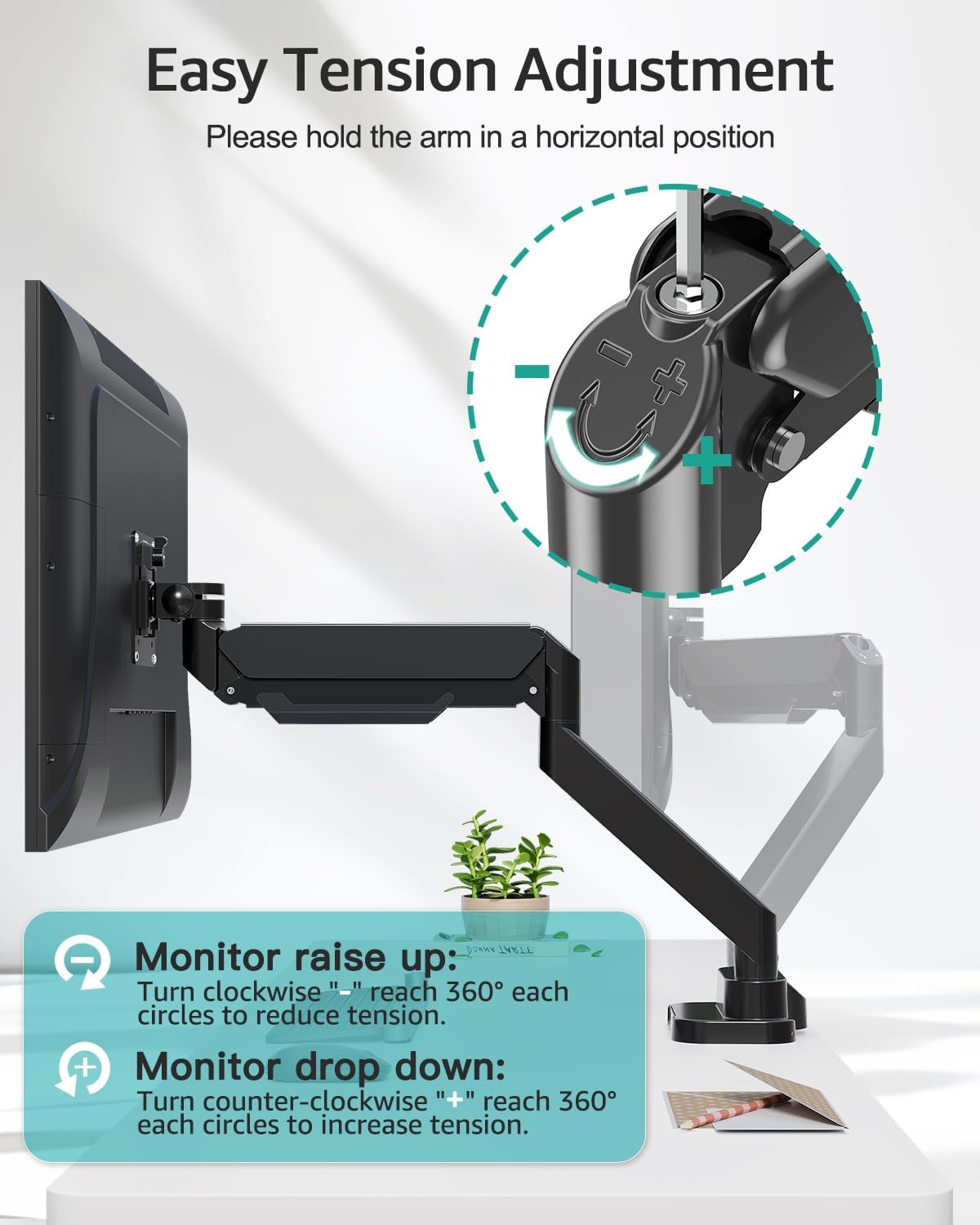
Figure 5.4: Detailed instructions for adjusting tension to suit monitor weight.
5.4 Идоракунии кабел
Route your monitor cables through the integrated cable management channels along the arms to maintain a tidy workspace.
5.5 порти USB
The base of the mount includes two USB ports. Connect the provided USB extension cable from the mount's base to your computer to enable these ports for charging devices or data transfer.

Figure 5.5: Cable management system and integrated USB ports for desktop organization.
6. Нигоҳдорӣ
- Ҳамаи винтҳо ва пайвастҳоро мунтазам тафтиш кунед, то боварӣ ҳосил кунед, ки онҳо маҳкам ва бехатар мебошанд.
- Монтажро бо матои нарм тоза кунед, damp матоъ. Аз тозакунандаҳои абразивӣ ё ҳалкунандаҳо худдорӣ кунед.
- Periodically verify that the gas spring tension is still appropriate for your monitor's weight.
7. Баррасии мушкилот
7.1 Monitor Sags or Does Not Stay in Position
- Ҳалли: The gas spring tension is too low for the monitor's weight. Increase the tension by turning the adjustment screw counter-clockwise towards the "+" symbol (refer to Section 5.3).
7.2 Monitor Arm is Too Stiff or Hard to Move
- Ҳалли: The gas spring tension is too high for the monitor's weight. Decrease the tension by turning the adjustment screw clockwise towards the "-" symbol (refer to Section 5.3).
7.3 Mount Feels Unstable on Desk
- Ҳалли: C-cl-ро аз нав мустаҳкам кунедamp or grommet bolt. Ensure the desk thickness is within the specified range (0.39"-1.77") and the desk material is sturdy.
7.4 Monitor Does Not Fit VESA Plate
- Ҳалли: Verify your monitor's VESA pattern is 75x75 mm or 100x100 mm. If not, a VESA adapter may be required. Some monitors may require removing a cover or original stand before attaching the VESA plate.
8. Мушаххасоти
| Хусусият | Мушаххасоти |
|---|---|
| Бренд | MOUNT PRO |
| Модели | B0F7LRZF4F |
| Мутобиқати андозаи монитор | 13" - 39" (flat or curved) |
| Weight Capacity (per arm) | 4.4 - 33 фунт (2 - 15 кг) |
| Мутобиқати VESA | 75x75 мм, 100x100 мм |
| Кунҷи майл | +90° / -45° |
| Кунҷи гардиш | 180° |
| Ротатсия | 360° |
| Макс Ҳайт | 21.5 инч |
| Максимум васеъшавӣ | 20.9 инч |
| Ғафсии миз (Cl)amp/Громмет) | 0.39" - 1.77" |
| Диаметри сӯрохи Grommet | 0.39" - 2.36" |
| Материал | Металл |
| Ранги | Сиёҳ |
| Вазни ашё | 14.63 фунт |
9. Кафолат ва дастгирӣ
MOUNT PRO products are designed and manufactured to high-quality standards. This product is covered by a limited warranty from the date of purchase. For warranty details, technical support, or to report missing/damaged parts, please contact MOUNT PRO customer service through the retailer where the product was purchased or visit the official MOUNT PRO webсайт.
Please have your model number (B0F7LRZF4F) and purchase information ready when contacting support.