
1. Муқаддима
Thank you for choosing the VAVA 5.5" 720P HD Video Baby Monitor. This manual provides essential information for the safe and effective use of your device. Please read it thoroughly before operation and retain it for future reference.
This monitor offers a secure and clear way to observe your baby with its 5.5-inch 720p display, two-way audio, night vision, and pan/tilt/zoom capabilities. It operates on a dedicated wireless connection, ensuring privacy and reliability.
Дар қуттӣ чӣ ҳаст
- Baby Monitor (Parent Unit)
- Camera (Baby Unit)
- Адаптери барқи AC x2
- Маҷмӯаи кӯҳӣ
- Монтажи камера
- Сими барқ x2
- Дастури корбар

Image 1.1: VAVA 5.5" 720P HD Video Baby Monitor components, including the parent unit (monitor) and baby unit (camera).
2. Маълумот оид ба бехатарӣ
Please observe the following safety precautions to prevent electric shock, injury, or damage to the product:
- Keep the monitor and camera out of reach of children.
- Do not place the camera or power cords within 3 feet (1 meter) of the crib.
- Use only the provided AC power adapters.
- Маҳсулотро ба об ё намӣ дучор накунед.
- Маҳсулотро дар наздикии манбаъҳои гармӣ ё нури бевоситаи офтоб ҷойгир накунед.
- Ensure proper ventilation; do not cover the product with blankets or other materials.
- Do not attempt to repair or modify the product yourself. Contact customer support for assistance.
3. Маҳсулот ба охир расидview
Шӯъбаи волидайн (монитор)
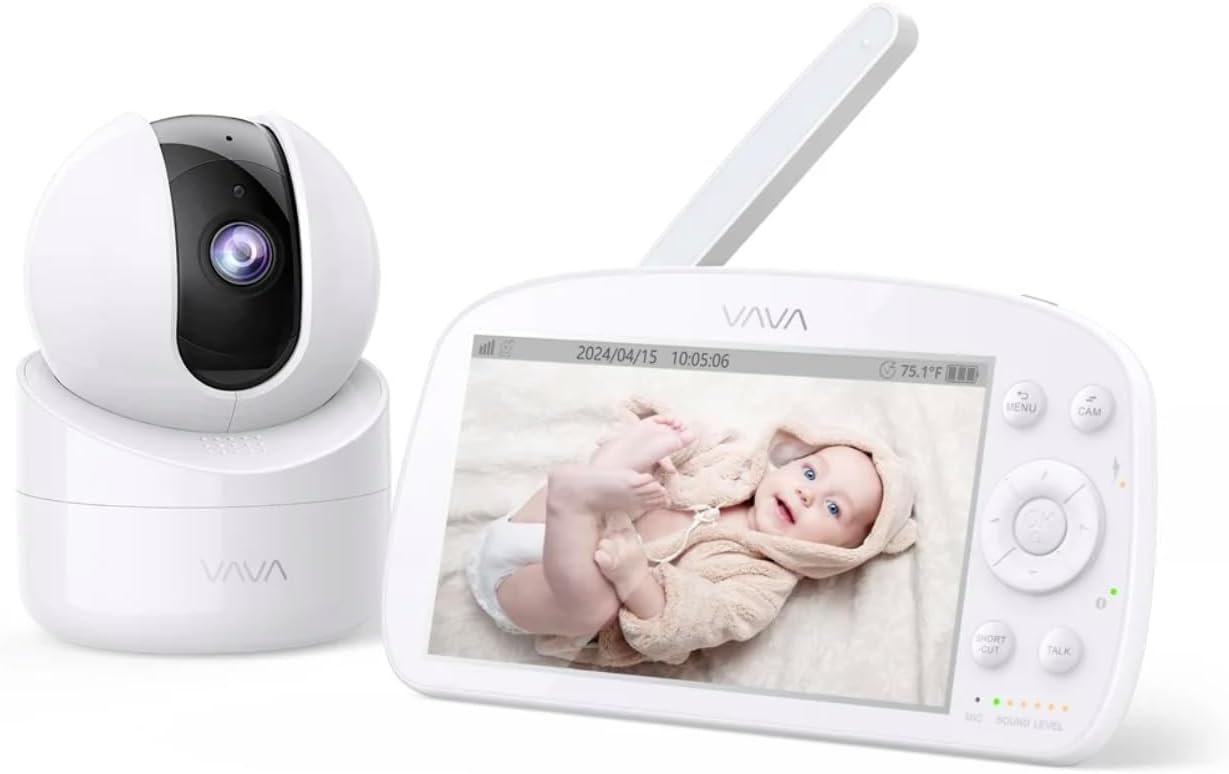
Image 3.1: The VAVA parent unit (monitor) and baby unit (camera) shown together.
The parent unit features a 5.5-inch HD display, control buttons, a microphone, speaker, and an antenna for signal reception.
Шӯъбаи кӯдакона (камера)

Image 3.2: The VAVA baby unit (camera) with its pan/tilt base, featuring the lens and microphone.
The baby unit includes a 720p camera with infrared LEDs for night vision, a microphone, speaker, and a temperature sensor. It supports pan, tilt, and digital zoom functions.
4. Танзимот
4.1 Ҷойгиркунии камера
Place the baby unit (camera) in a location that provides a clear view of your baby in the crib. Ensure it is at least 3 feet (1 meter) away from the crib to prevent entanglement with cords. The camera can be placed on a flat surface or mounted to a wall using the included mount kit.

Тасвири 4.1: Мисample of camera placement, mounted above a crib for optimal viewing.
4.2 Фаъолсозии барқ
- Connect one AC power adapter to the baby unit and plug it into a power outlet.
- Connect the second AC power adapter to the parent unit and plug it into a power outlet. The parent unit has a built-in rechargeable battery for portable use.
- Press and hold the power button on the parent unit to turn it on. The display will activate.
4.3 Pairing (If Necessary)
The baby unit and parent unit are pre-paired at the factory. If the connection is lost or you are adding an additional camera (up to 4 cameras supported), follow these steps:
- On the parent unit, press the МЕНЮ тугма.
- Navigate to the camera icon (Pairing) and select it.
- Choose an available camera channel (e.g., CAM 2, CAM 3, CAM 4).
- Press the pairing button on the back of the baby unit within 10 seconds.
- Once paired, the image from the camera will appear on the parent unit display.
5. Дастурҳои истифодабарӣ
5.1 Идоракунии воҳиди волидайн

Image 5.1: The parent unit in use, displaying the live feed from the baby unit.
- Тугмаи МЕНЮ: Access settings, pairing, lullabies, and other functions.
- Тугмаҳои паймоиш (боло/поён/чап/рост): Move through menus and control camera pan/tilt.
- Тугмаи OK: Интихобҳоро тасдиқ кунед.
- TALK Button: Press and hold to speak to your baby through the camera's speaker (Two-Way Audio).
- Тугмаи ZOOM: Magnify the image (2X-4X digital zoom).
- Ҳолати VOX: Voice Operated eXchange. The screen will turn on automatically when sound is detected from the baby unit. Adjust sensitivity in the menu.
- Лӯлаҳо: Select and play lullabies from the menu to soothe your baby.
- Нигоҳи шабона: Automatically activates in low light conditions, providing a clear black and white image.
- Реҷаи автоматии пилот: Cycles through connected cameras automatically.
5.2 Camera Control (Pan & Tilt)
From the parent unit, use the navigation buttons to remotely adjust the camera's viewкунҷи воридшавӣ:
- пахш кунед Боло/Поён камераро амудӣ гардонед.
- пахш кунед Чап/рост камераро ба таври уфуқӣ васл кунед.
6. Нигоҳдорӣ
6.1 Тозакунӣ
- Disconnect both units from power before cleaning.
- Use a soft, dry cloth to wipe the surfaces of the monitor and camera.
- For the camera lens, use a lens cleaning cloth to avoid scratches.
- Тозакунанда ё ҳалкунандаҳои абразивиро истифода набаред.
6.2 Battery Care (Parent Unit)
- Барои дароз кардани мӯҳлати хизмати батарея, аз пурра холӣ кардани батарея зуд-зуд худдорӣ намоед.
- Charge the parent unit regularly.
- If storing the unit for an extended period, charge the battery to approximately 50% and store in a cool, dry place.
7. Баррасии мушкилот
| Мушкилот | Сабаби эҳтимолӣ | Ҳалли |
|---|---|---|
| Дар волидайн тасвир нест | Parent unit is off; Camera is off; Out of range; Not paired. | Ensure both units are powered on. Move units closer. Re-pair the camera (see Section 4.3). |
| Сифати бади тасвир | Weak signal; Obstructions; Dirty lens. | Move units closer. Remove obstructions. Clean camera lens. |
| Садо ё садои таҳрифшуда нест | Volume too low; Out of range; Interference. | Increase parent unit volume. Move units closer. Avoid placing near other electronic devices. |
| Батареяи дастгоҳи волидайн зуд холӣ мешавад | High screen brightness; VOX mode off; Old battery. | Reduce screen brightness. Enable VOX mode. Contact support for battery replacement if necessary. |
| Camera not responding to pan/tilt | Connection issue; Camera malfunction. | Check connection. Power cycle both units. If issue persists, contact support. |
8. Мушаххасоти
| Хусусият | Тафсилот |
|---|---|
| Номи модел | VAVA 5.5" 720P Video Baby Monitor |
| Рақами модел | 83-24011-022 |
| Андозаи намоиш | 5.5 инч |
| Ҳалли видео | 720p HD |
| Диапазони интиқол | То 900 фут (хатти тамошо) |
| Технологияи пайвастшавӣ | Wireless (Dedicated 2.4GHz FHSS) |
| Манбаи нерӯ | Corded Electric, Rechargeable (Parent Unit) |
| Хусусиятҳои махсус | 2-Way Audio, Night Vision, Pan & Tilt, Zoom (2X-4X), VOX Mode, Lullabies, Temperature Sensor |
| Истифодаи дарунӣ/берунӣ | Дарунӣ |
| Навъи васлкунӣ | Монтажи болои миз |
| Андозаҳои маҳсулот | 8.46 x 8 x 5 инч |
| Вазни ашё | 2.2 фунт |
| UPC | 191280045666 |
9. Кафолат ва дастгирӣ
9.1 Маълумот дар бораи кафолат
VAVA products are designed and manufactured to the highest quality standards. This product is covered by a manufacturer's warranty from the date of purchase. Please refer to the warranty card included in your package or visit the official VAVA webсайт барои шартҳо ва шартҳои кафолати муфассал.
9.2 Дастгирии муштариён
If you encounter any issues or have questions regarding your VAVA 5.5" 720P HD Video Baby Monitor, please contact VAVA Customer Support. Our team is available to assist you with troubleshooting, technical support, and warranty claims.
Барои маълумоти мукаммали тамос, лутфан боздид кунед: www.vava.com/support