
Муқаддима
Welcome to the user manual for your new HP OMEN 16-ae0002TX Gaming Laptop. This document provides essential information to help you set up, operate, maintain, and troubleshoot your device. Designed for high-performance gaming and demanding tasks, this laptop features a 14th Gen Intel Core i7 processor, NVIDIA GeForce RTX 4060 graphics, 16GB DDR5 RAM, and a 1TB SSD, all presented on a vibrant 16.1-inch FHD 165Hz display.
1. Танзимоти ибтидоӣ
1.1 Unpacking Your Laptop
Ҳама ҷузъҳоро аз бастабандӣ бодиққат хориҷ кунед. Боварӣ ҳосил кунед, ки ашёҳои зерин мавҷуданд:
- HP OMEN 16-ae0002TX Gaming Laptop
- Адаптери барқ
- Сими барқ
- Дастури корбар (ин ҳуҷҷат)
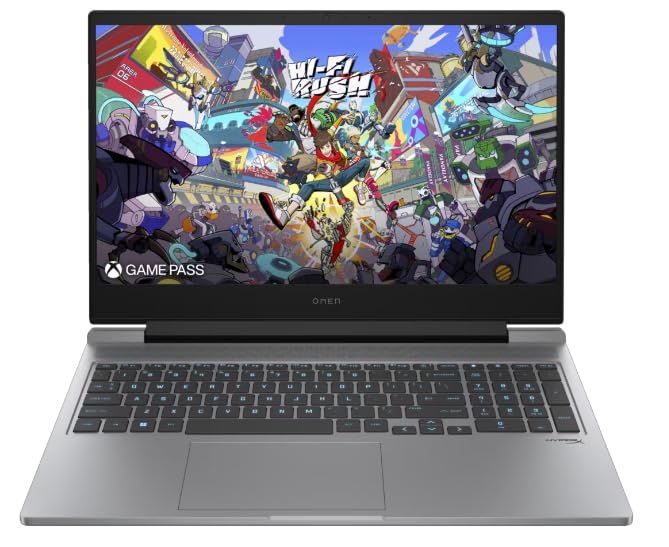
Figure 1: HP OMEN 16-ae0002TX Gaming Laptop overview.
1.2 Пайваст кардани адаптери барқ
- Сими барқро ба адаптери барқ пайваст кунед.
- Адаптери барқро ба васлаки деворӣ пайваст кунед.
- Connect the adapter's output plug to the power port on your laptop.
It is recommended to fully charge the laptop before initial use.
1.3 Боркунии аввал ва насби Windows
Press the power button located on the laptop chassis. The laptop will boot up, and you will be guided through the Windows 11 Home setup process. Follow the on-screen instructions to configure your operating system, network settings, and user account.
1.4 Пайваст кардани дастгоҳҳои беруна
Your HP OMEN laptop provides various ports for connecting external devices:
- Портҳои USB: Барои мушҳо, клавиатураҳо, хотираи беруна ва дигар дастгоҳҳои USB.
- Порти HDMI: Барои пайвастшавӣ ба дисплейҳои беруна ё телевизорҳо.
- Jack Jack: Барои гӯшмонакҳо ё баландгӯякҳои беруна.
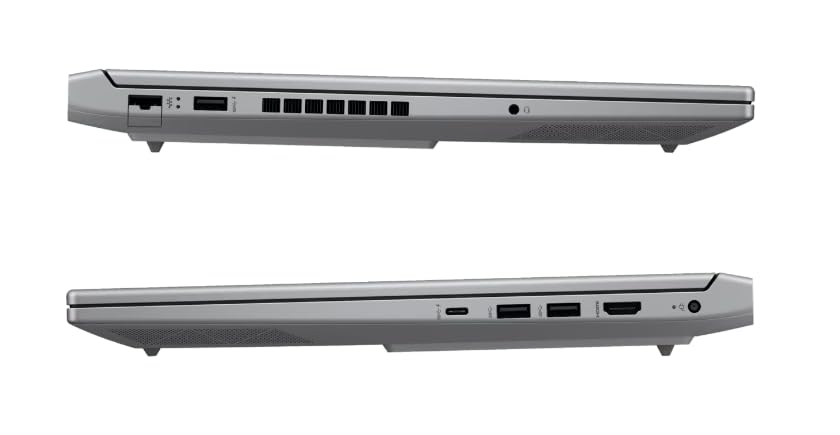
Расми 2: Тараф view illustrating available ports.
2. Идоракунии ноутбуки худ
2.1 Фаъолсозӣ / Хомӯш ва Ҳолати хоб
- Фаъол: Тугмаи барқро пахш кунед.
- Пӯшида шудан: Тугмаи Оғозро дар Windows пахш кунед ва сипас Ҳокимият > Хомӯшро интихоб кунед.
- Ҳолати хоб: Close the lid or select Power > Sleep from the Start menu.
2.2 Клавиатура ва сенсорӣ
The laptop features a 1-zone RGB backlit full-size keyboard with HyperX tactile feedback for an enhanced gaming and typing experience. The integrated touchpad supports multi-touch gestures for navigation.
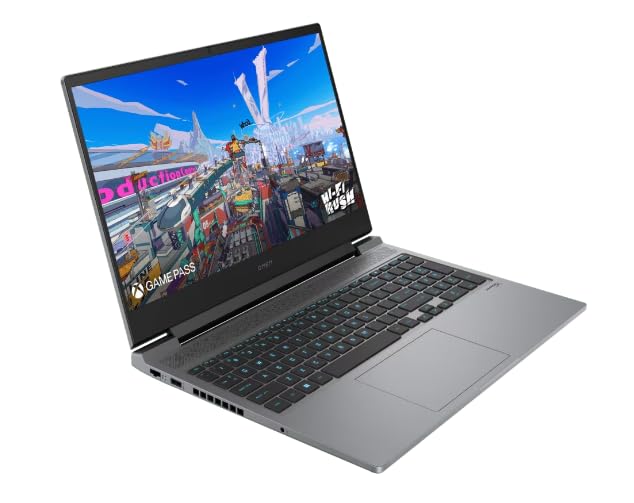
Расми 3: Тарҳбандии клавиатура ва touchpad.
2.3 Хусусиятҳои намоиш
The 16.1-inch FHD (1920 x 1080) IPS display offers a 165Hz refresh rate and 7ms response time, providing smooth and responsive visuals for gaming and multimedia. Adjust brightness and display settings through Windows display options.
2.4 Пайвасти шабакавӣ ва бесим
- Вай-фай: Connect to wireless networks via the Windows network settings.
- Блутуз: Pair Bluetooth-enabled devices such as headphones, mice, or game controllers.
2.5 HP True Vision 1080p FHD Camera
The integrated 1080p FHD webcam is suitable for video calls, online meetings, and streaming. Ensure proper lighting for optimal image quality.
3. Нигоҳдорӣ ва нигоҳубин
3.1 Тозакунии умумӣ
- Экран: Аз матои мулоим ва бе-лин сабук истифода баред гampбо об ё тозакунандаи экран. Аз маводи кимиёвии сахт худдорӣ намоед.
- Клавиатура ва шасси: Аз матои нарм истифода баред. Барои тоза кардани чанг, аз ҳавои фишурда истифода баред.
- Боварӣ ҳосил кунед, ки ноутбук пеш аз тозакунӣ хомӯш карда шудааст.
3.2 Нигоҳубини батарея
The laptop is equipped with a Lithium Ion battery. To maximize battery lifespan:
- Аз ҳарорати аз ҳад зиёд канорагирӣ кунед.
- Do not let the battery completely discharge frequently.
- Агар ноутбукро муддати тӯлонӣ нигоҳ доред, боварӣ ҳосил кунед, ки батареяи он тақрибан 50% пур карда шудааст.
3.3 Навсозии нармафзор
Regularly update your Windows operating system, drivers, and HP software to ensure optimal performance, security, and compatibility. These updates often include performance enhancements and bug fixes.
4. Бартараф кардани мушкилоти умумӣ
This section addresses common issues you might encounter. For more complex problems, refer to the HP support webсайт.
4.1 Масъалаҳои барқ
- Ноутбук фурӯзон нест: Ensure the power adapter is securely connected to both the laptop and a working power outlet. Check if the power adapter's indicator light is on.
- Батарея пур намешавад: Verify the power adapter connection. Try a different outlet.
4.2 Мушкилоти намоиш
- Дар экран тасвир нест: Ensure the laptop is powered on. Try connecting an external monitor to check if the issue is with the laptop's display.
- Тасвири милт-милт ё таҳрифшуда: Драйверҳои графикаи худро навсозӣ кунед. Суръати навсозии экранро дар танзимоти Windows танзим кунед.
4.3 Масъалаҳои пайвастшавӣ
- Wi-Fi пайваст намешавад: Check if Wi-Fi is enabled in Windows settings. Restart your router and laptop.
- Дастгоҳи Bluetooth пайваст намешавад: Боварӣ ҳосил кунед, ки дастгоҳи Bluetooth дар ҳолати ҷуфтшавӣ ва дар доираи диапазон қарор дорад. Танзимоти Bluetooth-ро дар ноутбуки худ санҷед.
5. Мушаххасоти маҳсулот
| Хусусият | Мушаххасоти |
|---|---|
| Бренд | HP |
| Номи модел | HP laptopOMEN (ae0002tx) |
| Протсессор | 14th Gen Intel® Core™ i7-14650HX (up to 5.2 GHz) |
| Хотираи RAM | 16 GB DDR5 (Max 32 GB) |
| Нигоҳдорӣ | 1 ТБ SSD (Диски сахти ҳолатӣ) |
| Корти графикӣ | NVIDIA GeForce RTX 4060 (8 ГБ GDDR6 бахшидашуда) |
| Намоиш | 16.1-inch FHD (1920 x 1080) IPS, 165Hz, 7ms, 300 nits |
| Низоми амал | Windows 11 Home |
| Клавиатура | 1-zone RGB Backlit, HyperX tactile feedback |
| Webcam | HP True Vision 1080p FHD |
| Пайвастшавӣ | Wi-Fi, Bluetooth |
| Портҳо | USB (Total: 1), HDMI (Total: 1) |
| Dimensions (L x W x Thickness) | 30L x 25W x 6Th Centimeters |
| Вазни ашё | 1.9 килограмм |
| Навъи батарея | Lithium Ion (2.6 Watt Hours) |
6. Маълумот дар бораи кафолат
Your HP OMEN 16-ae0002TX Gaming Laptop comes with an onsite warranty. Please retain your proof of purchase for warranty claims. For detailed terms and conditions, refer to the warranty card included with your product or visit the official HP support webсайт.
7. Дастгирии муштариён
For technical assistance, service, or further inquiries, please contact HP customer support:
- Истеҳсолкунанда / воридкунанда: HP India Sales Pvt. Ltd., 24 Salarpuria Arena, Hosur Main Road, Adugodi, Bangalore-560030
- Дастгирии онлайн: Расмий ташриф буюринг Дастгирии HP Webсайт барои ронандагон, дастурҳо ва дастурҳои бартараф кардани мушкилот.