
1. Муқаддима
The HAMCUBE Mini CW Trainer is a portable device designed for learning and practicing Morse code (CW). It features a compact design, a built-in speaker for standalone practice, and various interfaces for external connections. This manual provides essential information for setting up, operating, and maintaining your CW trainer.

Image 1.1: The HAMCUBE Mini CW Trainer, a portable Morse code training device.
2. Мундариҷаи баста
Лутфан ҳангоми кушодани қуттӣ мундариҷаи бастаро тафтиш кунед, то боварӣ ҳосил кунед, ки ҳама ашё мавҷуд аст:
- 1 x HAMCUBE Mini CW Trainer Unit
- 1 x кабели USB (барои пуркунии барқ ва интиқоли маълумот)
3. Маҳсулот ба охир расидview
Familiarize yourself with the various ports and controls of the HAMCUBE Mini CW Trainer.

Тасвири 3.1: боло view of the HAMCUBE Mini CW Trainer with labeled ports.
- Charging / Data Interface: USB-C port for charging the internal battery and connecting to a computer for data transfer.
- Key / Keyboard Interface: Connect an external CW key or keyboard for input.
- Earphone / External Speaker Port: Connect headphones or an external speaker for audio output.
- FUNC Interface: A multi-function interface for advanced features or external device control.
- Multifunction Selector Switch: Located on the side, used for power on/off and navigation.
- Тугмаи Reset: A small recessed button for resetting the device.
4. Танзимот
4.1 Пур кардани дастгоҳ
Before first use, fully charge the HAMCUBE Mini CW Trainer. Connect the provided USB cable to the Charging / Data Interface on the device and to a standard USB power adapter (not included) or a computer USB port. The charging indicator will show the charging status.
4.2 Фурӯзон/хомӯш кардан
To power on the device, locate the multifunction selector switch on the side. Press down and hold the switch for 3-5 seconds. A short press will not turn on the unit. To power off, repeat the same action.
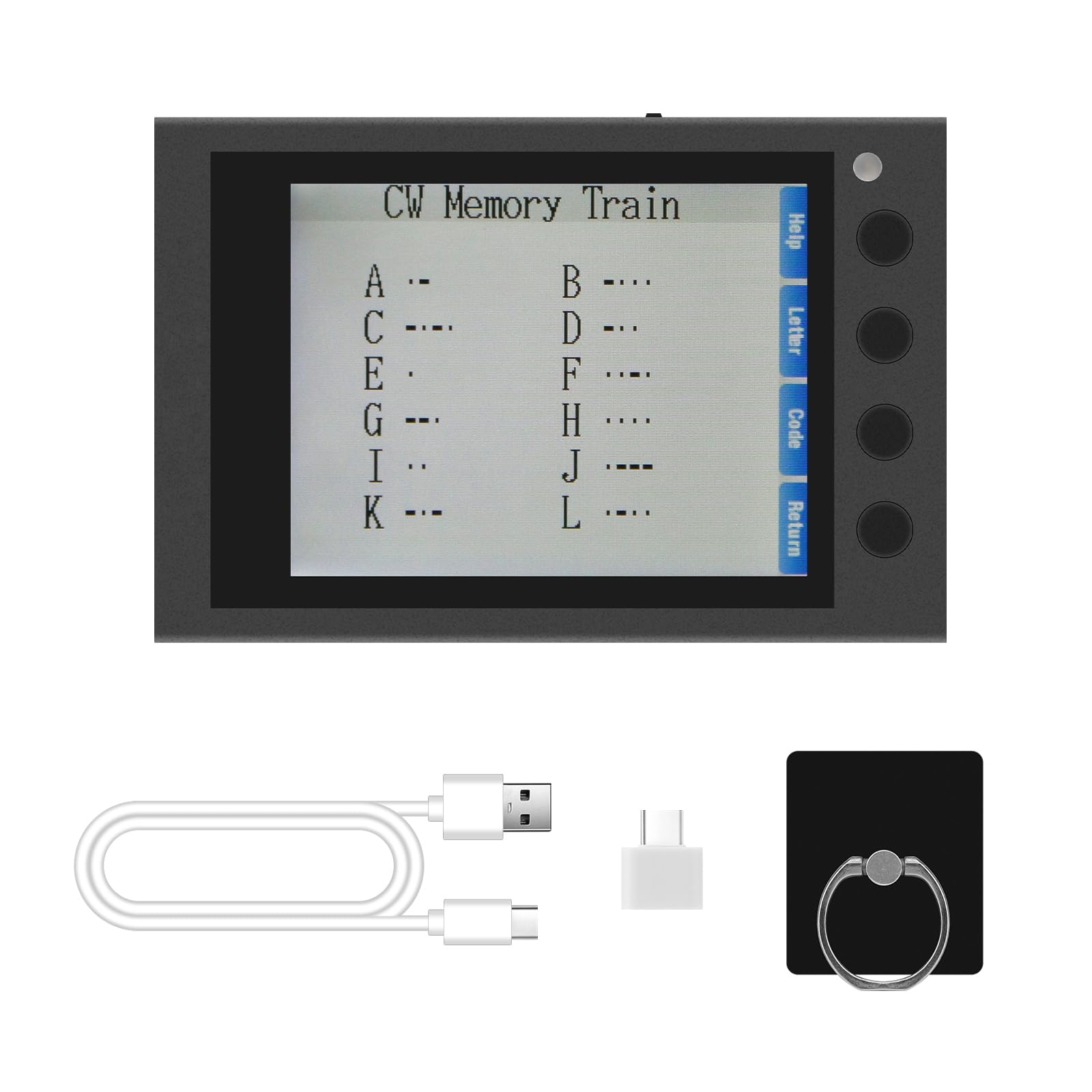
Image 4.1: Instructions for powering on the device.
4.3 Пайваст кардани лавозимот
- Калиди CW: Connect your external CW key to the 'KEY' interface.
- Headphones/Speaker: For private practice or louder audio, connect headphones or an external speaker to the 'PHONE' interface.
5. Дастурҳои истифодабарӣ
5.1 Навигатсия ва меню
The device features a clear screen and side buttons for navigation. Use the buttons adjacent to the screen to select options such as 'Help', 'Letter', 'Code', and 'Return' as displayed on the interface.

Image 5.1: Device screen showing the main menu and Morse code characters.
5.2 CW Training Modes
The HAMCUBE Mini CW Trainer offers various modes to assist in learning and practicing Morse code:
- Character Learning Mode: Displays Morse code for individual letters and numbers.
- Speed Training Mode: Practice receiving Morse code at different speeds (adjustable from 10 to 50 WPM).
- Sending Practice Mode: Connect an external key to practice sending Morse code.
- Listening Recognition Mode: Improves your ability to recognize Morse code by ear.
5.3 Custom Character Storage and One-Key Transmitting
The device includes 8 groups of custom character storage units. Each unit can store up to 60 English characters. This feature allows for one-key transmitting of frequently used phrases or call signs. Refer to the on-screen 'Help' or specific menu options for instructions on programming and recalling these stored messages.
5.4 PC & Mobile Connection
The USB-C port can be used to connect the trainer to a computer or mobile device. This enables potential data transfer, firmware updates, or integration with external software for enhanced training experiences. Specific software or drivers may be required, which can typically be found on the manufacturer's support webсайт.

Image 5.2: The trainer can connect to PCs and mobile devices.
6. Нигоҳдорӣ
- Тозакунӣ: Барои тоза кардани дастгоҳ матои мулоими хушкро истифода баред. Аз истифодаи маводи тозакунандаи моеъ ё маводи абразивӣ худдорӣ намоед.
- Нигоҳдорӣ: Store the trainer in a cool, dry place away from direct sunlight and extreme temperatures.
- Нигоҳубини батарея: Барои дароз кардани мӯҳлати хизмати батарея, аз пурра холӣ кардани дастгоҳ зуд-зуд худдорӣ намоед. Онро мунтазам пур кунед, ҳатто агар муддати тӯлонӣ истифода нашавед.
- Муқовимат ба об: The device is not water-resistant. Avoid exposure to moisture or liquids.
7. Баррасии мушкилот
- Дастгоҳ фаъол нест:
- Ensure the device is sufficiently charged. Connect it to a power source using the provided USB cable.
- Confirm you are pressing and holding the multifunction selector switch for 3-5 seconds. A short press will not activate the unit.
- If the issue persists, try performing a reset by gently pressing the recessed reset button with a thin object (e.g., a paperclip).
- Не баромади аудио:
- Check if headphones or an external speaker are properly connected to the 'PHONE' port.
- Adjust the volume settings on the device.
- Difficulty understanding instructions:
- The device interface is primarily in English. If you encounter difficulties, refer to the 'Help' section on the device screen or consult online resources.
8. Мушаххасоти
| Хусусият | Тафсилот |
|---|---|
| Бренд | hamgeek |
| Модели | Mini CW Trainer |
| Ранги | Сиёҳ |
| Хусусиятҳои махсус | CW Full-Process Assisted Learning, Custom Character Storage, One-Key Transmitting |
| Протоколи пайвастшавӣ | Кодекси Морзе |
| Батарея | Батареяи дарунсохт 2500 мАч барқгиранда |
| Компонентҳои дохилшуда | 1 x кабели USB |
| Андозаҳо (тақрибан) | 8.8 cm (L) x 5.8 cm (W) x 1.7 cm (H) / 3.46 in (L) x 2.28 in (W) x 0.66 in (H) |
| Сатҳи муқовимат ба об | Ба об тобовар нест |

Image 8.1: Approximate dimensions of the device.
9. Кафолат ва дастгирӣ
For warranty information and technical support, please refer to the official hamgeek webсайт ё фурӯшандаи худ тамос гиред. Квитансияи хариди худро ҳамчун далели харид барои ҳама даъвоҳои кафолат нигоҳ доред.