
1. Муқаддима
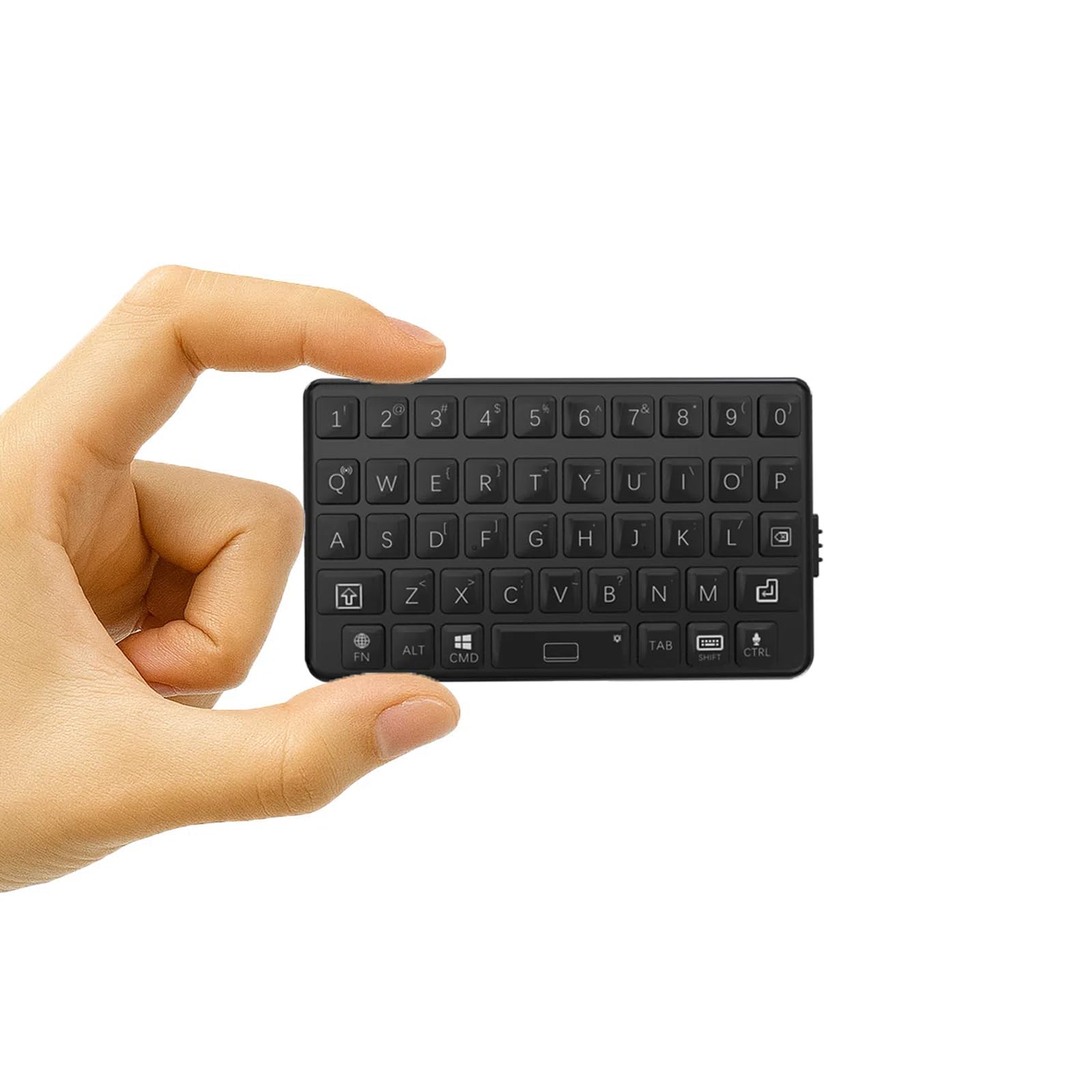
Ташаккур ба шумо барои харидasing the DarkWalker M4 Mini Bluetooth Keyboard. This ultra-portable wireless keyboard is designed for seamless compatibility with a wide range of devices, including smartphones, tablets, iPads, iPhones, Macs, Android devices, and Windows PCs. Its compact design and tactile keys provide an efficient and comfortable typing experience, making it ideal for mobile professionals and everyday use.
2. Танзимот
2.1 Пур кардани клавиатура
Before initial use, fully charge the keyboard. Connect the provided USB charging cable to the keyboard's charging port and to a USB power source (e.g., computer, wall adapter). The charging indicator light will illuminate during charging and turn off when fully charged.
2.2 Пайвасткунии Bluetooth
- Фаъол: Locate the power switch on the side of the keyboard and slide it to the "ON" position.
- Ҳолати ҷуфтшавӣ ворид кунед: -ро пахш карда нигоҳ доред Fn калид ва Bluetooth icon key (usually located on one of the number keys or a dedicated key) simultaneously for a few seconds until the Bluetooth indicator light starts blinking. This indicates the keyboard is in pairing mode.
- Bluetooth-ро дар дастгоҳи худ фаъол созед: Дар смартфон, планшет ё компютери худ ба танзимоти Bluetooth гузаред.
- Клавиатураро интихоб кунед: In the list of available Bluetooth devices, select "DarkWalker M4" or a similar name.
- Тасдиқи ҷуфтшавӣ: Follow any on-screen prompts to complete the pairing process. The Bluetooth indicator light on the keyboard will stop blinking and remain solid (or turn off) once successfully paired.
2.3 Multi-OS Automatic Recognition
The DarkWalker M4 keyboard features multi-OS automatic recognition. Upon powering on, it will automatically detect and configure itself for iOS, Mac, Android, or Windows operating systems, ensuring optimal key functionality without manual switching.

3. Дастурҳои истифодабарӣ
3.1 Навиштани асосӣ
The keyboard features a standard QWERTY layout. Simply type as you would on a full-sized keyboard. The tactile switches provide precise feedback for comfortable and efficient typing.
3.2 Special Functions (Fn Key Combinations)
Дар Fn key allows access to secondary functions printed on certain keys. Press and hold the Fn key, then press the desired function key.
- Тугмаҳои тирча: To use arrow keys (Up, Down, Left, Right), press and hold Fn and then press the keys corresponding to 7 (Up), 8 (Down), 9 (Left), and 0 (Right).
- Функсияҳои дигар: Refer to the keycaps for additional functions accessible via the Fn key, such as multimedia controls or system shortcuts.

3.3 Идоракунии барқ
- Ҳолати худкори хоб: The keyboard will enter sleep mode after a period of inactivity to conserve battery. Press any key to wake it up.
- Ҳаёти батарея: The keyboard provides up to 12 hours of continuous operation on a full charge.
4. Нигоҳдорӣ
4.1 Тозакунӣ
To clean the keyboard, power it off and gently wipe the surface with a soft, damp cloth. Avoid using harsh chemicals or abrasive materials. Do not immerse the keyboard in water.
4.2 Нигоҳдорӣ
When not in use for extended periods, store the keyboard in a cool, dry place. Ensure it is powered off to prevent battery drain.
5. Баррасии мушкилот
5.1 Клавиатура пайваст намешавад/ҷуфт намешавад
- Боварӣ ҳосил кунед, ки клавиатура фаъол аст ва пурра пур карда шудааст.
- Боварӣ ҳосил кунед, ки Bluetooth дар дастгоҳи шумо фаъол аст.
- Place the keyboard within close proximity to your device.
- Кӯшиш кунед, ки клавиатураро аз танзимоти Bluetooth-и дастгоҳи худ ҷудо ва аз нав ҷуфт кунед.
- Ҳам клавиатура (хомӯш/фаъол) ва ҳам дастгоҳи худро аз нав фаъол созед.
5.2 Калидҳо ҷавоб намедиҳанд
- Check if the keyboard is properly connected via Bluetooth.
- Боварӣ ҳосил кунед, ки батареяи клавиатура холӣ нашудааст.
- Clean any debris around the keys.
5.3 Таъхири вуруд ё қатъшавии пайвастшавӣ
- Барои кам кардани халал, ба дастгоҳи худ наздиктар шавед.
- Боварӣ ҳосил кунед, ки ягон дастгоҳи дигар халали Bluetooth намеорад.
- Клавиатураро пур кунед.
6. Мушаххасоти
| Бренд | DarkWalker |
| Рақами модел | M4 |
| Технологияи пайвастшавӣ | Bluetooth 5.0 |
| Дастгоҳҳои мувофиқ | Android, iOS, iPad, iPhone, Mac, PC, Windows |
| Тарҳбандии клавиатура | QWERTY |
| Навъи гузариш | Тактиль |
| Андозаҳои маҳсулот (L x W x H) | 7.5 х 4.5 х 1.2 см |
| Вазн | 40г |
| Давомнокии амалиёти доимӣ | То 12 соат |
| Кишвари аслӣ | Хитой |
| UPC | 739608135400 |
| ASIN | B0FNK4BWM2 |
7. Кафолат ва дастгирӣ
7.1 Маълумот дар бораи кафолат
This DarkWalker M4 Mini Bluetooth Keyboard comes with a Кафолати 1 сол from the date of purchase. This warranty covers manufacturing defects and malfunctions under normal use. It does not cover damage caused by misuse, accidents, unauthorized modifications, or normal wear and tear.
7.2 Дастгирии муштариён
For technical assistance, troubleshooting, or warranty claims, please contact DarkWalker customer support. Refer to the product packaging or the official DarkWalker webсайт барои маълумоти охирини тамос.