
Муқаддима
This manual provides detailed instructions for the setup, operation, and maintenance of your LIGE EF19-A Smartwatch. This device features a 1.85-inch HD display, Bluetooth calling capabilities, extensive health monitoring, and over 100 sports modes. It is designed for durability with IP68 waterproofing and a robust build. Please read this manual thoroughly to ensure proper use and to maximize the functionality of your smartwatch.
1. Танзимот
1.1 Мундариҷаи баста
- 1 x LIGE EF19-A Smartwatch
- 2 x Watch Straps (1 steel, 1 silicone)
- 1 x кабели пуркунандаи USB
- 1 x сими пуркунандаи Type-C
- 1 x Strap Adjuster (Regulator)
- 1 x Дастури корбар
1.2 Пур кардани соатҳои смарт
Пеш аз истифодаи аввал, соатҳои интеллектуалии худро пурра пур кунед.
- Сими пуркунандаи магнитиро ба контактҳои пуркунанда дар қафои соати интеллектуалӣ пайваст кунед.
- Connect the other end of the charging cable (USB or Type-C) to a compatible power source (e.g., USB wall adapter, computer USB port, power bank, car charger).
- Намоиши соат ҳолати барқро нишон медиҳад. Пуркунии пурра одатан тақрибан 2 соатро мегирад.

Image: The smartwatch connected to a charging cable, illustrating its 1000 mAh battery capacity and charging process.
A fully charged battery provides up to 7-15 days of normal use and up to 50 days in standby mode.
1.3 Насб ва пайваст кардани барнома
To access all features, download the companion app on your smartphone. The smartwatch is compatible with Android 5.1 and higher, and iOS 9.0 and higher.
- Scan the QR code provided in the manual or on the watch packaging, or search for the app name (usually specified in the quick start guide) in your phone's app store (Google Play Store for Android, Apple App Store for iOS).
- Барномаро насб кунед ва дар ҳолати дархостшуда ҳисоб эҷод кунед.
- Боварӣ ҳосил кунед, ки Bluetooth дар смартфони шумо фаъол аст.
- Open the app and follow the on-screen instructions to add your device. The app will search for your smartwatch.
- Select your smartwatch (e.g., "EF19-A" or similar Bluetooth name) from the list of available devices to pair.
- Confirm the pairing request on both your smartphone and smartwatch if a prompt appears.
1.4 Strap Installation/Adjustment
The smartwatch comes with two interchangeable straps: a steel strap and a silicone strap.
- Барои пайваст кардани тасма: Align the spring bar with the lug holes on the watch body and slide the pin into place.
- Барои хориҷ кардани тасма: Locate the small lever on the spring bar, pull it inwards, and gently detach the strap from the watch body.
- For the steel strap: Use the provided strap adjuster (regulator) to remove or add links for a comfortable fit. Refer to the specific instructions for the strap adjuster if needed.
2. Дастурҳои истифодабарӣ
2.1 Навигатсияи асосӣ
- Шишаи ламсӣ: Барои паймоиш дар менюҳо ва хусусиятҳо ба чап/ рост, боло/поён лағжед. Барои интихоб клик кунед.
- Тугма(ҳо)-и паҳлӯӣ: Typically, one button serves as a power on/off, back, or home button. Long press for power options, short press to return to the watch face or previous screen.
2.2 Зангҳо ва огоҳиҳои Bluetooth
Once paired with your smartphone, the smartwatch allows you to manage calls and receive notifications.
- Занг задан/қабул кардани зангҳо: When a call comes in, the watch will display the caller ID. You can answer or reject calls directly from the watch. You can also dial numbers or select contacts from the watch interface.
- Огоҳиҳои паёмӣ: Receive notifications for SMS, Facebook, WhatsApp, Twitter, TikTok, and other apps directly on your watch. Swipe down from the watch face to view огоҳиномаҳои охирин.

Image: The smartwatch showing an incoming call, message notifications, and the voice assistant interface.
2.3 Мониторинги саломатӣ
The smartwatch continuously monitors various health metrics.
- Набзи дил: Access the heart rate monitoring function to view суръати ҷории дил ва маълумоти таърихии шумо.
- Оксигени хун (SpO2): Сатҳи оксигени хуни худро чен кунед.
- Сифати хоб: The watch automatically tracks your sleep patterns, including deep sleep, light sleep, and wake times. View detailed sleep reports in the companion app.
- Сатҳи стресс: Сатҳи стресси худро дар давоми рӯз назорат кунед.
- Омӯзиши нафаскашӣ: Engage in guided breathing exercises to help manage stress.

Image: A user wearing the smartwatch, with the display showing real-time heart rate, blood oxygen saturation, and breathing exercise prompts.
Шарҳ: This device is not a medical device. Health monitoring data is for reference only and should not be used for medical diagnosis or treatment.
2.4 намуди варзиш
The smartwatch supports over 100 sports modes for tracking your physical activity.
- Navigate to the "Workout" or "Sports" menu on your watch.
- Select your desired activity (e.g., running, cycling, swimming, hiking, yoga, badminton, basketball, golf).
- The watch will begin tracking metrics such as steps, distance, calories burned, and heart rate.
- End the workout by following the on-screen prompts. Detailed summaries are available on the watch and in the companion app.

Image: A person cycling while wearing the smartwatch, with the display showing steps, distance, calories, and heart rate for different sports activities.
2.5 Torch Function
The smartwatch includes a built-in torch function for instant illumination.
- Access the torch function from the quick settings menu or app list.
- It offers different modes such as constant light, warning mode, and SOS mode.
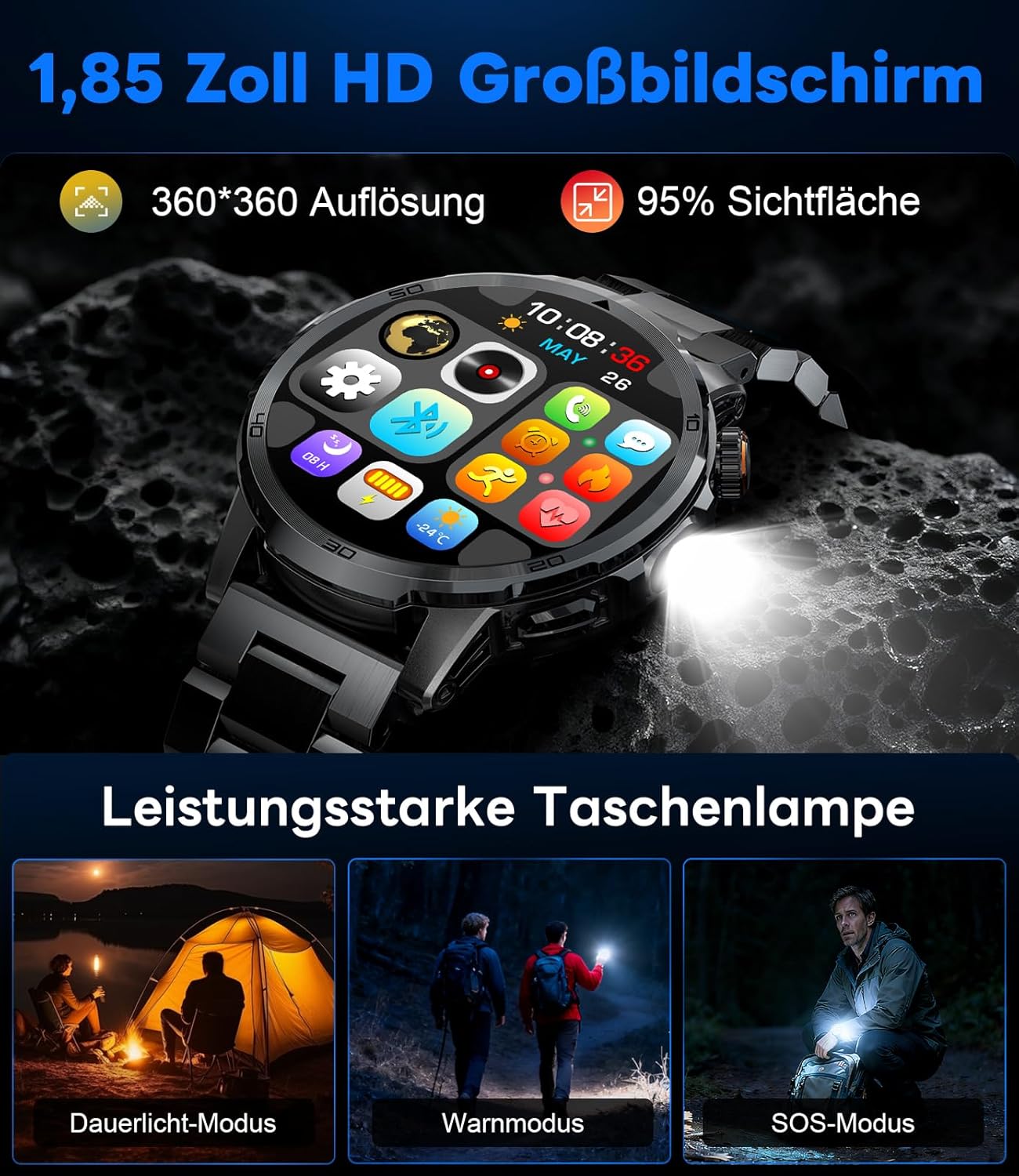
Image: The smartwatch displaying its 1.85-inch HD screen and demonstrating its powerful flashlight feature with different modes.
2.6 Функсияҳои дигар
- Ёвари овоз: Activate the voice assistant to control your phone or get information (e.g., "What's the weather?").
- Назорати мусиқӣ: Control music playback on your smartphone (play, pause, skip tracks, adjust volume) directly from your watch.
- Назорати камера: Соати худро ҳамчун пардаи дурдаст барои камераи смартфони худ истифода баред.
- Обу ҳаво: View шароити обу ҳаво ва пешгӯиҳои ҷорӣ.
- Ҳушдорҳо ва таймерҳо: Set alarms and use stopwatch/timer functions.
- Ёдрас кардани нӯшокӣ: Барои нӯшидани об ёдраскуниҳо насб кунед.
- Чеҳраҳоро тамошо кунед: Customize your watch face from over 100 options or upload your own photos via the app.

Image: The smartwatch interface displaying icons for music control, flashlight, camera control, weather, alarm, and drink reminders.

Image: A selection of diverse watch faces available for customization on the LIGE EF19-A Smartwatch.
3. Нигоҳдорӣ
3.1 Тозакунӣ
- Regularly clean your smartwatch and straps with a soft, dry, lint-free cloth.
- Агар лозим бошад, каме дamp бо собуни нарм латта бишӯед, сипас хушк кунед.
- Аз истифодаи маводи кимиёвии сахт, тозакунандаҳои абразивӣ ё ҳалкунандаҳо худдорӣ кунед, зеро онҳо метавонанд ба рӯйпӯш ва мӯҳрҳои соат зарар расонанд.
- Пеш аз пур кардан, боварӣ ҳосил кунед, ки контактҳои барқгиранда тоза ва хушк мебошанд.
3.2 Муқовимат ба об (IP68)
The LIGE EF19-A Smartwatch is IP68 waterproof, meaning it is resistant to dust and can withstand immersion in water up to 1.5 meters for up to 30 minutes.
- It is suitable for daily use, such as hand washing, rain, and shallow water swimming.
- Avoid using the watch in hot water, saunas, or steam rooms, as steam can penetrate the seals and cause damage.
- Тугмаҳоро дар зери об пахш накунед.
- After exposure to water, wipe the watch dry before charging or using.

Image: The smartwatch highlighting its robust military-grade design, including resistance to temperature extremes, shock, dust, and IP68 water resistance.
4. Баррасии мушкилот
4.1 Тамошои даргиранда нест
- Боварӣ ҳосил кунед, ки соат пурра пур шудааст. Онро ба пуркунандаи барқ на камтар аз 30 дақиқа пайваст кунед.
- Try long-pressing the side button for 10-15 seconds to force a restart.
4.2 Бо смартфон пайваст кардан ғайриимкон аст
- Боварӣ ҳосил кунед, ки Bluetooth дар смартфони шумо фаъол аст.
- Ensure the smartwatch is within Bluetooth range (typically 10 meters).
- Ҳам смартфони худ ва ҳам соатҳои смартро аз нав оғоз кунед.
- Check if the app has the necessary permissions (location, Bluetooth, etc.).
- If previously paired, try "forgetting" the device in your phone's Bluetooth settings and re-pairing through the app.
4.3 Маълумоти нодуруст дар бораи саломатӣ
- Боварӣ ҳосил кунед, ки соат дар банди шумо маҳкам пӯшида мешавад, паҳнои як ангушт аз устухони даст.
- Ҳангоми андозагирӣ аз ҳаракати аз ҳад зиёд худдорӣ намоед.
- Сенсорро дар қафои соат тоза кунед.
- Омилҳои муҳити зист ва физиологияи инфиродӣ метавонанд ба хондан таъсир расонанд.
4.4 Огоҳиҳо пайдо намешаванд
- Боварӣ ҳосил кунед, ки соат бо смартфони шумо бомуваффақият ҷуфт карда шудааст.
- Check notification settings within the companion app to ensure desired apps are enabled for notifications.
- Боварӣ ҳосил кунед, ки танзимоти огоҳиномаи телефони шумо ба барномаи ҳамроҳ имкон медиҳад, ки огоҳиҳоро нишон диҳад.
- Make sure your phone is not in "Do Not Disturb" mode.
5. Мушаххасоти
| Хусусият | Мушаххасоти |
|---|---|
| Рақами модел | EF19-A |
| Намоиш | 1.85-inch IPS HD Touch Screen, 360x360 pixels |
| Иқтидори батарея | 1000 мАч литий полимер |
| Мӯҳлати батарея (истифодаи муқаррарӣ) | 7-15 рӯз |
| Муҳлати батарея (интизорӣ) | То 50 рӯз |
| Вақти пуркунии барқ | тахминан. 2 соат |
| Пайвастшавӣ | Bluetooth 5.2 |
| Муқовимат ба об | IP68 (обногузар) |
| Иқтидори нигаҳдории хотира | 128 Мб |
| Дастгоҳҳои мувофиқ | Android 5.1+ / iOS 9.0+ Smartphones |
| Мониторинги саломатӣ | Heart Rate, Blood Oxygen, Sleep Quality, Stress Level |
| Усулҳои варзиш | 100+ (e.g., Running, Cycling, Swimming, Hiking, Yoga) |
| Хусусиятҳои иловагӣ | Bluetooth Calls, Message Notifications, Torch, Voice Assistant, Music Control, Camera Control, Weather, Alarms, Timers, Drink Reminder, Customizable Watch Faces |
| Низоми муайянкунии ҷаҳонии ҷои ист | Тавассути Смартфон |
| Шунавандагони мақсаднок | Мардон |
6. Маълумот дар бораи кафолат
The LIGE EF19-A Smartwatch comes with a Кафолати 2 сол аз рӯзи харид. Ин кафолат нуқсонҳои истеҳсолӣ ва корношоямиро дар ҳолати истифодаи муқаррарӣ фаро мегирад.
Кафолат инҳоро дар бар намегирад:
- Damage caused by improper use, accident, abuse, neglect, or unauthorized modification.
- Normal wear and tear, including scratches, dents, or cosmetic damage.
- Damage caused by exposure to extreme temperatures, liquids (beyond IP68 rating), or corrosive environments.
- Damage to accessories (straps, charging cables) unless defective upon receipt.
To claim warranty service, please retain your proof of purchase and contact customer support.
7. Дастгирии муштариён
If you encounter any issues or have questions regarding your LIGE EF19-A Smartwatch that are not covered in this manual, please contact our customer support team.
- Ба маълумоти тамосии дар бастабандии маҳсулот овардашуда ё ба LIGE-и расмӣ муроҷиат кунед. webсайт.
- When contacting support, please provide your product model number (EF19-A) and a detailed description of the issue.