
1. Муқаддима
This user manual provides comprehensive instructions for the NICGIGA 10-Port 10Gbps Unmanaged Ethernet Switch, Model S25-0802T. It covers product features, installation, operation, and troubleshooting to ensure optimal performance and longevity of your device. Please read this manual thoroughly before using the switch.
2. Маҳсулот ба охир расидview
The NICGIGA S25-0802T is an unmanaged Ethernet switch designed to expand your network capabilities with high-speed connectivity. It features a durable metal casing and a fanless design for quiet operation.
- Конфигуратсияи порт: 8 x 2.5Gb Base-T RJ45 ports and 2 x 10Gb RJ45 uplink ports.
- Speed Compatibility: Ports 1-8 support 2.5G/1G/100Mbps. Ports 9-10 support 10G/5G/2.5G/1G/100Mbps.
- Auto MDI/MDIX: Automatically detects and adjusts for straight-through or crossover cables.
- Plug and Play: No software configuration required for operation.
- High Switching Capacity: Up to 60Gbps.
- Тарроҳии гармӣ: Fanless for silent operation, with double-sided cooling holes and a metal case for efficient heat dissipation.
- Имконоти васлкунӣ: Supports desktop placement and wall mounting.

3. Мундариҷаи баста
Боварӣ ҳосил кунед, ки ҳама ашё дар баста мавҷуд аст:
- NICGIGA 10-Port Unmanaged Ethernet Switch (Model: S25-0802T)
- Адаптери барқ (DC 12V 1.5A)
- Дастури корбар (ин ҳуҷҷат)
4. Дастурамал оид ба насб
The NICGIGA S25-0802T switch is designed for simple plug-and-play operation. No software installation or complex configuration is required.
- Пайвасти барқ: Connect the included DC 12V 1.5A power adapter to the switch's power input port and then to a power outlet. The Power LED on the switch will illuminate.
- Пайвастшавии дастгоҳи шабакавӣ: Connect your network devices (e.g., computers, NAS, routers, access points) to any of the RJ45 ports (1-10) on the switch using standard Ethernet cables.
- Тасдиқи пайвастшавӣ: Once connected, the corresponding Link/Act LEDs for each port will illuminate, indicating an active connection.

5. Дастурҳои истифодабарӣ
The switch operates automatically once powered on and devices are connected. It supports auto-negotiation for speed and duplex mode, and auto MDI/MDIX for cable type detection.
- Automatic Speed Detection: The switch ports automatically detect the speed of the connected device (100Mbps, 1Gbps, 2.5Gbps, 5Gbps, or 10Gbps) and adjust accordingly.
- Амали пурраи дуплекс: All ports support full-duplex mode for maximum data throughput.
- Non-Blocking Architecture: The switch provides full wire-speed forwarding on all ports, ensuring efficient data transfer without bottlenecks.

6. Насбкунӣ
The NICGIGA S25-0802T switch offers flexible installation options:
- Ҷойгиркунии мизи корӣ: Гузаришро дар рӯи ҳамвор ва устувор ҷойгир кунед. Дар атрофи дастгоҳ вентилятсияи мувофиқро таъмин кунед.
- Монтажи девор: The switch can be mounted on a wall using appropriate screws (not included) and the mounting slots on the underside of the device. Ensure the mounting surface is sturdy enough to support the switch's weight.


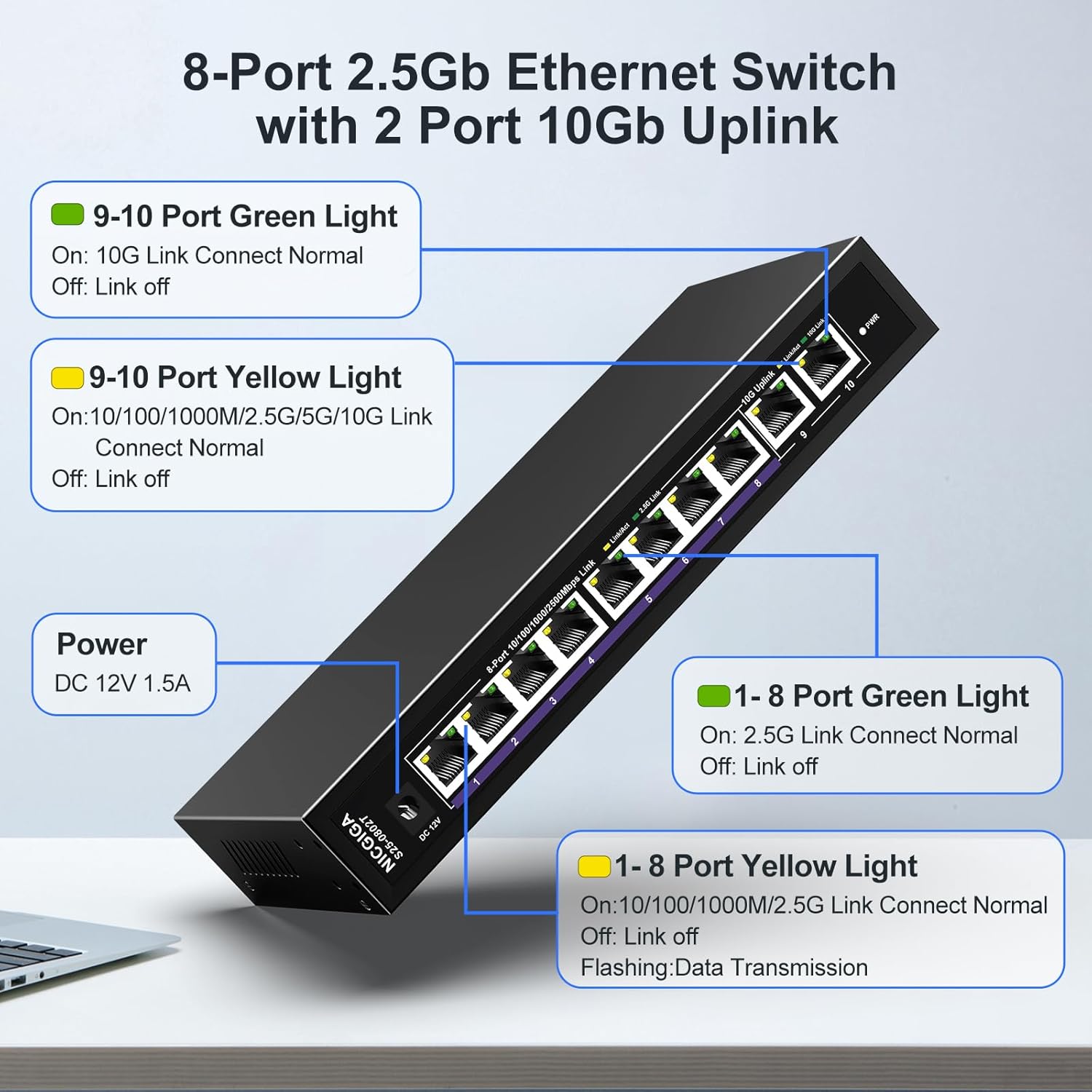
7. Нишондиҳандаҳои LED
The switch features LED indicators to provide real-time status information for each port and the device itself.
| Нишондиҳанда | Статус | Тавсифи |
|---|---|---|
| Қувва | On | Тугма фаъол аст. |
| Ports 1-8 Green Light | On | 2.5G Link Connect Normal. |
| Хомӯш | Link off. | |
| Ports 1-8 Yellow Light | On | 10/100/1000M/2.5G Link Connect Normal. |
| Дурахш | Data Transmission. | |
| Хомӯш | Link off. | |
| Ports 9-10 Green Light | On | 10G Link Connect Normal. |
| Хомӯш | Link off. | |
| Ports 9-10 Yellow Light | On | 10/100/1000M/2.5G/5G/10G Link Connect Normal. |
| Дурахш | Data Transmission. | |
| Хомӯш | Link off. |
8. Network Cable Compatibility
Using appropriate Ethernet cables is crucial for achieving optimal network speeds.
- For 2.5Gbps Ports (1-8):
- CAT5e Cable (≤100m)
- CAT6/6a Cable (≤100m)
- CAT7 Cable (≤100m)
- For 10Gbps Ports (9-10):
- CAT6 Cable (≤55m)
- CAT6a Cable (≤100m)
- CAT7 Cable (≤100m)


9. Мушаххасоти
| Хусусият | Тафсилот |
|---|---|
| Рақами модел | S25-0802T |
| Шумораи портҳо | 10 (8 x 2.5Gb RJ45, 2 x 10Gb RJ45) |
| Навъи интерфейс | RJ45 |
| Меъёри интиқоли маълумот | 60 гигабит дар як сония (Иқтидори гузариш) |
| Рейтинги ҳарорати боло | 50 дарача гарм |
| Вазни ашё | 1.76 фунт |
| Андозаҳои бастаҳо | 9.8 x 9.61 x 2.99 инч |
| Ранги | Сиёҳ |
| Дастгоҳҳои мувофиқ | Desktop, Gaming Console, Laptop, Printer, Router |
| Истеҳсолкунанда | НИКГИГА |
10. Баррасии мушкилот
If you encounter issues with your NICGIGA switch, refer to the following common troubleshooting steps:
- Не қудрат:
- Боварӣ ҳосил кунед, ки адаптери барқ ба коммутатор ва васлаки барқии корӣ боэътимод пайваст шудааст.
- Боварӣ ҳосил кунед, ки васлаки барқ фаъол аст.
- Бе нури пайванд:
- Check if the Ethernet cable is securely connected to both the switch port and the network device.
- Сими дигари Ethernet-ро санҷед.
- Боварӣ ҳосил кунед, ки дастгоҳи пайвастшуда фаъол аст ва адаптери шабакавии он фаъол аст.
- Verify the cable type is appropriate for the desired speed (refer to Section 8).
- Суръати сусти шабака:
- Ensure your network cables are rated for the desired speed (e.g., CAT6a or CAT7 for 10Gbps).
- Check the network adapter settings on your connected devices to ensure they are configured for auto-negotiation or the correct speed.
- Confirm that the connected devices themselves support the higher speeds (2.5Gbps or 10Gbps).
- Пайвастшавии фосилавӣ:
- Inspect Ethernet cables for damage.
- Ensure the switch is placed in a well-ventilated area to prevent overheating, although its fanless design is optimized for heat dissipation.
- Avoid placing the switch near strong electromagnetic interference sources.
11. Нигоҳдорӣ
To ensure the longevity and optimal performance of your switch, follow these maintenance guidelines:
- Тозакунӣ: Барои тоза кардани беруни коммутатор аз матои нарм ва хушк истифода баред. Аз тозакунандаҳои моеъ ё аэрозолӣ истифода набаред.
- Вентилятсия: Ensure that the ventilation holes on the sides of the switch are not obstructed to allow for proper heat dissipation.
- Муҳити зист: Operate the switch within its specified temperature range (-10~50°C) and humidity levels.
- Сикли барқ: If the switch becomes unresponsive, disconnect the power adapter, wait for 10 seconds, and then reconnect it.

12. Кафолат ва дастгирӣ
NICGIGA provides the following support for this product:
- Кафолат: Кафолати яксола аз рӯзи харид дода мешавад.
- Пуштибонии фаннӣ: Lifetime technical support is available for the product.
For warranty claims or technical assistance, please contact NICGIGA customer support through the retailer where the product was purchased or visit the official NICGIGA webсайт.