
1. Муқаддима
This manual provides essential information for the safe and efficient use of your coocaa DOSHISHA 32Z65 32-inch Google TV. Please read these instructions thoroughly before operating the television and retain them for future reference. This smart TV integrates advanced features for an enhanced viewтаҷрибаи ғанӣ.

Тасвир: Пеш view of the coocaa DOSHISHA 32Z65 32-inch Google TV.
2. Хусусиятҳои маҳсулот
- Integrated Tuners: Equipped with terrestrial digital, BS, and CS tuners (two of each) for comprehensive broadcast reception.
- Pre-installed Streaming Apps: Access popular services like Netflix, YouTube, Prime Video, and Google Play directly. Additional applications can be downloaded from the Google Play Store.
- Ёрдамчии Google: Utilize voice commands to search for movies, stream apps, play music, and control TV functions hands-free.
- Dolby Vision: Experience superior HDR technology with stunning brightness, deep blacks, and vibrant colors for a cinematic visual experience.
- Dolby Atmos: Enjoy three-dimensional, dynamic sound that complements the visuals, providing an immersive audio experience with clear detail.
- Dolby Audio + DTS: Delivers an immersive soundscape with precise audio detail for movies, music, and games.
- Chameleon Extreme: An advanced image processing engine that optimizes clarity, sharpness, and color accuracy at the pixel level for an exceptional visual experience.
- Реҷаи филмсоз: Activates a mode that bypasses unnecessary image processing, reproducing content as the director intended for an authentic cinematic feel.
- Remote Search Function: A built-in speaker in the remote control allows for easy location with a simple 3-step operation. Note: Remote pairing is required for this feature.
- Flicker Free: Reduces screen flicker to minimize eye strain and allow for focused viewing of movies and dramas.
- Нури пасти кабуд: coocaa's proprietary blue light reduction technology ensures comfortable and eye-friendly viewing even during extended periods.
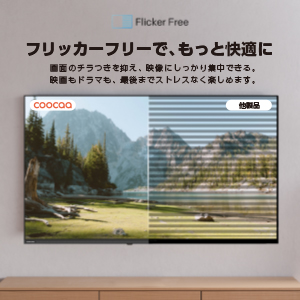
Image: Visual representation of Chameleon Extreme technology enhancing color and clarity.

Image: A television screen displaying a movie scene with palm trees, illustrating Filmmaker Mode.

Image: The Google TV home screen with various streaming app icons and content recommendations.

Image: Comparison showing a screen with and without blue light reduction, highlighting the Low Blue Light feature.
3. Танзимот
3.1 Кушодани қуттӣ ва ҷойгиркунии ибтидоӣ
Телевизорро бодиққат аз бастааш хориҷ кунед. Телевизорро дар сатҳи устувор ва ҳамвор ҷойгир кунед ё бо истифода аз васлкунаки мувофиқи VESA (алоҳида фурӯхта мешавад) ба девор васл кунед. Дар атрофи телевизор вентилятсияи мувофиқро таъмин кунед.
3.2 Пайваст кардани дастгоҳҳои периферӣ
- Пайвасти барқ: Сими барқро ба телевизор ва сипас ба васлаки барқ пайваст кунед.
- Пайвастшавии антенна/кабел: Connect your antenna or cable TV source to the appropriate input on the TV.
- Дастгоҳҳои HDMI: Connect external devices such as Blu-ray players, game consoles, or soundbars to the HDMI ports.
- External HDD: For recording, connect a compatible external HDD to the USB port.

Тасвир: Қафо view of the TV highlighting various input ports.
3.3 Устоди насби бори аввал
Ҳангоми бори аввал, телевизор ба шумо дар раванди танзими ибтидоӣ роҳнамоӣ мекунад. Ин дар бар мегирад:
- Интихоби забон.
- Пайвастшавӣ ба шабака (Wi-Fi ё Ethernet).
- Воридшавӣ ба ҳисоби Google барои хусусиятҳои Google TV.
- Channel scanning for broadcast TV.
- Remote control pairing (if prompted).
4. Дастурҳои истифодабарӣ
4.1 Функсияҳои идоракунии дурдаст
The included remote control allows you to navigate the TV's interface, adjust settings, and access smart features. Familiarize yourself with the buttons for power, volume, channel, input selection, and dedicated app buttons.

Image: The remote control for the coocaa DOSHISHA 32Z65 TV.
4.2 Навигатсияи ТВ Google
The Google TV interface organizes your content from various streaming services and live TV in one place. Use the remote's directional pad to browse recommendations, access your apps, and manage your library.
4.3 Истифодаи Google Assistant
Тугмаи Google Assistant-ро дар пультатон пахш кунед ва бо микрофон сухан гӯед:
- Ҷустуҷӯ movies, TV shows, or actors.
- Барномаҳоро кушоед.
- Дастгоҳҳои хонагии интеллектуалиро идора кунед.
- Get weather updates or ask general questions.
4.4 External HDD Recording
To record broadcast programs, connect an external HDD to the TV's USB port. Follow the on-screen prompts to format the drive if necessary. You can schedule recordings or record the current program. The TV supports background recording, allowing you to watch one program while another is being recorded.
5. Нигоҳдорӣ
5.1 Тоза кардани телевизор
Барои тоза кардани экран, онро бо матои мулоим, хушк ва бе пахта нарм тоза кунед. Барои аломатҳои якрав, каме гampМатоъро бо об ё маҳлули тозакунандаи экран бишӯед. Аз истифодаи маводи кимиёвии сахт ё маводҳои абразивӣ худдорӣ кунед. Барои корпуси телевизор матои мулоим ва хушк истифода баред.
5.2 Навсозии нармафзор
Ensure your TV's software is up to date for optimal performance and security. The TV may automatically prompt you for updates when connected to the internet. You can also manually check for updates in the settings menu.
6. Баррасии мушкилот
Агар шумо бо телевизиони худ мушкилоте дошта бошед, ба роҳҳои ҳалли маъмулии зерин муроҷиат кунед:
- Не қудрат: Check if the power cord is securely connected to both the TV and the power outlet. Ensure the outlet is functioning.
- Тасвир/садо нест: Боварӣ ҳосил кунед, ки манбаи дурусти вуруд интихоб шудааст. Ҳама пайвастҳои кабелиро тафтиш кунед (HDMI, антенна).
- Ҷавоб намедиҳад: Replace the batteries in the remote control. Ensure there are no obstructions between the remote and the TV. If the remote search function is not working, ensure it is paired.
- Масъалаҳои пайвастшавӣ ба шабака: Роутер ва модеми худро бозоғоз намоед. Телевизорро ба шабакаи Wi-Fi аз нав пайваст кунед ё пайвасти сими Ethernet-ро санҷед.
- App Not Working: Try restarting the app. If the issue persists, clear the app's cache or reinstall it from the Google Play Store.
Барои масъалаҳои мураккабтар, лутфан бо дастгирии муштариён тамос гиред.
7. Мушаххасоти
| Хусусият | Мушаххасоти |
|---|---|
| Андозаи экран | 32 инч |
| Навъи намоиш | LCD |
| Резолюция | Таърифи баланд |
| Таносуби тараф | 16:9 |
| Меъёри навсозӣ | 60 Гц |
| Таносуби контраст | 1200:1 |
| Портҳои HDMI | 2 |
| Пайвастшавӣ ба шабака | HDMI, Wireless (Infrared) |
| Хусусиятҳои баландгӯяк | Built-in Speakers (Dolby Audio + DTS) |
| Андозаҳои маҳсулот (D x W x H) | 18.8 х 71.8 х 48 см |
| Вазни маҳсулот | 3.4 кг |
| Истеъмоли солонаи энергия | 39.9 кВт/соат дар як сол |
| Рақами модел | 32Z65 |
8. Видеоҳои расмии маҳсулот
8.1 Google TV System Introduction
Video: An introduction to the Google TV system, showcasing its features and user interface. This video demonstrates how Google TV organizes content and provides personalized recommendations.
9. Кафолат ва дастгирӣ
Your coocaa DOSHISHA 32Z65 TV comes with a manufacturer's warranty. Please refer to the warranty card included in the packaging for details on coverage and duration. For technical support, service, or warranty claims, please contact DOSHISHA customer service through their official channels. Contact information can typically be found on the warranty card or the manufacturer's webсайт.