
Муқаддима
This manual provides detailed instructions for the installation, operation, and maintenance of your Leadfan 10.1" Car Play Radio, designed specifically for Honda Odyssey models from 2005 to 2010. This unit features a 10.1-inch touchscreen, wireless Apple CarPlay and Android Auto, GPS navigation, Bluetooth, FM/RDS radio, and supports a rear camera input. Please read this manual thoroughly before installation and use to ensure proper functionality and safety.
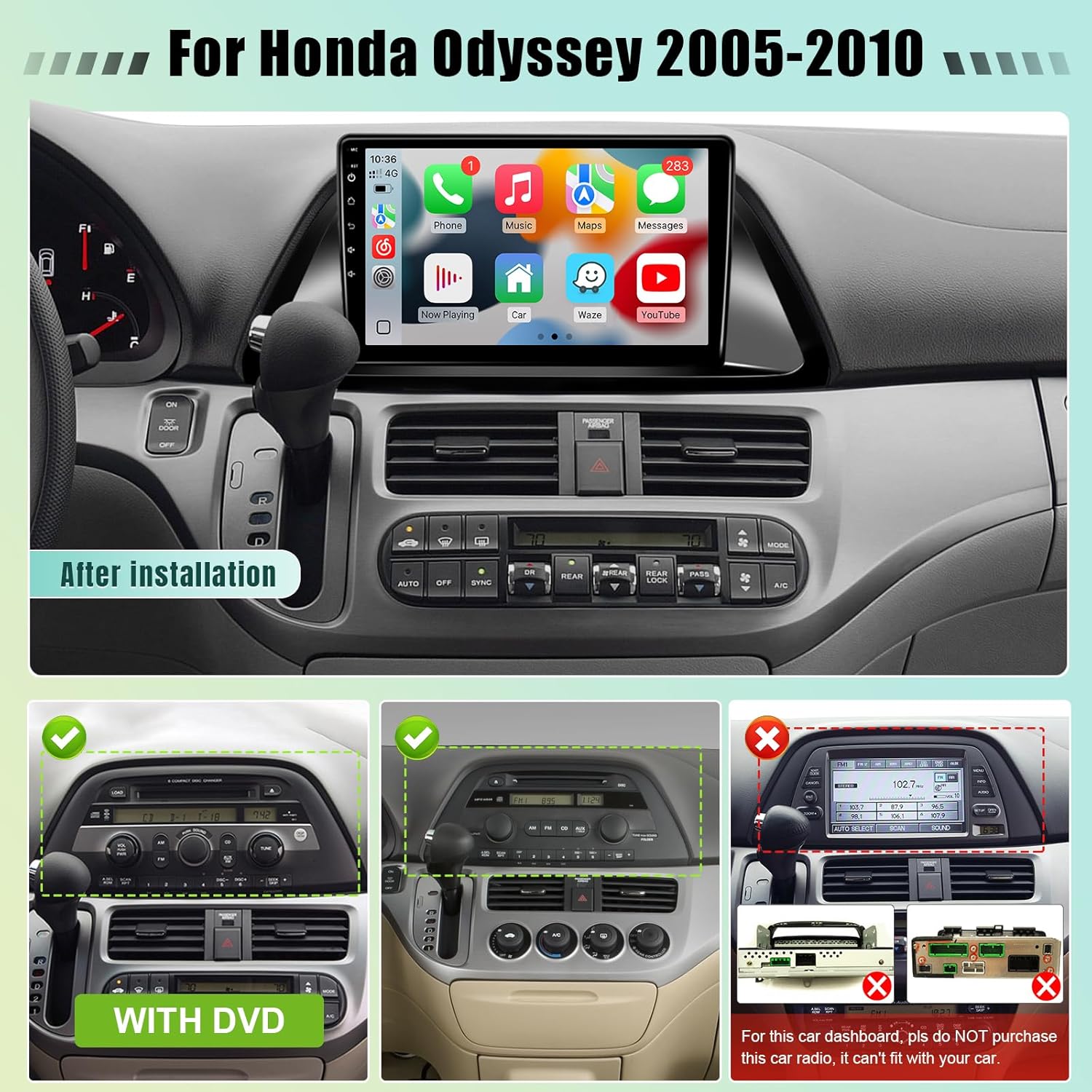
Image: Leadfan 10.1-inch Car Play Radio after installation in a Honda Odyssey dashboard, showing the main interface with various app icons.
Огоҳӣ оид ба мутобиқат
This car stereo is compatible with Honda Odyssey models from 2005 to 2010. Муҳим: If your vehicle is equipped with a premium sound system (e.g., J.B.L or B.O.S.E) or a large factory navigation screen, this unit may not be compatible. Please verify your vehicle's dashboard configuration before proceeding with installation.

Image: A diagram illustrating compatible and incompatible dashboard configurations for the Honda Odyssey (2005-2010) with the Leadfan car stereo. It shows examples of dashboards with and without DVD players, and a specific incompatible dashboard with a large factory screen.
Насб ва насб
The Leadfan Car Play Radio is designed for plug-and-play installation, minimizing complex wiring. However, professional installation is recommended if you are unfamiliar with car audio systems.
Мундариҷаи баста
Пеш аз оғоз, боварӣ ҳосил кунед, ки ҳамаи ҷузъҳо мавҷуданд:
- Leadfan 10.1" Car Play Radio Unit
- Камераи эҳтиётӣ
- Сими вуруди камераи баръакс
- Антеннаи GPS
- Plug and Play Power Harness
- Кабели RCA
- Маҷмӯаи радио
- Дастури корбар (ин ҳуҷҷат)
- Microphone (external)
- Симҳои USB (x2)

Image: An illustration of the complete package contents, including the main unit, cables, GPS antenna, backup camera, and microphone.
Installation Steps (General Guide)
- Тайёрӣ: Батареяи мошинро ҷудо кунед, то ки кӯтоҳи барқро пешгирӣ кунед.
- Радиои заводро тоза кунед: Carefully remove the existing factory radio and trim panels. Refer to your vehicle's service manual for specific instructions.
- Пайваст кардани сими сим: Connect the provided plug-and-play power harness to the vehicle's wiring and the new head unit. Ensure all connections are secure.
- Антенна GPS: Антеннаи GPS-ро дар ҷое бо равшанӣ насб кунед view осмон, одатан дар панели асбобҳо ё дар зери шишаи пеш.
- Камераи пушти (ихтиёрӣ):
- Connect the camera's video output to the "Reverse Input" on the head unit using the RCA cable.
- Connect the camera's power cable to the vehicle's reverse light positive (+) and negative (-) wires.
- Connect the reversing trigger cable from the head unit to the vehicle's reverse light positive (+) wire.

Image: A detailed wiring diagram showing how to connect the backup camera, including video and power connections to the head unit and vehicle's reverse lights.
- Микрофон: Connect the external microphone for improved call quality and voice commands. Position it optimally for clear audio capture.
- Пайвастҳои USB: Connect any desired USB devices or cables.
- Пайвастҳои санҷишӣ: Before fully reassembling, reconnect the battery and perform a basic power-on test to ensure the unit powers up.
- Воҳиди бехатарӣ: Mount the new head unit securely into the dashboard opening.
- Бозсозӣ: Ҳама панелҳои ороиширо аз нав насб кунед.
Дастурҳои амалиётӣ
Фаъол/хомӯш ва Навигатсияи асосӣ
Press the power button (usually located on the front panel or screen) to turn the unit on or off. The touchscreen interface allows for intuitive navigation through menus and applications. Swipe, tap, and drag gestures are supported.
бесими Apple CarPlay & Android Auto
This unit supports both wireless Apple CarPlay and Android Auto. This allows seamless integration of your smartphone for navigation, music, calls, and messaging.
- Ensure your phone's Bluetooth and Wi-Fi are enabled.
- On the car stereo, go to the CarPlay/Android Auto application.
- Follow the on-screen prompts to pair your phone via Bluetooth.
- Once paired, the system will automatically establish a Wi-Fi connection for CarPlay/Android Auto functionality.

Image: The car stereo display showing the Apple CarPlay interface on the left and the Android Auto interface on the right, demonstrating phone integration.
GPS Navigation & Wi-Fi Connection
The unit comes with built-in GPS and supports online/offline navigation. Connect to Wi-Fi via your phone's hotspot or a dedicated Wi-Fi network to access online maps and download apps.
- Харитаҳои онлайн: Connect to Wi-Fi, then use pre-installed navigation apps or download your preferred ones from the app store.
- Харитаҳои офлайнӣ: Download map data for your region in advance through a navigation app while connected to Wi-Fi.
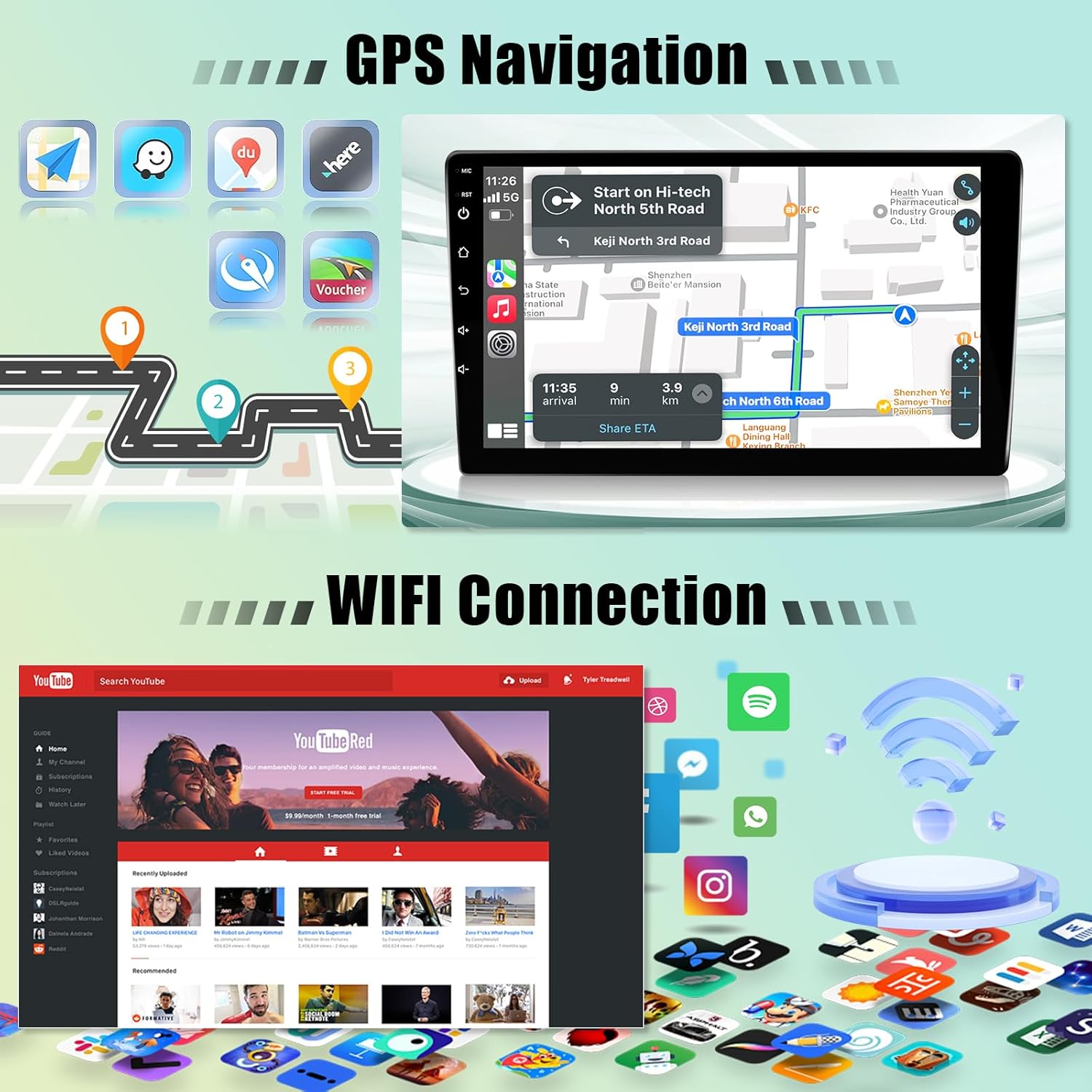
Image: The car stereo screen showing a GPS navigation map on one side and various app icons, including a Wi-Fi symbol, on the other, indicating connectivity and navigation features.
Bluetooth 5.0
Барои зангҳои бедаст ва пахши аудио, смартфони худро тавассути Bluetooth пайваст кунед.
- Ба танзимоти Bluetooth дар стереои мошин равед.
- Дар телефони худ Bluetooth-ро фаъол созед ва дастгоҳҳои дастрасро ҷустуҷӯ кунед.
- Select the car stereo's Bluetooth name (e.g., "Leadfan Car Play") from your phone's list and pair.
- Once connected, you can make/receive calls and play music wirelessly.

Image: The car stereo displaying Bluetooth features for hands-free calling and music playback, with a separate section illustrating the split-screen functionality.
FM/RDS Radio & EQ Settings
Access the FM radio tuner to listen to local stations. The RDS (Radio Data System) feature displays station information where available. Customize your audio experience with the built-in 10-band equalizer (EQ).
- Радиои FM: Select the "Radio" app, then use the on-screen controls to scan for stations or manually tune.
- Танзимоти EQ: Navigate to the "Sound" or "EQ" settings to adjust audio frequencies, balance, fader, and select preset sound modes (e.g., Pop, Rock, Jazz).

Image: The car stereo display showing the FM radio tuner interface with frequency display, and a separate screen illustrating the graphic equalizer (EQ) settings for audio customization.
Функсияи экрани тақсимшуда
The split-screen feature allows you to run two applications simultaneously on the 10.1-inch display, such as navigation and music playback.
- Аввалин барномаеро, ки мехоҳед истифода баред, кушоед.
- Press and hold the recent apps button (or swipe from the side, depending on UI) to activate split-screen mode.
- Select the second application from the list to display it alongside the first.

Image: The car stereo screen in split-screen mode, showing a navigation map on one side and a video playback application on the other, demonstrating simultaneous app usage.
Назорати руль (SWC)
The unit supports learning steering wheel controls, allowing you to map your vehicle's existing steering wheel buttons to control the stereo functions (e.g., volume, track skip, call answer).
- Go to the "Steering Wheel Control" settings in the system menu.
- Follow the on-screen instructions to program each button by pressing the physical button on your steering wheel and then selecting the corresponding function on the stereo's screen.

Image: The car stereo display showing the reverse camera view at the top, and the steering wheel control learning interface at the bottom, with an illustration of steering wheel buttons.
Намоиши камераи паси
When a compatible rear camera is connected and properly installed, the display will automatically switch to the camera view when the vehicle is put into reverse gear, aiding in safe parking and maneuvering.
Нигоҳдорӣ
- Тоза кардани экран: Барои хушхӯю пок кардани экрани сенсорӣ матои мулоим ва ифлосро истифода баред. Барои доғҳои якрав, каме гampматоъро бо об ё тозакунандаи барои экран бехатар. Аз маводи абразивӣ ё кимиёвии сахт худдорӣ намоед.
- Навсозии нармафзор: Periodically check for available software updates through the system settings or the manufacturer's webсайт барои таъмини кори беҳтарин ва дастрасӣ ба хусусиятҳои нав.
- Нигоҳубини умумӣ: Нагузоред, ки дастгоҳро ба ҳарорати аз ҳад зиёд, нурҳои бевоситаи офтоб барои муддати тӯлонӣ ё намии аз ҳад зиёд дучор кунед.
Мушкилкушо
| Мушкилот | Сабаби эҳтимолӣ | Ҳалли |
|---|---|---|
| Дастгоҳ фаъол нест. | Пайвасти сусти барқ, фишанги сӯхта, симкашии нодуруст. | Check power harness connections. Inspect vehicle's fuse box and the unit's inline fuse. Verify wiring according to the installation guide. |
| Садо нест. | Садо хеле паст аст, хомӯш кардан фаъол аст, мушкили симкашии баландгӯяк, манбаи нодурусти аудио. | Increase volume. Check if mute is active. Verify speaker connections. Ensure correct audio source is selected. |
| CarPlay/Android Auto бесим пайваст намешавад. | Bluetooth/Wi-Fi off on phone, incorrect pairing, interference. | Ensure phone's Bluetooth and Wi-Fi are on. Re-pair the phone. Try connecting with a USB cable first to establish initial connection. |
| Сигнали GPS заиф ё нодуруст аст. | Ҷойгиркунии антеннаи GPS, дахолати экологӣ. | Боварӣ ҳосил кунед, ки мавҷгири GPS равшан аст view of the sky. Avoid placing near metal objects. |
| Камераи ақиб нишон дода намешавад. | Incorrect camera wiring, faulty camera, trigger wire issue. | Verify all camera connections (video, power, trigger). Ensure the vehicle is in reverse. Test camera functionality if possible. |
| System freezes or lags. | Too many apps running, low memory, software issue. | Close unnecessary applications. Restart the unit. Consider a factory reset if persistent (backup data first). Avoid downloading too many apps. |
Мушаххасоти
| Бренд | Leadfan |
| Номи модел | Car Play Radio for Honda Odyssey 2005-2010 |
| Рақами модел | US02-SW300-3 |
| Андозаи экран | 10.1 инч |
| Низоми амал | Android 12 |
| Протсессор | 4 ядро |
| RAM | 2 ГБ |
| ROM (Нигоҳдории дохилӣ) | 32 ГБ |
| Технологияи пайвастшавӣ | Bluetooth (5.0), USB, Wi-Fi |
| Вуруди интерфейси инсон | Шишаи ламсӣ |
| Навъи харита | North America, Street, Worldwide (supports online/offline) |
| Ҳолати баромади аудио | Stereo (10 adjustable EQ levels) |
| Хусусиятҳои махсус | Wireless Apple CarPlay & Android Auto, Mirrorlink, GPS Navigation, FM/RDS, AHD Backup Camera support, Steering Wheel Control (SWC), Split Screen, Dual USB ports. |
| Андозаҳои ашё (L x W x H) | 16.9"L x 4.4"W x 12.2"H |
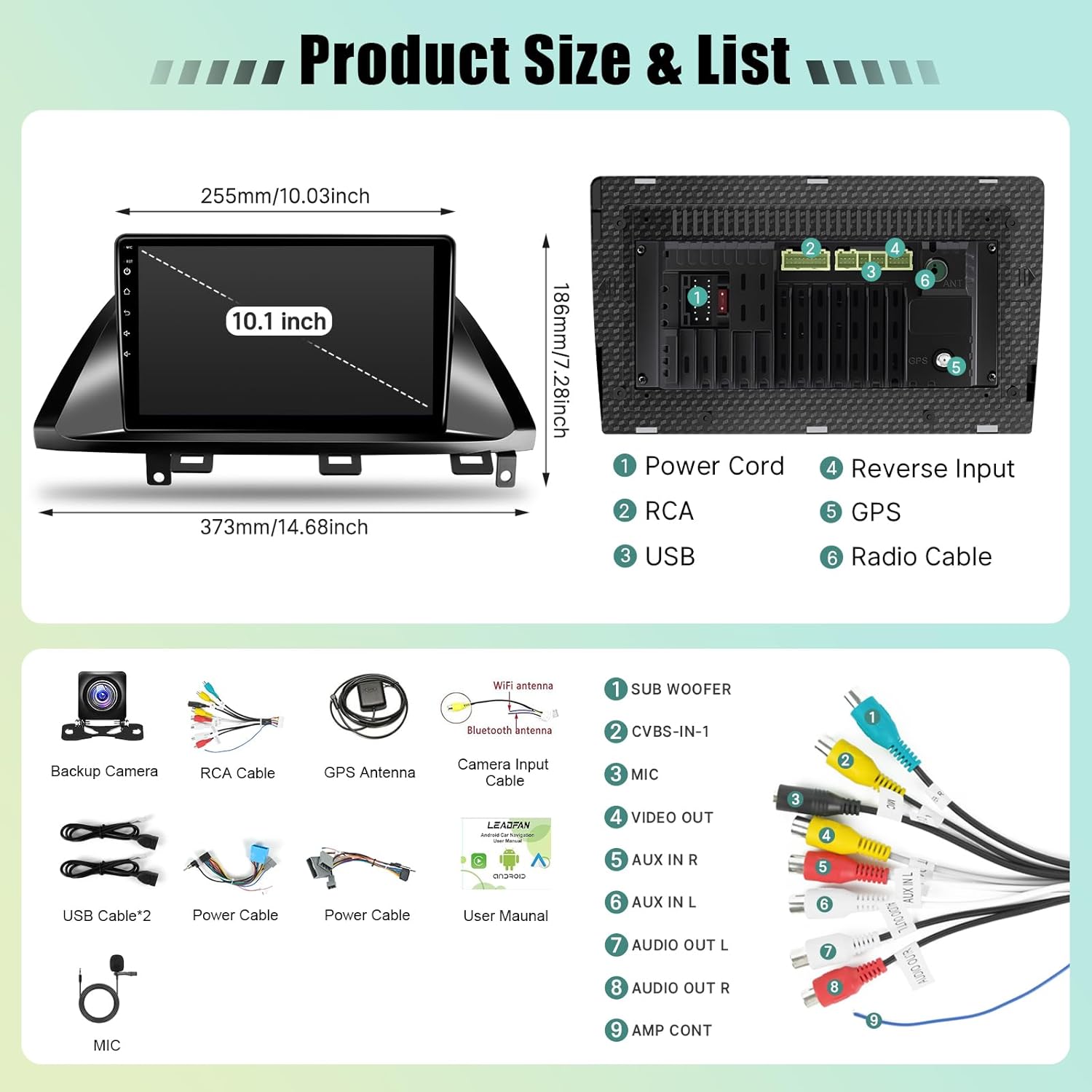
Image: A technical diagram illustrating the physical dimensions of the 10.1-inch car stereo unit and a detailed view of its rear connection ports, including power, RCA, USB, reverse input, GPS, and radio cable connections.
Маълумот дар бораи кафолат
This Leadfan Car Play Radio comes with a Кафолати 1 сол from the date of purchase. This warranty covers manufacturing defects and malfunctions under normal use. It does not cover damage caused by improper installation, misuse, accidents, or unauthorized modifications. Please retain your proof of purchase for warranty claims.
Дастгирии муштариён
For technical assistance, troubleshooting, or warranty inquiries, please contact Leadfan customer support. Refer to the contact information provided on the product packaging or the official Leadfan website. Online assistance is also available to enhance your shopping experience and address any questions.
Манбаъҳои онлайн: Боздид кунед Leadfan Store on Amazon барои маълумоти иловагӣ ва дастгирии маҳсулот.


