
1. Муқаддима
Thank you for choosing the Sanpyl Triple Car Camera Dash Cam. This device is designed to provide comprehensive surveillance of your vehicle's surroundings and interior, enhancing driving safety and providing crucial evidence in case of incidents. This manual will guide you through the installation, operation, and maintenance of your dash cam to ensure optimal performance.
2. Маҳсулот ба охир расидview
The Sanpyl Triple Car Camera Dash Cam features a three-channel recording system, capturing video from the front, interior, and rear of your vehicle. Key features include:
- Triple Camera Coverage: Front camera (1920x1080), interior camera (1280x720), and rear camera (640x480) for complete vehicle monitoring.
- Wide Angle Front Lens: A 140 to 170-degree high-definition front lens captures a broad field of view.
- 2 Inch LCD Display: A user-friendly screen for convenient recording review and management directly on the device.
- Enhanced Rear Camera Features: Provides reversing assistance and records rear-end collisions.
- Пайвастшавӣ WiFi: Supports wireless connections for real-time viewinging ва зеркашии footage to smartphones or tablets via a dedicated app.
- Сабти давр: Ба таври худкор кӯҳнатаринро аз нав менависад fileвақте ки корти хотира пур аст, сабти пайвастаро таъмин мекунад.
- G-сенсори дарунсохт: Detects sudden impacts or collisions and automatically locks the current video footagбарои пешгирӣ аз аз нав навиштани он.

Image: Illustration of the dash cam's 360-degree surveillance capability, showing front, cabin, and rear camera coverage.

Image: Split screen showing simultaneous views from the front (road), interior (cabin), and rear cameras.
3. Мундариҷаи баста
Лутфан бастаро барои ҷузъҳои зерин тафтиш кунед:
- Sanpyl Triple Car Camera Dash Cam Unit
- Камераи пушти бо кабел
- Пуркунандаи мошин
- Mounting Bracket (with adhesive pad)
- Сими USB
- Дастури корбар (ин ҳуҷҷат)
- Корти Micro SD 32 ГБ (қаблан насб карда шудааст ё алоҳида дохил карда шудааст)

Image: The dash cam unit, rear camera, car charger, mounting bracket, and cables included in the package.
4. Танзимот
4.1 Гузоштани корти Micro SD
- Боварӣ ҳосил кунед, ки камераи идоракунии панели идоракунӣ хомӯш карда шудааст.
- Locate the Micro SD card slot on the side of the dash cam.
- Insert the Micro SD card with the gold contacts facing the back of the dash cam until it clicks into place.
- Барои хориҷ кардан, кортро оҳиста тела диҳед, то он даме ки садои кликро пахш кунад ва сипас раҳо кунед.
Шарҳ: A Class 10 or higher Micro SD card (up to 128GB) is recommended for reliable recording. Format the card regularly to maintain performance.
4.2 Ҷойгиркунии камераи Dash Cam
- Clean the windshield area where you intend to mount the dash cam. Ensure it does not obstruct your driving view.
- Attach the adhesive mounting bracket to the dash cam.
- Remove the protective film from the adhesive pad on the bracket.
- Firmly press the dash cam onto the chosen spot on the windshield for at least 30 seconds.
- Adjust the lens angle to ensure the front camera captures the road ahead clearly.

Image: The dash cam unit mounted on the car's windshield, showing its position relative to the driver's view.
4.3 Насб кардани камераи қафо
- Mount the rear camera on the rear windshield or license plate area using its adhesive or screws.
- Route the rear camera cable to the main dash cam unit, ensuring it does not interfere with vehicle operations.
- Сими камераи қафоро ба бандари таъиншуда дар воҳиди асосии камераи тире пайваст кунед.
4.4 Пайвастшавии барқ
- Пуркунандаи барқро ба порти вуруди барқи камераи асбобҳо пайваст кунед.
- Нӯги дигари пуркунандаи мошинро ба розеткаи барқии 12V (розеткаи оташгирандаи сигор)-и мошинатон пайваст кунед.
- Вақте ки оташгирии мошин фаъол аст, камераи назоратии мошин ба таври худкор фурӯзон мешавад ва сабтро оғоз мекунад.
5. Дастурҳои истифодабарӣ
5.1 Сабти асосӣ
Once powered on, the dash cam will automatically start recording in a continuous loop. Video files are saved in segments (e.g., 1, 3, or 5 minutes) to the Micro SD card. When the card is full, the oldest unlocked files бо сабтҳои нав сабт карда мешаванд.
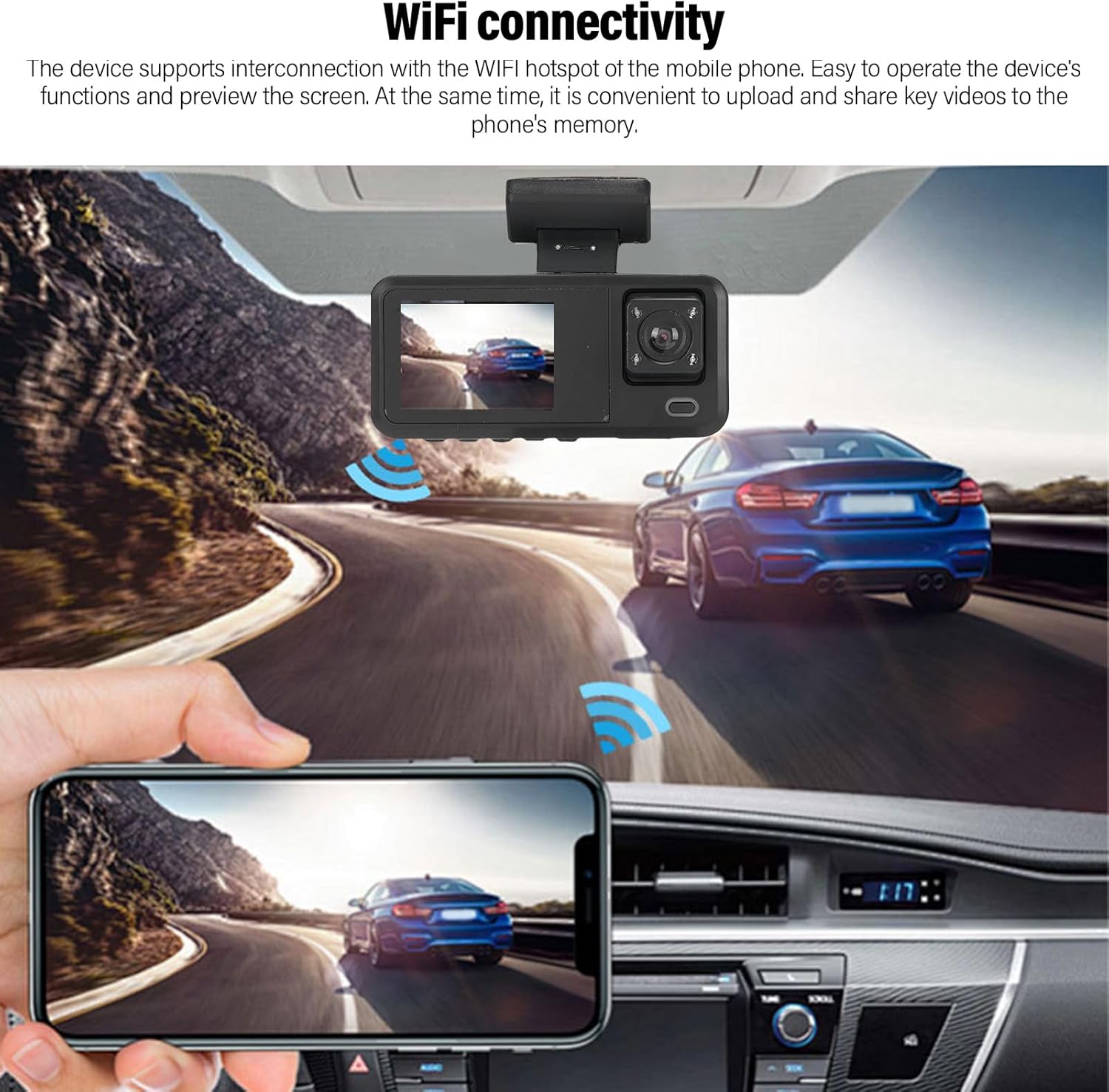
Image: A circular diagram showing how loop recording continuously records and overwrites older footagд вақте ки корти хотира пур аст.
5.2 G-Sensor (Сабти фаврӣ)
The built-in G-sensor detects sudden acceleration, braking, or collisions. When triggered, the current video segment is automatically locked and saved to a protected folder on the Micro SD card, preventing it from being overwritten by loop recording. This ensures critical incident footagд нигоҳ дошта мешавад.
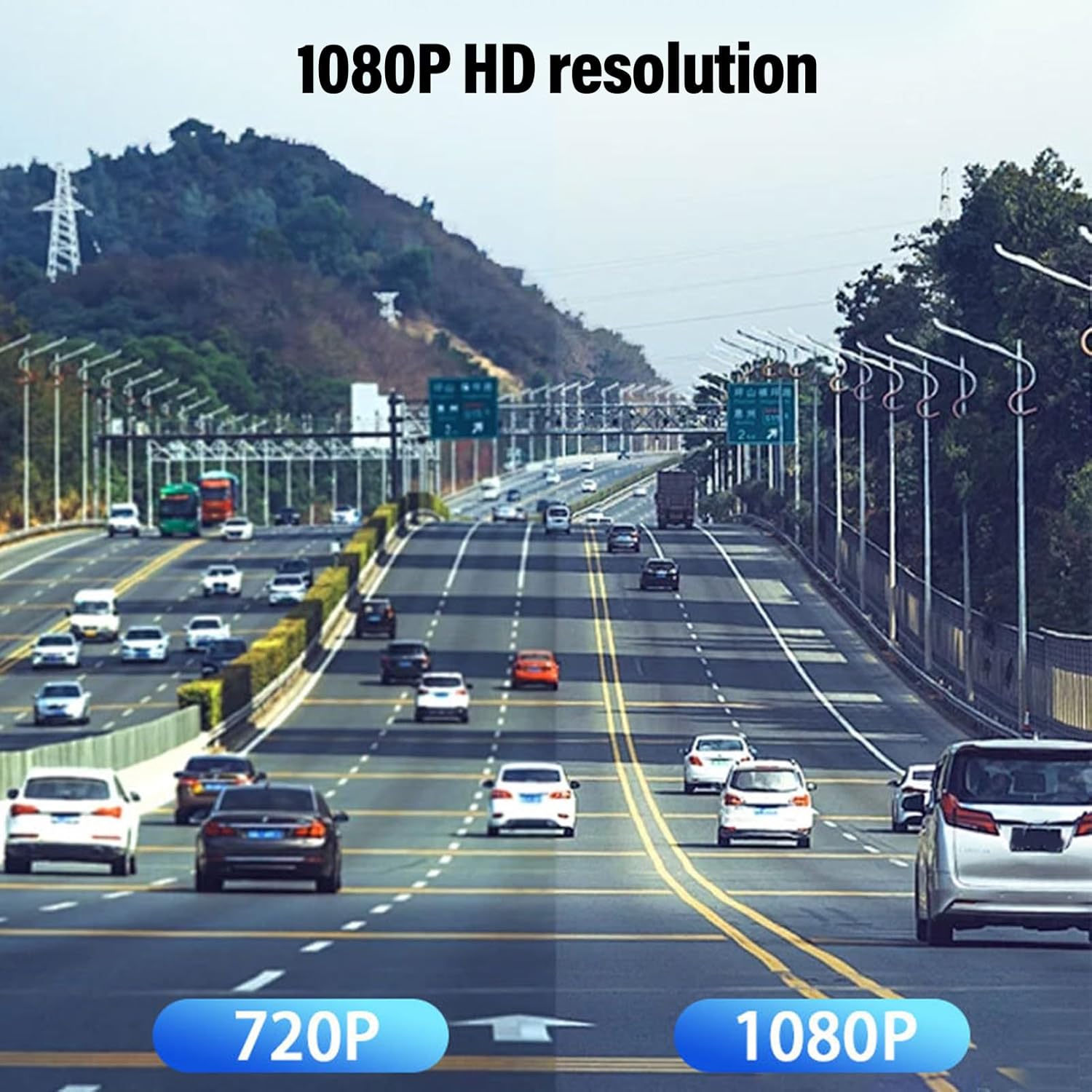
Image: Two individuals inspecting car damage, with an overlay indicating the G-sensor automatically locking video footage during an emergency.
5.3 Parking Assistance (Rear Camera)
When the vehicle is put into reverse gear (and the rear camera is correctly wired to the reverse light trigger), the dash cam display will automatically switch to the rear camera view, often with parking guidelines, to assist with parking maneuvers.

Image: The dash cam screen displaying the rear camera feed with visual parking assistance guidelines, showing a car backing into a parking spot.
5.4 Пайвасти WiFi ва истифодаи барнома
The dash cam supports WiFi connectivity, allowing you to connect your smartphone or tablet to the device for real-time viewing, downloading, and managing recordings.
- Download the dedicated dash cam app from your device's app store (refer to the dash cam's on-screen instructions or packaging for the app name).
- On the dash cam, enable WiFi mode (usually via the menu settings). The dash cam will broadcast a WiFi network.
- On your smartphone/tablet, go to WiFi settings and connect to the dash cam's WiFi network (SSID and password will be displayed on the dash cam screen).
- Барномаро ба view зинда бошиtage, тамошои видеоҳои сабтшуда, зеркашӣ files to your phone, and adjust settings.
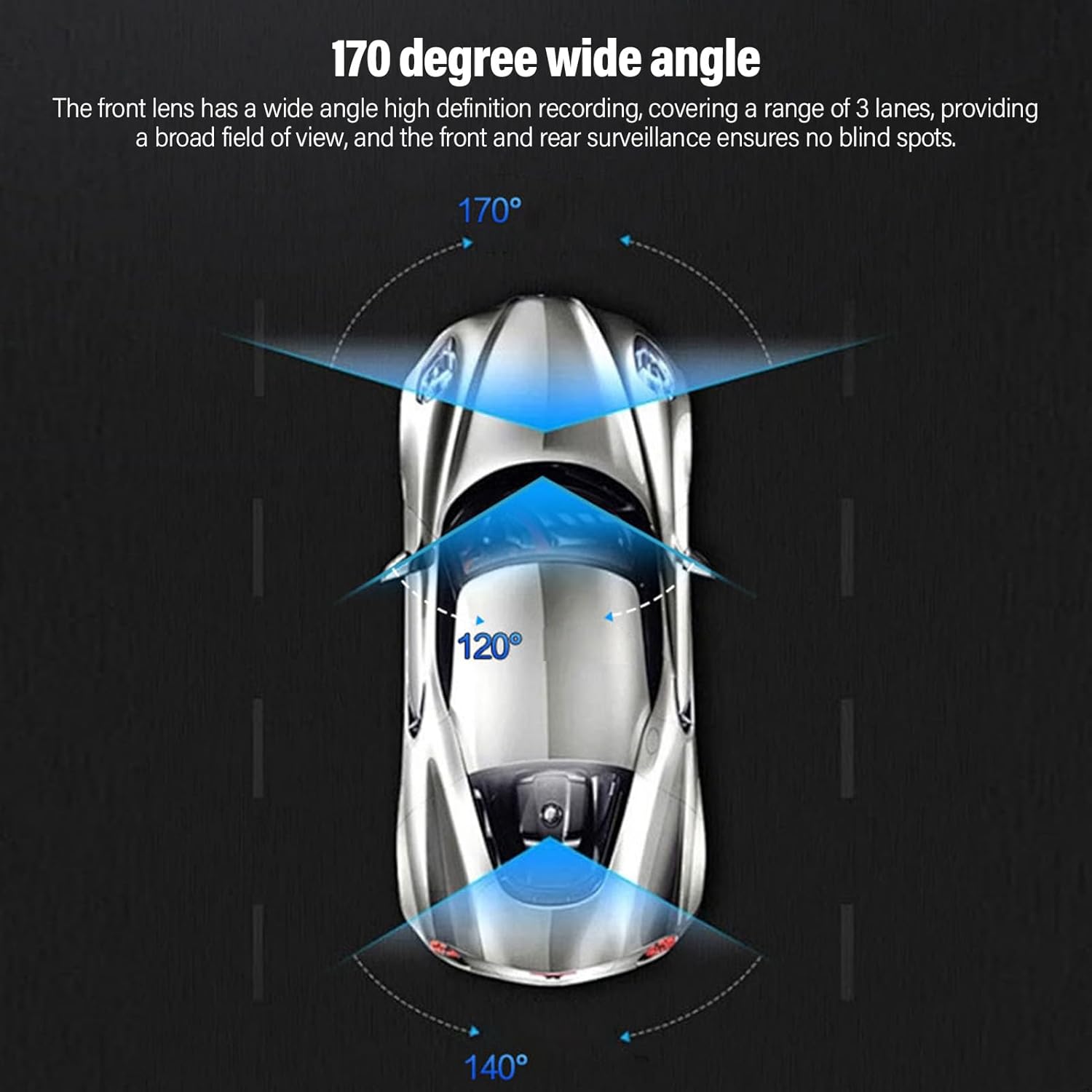
Image: A smartphone screen showing live video feed from the dash cam, demonstrating WiFi connectivity for remote viewing.
6. Нигоҳдорӣ
6.1 Formatting the Micro SD Card
It is recommended to format the Micro SD card once a month to prevent data corruption and ensure optimal recording performance. This can usually be done through the dash cam's menu settings.
6.2 Cleaning the Lenses and Screen
Use a soft, lint-free cloth to gently wipe the camera lenses and the LCD screen. Avoid using abrasive cleaners or solvents, as they may damage the surfaces.
6.3 Мулоҳизаҳои муҳити зист
Avoid exposing the dash cam to extreme temperatures for prolonged periods. If the vehicle is parked in direct sunlight during hot weather, consider removing the dash cam or using a sunshade to protect it.
7. Баррасии мушкилот
Камераи Dash 7.1 фаъол нест
- Check if the car charger is securely plugged into both the dash cam and the vehicle's 12V outlet.
- Ensure the vehicle's 12V outlet is receiving power (test with another device if possible).
- Try a different car charger or USB cable if available.
7.2 Recording Stops or Freezes
- Корти Micro SD-ро тавассути танзимоти камераи назоратӣ формат кунед.
- Ensure you are using a high-speed (Class 10 or higher) Micro SD card.
- Try a different Micro SD card to rule out card issues.
- Check for firmware updates (if applicable, refer to manufacturer's webсайт).
7.3 Сифати пасти видео
- Линзаҳои камераро бо матои мулоим тоза кунед.
- Боварӣ ҳосил кунед, ки плёнкаи муҳофизатӣ аз линзаҳо хориҷ карда шудааст.
- Check video resolution settings in the dash cam menu; ensure it's set to 1080P for the front camera.

Image: A visual comparison demonstrating the difference in clarity between 720P and 1080P video resolutions for dash cam footage.
7.4 Мушкилоти пайвасти WiFi
- Боварӣ ҳосил кунед, ки Wi-Fi дар камераи назоратӣ ва смартфони шумо фаъол аст.
- Verify you are connecting to the correct WiFi network broadcast by the dash cam.
- Ҳам камераи тир ва ҳам смартфони худро аз нав оғоз кунед.
- Ensure the dash cam app is up to date.
8. Мушаххасоти
| Бренд | Санпил |
| Рақами модел | Sanpylskbofg43at |
| Қарори камераи пеши | 1920x1080P |
| Interior Camera Resolution | 1280x720P |
| Қарори камераи пушти сар | 640x480P |
| Кунҷи камераи пешӣ | 140-170 дараҷа гарм |
| Намоиш | 2.0 дюймаи LCD |
| Технологияи пайвастшавӣ | Вай-фай |
| Нигоҳдорӣ | Micro SD Card (up to 128GB, Class 10 recommended) |
| Хусусиятҳои махсус | Loop Recording, G-Sensor, Parking Assistance, Adjustable |
| Андозаҳои маҳсулот | 5.91"D x 4.33"W x 2.76"H (150mm x 110mm x 70mm) |

Image: Technical drawing illustrating the physical dimensions of the dash cam unit.
9. Кафолат ва дастгирӣ
9.1 Маълумот дар бораи кафолат
This Sanpyl product is covered by a manufacturer's warranty for 90 days from the date of purchase. This warranty covers defects in materials and workmanship under normal use. It does not cover damage caused by misuse, accidents, unauthorized modifications, or improper installation.
9.2 Дастгирии муштариён
For technical assistance, troubleshooting, or warranty claims, please contact Sanpyl customer support. Refer to the contact information provided on the product packaging or the official Sanpyl webсайт.