
1. Муқаддима
This manual provides detailed instructions for the safe and efficient operation of your TOOLTOP TT-Yihua-8858-I Portable Hot Air Station. This device is designed for various electronic repair tasks, including PCB SMD repair and BGA rework, offering precise temperature and airflow control. Please read this manual thoroughly before using the product and retain it for future reference.
2. Дастурамал оид ба бехатарӣ
Барои пешгирии осеб ё осеб дидани дастгоҳ ҳамеша чораҳои бехатарии зеринро риоя кунед:
- Хавфи ҳарорати баланд: The hot air nozzle and emitted air reach very high temperatures. Avoid direct contact with skin or flammable materials.
- Вентилятсия: Use the hot air station in a well-ventilated area to disperse fumes generated during soldering or desoldering.
- Таъмини нерӯ: Таъмини таъминоти барқ voltage matches the specifications of the device. Do not use if the power cord is damaged.
- Children and Unauthorized Users: Keep the device out of reach of children and individuals not trained in its use.
- Хунук шудан: Пеш аз нигоҳ доштани дастгоҳ иҷозат диҳед, ки пурра хунук шавад.
- Нигоҳдорӣ: Дастгоҳро худатон таъмир накунед. Ҳама хидматрасониро ба кормандони соҳибихтисос муроҷиат кунед.
- Истифодаи дуруст: Дастгоҳро танҳо мувофиқи мақсадаш истифода баред.
3. Мундариҷаи баста
Боварӣ ҳосил кунед, ки ҳамаи ҷузъҳои дар поён овардашуда дар бастаи шумо мавҷуданд:
- TOOLTOP TT-Yihua-8858-I Portable Hot Air Station (Main Unit)
- Hot Air Nozzles (Various sizes)
- Сими барқ
- Дастури корбар (Ин ҳуҷҷат)

Image 3.1: The TOOLTOP TT-Yihua-8858-I Portable Hot Air Station shown with three included nozzles.
4. Маҳсулот ба охир расидview
Familiarize yourself with the components and controls of your hot air station.
4.1 Унсурҳои асосӣ
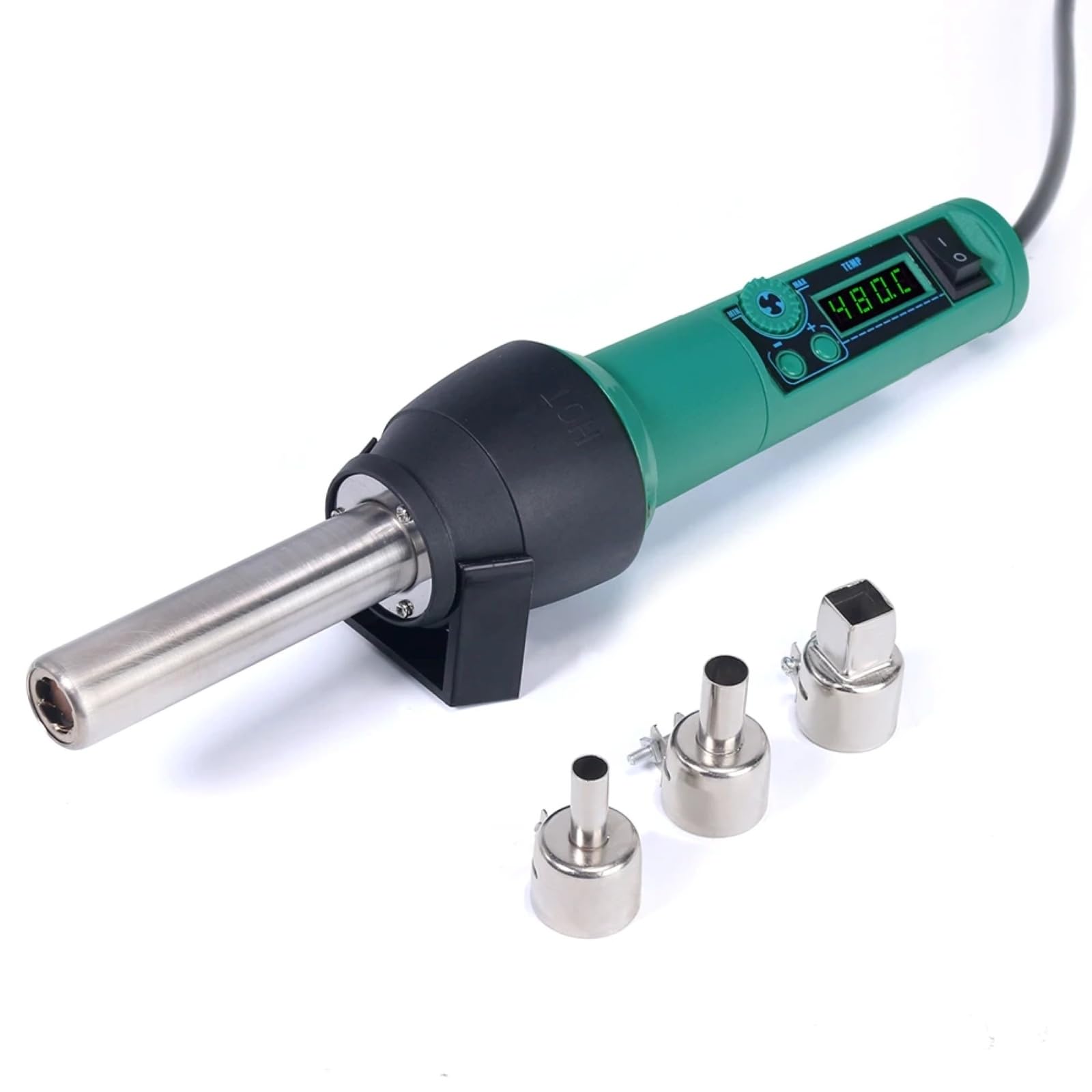
Image 4.1: The main unit of the hot air station, displaying the digital temperature display and control buttons.
4.2 Airflow System
The hot air station features a spiral wind airflow design for efficient and even heat distribution.

Image 4.2: Detail of the nozzle interior, illustrating the spiral wind air flow mechanism.
4.3 вуруди ҳаво
The air inlet is located at the rear of the unit, ensuring proper air circulation for heating.

Image 4.3: The air inlet grille, essential for the device's cooling and heating functions.
4.4 Назоратҳо
The device features intuitive controls for adjusting air volume and temperature.

Image 4.4: The control panel showing buttons for adjusting air volume (MIN/MAX) and temperature (up/down arrows).
4.5 Hot Air Gun Holder
A dismountable holder is provided for safe placement of the hot air gun when not in use or during cool-down.
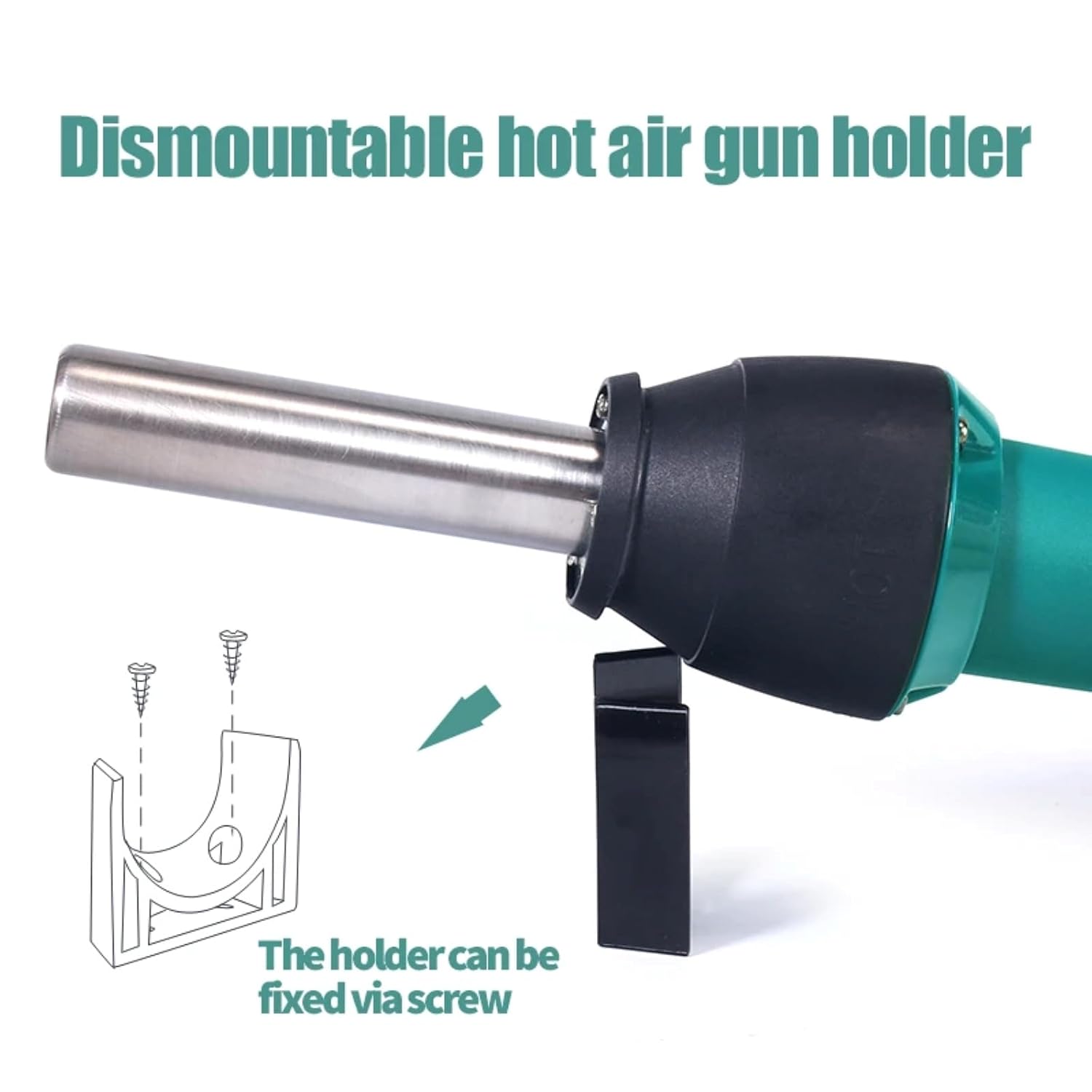
Image 4.5: The hot air gun holder, which can be fixed via screw for stability.
5. Танзимот
- Кушодани: Ҳама ҷузъҳоро аз бастабандӣ бодиққат хориҷ кунед.
- Тафтиш: Check the device and accessories for any signs of damage. Do not use if damaged.
- Ҷойгиршавӣ: Place the hot air station on a stable, heat-resistant surface in a well-ventilated area. Ensure there is sufficient space around the air inlet and outlet for proper airflow.
- Пайвастшавӣ: Select the appropriate nozzle for your task and securely attach it to the hot air gun.
- Пайваст кардани барқ: Plug the power cord into the hot air station and then into a suitable power outlet.
- Install Holder (Optional): If desired, attach the dismountable hot air gun holder to a workbench using screws for convenient and safe storage during operation.
6. Дастурҳои истифодабарӣ
- Фаъол: Flip the power switch to the "ON" position. The LED digital display will illuminate, showing the current temperature.
- Танзими ҳарорат: Use the temperature adjustment buttons (up/down arrows) to set the desired temperature. The adjustable range is typically 100°C to 480°C. The display will show the set temperature and then the actual temperature as it heats up.
- Adjust Air Volume: Use the air volume adjustment buttons (MIN/MAX) to set the desired airflow. Start with a lower setting and increase as needed for your application.
- Пеш аз гармкунӣ: Allow the unit to reach the set temperature before beginning work. This usually takes a few seconds.
- Амалиёт: Direct the hot air nozzle towards the component or area you wish to work on. Maintain a safe distance to avoid overheating or damaging surrounding components.
- Хунук шудан: After use, place the hot air gun back into its holder. The unit will automatically enter a cool-down mode, blowing cool air until the temperature drops to a safe level. Do not switch off the power until the cool-down cycle is complete, as this protects the heating element.
- Хомӯш: Once the unit has cooled down and the display indicates a safe temperature, you can switch off the power.
7. Нигоҳдорӣ
Regular maintenance ensures the longevity and optimal performance of your hot air station.
- Тозакунӣ: Ensure the device is unplugged and completely cool before cleaning. Wipe the exterior with a soft, damp матоъ. Тозакунанда ё ҳалкунандаҳои абразивиро истифода набаред.
- Вуруд / баромади ҳаво: Periodically check the air inlet and nozzle for any obstructions (dust, debris). Clean gently with a soft brush if necessary to maintain proper airflow.
- Соплоҳо: Clean the nozzles regularly to prevent solder or flux buildup, which can affect airflow and heat distribution.
- Нигоҳдорӣ: Store the hot air station in a dry, dust-free environment when not in use.
8. Баррасии мушкилот
If you encounter issues with your hot air station, refer to the table below for common problems and solutions.
| Мушкилот | Сабаби эҳтимолӣ | Ҳалли |
|---|---|---|
| Дастгоҳ фаъол нест. | No power supply; power cord damaged; power switch off. | Check power connection; inspect power cord; ensure power switch is ON. |
| No hot air or insufficient heat. | Heating element failure; air inlet/outlet blocked; incorrect temperature setting. | Contact customer support; clean air inlets/outlets; verify temperature setting. |
| Airflow is weak or inconsistent. | Air volume set too low; fan malfunction; air path obstruction. | Increase air volume setting; clean air inlets/outlets; contact customer support. |
| Temperature display error. | Норасоии сенсор. | Power cycle the device; if error persists, contact customer support. |
Агар пас аз кӯшиши ин ҳалли мушкилот мушкилот боқӣ монад, лутфан бо дастгирии муштариён тамос гиред.
9. Мушаххасоти
| Рақами модел | TT-Yihua-8858-I |
| Бренд | TOOLTOP |
| Истеъмоли қувваи барқ | 700 Вт |
| Диапазони ҳарорат | 100°C - 480°C (212°F - 896°F) |
| Навъи намоиш | Дисплейи рақамии LED |
| Навъи ҷараёни ҳаво | Spiral Wind |
| Компонентҳои дохилшуда | Hot Air Station, Nozzles, Power Cord |
10. Кафолат ва дастгирӣ
The TOOLTOP TT-Yihua-8858-I Portable Hot Air Station comes with a Кафолати 1-солаи истеҳсолкунанда аз рӯзи харид. Ин кафолат нуқсонҳои мавод ва коркардро ҳангоми истифодаи муқаррарӣ фаро мегирад.
For warranty claims, technical support, or any inquiries regarding your product, please contact TOOLTOP customer service through your retailer or the official TOOLTOP webсайт. Лутфан ҳангоми тамос бо дастгирӣ рақами модел ва санаи хариди худро дастрас намоед.