PowerA Advantage Wireless Controller for Nintendo Switch 2 - Mario & Yoshi
Model: NSGP0569-01V
Муқаддима
Ин дастур дастурҳои мукаммалро барои PowerA Advan пешниҳод мекунадtage Wireless Controller, designed for use with the Nintendo Switch family of devices. It covers setup, operation, maintenance, and troubleshooting to ensure optimal performance and longevity of your controller.
Хусусиятҳои асосӣ
Модулҳои эффекти Холл: Equipped with contact-free magnetic sensors in the thumbsticks to prevent stick drift, offering smoother control, enhanced precision, and increased longevity.
Тугмаҳои бозиҳои пешрафта: Two mappable buttons can be programmed on the fly during gameplay without needing to access system settings.
Intuitive Motion Controls: Experience fluid and responsive motion controls for aiming, steering, flying, and other in-game actions.
Тугмаи C: Provides quick access to GameChat features.
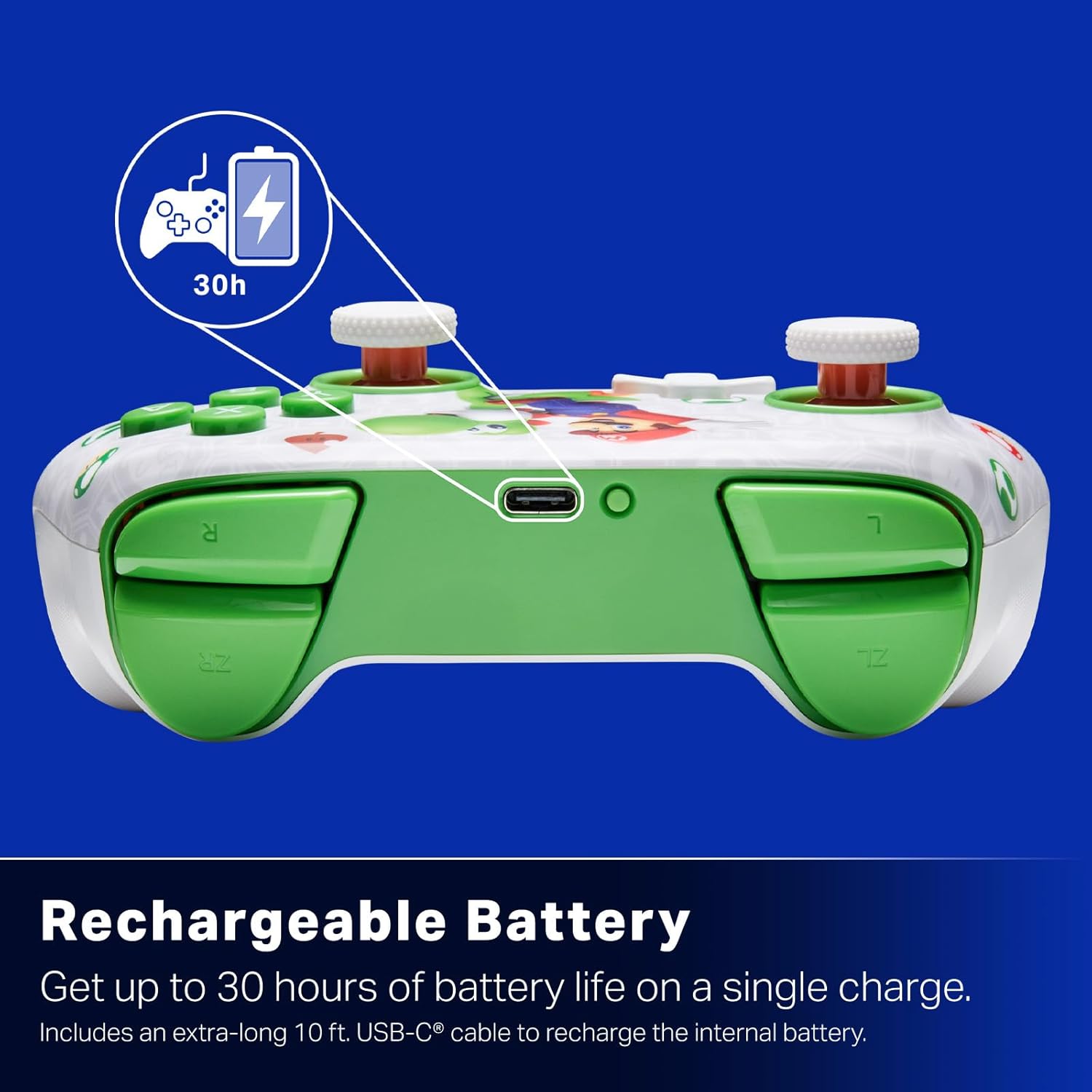
Батареяи барқгиранда: Offers up to 30 hours of gameplay on a single charge. Includes a 10 ft. (3m) USB-C cable for recharging.
Тарҳрезии эргономикӣ: Crafted for comfort during extended gaming sessions, utilizing cutting-edge ergonomics and high-quality materials.
Nintendo Family Compatibility: Compatible with Nintendo Switch 2, Nintendo Switch, Nintendo Switch – OLED Model, and Nintendo Switch Lite.
Литсензияи расмӣ: PowerA products undergo rigorous testing by Nintendo to ensure compatibility and quality.
Дастурҳои насб
1. Пуркунии ибтидоӣ
Before first use, fully charge your PowerA Advantage Wireless Controller. Connect the included 10 ft. (3m) USB-C cable to the controller's USB-C port and the other end to a powered USB port on your Nintendo Switch dock or a USB wall adapter.
Figure 1: Controller connected via USB-C for charging, highlighting the rechargeable battery feature.
2. Ҷуфтшавӣ бо Nintendo Switch
Боварӣ ҳосил кунед, ки консоли Nintendo Switch-и шумо фаъол аст ва ба нармафзори охирини система навсозӣ шудааст.
Аз Менюи HOME ро интихоб кунед Назоратчиён, пас Тағйир Grip / Тартиби.
On the PowerA Advantage Wireless Controller, press and hold the Тугмаи SYNC located on the top edge of the controller for at least three seconds. The player indicator LEDs on the bottom of the controller will begin to flash.
Once the controller successfully pairs, the player indicator LED(s) corresponding to the controller number will remain lit.
-ро пахш кунед Тугма to confirm and exit the pairing screen.
For subsequent uses, simply press the HOME button on the controller to wake it up and automatically reconnect to your Switch console.
Дастурҳои амалиётӣ
Назорати асосӣ
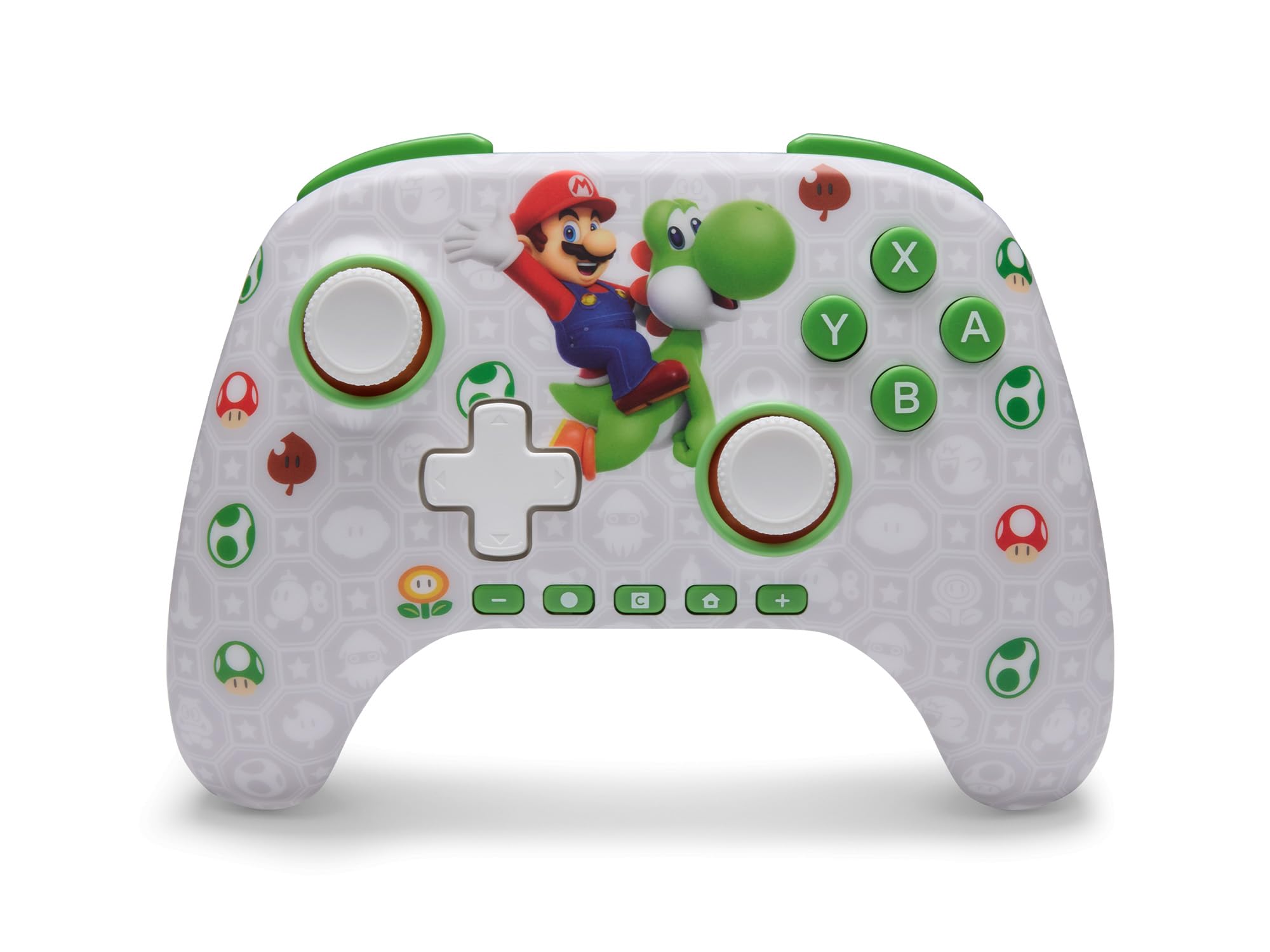
PowerA Advantage Wireless Controller features standard Nintendo Switch button layouts, including A, B, X, Y buttons, L/R and ZL/ZR shoulder buttons, a D-pad, and dual analog sticks. Familiarize yourself with these controls for general gameplay.
Расми 2: Пеш view аз PowerA Advantage Wireless Controller, highlighting the Mario and Yoshi design and button layout.
Advanced Gaming Buttons (AGB)
The controller includes two mappable Advanced Gaming Buttons (AGR and AGL) on the back. These buttons can be assigned to replicate any other button on the controller for quick access during gameplay.
-ро пахш кунед Program Button (PRGM) on the back of the controller. The Program LED will flash.
-ро пахш кунед Advanced Gaming Button (AGR or AGL) you wish to map. The Program LED will flash rapidly.
-ро пахш кунед тугма you want to assign to the Advanced Gaming Button (e.g., A, B, X, Y, L, R, ZL, ZR, D-pad directions). The Program LED will stop flashing, indicating successful mapping.
To clear a mapped button, repeat steps 1-2, then press the Тугмаи барнома боз.
Figure 3: Advanced Gaming Buttons (AGB) on the back of the controller, with an illustration of mappable functions.
Назорати ҳаракат
The controller supports motion controls, allowing for intuitive interaction in compatible games. These controls are automatically enabled when supported by the game.
Figure 4: Controller demonstrating motion control capabilities through tilting.
C Button (GameChat)
The dedicated C Button provides quick access to GameChat features in supported titles, enhancing your multiplayer experience.
Figure 5: The 'C' button, used for GameChat features.
Нигоҳдорӣ
Тозакунӣ: Барои тоза кардани контроллер аз матои нарм ва хушк истифода баред. Аз истифодаи маводи кимиёвии сахт ё маводҳои абразивӣ худдорӣ намоед.
Нигоҳдорӣ: Контроллерро дар ҷои хунук ва хушк аз нури бевоситаи офтоб ва ҳарорати аз ҳад зиёд дур нигоҳ доред.
Нигоҳубини батарея: Барои дароз кардани мӯҳлати кори батарея, аз холӣ кардани пурраи контроллер зуд-зуд худдорӣ кунед. Онро мунтазам пур кунед, ҳатто агар он доимо истифода нашавад ҳам.
Нигоҳубини кабел: Handle the USB-C charging cable with care. Avoid bending or twisting it excessively.
Мушкилкушо
Контроллер пайваст намешавад/ҷуфт намешавад
Боварӣ ҳосил кунед, ки контроллер пурра пур шудааст.
Verify the Nintendo Switch console is updated to the latest system software.
Repeat the pairing process (see "Pairing with Nintendo Switch" in Setup Instructions).
If issues persist, try restarting both the controller and the Nintendo Switch console.
Дрифти чӯбӣ
PowerA Advantage Controller features Hall Effect modules designed to prevent stick drift. If you experience any unintended input, ensure the controller's firmware is up to date (check PowerA's official webсайт барои навсозӣ).
Recalibrate the joysticks through the Nintendo Switch system settings if necessary (System Settings > Controllers and Sensors > Calibrate Control Sticks).
Муҳлати кӯтоҳи батарея
Ensure the controller is fully charged before each use.
Battery life can vary based on game usage and features enabled.
Use the provided USB-C cable for optimal charging.
Мушаххасоти
Хусусият
Тафсилот
Рақами модел
NSGP0569-01V
Пайвастшавӣ
Wireless (Bluetooth), USB-C (for charging)
Дастгоҳҳои мувофиқ
Nintendo Switch 2, Nintendo Switch, Nintendo Switch – OLED Model, Nintendo Switch Lite
Муҳлати батарея
То 30 соат (бо истифода фарқ мекунад)
Дарозии кабел
10 ft. (3m) USB-C
Андозаҳо
5.88 x 4.21 x 2.36 инч
Вазн
0.66 фунт
Хусусиятҳои махсус
Hall Effect Thumbsticks, Mappable Advanced Gaming Buttons, Motion Controls, C Button
Кафолат ва дастгирӣ
PowerA Advantage Wireless Controller comes with a Кафолати маҳдуди дусола. For detailed warranty information, product support, or to register your product, please visit the official PowerA webсайт дар PowerA.com/Support.
Figure 6: Official Nintendo Licensed Product badge, ensuring quality and compatibility.
Ask a question about this manual
Ask about setup, troubleshooting, compatibility, parts, safety, or missing instructions. Manuals+ will review the question and use this page’s manual context to help answer it.