1. Муқаддима
This manual provides essential information for the proper setup, operation, and maintenance of your Coby DVD-527 5.1 Channel Progressive Scan DVD Player. Please read this manual thoroughly before using the device to ensure optimal performance and safety. The Coby DVD-527 features a super-slim design, 5.1 channel audio output, and progressive scan video output for enhanced picture quality on compatible televisions.
2. Маълумот оид ба бехатарӣ
- Манбаи нерӯ: Боварӣ ҳосил кунед, ки таъминоти барқ ба ҳаҷм мувофиқ астtage талаботи дар воҳид муқарраршуда.
- Вентилятсия: Сӯрохиҳои вентилятсияро набандед. Барои гардиши дурусти ҳаво дар атрофи дастгоҳ фазои кофӣ гузоред, то аз гармшавии аз ҳад зиёд пешгирӣ карда шавад.
- Рутубат: Дастгоҳро ба борон, намӣ ё намии аз ҳад зиёд нагузоред.
- Тозакунӣ: Unplug the unit from the power outlet before cleaning. Use a soft, dry cloth.
- Хизматрасонӣ: Худатон кӯшиш накунед, ки ба ин маҳсулот хидмат расонад. Ҳама хидматрасониро ба кормандони соҳибихтисос муроҷиат кунед.
3. Мундариҷаи баста
Боварӣ ҳосил кунед, ки ҳама ашё дар баста мавҷуд аст:
- Coby DVD-527 DVD Player
- Назорати дурдасти пурраи функсия
- AV кабелӣ
- Дастури корбар (ин ҳуҷҷат)
- Маълумот дар бораи кафолат
4. Маҳсулот ба охир расидview
The Coby DVD-527 DVD Player and its accompanying remote control are designed for ease of use and integration into your home entertainment system.
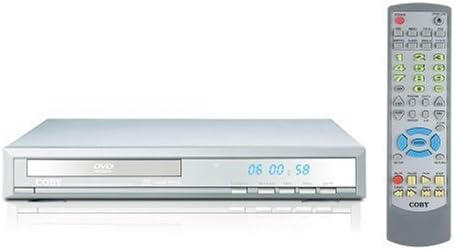
Расми 1: Coby DVD-527 DVD Player (left) and its full-function remote control (right). The DVD player features a slim profile with a disc tray, display screen, and control buttons on the front panel. The remote control includes various buttons for playback, navigation, and special features.
Назорати панели пеши
The front panel typically includes the disc tray, power button, play/pause, stop, and eject buttons, along with a digital display showing playback time or status.
Пайвастҳои панели пушти сар
The rear panel houses various audio and video output ports for connecting to your television and audio system.
Назорати дурдаст
The included remote control provides full functionality for operating the DVD player from a distance, including power, playback controls, menu navigation, volume, and special features.
5. Танзимот
5.1 Пайвастшавӣ ба телевизион
Choose one of the following video connection methods:
- Component Video Output (Progressive Scan): For the highest quality picture on HD-capable televisions, connect the Y, Pb, and Pr component video outputs from the DVD player to the corresponding inputs on your TV using component video cables.
- Баромади видеоии RCA: Connect the yellow RCA video output from the DVD player to the video input on your TV using an RCA video cable.
- Баромади S-Видео: Connect the S-Video output from the DVD player to the S-Video input on your TV using an S-Video cable.
5.2 Пайвастшавӣ ба системаи аудио
Яке аз усулҳои зерини пайвастшавии аудиоиро интихоб кунед:
- 5.1 Dolby Digital Output: For surround sound, connect the 5.1 channel audio outputs (Front Left, Front Right, Center, Surround Left, Surround Right, Subwoofer) from the DVD player to the corresponding inputs on your 5.1 channel receiver or ampлифер.
- Баромади аудиои рақамии коаксиалӣ: Connect the coaxial digital audio output from the DVD player to the coaxial digital audio input on your receiver or amplifier using a coaxial digital audio cable.
- Баромади аудиои рақамии оптикӣ: Connect the optical digital audio output from the DVD player to the optical digital audio input on your receiver or amplifier using an optical digital audio cable.
- Баромади аудиои аналогӣ: Connect the red and white RCA analog audio outputs from the DVD player to the corresponding audio inputs on your TV or stereo system using an RCA audio cable.
5.3 Пайвастшавии барқ
After all audio and video connections are made, plug the DVD player's power cord into a standard AC power outlet.
6. Дастурҳои истифодабарӣ
6.1 Бозии асосии диск
- Turn on your television and select the correct input source for the DVD player.
- Press the Power button on the DVD player or remote control to turn on the unit.
- Press the Eject button (▲) on the front panel or remote to open the disc tray.
- Place a compatible disc (DVD, CD, CD-R/RW, MP3) gently into the disc tray with the label side facing up.
- Press the Eject button (▲) again to close the disc tray. The player will begin reading the disc.
- Playback should start automatically. If a disc menu appears, use the navigation buttons on the remote to select your desired option and press Enter.
- Use the Play (▶), Pause (▐▐), Stop (■), Fast Forward (►►), and Rewind (◄◄) buttons on the remote for playback control.
6.2 Хусусиятҳои махсус
- Намоиши экран: Press the OSD button on the remote to view playback information on your screen.
- Амали масштаб: Use the Zoom button to magnify a portion of the picture.
- Бисёр Viewкунҷҳои ing: For discs that support it, press the Angle button to switch between different camera angles.
- Субтитрҳо: Press the Subtitle button to select available subtitle languages.
- Parental Lock Control: Access the setup menu to configure parental control settings, restricting playback of certain content based on rating.
6.3 Танзимоти система
Press the Setup button on the remote to access the system menu. Here you can adjust video settings (e.g., aspect ratio, progressive scan mode), audio settings, language preferences, and parental control options. Refer to the on-screen menu for detailed navigation.
7. Нигоҳдорӣ
7.1 Тоза кардани дастгоҳ
Қисми берунии плеери DVD-ро бо матои нарм ва хушк пок кунед. Аз тозакунандаҳои моеъ ё аэрозолӣ истифода набаред, зеро онҳо метавонанд ба қисматҳои дохилӣ ё рӯйпӯш зарар расонанд.
7.2 Нигоҳубини диск
Handle discs by their edges. Keep discs clean and free of scratches. Store discs in their cases when not in use to prevent dust and damage.
8. Баррасии мушкилот
If you encounter problems with your DVD player, refer to the following common issues and solutions:
- Не қудрат:
• Ensure the power cord is securely plugged into both the DVD player and a working electrical outlet.
• Check if the power outlet is functional by plugging in another device. - Сурат нест:
• Verify that the video cables are correctly connected between the DVD player and the TV.
• Ensure your TV is set to the correct input source (e.g., AV1, Component, HDMI).
• Check the TV's picture settings. - Овоз нест:
• Confirm that audio cables are properly connected to your TV or audio system.
• Check the volume level on both the DVD player and your TV/audio system.
• Ensure your TV/audio system is set to the correct audio input.
• If using digital audio, verify the audio settings in the DVD player's setup menu. - Disc Not Playing / Disc Error:
• Ensure the disc is clean and free of scratches or smudges.
• Make sure the disc is inserted correctly with the label side facing up.
• Verify that the disc format is compatible with the player (DVD, CD, CD-R/RW, MP3). - Идоракунии дурдаст кор намекунад:
• Check and replace the batteries in the remote control.
• Ensure there are no obstructions between the remote and the DVD player's sensor.
• Point the remote directly at the DVD player.
9. Мушаххасоти
| Модели | DVD-527 |
| Бренд | Коби |
| Андозаҳо (W x D x H) | 11 x 10 x 2 дюйм (тақрибан) |
| Вазн | 7 фунт (тақрибан) |
| Media Type Compatibility | DVD, CD, CD-R/RW, MP3 |
| Натиҷаи видео | Component Video (Y, Pb, Pr), RCA Video, S-Video |
| Натиҷаи аудио | 5.1 Channel Dolby Digital, Coaxial Digital, Optical Digital, Analog RCA (L/R) |
| Хусусиятҳои махсус | Progressive Scan, Multiple Subtitles, Multiple Viewing Angles, On-Screen Display, Zoom Operation, Parental Lock Control |
| Мутобиқати видео | Системаи NTSC/PAL |
10. Кафолат ва дастгирӣ
This product is covered by a limited manufacturer's warranty. Please refer to the warranty information card included in your package for specific terms and conditions, including the warranty period and coverage details. Keep your purchase receipt as proof of purchase.
For technical assistance or customer support, please refer to the contact information provided in your warranty documentation or visit the official Coby webсайт барои навтарин захираҳои дастгирӣ.


