Муқаддима
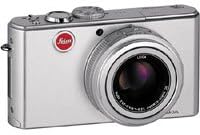
The Leica D-LUX 2 is an 8.4 megapixel digital camera designed for versatile photography. It features Leica DC VARIO-ELMARIT 6.3-25.2 mm f/2.8-4.9 ASPH. optics with 4x optical zoom, providing a focal length range equivalent to 28-112 mm on a 35 mm camera. The camera incorporates optical image stabilization and offers various scene programs to adapt to different shooting conditions. Its compact and stylish aluminum body is built for portability and ease of use.
Ташкил кардан
1. Насби батарея
The Leica D-LUX 2 uses a Lithium-Ion battery (3.7 V, 1150 mAH). Ensure the battery is fully charged before first use.
- Сарпӯши қисмати батареяро, ки дар поёни камера ҷойгир аст, кушоед.
- Insert the charged battery into the compartment, ensuring correct orientation as indicated inside the compartment.
- Сарпӯши қисмати батареяро то он даме, ки клик ба ҷои худ ҷойгир шавад, пӯшед.
Тасвир: Поён view of the Leica D-LUX 2 camera, highlighting the battery and memory card compartment. This compartment is crucial for power and storage.
2. Насби корти хотира
The camera supports SD & MMC Cards. A 64 MB SD Card is supplied with the camera.
- Ҳангоми кушода будани қисмати батарея, слотчаи корти хотираро ҷойгир кунед.
- Insert the SD or MMC card into the slot with the label facing the correct direction (usually towards the front of the camera) until it clicks.
- Сарпӯши қисмати батареяро пӯшед.
3. Пайваст кардани сарпӯши линза
Always attach the lens cap when the camera is not in use to protect the lens from dust and scratches.

Тасвир: Пеш view of the Leica D-LUX 2 camera with its lens cap in place, demonstrating proper lens protection.
Истифода бурдани камера
1. Фурӯзон/хомӯшкунӣ
Press the power button to turn the camera on or off. The lens will extend upon powering on.
2. Усулҳои асосии тирандозӣ
The D-LUX 2 offers various exposure control modes:
- Full Automatic Mode: The camera automatically sets all parameters. Shutter speed range: 1/4 - 1/2000 sec.
- Ҳолати барнома (P): The camera sets aperture and shutter speed, but you can adjust other settings. Shutter speed range: 1 - 1/2000 sec.
- Афзалияти диафрагма (Av ё A): You set the aperture, and the camera selects the appropriate shutter speed.
- Афзалияти парда (Тв ё S): You set the shutter speed, and the camera selects the appropriate aperture. Shutter speed range: 8 - 1/2000 sec.
- Ҳолати дастӣ (M): You control both aperture and shutter speed. Shutter speed range: 60 - 1/2000 sec.
- Scene Programs: Select from various pre-set scene modes like Portrait, Sport, Night-time Landscape, Night-time Portrait, Fireworks, Party, Snow, Self-portrait, Food, Baby, Soft-focus for skin, Candlelight, and Starry Sky.

Тасвир: Қафо view of the Leica D-LUX 2, displaying the LCD screen and various control buttons for mode selection and navigation.
3. Ҳассосияти ISO
Adjust the ISO sensitivity manually or set it to automatic. Available ISO settings are 80, 100, 200, and 400.
4. Optical Image Stabilizer
The camera features an Optical Image Stabilizer with two operating modes: one for exposure only and another for both exposure and monitor display. This helps reduce blur caused by camera shake.
5. File Форматҳо
Still images can be saved in RAW, TIFF, or JPEG (Fine / Standard) formats. RAW and TIFF formats offer maximum image data for post-processing, while JPEG provides smaller file андозаҳо.
6. Сабти видео
The camera can record video in QuickTime Motion JPEG format. Video resolutions include up to 3840 x 2160, 16:9 VGA 848 x 480, and 4:3 VGA 640 x 480 at 10 or 30 frames per second.
7. Автотаймер
Utilize the self-timer function for delayed shots, with options for a 2-second or 10-second delay.
Нигоҳдорӣ
1. Тоза кардани камера
- Барои тоза кардани корпуси камера аз матои мулоим ва ифлос истифода баред.
- For the lens, use a specialized lens cleaning cloth and solution. Avoid touching the lens surface directly.
- Keep the lens cap on when not in use to prevent dust accumulation.
2. Нигоҳубини батарея
- Store the Lithium-Ion battery in a cool, dry place when not in use.
- Барои дароз кардани мӯҳлати истифодааш батареяро зуд-зуд холӣ накунед.
- Барои батарея танҳо пуркунандаи барқро истифода баред.
3. Memory Card Handling
- Пеш аз истифодаи аввал ҳамеша кортҳои хотираи навро дар камера формат кунед.
- Avoid removing the memory card while the camera is writing data to prevent corruption.
- Regularly back up your photos and videos to an external storage device.
Мушкилкушо
| Мушкилот | Сабаби эҳтимолӣ | Ҳалли |
|---|---|---|
| Камера фаъол нест. | Battery is discharged or incorrectly inserted. | Батареяро пурра пур кунед ва боварӣ ҳосил кунед, ки он дуруст ҷойгир карда шудааст. |
| Тасвирҳо норавшананд. | Camera shake or incorrect focus. | Ensure Optical Image Stabilizer is active. Use a faster shutter speed or tripod. Check focus settings. |
| Хатогии корти хотира. | Корт пур, вайроншуда ё номувофиқ аст. | Нолозимро нест кунед files, reformat the card (will erase all data), or try a different compatible SD/MMC card. |
| Флеш оташ намегирад. | Flash mode is set to OFF or conditions are too bright. | Check flash mode settings (Auto, On, Off, Slow Synch). Ensure subject is within flash range. |
Мушаххасоти
| Хусусият | Тафсилот |
|---|---|
| Номи модел | Leica D-LUX 2 |
| Ҳалли самаранок | 8.4 МП |
| Навъи сенсори тасвир | 1/1.6 inches CCD |
| Навъи линза | Leica DC VARIO-ELMARIT 6.3-25.2 mm f/2.8-4.9 ASPH. with 4x optical zoom |
| Focal Length (35mm equivalent) | 28 то 112 мм |
| Масштаби оптикӣ | 4x |
| Миқёси рақамӣ | 5x |
| Устуворсозии тасвир | Оптикӣ |
| Дастгир карда шудааст File Форматҳо | JPEG, RAW, TIFF |
| Натиҷаи видео | QuickTime Motion JPEG |
| Ҳалли видео | То 480p |
| Андозаи экран | 2.5 дюйм LCD |
| Ҳассосияти ISO | Авто, 80, 100, 200, 400 |
| Диапазони суръати парда | 60 - 1/2000 sec (Manual), 1/4 - 1/2000 sec (Auto) |
| Вақтсанҷи худ | 2 ё 10 сония |
| Таъмини нерӯ | Lithium-Ion battery, 3.7 V, 1150 mAH |
| Андозаҳо (W x H x D) | 105.7 x 58.3 x 25.6 mm (4 5/32 x 2 9/32 x 1 inch) |
| Вазн | 185 grams (6.5 ounces) without battery, 220 grams (7.75 ounces) with battery |
Кафолат ва дастгирӣ
For warranty information, please refer to the documentation included with your purchase or visit the official Leica website. For technical support, service, or additional inquiries, please contact Leica customer service through their official channels.
- Дастгирии онлайн: Боздид кунед Камераи Leica webсайт for FAQs, software downloads, and service information.
- Тамос: Refer to your product packaging or the Leica webсомона барои маълумоти тамос бо хидматрасонии минтақавии муштариён.