1. Муқаддима
The Thrustmaster T-Flight Hotas X is a versatile and ergonomic flight stick and detachable throttle system designed for PC flight simulation. It offers a comprehensive control experience with programmable buttons and axes, allowing users to fully immerse themselves in various flight scenarios, from civil aviation to aerial combat. This manual provides detailed instructions for setup, operation, maintenance, and troubleshooting to ensure optimal performance and longevity of your device.
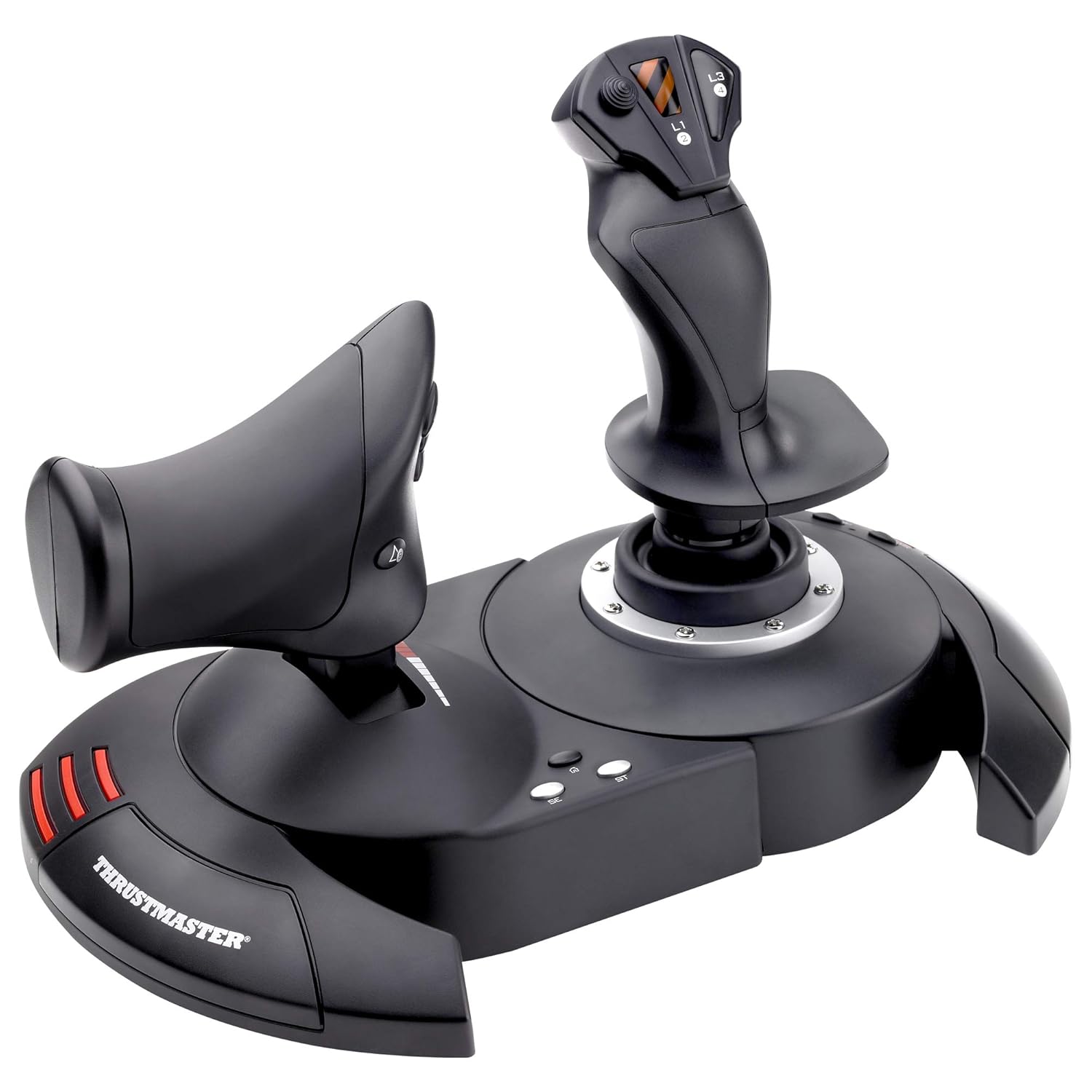
Figure 1: The Thrustmaster T-Flight Hotas X, showcasing the integrated joystick and detachable throttle unit.
2. Хусусиятҳои асосӣ
- Wide Hand-Rest: Designed for optimal comfort during extended gaming sessions, allowing players to keep their hands relaxed and responsive.
- Fully Programmable: Features 12 action buttons and 5 axes that are entirely programmable, offering extensive customization for different flight simulators and game styles.
- Dual-System Aerodynamic Control: Provides precise control through a rotating handle with an integrated blocking system or a progressive tilting lever, enhancing maneuverability.
- Хотираи дохилӣ: Stores all your programming settings directly on the device, ensuring your custom configurations are retained even when the joystick is disconnected.
- High-Precision Joystick: Equipped with adjustable resistance, allowing users to fine-tune the stick's sensitivity for accurate control.
- Detachable Throttle Control: A real-size, ergonomically-designed throttle that can be detached from the joystick base for flexible placement and enhanced realism.
- Exclusive Mapping Button: Enables instant switching of all functions between different controls, providing quick adaptation during gameplay.
- Exclusive Preset Button: Allows for immediate switching between different pre-defined control profiles.
- Plug & Play: Ensures ultra-simple and fast installation with all functions pre-configured for immediate use, eliminating complex setup procedures.
- Trigger for Brakes/Rapid Fire: A dedicated trigger button for civil flight braking or military flight rapid fire, enhancing control versatility.
- Multi-Directional Hat: Панорамаро таъмин мекунад view control, essential for situational awareness in flight simulations.
- Пойгоҳи вазн: Ensures greater stability during intense gameplay, preventing accidental movement of the unit.

Figure 2: The ergonomic design of the joystick provides a comfortable grip for extended use.
3. Танзимот
- Кушодани: Carefully remove the Thrustmaster T-Flight Hotas X and its components from the packaging. Ensure all parts listed in the "What's in the Box" section are present.
- Connecting the Throttle (Optional): The throttle unit can be used attached to the joystick base or detached. If detaching, ensure the connecting cable is securely plugged into both units.
- Интихоби платформа: Locate the PS3/PC switch on the underside of the joystick base. Slide the switch to the "PC" position for computer use.

Figure 3: The detachable throttle unit, showing its independent functionality and connection point.
- Пайвасти USB: Plug the USB connector from the joystick base into an available USB port on your PC. The device is Plug & Play, and your operating system should automatically detect and install the necessary drivers.
- Муқовимати танзим: On the underside of the joystick base, locate the resistance adjustment knob. Turn the knob clockwise to increase resistance (stiffer movement) or counter-clockwise to decrease resistance (looser movement) according to your preference.
4. Дастурҳои истифодабарӣ
Once connected, the T-Flight Hotas X is ready for immediate use with most flight simulation games. Its pre-configured functions allow for instant takeoff. For advanced control and customization, utilize the programmable features.
- Назорати Ҷойстик:
- Move the joystick forward/backward for pitch control.
- Move the joystick left/right for roll control.
- Twist the joystick handle (rudder feature) for yaw control. This can be locked if preferred.
- Назорати газ:
- Slide the throttle lever forward/backward to control engine thrust.
- Button Programming (Mapping & Preset):
The T-Flight Hotas X features "Mapping" and "Preset" buttons on the base for advanced customization:
- Mapping Button: Allows you to reassign functions to any of the 12 action buttons or 5 axes. Refer to your game's control settings for specific mapping procedures. The internal memory saves your custom mappings.
- Тугмаи пешакӣ: Instantly switches between different pre-defined control profiles. This is useful for quickly adapting to different aircraft or mission types without re-mapping.
5. Нигоҳдорӣ
- Тозакунӣ: Use a soft, dry cloth to clean the surfaces of the joystick and throttle. Avoid using abrasive cleaners or solvents, as they may damage the plastic.
- Нигоҳдорӣ: Store the device in a cool, dry place away from direct sunlight and extreme temperatures. If detaching the throttle, ensure the connecting cable is not kinked or strained.
- Нигоҳубини кабел: Avoid sharp bends or excessive pulling on the USB cable and the throttle connecting cable to prevent internal damage.
6. Баррасии мушкилот
- Дастгоҳ эътироф нашудааст:
- Ensure the PS3/PC switch on the underside of the base is set to "PC".
- Try plugging the USB cable into a different USB port on your computer.
- Компютери худро бозоғоз намоед.
- Check your operating system's Device Manager to see if the device is listed and if there are any driver issues.
- Buttons/Axes Not Responding:
- Verify that the device is properly recognized by your computer.
- Check in-game control settings to ensure the correct input device is selected and controls are mapped as desired.
- If custom mappings were used, try resetting to default settings using the "Preset" button or through the game's control options.
- Inconsistent Movement/Drift:
- Adjust the resistance knob on the underside of the joystick base.
- Ensure the joystick is centered before starting a game.
- Calibrate the joystick through your operating system's game controller settings (e.g., Windows Game Controllers).
7. Мушаххасоти
| Мушаххасоти | Тафсилот |
|---|---|
| Рақами модел | 2960703 |
| Андозаҳои маҳсулот | 10.39 x 9.53 x 10.43 инч |
| Вазни ашё | 4.77 фунт |
| Мутобиқати | PC (also compatible with PlayStation 3, though this model is specified for PC) |
| Шумораи тугмаҳо | 12 programmable action buttons |
| Шумораи меҳварҳо | 5 programmable axes |
| Пайвастшавӣ | USB |
| Материал | Пластмассаи устувор |
8. Кафолат ва дастгирӣ
For detailed warranty information, please refer to the "Warranty (PDF)" document available on the product's Amazon page or the official Thrustmaster website. Thrustmaster offers various protection plans for extended coverage.
- Дастури корбар: A comprehensive user guide is available in PDF format for further details and advanced configurations. Дастури корбарро зеркашӣ кунед (PDF)
- Маълумот дар бораи кафолат: For warranty terms and conditions. Кафолатро зеркашӣ кунед (PDF)
- Дастгирии онлайн: Visit the official Thrustmaster website for the latest drivers, FAQs, and customer support. Thrustmaster Store on Amazon


