1. Муқаддима
This manual provides essential information for the safe and efficient operation of your VOLTCRAFT GOS-632 FG Oscilloscope with Frequency Generator. Please read this manual thoroughly before using the device and keep it for future reference. The GOS-632 FG is a 30 MHz dual-channel analog oscilloscope integrated with a frequency generator, designed for various electronic measurement and testing applications.
2. Дастурамал оид ба бехатарӣ
Always observe the following safety precautions to prevent electric shock, injury, or damage to the instrument:
- Манбаи нерӯ: Асбобро танҳо ба манбаи барқ бо ҳаҷми муайяншуда пайваст кунедtagд ва басомад.
- Ба заминканӣ: Боварӣ ҳосил кунед, ки дастгоҳ ба таври дуруст ба замин пайваст карда шудааст, то аз зарбаи барқ пешгирӣ карда шавад.
- Вентилятсия: Do not block ventilation openings. Ensure adequate airflow to prevent overheating.
- Муҳити зист: Operate the oscilloscope in a dry, clean environment, away from direct sunlight, high temperatures, and excessive dust or humidity.
- Санҷишҳо: Use only probes rated for the voltage and frequency being measured. Ensure probes are in good condition.
- Хизматрасонӣ: Refer all servicing to qualified service personnel. Do not attempt to open or repair the instrument yourself.
- Тамос бо моеъ: Avoid contact with liquids. If liquid enters the device, disconnect power immediately and have it inspected by a qualified technician.
3. Мундариҷаи баста
Please check the package contents upon receipt. If any items are missing or damaged, contact your dealer immediately.
- VOLTCRAFT GOS-632 FG Oscilloscope with Frequency Generator
- Сими барқ
- Two (2) Oscilloscope Probes (1x/10x switchable)
- Дастури корбар (ин ҳуҷҷат)
4. Маҳсулот ба охир расидview
The VOLTCRAFT GOS-632 FG is a robust analog oscilloscope designed for reliable waveform analysis. Below is a general view аз дастгоҳ.
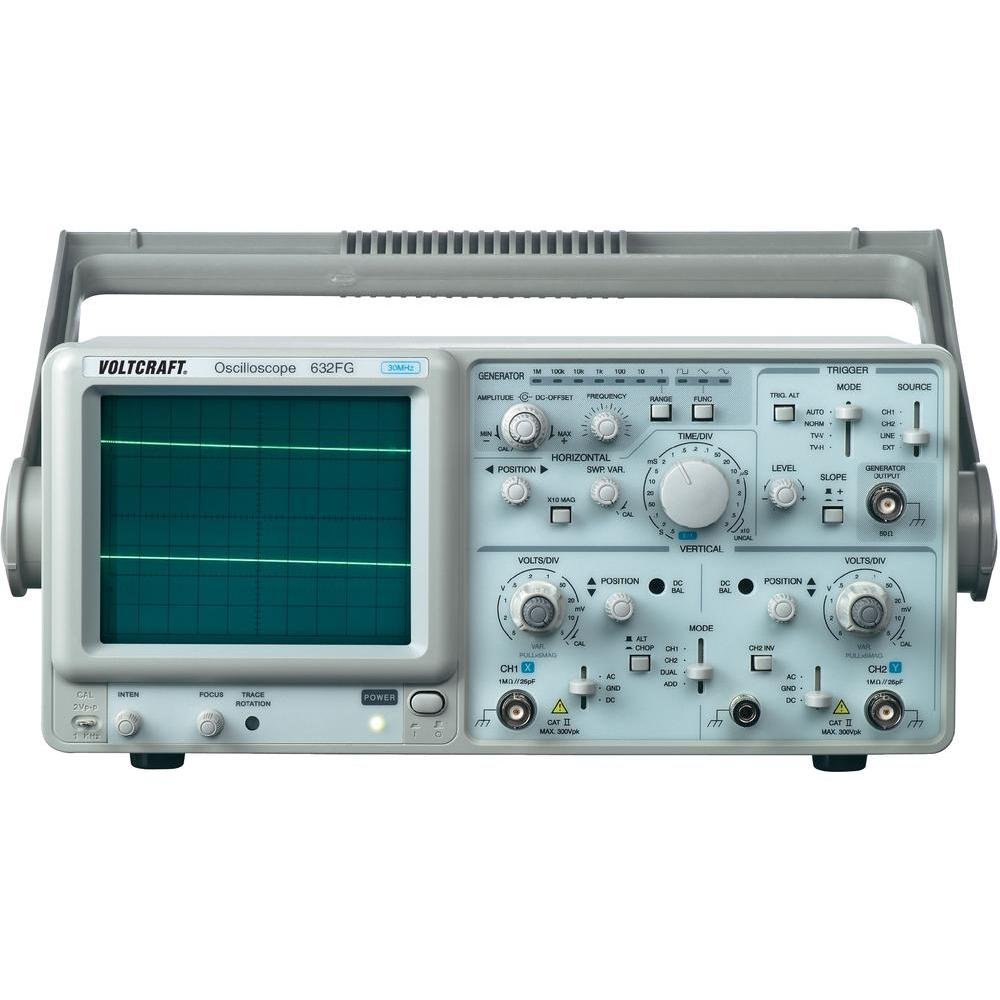
Расми 4.1: Пеш view of the VOLTCRAFT GOS-632 FG Oscilloscope. This image shows the main display, control knobs, and input connectors for the two channels and the frequency generator output.
4.1. Назорати панели пеши
- CRT Display: Shows the waveform.
- CH1/CH2 Input: BNC connectors for connecting oscilloscope probes.
- ВОЛТС/ДИВ: Adjusts the vertical sensitivity for each channel.
- МАВҚИ: Adjusts the vertical position of the waveform.
- TIME/DIV: Adjusts the horizontal sweep speed.
- TRIGGER LEVEL: Ҳаҷмро муқаррар мекунадtage level at which the sweep starts.
- РЕЖМ: Selects trigger source (CH1, CH2, EXT, LINE).
- FREQUENCY GENERATOR OUTPUT: BNC connector for the integrated signal generator.
- FREQUENCY/AMPҲУҚУҚ: Controls for the frequency generator output.
- Тугмаи барқ: Дастгоҳро фаъол ё хомӯш мекунад.
4.2. Пайвастшавиҳои панели пушти сар
- Вуруди барқ AC: Пайвасткунак барои сими барқ.
- Терминали заминӣ: For additional grounding if required.
5. Танзимот
- Кушодани: Carefully remove the oscilloscope from its packaging. Retain the packaging for future transport.
- Ҷойгиршавӣ: Place the oscilloscope on a stable, level surface with adequate ventilation around the unit.
- Пайвасти барқ: Connect the supplied power cord to the AC power input on the rear panel and then to a grounded electrical outlet.
- Пайвастшавии зонд: Connect the oscilloscope probes to the CH1 and/or CH2 BNC input connectors on the front panel. Ensure a secure connection.
- Ҷуброни зонд: Before taking measurements, compensate your probes. Connect the probe tip to the probe compensation output (usually a square wave signal on the front panel) and adjust the probe's compensation trimmer until a flat-top square wave is displayed.
6. Кори осциллограф
6.1. Андозаи асосӣ
- Фаъол: Press the POWER switch to turn on the oscilloscope. Allow a few minutes for the display to stabilize.
- Сигнали вуруд: Зондро ба нуқтаи схемае, ки мехоҳед чен кунед, пайваст кунед.
- Vertical Adjustment (VOLTS/DIV & POSITION):
- Select the appropriate VOLTS/DIV setting to display the waveform within the screen.
- Use the POSITION knob to center the waveform vertically.
- Horizontal Adjustment (TIME/DIV & POSITION):
- Select the appropriate TIME/DIV setting to display several cycles of the waveform horizontally.
- Use the horizontal POSITION knob to move the waveform left or right.
- Танзими триггер:
- Set the TRIGGER MODE (e.g., AUTO, NORM).
- Adjust the TRIGGER LEVEL knob until a stable waveform is displayed.
- Select the TRIGGER SOURCE (e.g., CH1, CH2).
6.2. Using the Frequency Generator
- Пайвастшавӣ баромад: Connect a BNC cable from the FREQUENCY GENERATOR OUTPUT to the circuit or device under test.
- Танзими басомад: Use the FREQUENCY control to select the desired output frequency.
- Танзим Ampпастӣ: -ро истифода баред AMPLITUDE control to adjust the output signal strength.
- Интихоби шакли мавҷ: If available, select the desired waveform type (e.g., sine, square, triangle).
7. Нигоҳдорӣ
- Тозакунӣ: Пеш аз тоза кардан сими барқро ҷудо кунед. Аз матои нарм истифода баредamp cloth with a mild detergent to clean the exterior. Do not use abrasive cleaners or solvents.
- Нигоҳдорӣ: Вақте ки дар муддати тӯлонӣ истифода набаред, осциллографро дар муҳити хушк ва тоза нигоҳ доред.
- Калибрченкунӣ: For accurate measurements, periodic calibration by qualified personnel is recommended.
8. Баррасии мушкилот
| Мушкилот | Сабаби эҳтимолӣ | Ҳалли |
|---|---|---|
| Пас аз фурӯзон шудан намоиш нест | No power, brightness/focus too low | Check power cord, outlet. Adjust INTENSITY and FOCUS knobs. |
| Шакли мавҷи ноустувор | Incorrect trigger settings, signal too noisy | Adjust TRIGGER LEVEL, TRIGGER MODE, and TRIGGER SOURCE. Check signal integrity. |
| Ягон сигнал нишон дода нашудааст | Probe not connected, incorrect VOLTS/DIV, signal outside range | Ensure probe is connected and making contact. Adjust VOLTS/DIV and POSITION. Check probe compensation. |
| Frequency generator output not working | Output cable not connected, amplitude set to zero | Check output cable connection. Increase AMPЛИТУДИ. |
9. Мушаххасоти
| Хусусият | Тафсилот |
|---|---|
| Рақами модел | GOS-632 FG |
| Истеҳсолкунанда | ВОЛТКРАФТ |
| Маҷрои маҷрои | 30 MHz (DC) |
| Каналҳо | 2 каналҳои аналогӣ |
| Integrated Function | Генератори басомад |
| Вазни маҳсулот | 9.07 g (Note: This weight seems unusually low for an oscilloscope and might be a data entry error. Refer to product packaging for accurate weight.) |
| ASIN | B003IDBEYM |
| Аввалин дастрас | 31 марти соли 2015 |
10. Кафолат ва дастгирӣ
VOLTCRAFT products are designed for quality and reliability. For information regarding warranty terms, technical support, or service, please refer to the warranty card included with your product or visit the official VOLTCRAFT webсомона. Кӯшиш накунед, ки дастгоҳро худатон таъмир кунед, зеро ин метавонад кафолати шуморо бекор кунад.
For further assistance, please contact your local VOLTCRAFT distributor or customer service center.


