Муқаддима
The Ergotron Neo-Flex Mobile MediaCenter VHD is a versatile rolling computer cart designed to support heavy monitors or televisions up to 75 inches diagonal, weighing between 50 to 90 pounds. This cart provides effortless height adjustment, portrait-to-landscape rotation, and independent display tilt, making it suitable for various presentation and collaboration environments. Its robust design ensures stability and mobility for your display equipment.
Маълумот оид ба бехатарӣ
- Иқтидори вазн: Do not exceed the maximum weight capacity of 90 lbs (40.8 kg) for the display. Overloading can cause instability and potential injury.
- Субот: Ensure the display is securely mounted and all fasteners are tightened before moving the cart.
- Ҳаракат: Always push the cart from the base or lower frame. Avoid pushing from the top of the display. Ensure the path is clear of obstacles.
- Тормозҳо: Engage the wheel brakes when the cart is stationary to prevent accidental movement.
- Кӯдакон ва ҳайвоноти хонагӣ: Keep children and pets away from the cart during assembly and operation.
- Бехатарии барқ: Route all cables safely to prevent tripping hazards. Do not overload power strips.
Ташкил кардан
Follow these steps for proper assembly and initial setup of your Neo-Flex Mobile MediaCenter VHD.
1. Кушодан ва муайянкунии ҷузъҳо
Carefully remove all components from the packaging. Verify that all parts are present according to the packing list (not provided in this manual, refer to your product's included documentation).
2. Маҷмаи пойгоҳ
Assemble the base components, ensuring the casters are securely attached. The casters allow for easy mobility and include locking mechanisms for stability.

3. Display Mounting
Attach your monitor or TV to the VESA mounting plate. This cart supports large VESA patterns, any size within 100-600mm by 100-400mm. Ensure the display is centered and securely fastened using the provided hardware.


4. Идоракунии кабел
Utilize the integrated cable management features along the central column to route and secure all power and video cables. This prevents tangles and reduces tripping hazards.

Дастурҳои амалиётӣ
This section details how to adjust and move your Neo-Flex Mobile MediaCenter VHD.
1. Танзими баландӣ
The cart features 20 inches (51 cm) of effortless height adjustment. Locate the height adjustment mechanism (typically a lever or button) and gently raise or lower the display to your desired viewing height. Release the mechanism to lock the height in place.
2. Display Rotation (Portrait-to-Landscape)
To rotate the display, ensure there is sufficient clearance around the screen. Gently rotate the display 90 degrees to switch between portrait and landscape orientations. The mechanism is designed for smooth, controlled movement.
3. Display Tilt
The display can be tilted up to 20 degrees independently. Adjust the tilt mechanism to achieve the optimal viewing angle, reducing glare and improving visibility for various audience positions.
4. Moving the Cart
Before moving the cart, ensure all cables are clear and the display is securely positioned. Release the brakes on the casters. Push the cart from the base or lower frame to guide it to the desired location. The cart is designed to roll easily through doorways and can be nested with other carts for storage.
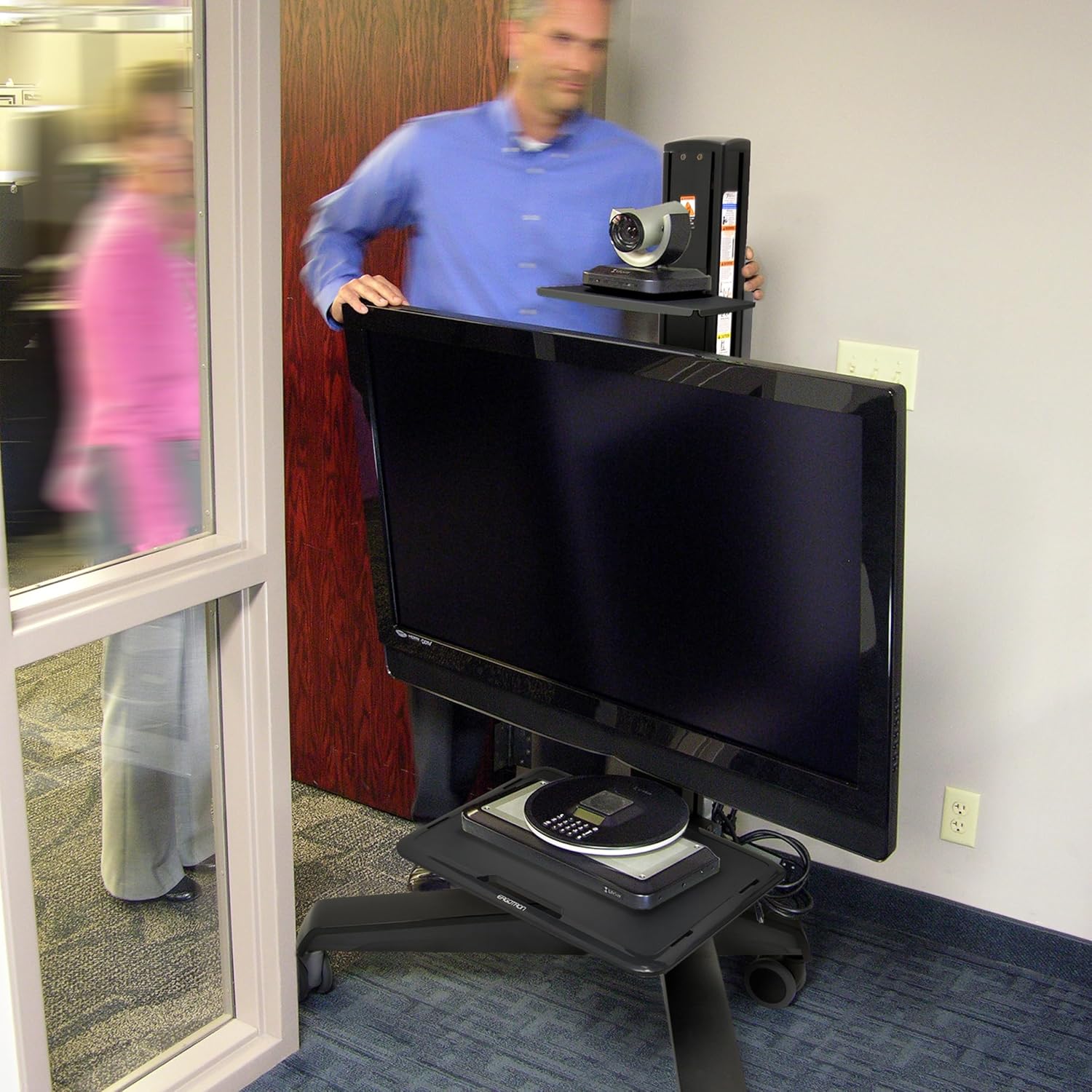


5. Locking Casters
Once the cart is in its desired position, engage the brakes on all casters to prevent unintended movement and ensure stability during use.
Нигоҳдорӣ
- Тозакунӣ: нармро истифода баред, гamp cloth to clean the surfaces of the cart. Avoid abrasive cleaners or solvents.
- Санҷиш: Periodically check all fasteners and connections to ensure they are tight and secure.
- Нигоҳубини кастер: Барои таъмини ғелонидани ҳамвор чархакҳоро аз партовҳо тоза нигоҳ доред.
Мушкилкушо
| Мушкилот | Сабаби эҳтимолӣ | Ҳалли |
|---|---|---|
| Cart is difficult to move. | Caster brakes are engaged. Debris in casters. | Disengage all caster brakes. Clean any debris from the caster wheels. |
| Display feels unstable. | Mounting screws are loose. Display weight exceeds capacity. | Tighten all display mounting screws. Verify display weight is within 50-90 lbs (22.7-40.8 kg). |
| Height adjustment is stiff. | Mechanism requires lubrication or adjustment. | Refer to the full product manual for specific lubrication instructions or contact customer support. |
Мушаххасоти
| Хусусият | Тафсилот |
|---|---|
| Рақами модел | 24-191-085 |
| Display Size Compatibility | То 75 дюйм диагонал |
| Иқтидори вазн | 50 то 90 фунт (22.7 то 40.8 кг) |
| Мутобиқати VESA | 100x100мм то 600х400мм |
| Танзими баландӣ | 20 инч (51 см) |
| Намоиши Тилт | 20 degrees independent tilt |
| Намоиши гардиш | Portrait to Landscape |
| Вазни ашё | 92.6 фунт (42 кг) |
| Материал | Plastic (frame likely metal, but specification says plastic) |
| Ранги | Сиёҳ |
| Навъи васлкунӣ | Монтажи ошёна |
Кафолат ва дастгирӣ
The Ergotron Neo-Flex Mobile MediaCenter VHD comes with a Кафолати 3 сол, ensuring quality and reliability. For technical support, warranty claims, or additional product information, please visit the official Ergotron webсайт ё шӯъбаи хидматрасонии муштариёни онҳо тамос гиред.
Шумо метавонед маълумоти бештар ва захираҳои дастгирӣ тавассути боздид аз сайт пайдо кунед Ergotron Store on Amazon ё ширкати расмии онҳо webсайт.


