1. Муқаддима
The Linksys SE1500 is a 5-Port Fast Ethernet Switch designed to expand your wired network. It allows you to connect up to five devices, such as computers, printers, storage devices, and gaming consoles, at speeds up to 100 Mbps. This device provides a simple and efficient way to add more wired connections to your existing network without complex configuration.

Расми 1: Пеш view of the Linksys SE1500 5-Port Fast Ethernet Switch.
2. Мундариҷаи баста
Боварӣ ҳосил кунед, ки бастаи шумо ҷузъҳои зеринро дар бар мегирад:
- Linksys SE1500 5-Port 10/100 Switch
- Адаптери барқ
- Дастури оғози зуд (ба ин дастур дохил карда нашудааст)
3. Хусусиятҳои маҳсулот
The Linksys SE1500 switch offers the following key features:
- 5 Fast Ethernet Ports: Provides five 10/100 Mbps ports for connecting wired devices.
- Auto-Sensing Ports: Automatically detects and optimizes the speed for each connected device.
- Сифати хизматрасонӣ (QoS): Prioritizes traffic for smooth performance of bandwidth-intensive applications.
- Хусусиятҳои сарфаи барқ: Includes auto power-down for unused ports and a port status switch to disable LED indicators, reducing energy consumption.
- Plug-and-play: Requires no software configuration for basic operation.
4. Дастурамал оид ба насб
Follow these steps to set up your Linksys SE1500 switch:
- Гузаришро ҷойгир кунед: Place the switch on a flat, stable surface or mount it in a suitable location. Ensure adequate ventilation around the device.
- Адаптери барқро пайваст кунед: Plug the included power adapter into the 12V DC port on the back of the switch. Then, plug the other end of the power adapter into a standard electrical outlet. The power LED on the front of the switch should illuminate.
- Ба шабакаи худ пайваст шавед: Connect an Ethernet cable from your router or modem to any of the five numbered Ethernet ports on the back of the SE1500 switch.
- Пайваст кардани дастгоҳҳо: Connect your wired devices (e.g., computer, printer, gaming console) to the remaining Ethernet ports on the switch using Ethernet cables. The switch's auto-sensing ports will automatically detect the connection speed.
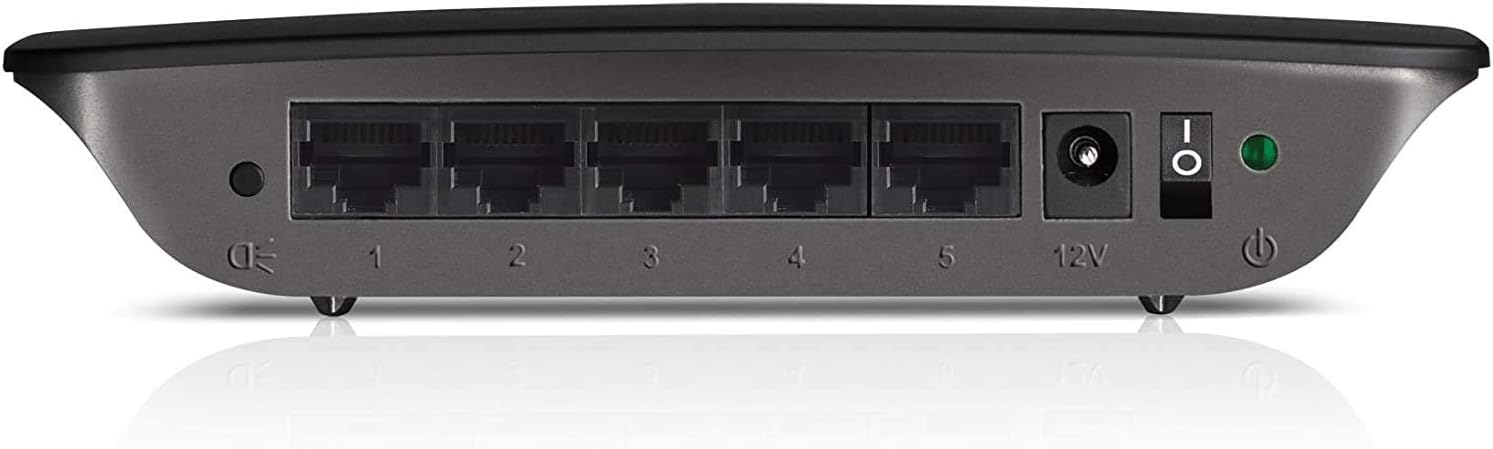
Figure 2: Rear panel of the Linksys SE1500, showing Ethernet ports, power input, and power switch.
5. Дастурҳои истифодабарӣ
The Linksys SE1500 is a plug-and-play device, meaning it typically requires no software configuration. Once connected, it operates automatically.
Нишондиҳандаҳои LED
Панели пеши коммутатор дорои нишондиҳандаҳои LED барои нишон додани маълумот дар бораи вазъият мебошад:
- LED барқ: Вақте ки калид фаъол аст, равшан мешавад.
- LED-ҳои порт (1-5): Each numbered port has an associated LED.
- Сабз сабз: Indicates a successful link connection at 100 Mbps.
- Қаҳранги сахт: Indicates a successful link connection at 10 Mbps.
- Дурахш: Indicates network activity (data transmission).
- Хомӯш: Пайванд пайдо нашуд ё порт ғайрифаъол аст.
Ҳолати сарфаи барқ
The SE1500 automatically enters a power-saving mode when a connected device is turned off or when a port is unused. This feature helps reduce energy consumption. You can also use the port status switch on the rear panel to turn off the port LEDs if desired.
6. Нигоҳдорӣ
To ensure optimal performance and longevity of your Linksys SE1500 switch, consider the following maintenance tips:
- Тоза нигоҳ доред: Regularly wipe the exterior of the switch with a soft, dry cloth. Avoid using liquid cleaners or aerosols.
- Вентилятсияро таъмин кунед: Do not block the ventilation openings on the switch. Ensure it is placed in an area with good airflow to prevent overheating.
- Идоракунии кабелӣ: Keep Ethernet cables neatly organized to prevent accidental disconnections or damage.
- Power Cycle (if needed): If the switch becomes unresponsive, disconnect the power adapter, wait 10 seconds, and then reconnect it.
7. Баррасии мушкилот
If you encounter issues with your Linksys SE1500 switch, try the following troubleshooting steps:
- Не қудрат:
- Боварӣ ҳосил кунед, ки адаптери барқ ба коммутатор ва васлаки барқии корӣ боэътимод пайваст шудааст.
- Verify the power switch on the rear panel is in the "On" position.
- Бе нури пайванд:
- Check that the Ethernet cable is securely connected to both the switch port and the connected device.
- Сими дигари Ethernet-ро санҷед.
- Боварӣ ҳосил кунед, ки дастгоҳи пайвастшуда фаъол аст ва дуруст кор мекунад.
- If the port status switch is off, toggle it to enable the LEDs.
- Суръати сусти шабака:
- Ensure all connected devices and cables support Fast Ethernet (100 Mbps) for optimal performance.
- Check for excessive network traffic or issues with your internet service provider (ISP) or router.
- Пайвастшавии фосилавӣ:
- Inspect Ethernet cables for damage.
- Try connecting devices to different ports on the switch.
- Power cycle the switch, router, and connected devices.
8. Мушаххасоти
| Модели | SE1500 |
| Бренд | Linksys |
| Шумораи портҳо | 5 |
| Навъи интерфейс | RJ45 |
| Меъёри интиқоли маълумот | 10/100 Мбит / сония (Ethernet Fast) |
| Андозаҳои маҳсулот | 4.29 x 6.06 x 1.14 инч |
| Вазни ашё | 5.4 унсия (0.34 фунт) |
| Ранги | Сиёҳ |
| Дастгоҳҳои мувофиқ | Desktop, Gaming Console, Laptop, Printer |
| Компонентҳои дохилшуда | 5-port 10/100 Switch, Power Adapter |
9. Кафолат ва дастгирӣ
For detailed warranty information and technical support, please refer to the documentation included with your purchase or visit the official Linksys support webсайт. Шартҳо ва шартҳои кафолат вобаста ба минтақа метавонанд фарқ кунанд.
Дастгирии Linksys Webсайт: www.linksys.com/support


