Муқаддима
This manual provides detailed instructions for the installation, operation, and maintenance of your GIGABYTE GA-990FXA-UD3 motherboard. Please read this manual thoroughly before proceeding with installation or use to ensure proper functionality and safety.
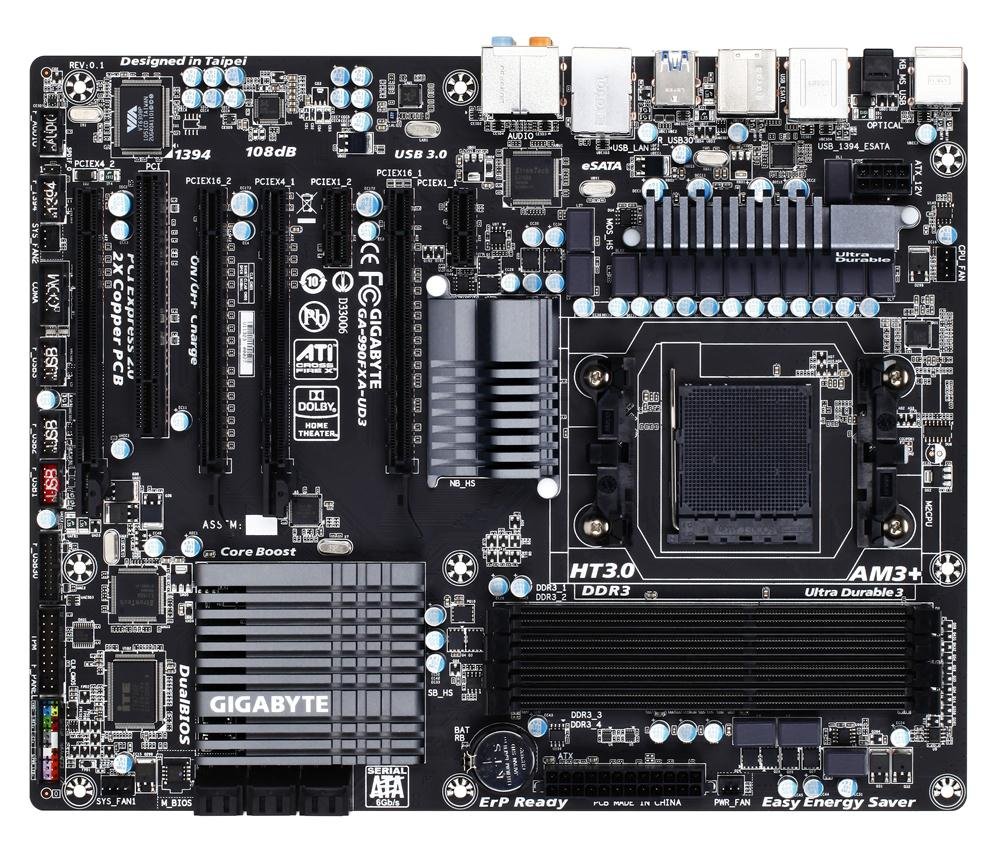
Image showing the GIGABYTE GA-990FXA-UD3 motherboard with its black and gray color scheme, highlighting the CPU socket, DIMM slots, and PCIe slots.
Маҳсулот ба охир расидview
The GIGABYTE GA-990FXA-UD3 is an ATX motherboard designed for AMD AM3+ and AM3 processors. It features the AMD 990FX and SB950 chipsets, offering robust performance and extensive connectivity options for building a high-performance personal computer.
Хусусиятҳои асосӣ:
- Supports AMD AM3+ FX/AM3 Phenom II series processors.
- Advanced 8+2 phase CPU VRM power design for high-TDP CPU support.
- Multiple PCI-E 2.0 interfaces for 2-way AMD CrossFireX and NVIDIA SLI multi-graphics support.
- AMD SB950 provides 6 native SATA 6Gb/s ports with RAID 0, 1, 5, 10 support.
- Integrated USB 3.0 with superfast transfer rates of up to 5 Gbps.
- GIGABYTE 3x USB Power with On/Off Charge USB ports.
- Ultra Durable 3 Classic Technology for enhanced durability and lower operating temperatures.
- Realtek ALC889 codec with High Definition Audio and Dolby Home Theater support.
- Patented DualBIOS with Hybrid EFI technology for 3TB+ HDD support.
Ташкил кардан
Мундариҷаи баста:
Боварӣ ҳосил кунед, ки ҳама ҷузъҳо дар бастаи motherboard шумо мавҷуданд:
- GIGABYTE GA-990FXA-UD3 Motherboard
- Дастури корбар
- Ронандаи CD
- SATA 6Gb/s Cables (typically 2-4)
- I / O Shield
- SLI Bridge Connector (for multi-GPU configurations)
Маълумот дар бораи бехатарӣ:
- Пеш аз насб ё хориҷ кардани ягон қисм, сими барқро аз розеткаи деворӣ ҷудо кунед.
- Барои пешгирии зарари разряди электростатикӣ (ESD) ба ҷузъҳо тасмаи дастони антистатикӣ пӯшед.
- Handle components by their edges and avoid touching pins or circuitry.
- Ensure proper ventilation within your computer case.
Motherboard Layout and Connectors:
Бо пайвасткунакҳо ва ҷузъҳои гуногуни motherboard шинос шавед:
- CPU Socket (AM3+): Located centrally, for installing your AMD processor.
- DDR3 DIMM Sockets: Four 1.5V DDR3 sockets for system memory, supporting up to 32 GB.
- Слотҳои PCI Express x16: Two slots for graphics cards, supporting 2-Way CrossFireX and SLI.
- PCI Express x1/x4 Slots: For expansion cards like sound cards or network adapters.
- PCI Slots: For legacy expansion cards.
- Пайвасткунакҳои SATA 6Gb/s: Six ports for connecting storage devices (HDDs, SSDs).
- Сарлавҳаҳои USB: Internal headers for additional USB 2.0/1.1 and USB 3.0/2.0 ports.
- Сарлавҳаҳои панели пеши: For connecting case buttons, LEDs, and front audio/USB ports.
- Пайвасткунакҳои панели пушти:
- 1 x PS / 2 клавиатура / порти муш
- 1 x пайвасткунаки оптикии S / PDIF берун
- 1 x IEEE 1394 port
- 8 x USB 2.0 / 1.1 порт
- 2 x USB 3.0 / 2.0 порт
- 2 x eSATA 6Gb/s connectors
- 1 x порти RJ-45 LAN
- 6 x сурохии аудио
Қадамҳои насб:
- Омода кардани парванда: Сипари вуруд/хуруҷро дар сӯрохи қафои корпуси компютери худ насб кунед.
- CPU насб кунед: Open the CPU socket lever, align the CPU with the socket (match the golden triangle on the CPU to the triangle on the socket), gently place the CPU into the socket, and close the lever.
- CPU Cooler -ро насб кунед: Барои насб кардани хунуккунандаи CPU ба motherboard, дастурҳои истеҳсолкунандаи хунуккунандаро риоя кунед. Сими вентилятори CPU-ро ба сарлавҳаи CPU_FAN пайваст кунед.
- Модулҳои хотираро насб кунед: Open the clips on the DIMM slots. Align the memory module notch with the slot key, insert the module firmly until the clips snap into place. For dual-channel operation, refer to the motherboard manual for correct slot pairing.
- Монтажи плата: Carefully place the motherboard into the case, aligning the screw holes with the standoffs. Secure the motherboard with screws.
- Install Graphics Card(s): Insert your PCI Express graphics card(s) into the appropriate PCIe x16 slot(s) until it clicks into place. Secure with a screw or retention clip.
- Дастгоҳҳои нигоҳдорӣ насб кунед: Connect your SATA HDDs/SSDs to the SATA 6Gb/s ports using the provided SATA cables.
- Пайваст кардани қувваи барқ: Connect the 24-pin ATX main power connector and the 8-pin ATX 12V power connector from your power supply to the motherboard. Connect power to graphics cards and storage devices.
- Кабелҳои пеши панелро пайваст кунед: Connect the power button, reset button, HDD LED, power LED, and front panel audio/USB cables to their respective headers on the motherboard.
Фаъолият
Setup BIOS:
The BIOS (Basic Input/Output System) is firmware that initializes hardware during the boot process. To enter the BIOS setup utility, press the ДЕЛ key repeatedly during system startup. Here you can configure various system settings such as boot order, date/time, CPU/memory settings, and enable/disable integrated peripherals. The GA-990FXA-UD3 features GIGABYTE's DualBIOS with Hybrid EFI technology, providing redundancy and support for large hard drives.
Насби драйвер:
After installing your operating system, install the necessary drivers for the motherboard's components. You can use the driver CD included in your package or download the latest drivers from the official GIGABYTE webсайт (www.gigabyte.com) for optimal performance and compatibility.
Нигоҳдорӣ
- Тоза нигоҳ доред: Regularly clean dust from the motherboard and components using compressed air. Ensure fans are free of obstructions.
- Навсозии BIOS: GIGABYTE-ро мунтазам тафтиш кунед website for BIOS updates. BIOS updates can improve system stability, add support for new hardware, or fix bugs. Follow GIGABYTE's instructions carefully when updating the BIOS.
- Пайвастҳоро тафтиш кунед: Боварӣ ҳосил кунед, ки ҳамаи симҳои барқӣ, симҳои додаҳо ва кортҳои васеъкунӣ дуруст ҷойгир шудаанд. Пайвастҳои суст метавонанд боиси мушкилоти фосилавӣ шаванд.
Мушкилкушо
- Не қудрат: Ensure the power supply is connected correctly to the motherboard (24-pin and 8-pin connectors) and that the power supply switch is on. Check front panel power button connection.
- Намоиши: Verify that the graphics card is properly seated in its PCIe slot and that all necessary power connectors are attached. Ensure the monitor cable is securely connected to the graphics card.
- Система ба кор намеояд: Check memory modules are correctly installed. Try booting with only one memory module. Verify boot order in BIOS.
- Unexplained Slow Boot Times: Some users have reported slow boot times with this motherboard, even with SSDs. Ensure your BIOS is updated to the latest stable version. Verify that the SSD/HDD is set as the first boot device in the BIOS.
- Linux Compatibility (IOMMU/USB/Network Issues): For Linux users experiencing issues with network or USB 2.0 ports, it may be necessary to disable IOMMU in the BIOS and add "iommu=soft" to your GRUB boot options.
- Overclocking Instability: If overclocking, ensure adequate cooling and gradually increase voltages and frequencies. Refer to online resources and community forums for stable overclocking profiles for your specific CPU and memory.
- Audio Crackling: If experiencing audio crackling, try reinstalling the audio drivers. Ensure no conflicting audio software is running.
Мушаххасоти
| Хусусият | Мушаххасоти |
|---|---|
| Васлаки CPU | Розетка AM3+ |
| Протсессорҳои мувофиқ | AMD AM3+ FX / AM3 Phenom II / Athlon II series processors |
| Чипсет | AMD 990FX / SB950 |
| Хотира | 4 x DDR3 DIMM sockets, up to 32 GB, DDR3 2000(O.C.)/1866/1600/1333/1066 MHz |
| Ҷойҳои васеъ | 2 x PCI Express x16, 1 x PCI Express x4, 2 x PCI Express x1, 1 x PCI |
| Интерфейси нигаҳдорӣ | 6 x SATA 6Gb/s (RAID 0, 1, 5, 10, JBOD), 2 x eSATA 6Gb/s (RAID 0, 1) |
| Портҳои USB | Up to 14 x USB 2.0/1.1, Up to 4 x USB 3.0/2.0 |
| Аудио | Realtek ALC889 codec, High Definition Audio, Dolby Home Theater, 2/4/5.1/7.1-channel |
| LAN | 10/100/1000 Мбит |
| Формаи форма | ATX |
| Андозаҳо | 13 x 11 x 3 инч (Андозаҳои маҳсулот) |
| Вазн | 3.6 фунт |
Кафолат ва дастгирӣ
Маҳсулоти GIGABYTE бо кафолати маҳдуд фаро гирифта шудаанд. Лутфан, ба корти кафолатие, ки бо маҳсулоти шумо дода шудааст, муроҷиат кунед ё ба вебсайти расмии GIGABYTE муроҷиат кунед. website for detailed warranty terms and conditions. For technical support, driver downloads, and further assistance, please visit the GIGABYTE support page at www.gigabyte.com/Support.