Муқаддима
Ташаккур ба шумо барои харидasing the Denver CR-CD211 Radio Alarm Clock. This device combines a digital alarm clock with a radio tuner, a front-loading CD player, and a convenient time projection feature. This manual provides detailed instructions for setup, operation, and maintenance to ensure optimal performance and longevity of your product.
Маълумоти муҳим оид ба бехатарӣ
- Read all instructions carefully before use and retain them for future reference.
- Барои пешгирии сӯхтор ё зарбаи барқ дастгоҳро зери борон ё намӣ нагузоред.
- Боварӣ ҳосил кунед, ки сими барқ фишурда нашудааст ё дар болои он роҳ намеравад.
- Ягон сӯрохиҳои вентилятсияро маҳкам накунед. Мувофиқи дастурҳои истеҳсолкунанда насб кунед.
- Танҳо замимаҳо/ лавозимотҳои аз ҷониби истеҳсолкунанда муайяншударо истифода баред.
- Ҳангоми тӯфони барқӣ ё дар муддати тӯлонӣ истифода нашудани ин дастгоҳро аз розетка ҷудо кунед.
- Ҳама хидматҳоро ба кормандони босалоҳияти хидматрасонӣ супоред. Хизматрасонӣ вақте лозим аст, ки дастгоҳ бо ягон роҳ осеб дида бошад.
Маҳсулот ба охир расидview
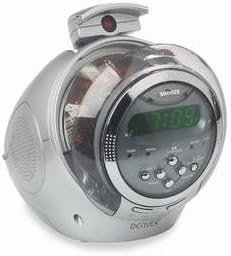
Тавсифи тасвир: A silver-colored Denver CR-CD211 radio alarm clock. The device has a rounded, futuristic design with a clear plastic dome covering the CD player compartment. The front features a digital display showing '7:09' in green, surrounded by control buttons for functions like 'SNOOZE', 'ALARM', 'SET', 'TUNING', and 'VOLUME'. A small projector arm extends from the top, capable of rotating to project the time. A speaker grille is visible on the left side. The overall appearance is compact and modern, designed for a bedside table or desk.
The Denver CR-CD211 is a versatile bedside companion. Its key features include:
- Намоиши соати рақамӣ: Clear, easy-to-read digital time display.
- FM/AM Radio Tuner: For listening to your favorite radio stations.
- Front-Loading CD Player: Compatible with standard audio CDs.
- Функсияи ҳушдор дугона: Wake up to radio or buzzer.
- Пешгӯии вақт: Project the current time onto a wall or ceiling.
- Функсияи ҳифз: Temporarily pause your alarm.
Ташкил кардан
1. Пайвастшавии барқ
- Дастгоҳро аз баста кушоед ва онро дар сатҳи ҳамвор ва устувор ҷойгир кунед.
- Connect the AC power adapter (if included) or power cord to the DC IN jack on the back of the unit.
- Plug the other end of the power cord into a standard wall outlet. The display should light up.
- Optional Backup Batteries: For maintaining time settings during power outages, locate the battery compartment (usually on the bottom or back) and insert 2 x AAA batteries (not included), observing correct polarity.
2. Муқаррар кардани вақт
- -ро пахш карда нигоҳ доред Вақти таъиншуда button (or similar, refer to your unit's specific button layout). The hour digits will begin to flash.
- -ро истифода баред СОАТ ва ДАКИКА buttons (or TUNING +/- buttons) to adjust the hour and minute respectively.
- пахш кунед Вақти таъиншуда бори дигар барои тасдиқи вақт.
Дастурҳои амалиётӣ
1. Амалиёти радио
- -ро пахш кунед КУВВА тугма барои фаъол кардани агрегат.
- -ро пахш кунед ФУНКЦИЯ/РЕЖИМ button repeatedly until 'RADIO' or the radio frequency is displayed.
- -ро истифода баред TUNING +/- buttons to manually tune to your desired station.
- For automatic scanning, press and hold the TUNING +/- button for a few seconds. The radio will scan and stop at the next strong station.
- Баландии овозро бо ёрии ҲАҶМ +/- тугмаҳо.
2. Фаъолияти плеери CD
- -ро пахш кунед КУВВА тугма барои фаъол кардани агрегат.
- -ро пахш кунед ФУНКЦИЯ/РЕЖИМ button repeatedly until 'CD' is displayed.
- Gently open the CD compartment cover (if applicable) or insert a CD into the front-loading slot with the label side facing up.
- The CD player will automatically start playing the first track. If not, press the Бозӣ/Таваққуф тугма.
- -ро истифода баред ГУЗАРЕД +/- тугмаҳо барои паймоиш байни трекҳо.
- пахш кунед Бозӣ/Таваққуф барои таваққуф ё идомаи навозиш.
- -ро пахш кунед ИСТ тугма барои қатъ кардани навозиш.
3. Танзими ҳушдор
The CR-CD211 typically features two independent alarms (Alarm 1 and Alarm 2).
- -ро пахш карда нигоҳ доред БОНГОР 1 СИСТЕМА тугмаи (ё БОНГОХ button and then select Alarm 1). The alarm hour digits will flash.
- -ро истифода баред СОАТ ва ДАКИКА тугмаҳои барои таъин кардани вақти ҳушдор дилхоҳ.
- пахш кунед БОНГОР 1 СИСТЕМА бори дигар барои тасдиқи вақт.
- Next, select the alarm source: Press the ALARM 1 MODE button (or similar) repeatedly to cycle through options: БУЗЗЕР, РАДИО, ё ХОМӮШ.
- Барои такрор кунед Ҳушдори 2 агар хоҳед.
4. Функсияи таъхир
Вақте ки ҳушдор садо медиҳад, тугмаи калонро пахш кунед СНООЗ button (usually located on top of the unit). The alarm will temporarily stop and sound again after approximately 9 minutes.
5. Пешгӯии вақт
- Locate the projector arm on top of the unit.
- Adjust the angle of the projector arm to direct the time display onto a wall or ceiling.
- -ро истифода баред ДИККАТ wheel (if available, usually on the projector arm) to sharpen the projected image.
- -ро пахш кунед ДУРУСТ/ФУРӮШ button (or similar) to activate or deactivate the projection.
- Some models may have a FLIP button to rotate the projected image 180 degrees.
Нигоҳдорӣ
- Тозакунӣ: Дастгоҳро бо матои мулоим ва хушк пок кунед. Тозакунанда ё ҳалкунандаҳои абразивиро истифода набаред.
- Нигоҳубини плеери CD: Handle CDs by their edges. Keep the CD compartment clean and free of dust. Do not attempt to clean the CD lens yourself.
- Вентилятсия: Боварӣ ҳосил кунед, ки сӯрохиҳои вентилятсия баста нашудаанд, то аз ҳад зиёд гармшавиро пешгирӣ кунанд.
Мушкилкушо
| Мушкилот | Сабаби эҳтимолӣ | Ҳалли |
|---|---|---|
| Дастгоҳ фаъол нест. | Сими барқ дуруст пайваст нашудааст. | Пайвастагии сими барқро ба дастгоҳ ва васлаки деворӣ тафтиш кунед. |
| Огоҳӣ садо намедиҳад. | Alarm not set correctly; Alarm volume too low; Alarm mode set to OFF. | Verify alarm time and mode (Buzzer/Radio). Increase alarm volume. Ensure alarm is activated. |
| Кабули радио бад. | Антенна дуруст дароз карда нашудааст ё ҷойгир нашудааст; Халалрасонӣ. | Extend and adjust the position of the FM wire antenna. Try moving the unit to a different location away from other electronic devices. |
| CD бозӣ намекунад ё намегузарад. | CD is dirty or scratched; CD inserted incorrectly; CD format not supported. | Clean the CD with a soft cloth. Re-insert the CD with the label side up. Ensure it is an audio CD. |
| Time projection is blurry or not visible. | Focus not adjusted; Projector angle incorrect; Room too bright. | Adjust the focus wheel on the projector. Reposition the projector arm. Ensure the room is sufficiently dark. |
Мушаххасоти
- Бренд: Денвер
- Модели: CR-CD211
- Манбаи нерӯ: Electric (AC power adapter), Optional Battery Backup (AAA batteries, not included)
- Навъи намоиш: Рақамӣ
- Мавод: Пластмасса
- Андозаҳо (тақрибан): 26.8 х 20.8 х 20.2 см
- Вазн (тақрибан): 1.7 кг
- Хусусиятҳои махсус: Radio, CD Player, Alarm Clock, Time Projection
Кафолат ва дастгирӣ
For warranty information and technical support, please refer to the warranty card included with your product or contact your local Denver retailer or service center. Keep your proof of purchase for warranty claims.


