1. Муқаддима
This manual provides comprehensive instructions for the setup, operation, and maintenance of your InFocus IN124 DLP Projector. Please read this manual thoroughly before using the projector to ensure proper functionality and to maximize its lifespan.
The InFocus IN124 is designed to deliver clear and bright projections, suitable for various environments including home cinema and business presentations. Its compact design and robust features make it a versatile display solution.
2. Қисмҳои маҳсулот
Upon unboxing your InFocus IN124 DLP Projector, please verify that all the following components are included:
- InFocus IN124 DLP Projector Unit
- Назорати дурдаст
- Кабели барқ
- VGA Cable (may vary by region/package)
- User Manual (this document, typically on CD or downloadable)
If any items are missing or damaged, please contact InFocus customer support immediately.
3. Танзимот
3.1 Ҷойгиркунии ҷисмонӣ
Position the projector on a stable, flat surface or mount it securely to a ceiling. Ensure adequate ventilation around the unit to prevent overheating. Maintain a clear path between the projector lens and the projection surface (screen or wall).
3.2 Дастгоҳҳои пайвастшавӣ
The InFocus IN124 supports various input sources. Connect your source device (e.g., laptop, DVD player, gaming console) to the projector using the appropriate cable.
- HDMI: Барои видео ва аудиои рақамии баландсифат. Сими HDMI-ро аз дастгоҳи манбаи худ ба порти HDMI дар проектор пайваст кунед.
- VGA: For analog video input, commonly used with computers. Connect a VGA cable from your computer's VGA output to the VGA input on the projector.
- Видеои таркиби: For standard definition video. Connect a composite video cable (yellow RCA) to the corresponding port.
- Ворид/баромади аудио: Connect external audio devices if needed.
3.3 Фаъолсозии барқ
Пас аз пайваст кардани ҳамаи кабелҳои зарурӣ:
- Сими барқро ба проектор ва сипас ба розетка пайваст кунед.
- Press the power button on the projector's control panel or the remote control. The power indicator light will change, and the projector lamp мунаввар хоҳад кард.
- Allow a few moments for the projector to warm up and display the image.
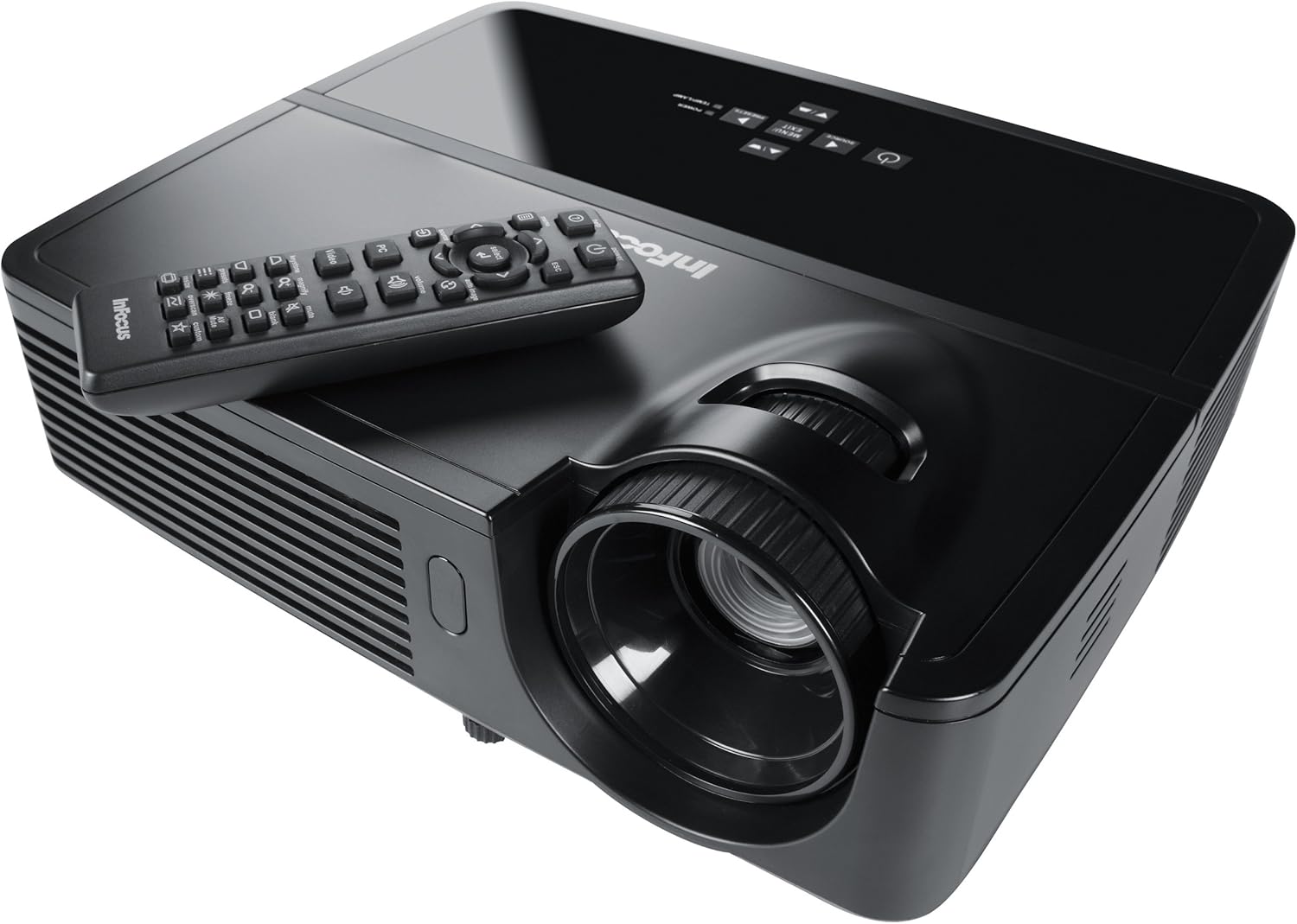
Figure 1: InFocus IN124 DLP Projector with its remote control. The image shows the top-down view of the black projector unit, highlighting the lens, ventilation grilles, and the control panel. The remote control is placed on top of the projector.
4. Истифода бурдани проектор
4.1 Идоракунии асосӣ
The projector can be operated using the control panel on the unit or the included remote control.
- Тугмаи барқ: Проекторро фаъол ё хомӯш мекунад.
- Тугмаи манбаъ: Cycles through available input sources (HDMI, VGA, Video).
- Тугмаи меню: Accesses the on-screen display (OSD) menu for settings adjustments.
- Тугмаҳои тирча: Дар менюи танзимот паймоиш кунед ва арзишҳоро танзим кунед.
- Тугмаи Ворид/Интихоб: Интихобҳоро дар меню тасдиқ мекунад.
- Тугмаҳои баландии овоз: Сатҳи баромади аудиоро танзим мекунад.
- Ислоҳи санги калидӣ: Adjusts the image shape to correct trapezoidal distortion.
- Ҳалқаи фокусӣ: Manually adjust the lens to sharpen the image.
4.2 Менюи Навигатсия ва Танзимот
Press the "Menu" button to open the On-Screen Display (OSD). Use the arrow keys to navigate through categories such as "Picture," "Display," "Setup," and "Advanced." Press "Enter" to select a category or option. Adjust settings like brightness, contrast, color temperature, aspect ratio, and resolution to optimize your viewтаҷрибаи ғанӣ.
4.3 Функсияи сеченака
The InFocus IN124 is 3D-ready. To experience 3D content, you will need compatible 3D source material, a 3D-capable player, and active DLP Link 3D glasses (sold separately). Refer to your 3D source device's manual for specific setup instructions.
5. Нигоҳдорӣ
Нигоҳдории мунтазам кори беҳтаринро таъмин мекунад ва мӯҳлати кори проекторро дароз мекунад.
5.1 Тоза кардани линза
Use a soft, lint-free cloth specifically designed for optical lenses. Gently wipe the lens surface to remove dust or smudges. Avoid using abrasive cleaners or excessive force, which can scratch the lens.
5.2 Тоза кардани филтрҳои ҳаво
The projector has air filters to prevent dust from entering the internal components. Locate the filter cover (refer to the diagram in the full manual if available) and remove it. Clean the filter using a small brush or a vacuum cleaner with a brush attachment. Replace the filter securely.
5.3 Лamp Иваз кардан
Проектор Лamp умри маҳдуд дорад. Вакте ки лamp чароғи индикатор фурӯзон мешавад ё тасвир хира мешавад, вақти иваз кардани лamp. Always allow the projector to cool down completely before attempting lamp replacement. Consult the full service manual or a qualified technician for detailed lamp replacement procedures specific to the IN124 model.
6. Баррасии мушкилот
Ин бахш масъалаҳои умумиеро, ки шумо бо проекторатон дучор шуда метавонед, баррасӣ мекунад.
| Мушкилот | Сабаби эҳтимолӣ | Ҳалли |
|---|---|---|
| Ягон тасвир нишон дода нашудааст | Incorrect input source selected; Loose cable connection; Projector not powered on. | Press the "Source" button to cycle inputs; Check all cable connections; Ensure projector is powered on and lamp фурӯзон аст. |
| Тасвир норавшан аст | Out of focus; Incorrect resolution setting. | Adjust the focus ring on the lens; Adjust the resolution setting in the OSD menu or on your source device. |
| Тасвир трапеция аст | Проектор ба экран перпендикуляр нест. | Use the keystone correction feature (digital or manual) to square the image. Reposition the projector if possible. |
| Аудио нест | Volume too low; Incorrect audio input selected; Muted. | Increase volume; Check audio cable connections; Ensure projector or source device is not muted. |
| Проектор аз ҳад зиёд гарм мешавад ва хомӯш мешавад | вентилятсияи басташуда; Филтри ҳавои ифлос. | Ensure clear space around vents; Clean air filter as per maintenance section. |
For issues not listed here, please refer to the comprehensive online support resources or contact InFocus customer service.
7. Мушаххасоти
Below are the key technical specifications for the InFocus IN124 DLP Projector:
| Хусусият | Тафсилот |
|---|---|
| Рақами модел | IN124 |
| Технологияи намоиш | DLP |
| Қарори ватанӣ | 1280x720 (HD) |
| Равшанӣ | То 3200 Lumens |
| Таносуби контраст | 3000:1 |
| Пайвастшавӣ | HDMI, VGA, Composite Video |
| Хусусиятҳои махсус | 3D-тайёр |
| Андозаҳои маҳсулот (L x W x H) | 12.99 x 12.99 x 5.9 инч |
| Вазни ашё | 4.78 фунт (2.17 кг) |
| Таъмини нерӯ | 100-240 Volts at 50-60 Hz |
| Истифодаи тавсияшаванда | Кинотеатри хонагй |
8. Кафолат ва дастгирӣ
InFocus provides a limited warranty for the IN124 DLP Projector. For detailed warranty terms and conditions, please refer to the warranty card included with your product or visit the official InFocus webсайт. Квитансияи хариди худро ҳамчун далели харид барои даъвоҳои кафолат нигоҳ доред.
For technical support, troubleshooting assistance beyond this manual, or service requests, please contact InFocus customer support through their official website or the contact information provided in your product documentation. Online resources, including FAQs and driver downloads, may also be available.


