Маҳсулот ба охир расидview
The iSound Twist Portable Bluetooth Wireless Speaker offers a unique design combined with superior sound quality. Its compact form factor allows for portability, while its advanced features enable wireless music streaming and hands-free calling. The speaker features full stereo sound with 6 watts total output from two 40mm drivers and a passive radiator for enhanced bass.
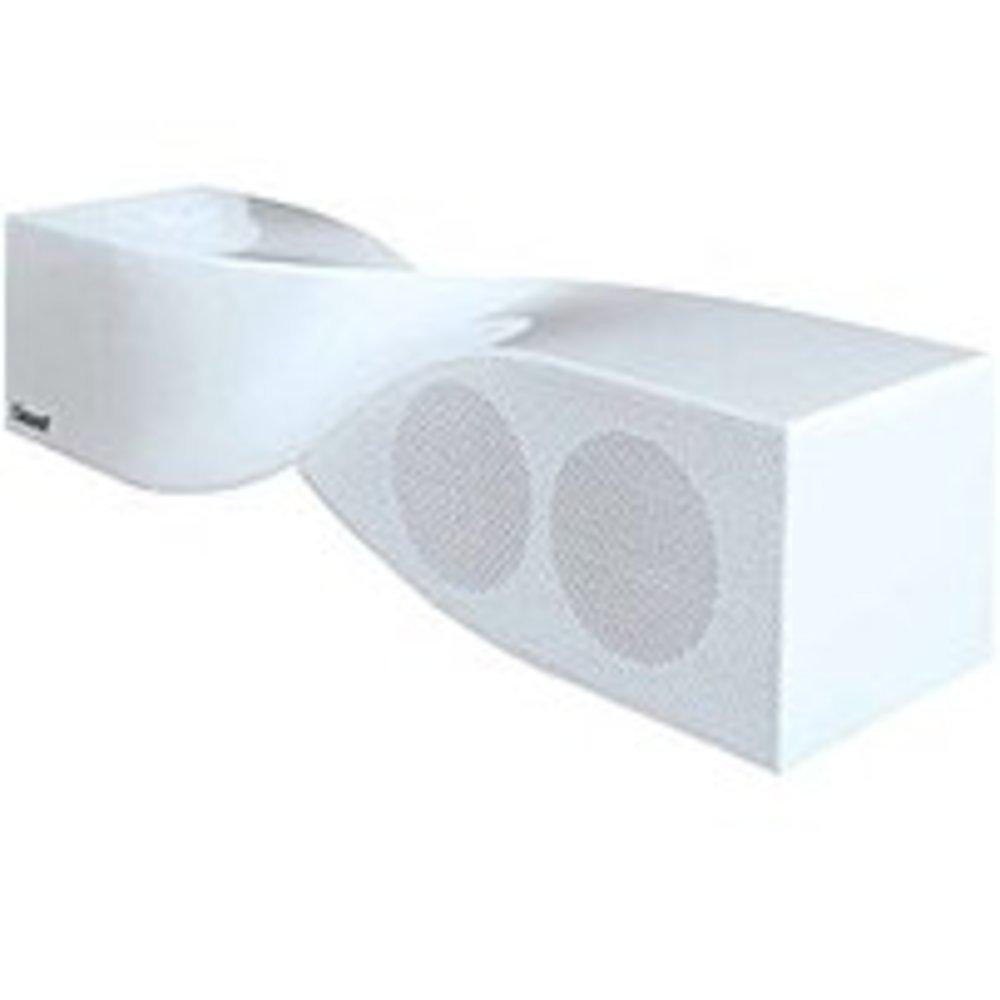
Image: The iSound Twist Portable Bluetooth Wireless Speaker in white, showcasing its unique twisted design.
Мундариҷаи баста
- iSound Twist Portable Bluetooth Wireless Speaker
- Сими пуркунандаи USB
- 3.5mm AUX Input Cable
- Дастури корбар (ин ҳуҷҷат)
Ташкил кардан
1. Барқдиҳии баландгӯяк
Before initial use, fully charge the iSound Twist speaker. Connect the provided USB charging cable to the speaker's USB charging port and the other end to a powered USB source (e.g., computer, USB wall adapter). The charging indicator light will illuminate during charging and turn off when fully charged. A full charge provides up to 5 hours of continuous play.

Image: Rear panel of the speaker, highlighting the USB charging port, ON/OFF switch, and AUX IN port.
2. Фурӯзон/хомӯшкунӣ
Locate the ON/OFF switch on the rear panel of the speaker. Slide the switch to the "ON" position to power on the device. Slide it to the "OFF" position to power off.
3. Ҷуфти Bluetooth
- Ensure the speaker is powered on and within close proximity to your Bluetooth-enabled device (e.g., smartphone, tablet, laptop).
- The speaker will automatically enter Bluetooth pairing mode. A blue indicator light will flash, indicating it is discoverable.
- Дар дастгоҳи худ, ба танзимоти Bluetooth равед ва Bluetooth-ро фаъол созед.
- Ҷустуҷӯ available devices. The iSound Twist speaker should appear in the list, typically named "iSound Twist" or similar.
- Select the speaker from the list to initiate pairing. If prompted for a password, enter "0000".
- Once successfully paired, the blue indicator light on the speaker will stop flashing and remain solid. You will hear an audible confirmation.
- Your device is now connected, and you can stream audio wirelessly.
4. Пайвастани вуруди AUX
For devices without Bluetooth capability, or if you prefer a wired connection, use the provided 3.5mm AUX cable.
- Connect one end of the 3.5mm AUX cable to the AUX IN port on the rear of the speaker.
- Connect the other end of the cable to the headphone jack or audio output port of your audio device.
- Баландгӯяк ба таври худкор ба ҳолати вуруди AUX мегузарад.
Дастурҳои амалиётӣ
Функсияҳои панели идоракунӣ
The speaker features onboard controls located on its top surface for convenient operation.
- Тугмаи барқ / ҳолат: Press and hold to power on/off. Short press to switch between Bluetooth and AUX modes.
- Тугмаи бозӣ/Таваққуф/Зангзанӣ: Short press to play or pause music. During an incoming call, short press to answer or end the call. Press and hold to reject an incoming call.
- Баланд бардоштани овоз/Тугмаи пайгирии навбатӣ: Short press to increase volume. Press and hold to skip to the next track.
- Паст кардани овоз/Тугмаи пайгирии қаблӣ: Барои кам кардани баландии овоз, пахши кӯтоҳ кунед. Барои гузаштан ба треки қаблӣ пахш карда нигоҳ доред.
Зангҳои дастӣ
When connected via Bluetooth, the iSound Twist speaker's built-in microphone allows for hands-free phone calls.
- Ҷавоб додан ба занг: When a call comes in, the music will pause. Press the Play/Pause/Call button once to answer.
- Анҷом додани занг: During a call, press the Play/Pause/Call button once to end the call.
- Радди занг: Барои рад кардани занги даромад тугмаи Навозиш/Таваққуф/Зангро пахш карда нигоҳ доред.
Нигоҳдорӣ
- Динамикро аз об, намӣ ва ҳарорати аз ҳад зиёд дур нигоҳ доред.
- Динамикро бо матои мулоим ва хушк тоза кунед. Тозакунанда ё ҳалкунандаҳои абразивиро истифода набаред.
- Нагузоред, ки баландгӯякро афтонед ё ба таъсири сахт дучор кунед.
- Вақте ки шумо муддати тӯлонӣ истифода намебаред, баландгӯякро дар ҷои хунук ва хушк нигоҳ доред ва онро мунтазам пур кунед, то ҳолати батареяро нигоҳ доред.
Мушкилкушо
| Мушкилот | Ҳалли |
|---|---|
| Баландгӯяк фаъол нест. | Боварӣ ҳосил кунед, ки батарея пур шудааст. Баландгӯякро бо истифода аз сими USB ба манбаи барқ пайваст кунед ва дубора кӯшиш кунед. |
| Тавассути Bluetooth пайваст карда намешавад. |
|
| Овоз нест ё садои паст. |
|
| Сифати занг паст аст. |
|
Мушаххасоти
| Хусусият | Тафсилот |
|---|---|
| Номи модел | ISOUND-1691 |
| Бренд | iSound |
| Навъи баландгӯяк | Манора |
| Хусусияти махсус | Микрофони дарунсохт |
| Истифодаи тавсияшаванда | For Smartphones or Tablets, Music Players |
| Дастгоҳҳои мувофиқ | Desktop, Laptop, MP3 Player, Projector, Smartphone, Tablet, Television |
| Танзимоти канали садои атроф | 2.0 |
| Ранги | Сафед |
| Вазни ашё | 13.6 унция |
| Обногузар аст | ДУРУГ |
| Технологияи алоқаи бесим | блутуз |
| Андозаи баландгӯяк | 0.75 инч |
| Манбаи нерӯ | Батареяе |
| Шумораи батареяҳо | 1 батареяи литий-ион лозим аст. (дохил карда шудааст) |
| Навъи драйвери аудио | Ронандаи динамикӣ |
| Андозаи драйвери аудио | 40 миллиметр |
| Андозаҳои маҳсулот | 5 x 4 x 11.75 инч |
| Баландгӯяк Максимум қудрати баромади | 6 Ватт |
| Технологияи пайвастшавӣ | Бесимӣ |
| Ҳолати баромади аудио | Стерео |
| Навъи васлкунӣ | Монтажи болои миз |
Видеои расмии маҳсулот
Video: Official product video for the iSound Twist Bluetooth Speaker, demonstrating its features and design. This video showcases the speaker's ability to stream audio from various devices and handle calls.
Кафолат ва дастгирӣ
The iSound Twist Portable Bluetooth Wireless Speaker comes with a Кафолати маҳдуд. For specific warranty terms, conditions, and support inquiries, please refer to the warranty card included in your product packaging or visit the official iSound webсайт.
For further assistance, please contact iSound customer support.


