1. Дастурҳои муҳим оид ба бехатарӣ
Please read these instructions carefully before operating the unit and retain them for future reference. Following these guidelines will ensure safe and proper use of your GPX R602B radio.
- Об ва намӣ: Do not use this apparatus near water. Avoid exposure to rain or moisture.
- Сарчашмаҳои гармӣ: Дар наздикии ягон манбаъҳои гармӣ, аз қабили радиаторҳо, регистрҳои гармидиҳӣ, плитаҳо ё дигар дастгоҳҳо (аз ҷумла ampлифтҳо), ки гармӣ истеҳсол мекунанд.
- Вентилятсия: Вентилятсияи дурустро таъмин кунед. Ягон сӯрохиҳои вентилятсияро маҳкам накунед.
- Манбаъҳои нерӯ: Operate only from the type of power source indicated on the marking label.
- Тозакунӣ: Танҳо бо матои хушк тоза кунед.
- Замимаҳо: Танҳо замимаҳо/ҷисмҳои муайянкардаи истеҳсолкунандаро истифода баред.
- Хизматрасонӣ: Ҳама хидматрасониро ба кормандони соҳибихтисос муроҷиат кунед. Хизматрасонӣ ҳангоме лозим аст, ки дастгоҳ бо ягон роҳ осеб дида бошад, масалан, сими таъминкунандаи барқ ё васлаки вайроншуда, рехтани моеъ ё ба дохили дастгоҳ афтодани ашё, зери борон ё намӣ дучор шудани дастгоҳ, ба таври мӯътадил кор намекунад. , ё партофта шудааст.
Бехатарии батарея
- Батареяҳои кӯҳна ва навро омехта накунед.
- Батареяҳои сілтӣ, стандартӣ (карбон-синк) ё барқгиранда (никель-кадмий) омехта накунед.
- Insert batteries correctly, observing the + and - polarities.
- Батареяҳои тамомшударо фавран хориҷ кунед.
- Батареяҳоро дуруст партояд. Сӯзон накунед.
2. Хусусиятҳо
The GPX R602B Portable AM/FM Radio offers a range of features designed for convenience and versatility:
- Portable AM/FM radio with a built-in handle for easy transport.
- Integrated speakers with analog volume control and durable metal grills.
- Digital clock with user-friendly setting buttons.
- Operates using the built-in AC power cable.
- Can also be powered by 3 C batteries (sold separately) for portable use.
- 3.5mm audio line input jack for connecting external audio devices.
- Telescopic antenna for improved FM reception.
- Stereo headphone jack for private listening.

Figure 2.1: Key features and connection points of the GPX R602B radio.
3. Мундариҷаи баста
Upon unpacking your GPX R602B radio, please ensure all the following items are present:
- GPX R602B Portable AM/FM Radio Unit
- Дастури молик
- Built-in AC Power Adapter
4. Назорат ва нишондиҳандаҳо
Familiarize yourself with the controls and indicators on your radio for optimal operation.
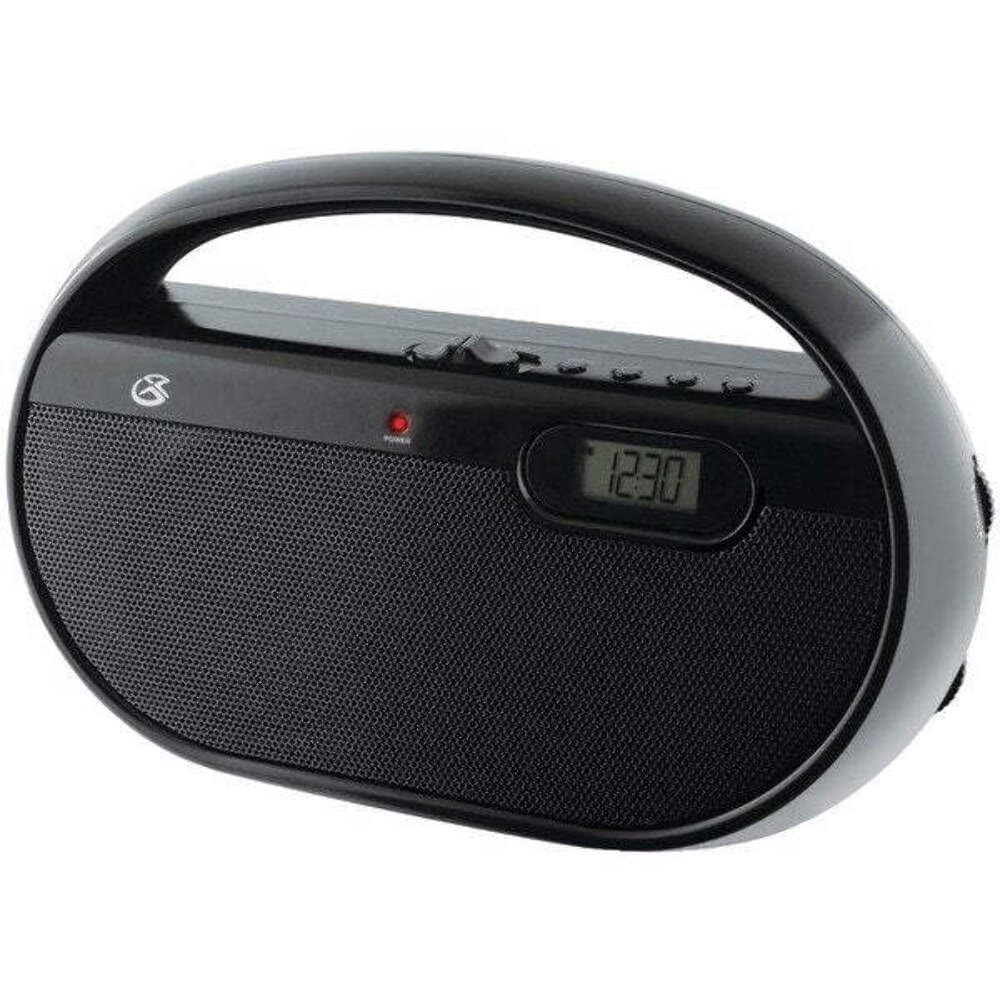
Расми 4.1: Пеш view of the GPX R602B radio.
Control Layout (Refer to Figure 4.1)
- Тугмаи барқ/ҳаҷм: Rotates to turn the unit ON/OFF and adjust the volume level.
- Тугмаи танзим: Rotates to select AM or FM radio stations.
- Калиди интихоби банд: Slides to select between AM and FM radio bands.
- Намоиши рақамӣ: Shows the current time or radio frequency.
- Set Time Button: Used in conjunction with H/M buttons to set the clock.
- H/M Buttons: Used to adjust hours and minutes when setting the clock.
- Display Time Button: Briefly shows the time when the radio is playing.
- Aux In Jack (3.5mm): Дастгоҳҳои аудиоии берунаро пайваст кунед.
- Ҷойи гӯшмонак (3.5 мм): Барои гӯш кардани гӯшии хусусӣ гӯшмонакҳоро пайваст кунед.
- Антенаи телескопии FM: Extend and adjust for optimal FM reception.
5. Қувваи барқ
The GPX R602B radio can be powered by either AC power or batteries.
Амалиёти барқии AC
- Locate the built-in AC power cord. This cord is typically stored in the battery compartment when not in use.
- Plug the AC power cord into a standard wall outlet (120V AC, 60Hz).
- Холо агрегат ба кор омода аст.
Фаъолияти қувваи батарея
For portable use, the radio requires 3 'C' size batteries (not included).
- Сарпӯши қисмати батареяро, ки дар қафои дастгоҳ ҷойгир аст, кушоед.
- Insert 3 'C' size batteries, ensuring the correct polarity (+ and -) as indicated inside the compartment.
- Сарпӯши қисмати батареяро бехатар пӯшед.
- The unit is now ready for battery-powered operation.

Figure 5.1: Power options for the GPX R602B radio.
6. Танзимот ва амалиёти асосӣ
Танзимоти ибтидоӣ
- Пайвасти барқ: Connect the radio to AC power or insert batteries as described in Section 5.
- Танзими антенна: For FM reception, extend the telescopic antenna fully. For AM reception, the unit has a built-in antenna, so no external adjustment is needed. Position the unit for best AM reception.
Идоракунии радио
- Даргирондан: Rotate the Power/Volume knob clockwise until it clicks and the unit powers on.
- Бандро интихоб кунед: Slide the Band Selector switch to either AM or FM.
- Истгоҳи танзим: Rotate the Tuning knob to find your desired radio station. The frequency will be displayed on the digital screen.
- Танзими овоз: Rotate the Power/Volume knob to adjust the sound level.
- Хомӯш кардан: Rotate the Power/Volume knob counter-clockwise until it clicks and the unit powers off.
Using the Line Input (Aux In)
You can connect external audio devices, such as smartphones or MP3 players, to play audio through the radio's speakers.
- Connect a 3.5mm audio cable (not included) from the headphone jack or line-out jack of your external device to the Aux In jack on the radio.
- Turn on the radio and your external device.
- Adjust the volume on both the radio and your external device for optimal sound.

Figure 6.1: Devices compatible with the Aux In feature.
Истифодаи гӯшмонакҳо
For private listening, plug standard 3.5mm headphones (not included) into the Headphone Jack. The internal speakers will automatically mute.
Танзими соати рақамӣ
The digital clock can be set when the radio is turned off.
- Ensure the radio is turned OFF using the Power/Volume knob.
- Ҳардуро пахш кунед ва нигоҳ доред Вақтро таъин кунед тугма ва Х/М тугмаи ҳамзамон.
- Ҳангоми нигоҳ доштани Вақтро таъин кунед button, repeatedly press the Х/М button to adjust the hour and then the minutes.
- -ро озод кунед Вақтро таъин кунед button once the desired time is set.
- Ба view the time while the radio is playing, press the Вақти намоиш button. The time will appear briefly on the digital display.
7. Нигоҳдорӣ
Proper care and maintenance will ensure the longevity of your GPX R602B radio.
- Тозакунӣ: Қисми берунии дастгоҳро бо матои мулоим ва хушк пок кунед. Тозакунакҳои абразивӣ, мумҳо ва ҳалкунандаҳоро истифода набаред.
- Иваз кардани батарея: If using batteries, replace all three 'C' batteries when the unit's performance diminishes. Always replace with new batteries of the same type.
- Нигоҳдорӣ: If storing the unit for an extended period, remove the batteries to prevent leakage and corrosion.
8. Баррасии мушкилот
If you encounter issues with your GPX R602B radio, refer to the following common problems and solutions:
| Мушкилот | Сабаби эҳтимолӣ | Ҳалли |
|---|---|---|
| Не қудрат | AC cord not plugged in; Batteries exhausted or incorrectly inserted. | Ensure AC cord is securely plugged into a live outlet. Replace batteries with new ones, checking polarity. |
| Кабули радио бад | Antenna not extended (FM); Unit poorly positioned (AM); Weak signal. | Extend and adjust the telescopic FM antenna. For AM, rotate the unit for better reception. Try moving the radio to a different location. |
| Аз баландгӯякҳо садое нест | Садои овоз хеле паст аст; Гӯшмонакҳо пайваст карда шудаанд. | Increase the volume using the Power/Volume knob. Disconnect headphones if not desired. |
| Clock not setting correctly | Силсилаи нодурусти тугмаҳо. | Ensure the radio is OFF. Press and hold both 'Set Time' and 'H/M' buttons simultaneously, then repeatedly press 'H/M' to adjust. Release 'Set Time' when done. |
| Овоз таҳрифшуда ё норавшан | Volume too high; Poor reception; External device volume too high. | Lower the volume. Adjust antenna or unit position for better reception. If using Aux In, adjust volume on the external device. |
9. Мушаххасоти
Detailed technical specifications for the GPX R602B Portable AM/FM Radio:
- Рақами модел: R602B
- Андозаҳои маҳсулот (L x W x H): 9.62 x 3.74 x 6.3 инч (24.43 x 9.50 x 16.00 см)
- Вазни ашё: 1.76 фунт (0.80 кг)
- Манбаи нерӯ: AC 120V, 60Hz or 3 x 'C' size batteries (not included)
- Технологияи танзимкунанда: AM/FM
- Гурӯҳҳои радио дастгирӣ мешаванд: 2-Band (AM/FM)
- Технологияи пайвастшавӣ: Radio, 3.5mm Aux In
- Хусусиятҳои махсус: Built-In AM Antenna, Built-In Clock, Portable, Telescopic FM Antenna, 3.5mm Headphone Jack
- Ранги: Сиёҳ
- Истеҳсолкунанда: Digital Products International, Inc.
- Санаи аввалин дастрас: 5 июни соли 2012
10. Кафолат ва дастгирӣ
For warranty information and customer support regarding your GPX R602B radio, please refer to the warranty card included with your purchase or visit the official GPX webсайт. Квитансияи хариди худро ҳамчун далели харид барои ҳама даъвоҳои кафолат нигоҳ доред.
If you require technical assistance or have questions not covered in this manual, please contact GPX customer service directly. Contact details are typically available on the manufacturer's webсайт ё дар бастаи маҳсулот.


