1. Муқаддима
This manual provides detailed instructions for the proper use and maintenance of your Hytera TC-320U-1 UHF Analog 2-Watt Radio. The TC-320 is a cost-effective business two-way radio designed for reliable communication. It features a robust design, long battery life, and user-friendly operation.
2. Дар қуттӣ чӣ мавҷуд аст
Carefully unpack your radio and check that all items listed below are present and in good condition. If any item is missing or damaged, please contact your dealer.
- Antenna (AN0460H11)
- Li-ion Battery (1700mAh) (BL1715)
- Switching Power Adapter (PS0602)
- Belt Clip (BC16)
- Nylon Strap (RO01)

Image 2.1: Contents of the Hytera TC-320U-1 package, including the radio, antenna, battery, power adapter, belt clip, and nylon strap.
3. Маҳсулот ба охир расидview
The Hytera TC-320U-1 radio is designed for ease of use and durability. Key features include 16 channel capacity, wide communication range, double injection molding for anti-skid design, and a long-lasting battery with an indicator. The radio also supports switchable high/low power output.
3.1 Radio Controls and Components

Тасвири 3.1: Пеш view of the Hytera TC-320U-1 radio, showing the speaker grille and microphone area.

Тасвир 3.2: Тараф view of the Hytera TC-320U-1 radio, highlighting the orange Push-To-Talk (PTT) button.
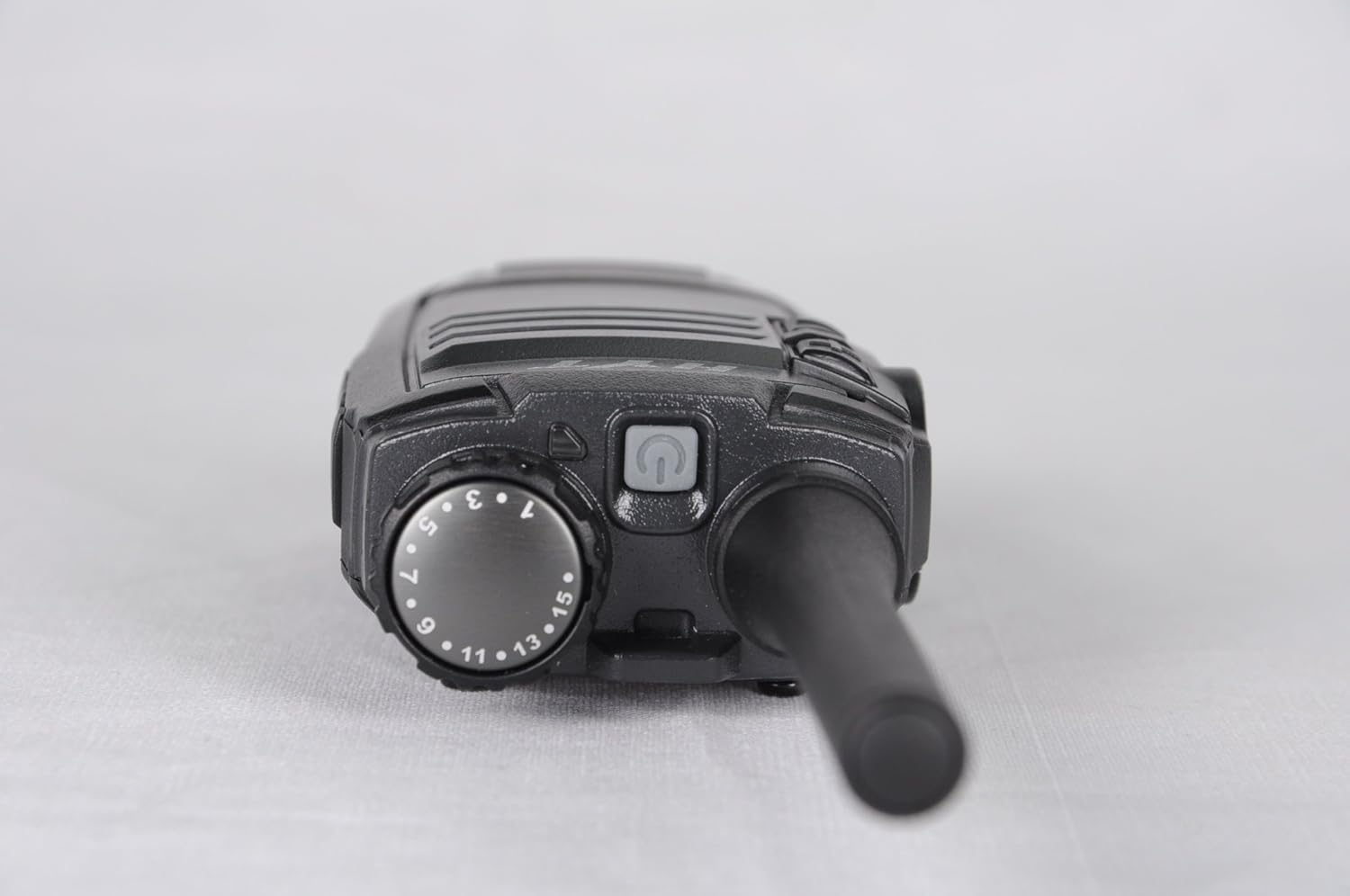
Тасвири 3.3: боло view of the Hytera TC-320U-1 radio, showing the channel selector knob (numbered 1-16) and the power/volume knob.
4. Танзимот
4.1 Пайваст кардани антенна
- Align the threaded end of the antenna with the antenna connector on the top of the radio.
- Turn the antenna clockwise until it is securely fastened. Do not overtighten.
4.2 Насби батарея
- Боварӣ ҳосил кунед, ки радио хомӯш аст.
- Қуттии батареяро бо чуқурҳои қафои радио мувофиқ кунед.
- Қуттии батареяро ба боло лағжонед, то он даме ки клик дар ҷои худ ҷойгир шавад.
- To remove, slide the battery latch (if present) and slide the battery downwards.
4.3 Пур кардани батарея
Before initial use, fully charge the battery. Use only the provided Hytera switching power adapter (PS0602) and charging accessories.
- Адаптери барқро ба васлаки AC пайваст кунед.
- Insert the charging cable into the radio's charging port or place the radio in its charging cradle.
- The charging indicator will typically show red during charging and green when fully charged.
4.4 Attaching the Belt Clip and Nylon Strap
- Клипи камарро бо сӯрохиҳои винт дар қафои радио мувофиқ кунед.
- Secure the belt clip with the provided screws.
- Thread the nylon strap through the designated loop on the radio for added security.
5. Дастурҳои истифодабарӣ
5.1 Фаъол/хомӯшкунӣ ва танзими баландии овоз
Rotate the power/volume knob (located on the top of the radio, see Image 3.3) clockwise to power on the radio. Continue rotating clockwise to increase the volume. Rotate counter-clockwise to decrease volume and fully counter-clockwise to power off the radio.
5.2 Интихоби канал
Rotate the channel selector knob (located on the top of the radio, see Image 3.3) to choose one of the 16 available channels. The selected channel number is indicated on the knob.
5.3 Интиқол ва қабул
- Гирифтан: When the radio receives a signal, the LED indicator will illuminate, and you will hear the audio through the speaker.
- Интиқол: To transmit, press and hold the Push-To-Talk (PTT) button on the side of the radio (see Image 3.2). Speak clearly into the microphone, holding the radio approximately 2.5 to 5 cm (1 to 2 inches) from your mouth. Release the PTT button to stop transmitting and return to receive mode.
5.4 High/Low Power Switch
The TC-320U-1 allows you to switch between high and low power output. Refer to your radio's specific controls for the location of this switch, typically a dedicated button or a programmable function. Using low power conserves battery life when communicating over short distances.
6. Нигоҳдорӣ
6.1 Нигоҳубини умумӣ
- Keep the radio dry. Avoid exposure to rain, moisture, or corrosive liquids.
- Радиоро ба ҳарорати аз ҳад зиёд нагузоред.
- Сатҳи радиоро бо нарм тоза кунед, гamp матоъ. Моддаҳои кимиёвии сахт ё тозакунандаи абразивиро истифода набаред.
- Боварӣ ҳосил кунед, ки антенна ва контактҳои батарея тоза ва аз партовҳо холӣ мебошанд.
6.2 Нигоҳубини батарея
- Always use genuine Hytera batteries and chargers.
- Терминалҳои батареяро ноқилҳои кӯтоҳ накунед.
- Батареяҳоро дар оташ напартоед.
- If the battery is not used for an extended period, store it in a cool, dry place after partially charging it.
7. Баррасии мушкилот
Агар шумо бо радиои худ мушкилот дошта бошед, ба мушкилот ва роҳҳои ҳалли маъмулии зерин муроҷиат кунед:
| Мушкилот | Сабаби эҳтимолӣ | Ҳалли |
|---|---|---|
| Радио фаъол нест | Battery is depleted or not installed correctly | Батареяро пур кунед ё онро бехатар аз нав насб кунед. |
| Интиқол ё қабул карда наметавонад | Incorrect channel selected; out of range; antenna loose | Verify channel selection; move closer to other radios; check antenna connection. |
| Ҳаҷми садои паст | Volume set too low; speaker obstructed | Increase volume; clear any obstructions from the speaker. |
| Доираи кӯтоҳи алоқа | Low power mode selected; environmental obstructions | Switch to high power mode; move to an open area. |
8. Мушаххасоти
The following table outlines the technical specifications for the Hytera TC-320U-1 radio:
| Хусусият | Мушаххасоти |
|---|---|
| Рақами модел | TC-320 |
| Диапазони басомад | UHF 400-470MHz |
| Шумораи каналҳо | 16 |
| Фосилаи канал | 25/12.5 кГц |
| Қувваи баромад | 2 Ватт |
| Навъи батарея | 1 литий-ион (1700 мАч) |
| Ҷилдиtage | 3.8 Вольт (ДС) |
| Андозаҳои маҳсулот | 5.91 x 1.57 x 1.57 инч |
| Вазни ашё | 0.71 унсия (20 Грам) |
| Масофаи ҳадди аксар | 2 Miles (approximate, varies by terrain) |
| Сатҳи муқовимат ба об | Ба об тобовар нест |
9. Маълумот дар бораи кафолат
The Hytera TC-320U-1 radio comes with a Кафолати 2-солаи истеҳсолкунанда. Please retain your proof of purchase for warranty claims. For specific terms and conditions, refer to the warranty card included with your product or contact Hytera customer service.
10. Дастгирӣ
For further assistance, technical support, or service inquiries regarding your Hytera TC-320U-1 radio, please contact your authorized Hytera dealer or visit the official Hytera website for contact information and resources.


