1. Муқаддима
This manual provides detailed instructions for the setup, operation, and maintenance of your Vibe Axcess 5-in-1 Universal Remote. Please read this manual thoroughly before using the remote control to ensure proper functionality and to maximize your user experience. This remote is designed to control up to five different audio/video devices.
2. Маҳсулот ба охир расидview
The Vibe Axcess 5-in-1 Universal Remote is designed to consolidate control of multiple home entertainment devices into a single unit. It features dedicated buttons for various functions and device types.
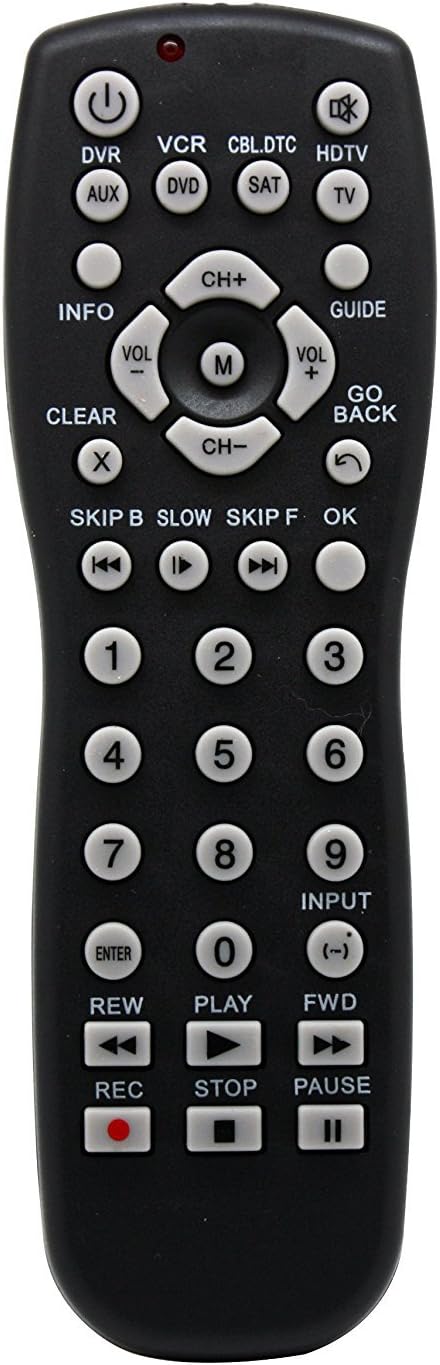
Расми 1: Пеш view of the Vibe Axcess 5-in-1 Universal Remote. This image displays the remote's layout, including device selection buttons (DVR, VCR, CBL.DTC, HDTV, AUX, DVD, SAT, TV), navigation pad, number keys, and media control buttons (REW, PLAY, FWD, REC, STOP, PAUSE).

Расми 2: Packaging of the Vibe Axcess 5-in-1 Universal Remote. The packaging highlights the remote's 5-in-1 capability and compatibility with various device types such as DVD/VCR, HDTV, DVD, AUX, and CBL/SAT/CABLE.
3. Танзимот
3.1 Насби батарея
- Сарпӯши қисмати батареяро дар қафои идоракунии дурдаст ҷойгир кунед.
- Сарпӯшро ба поён лағжонед ё қулфро пахш кунед ва барои кушодан бардоред.
- Ду (2) батареяи AAA-ро ҷойгир кунед ва боварӣ ҳосил кунед, ки терминалҳои мусбат (+) ва манфӣ (-) бо диаграммаҳои дохили қисм мувофиқат мекунанд.
- Сарпӯши қисмати батареяро иваз кунед ва онро то он даме, ки бехатар клик кунад, ба ҷои худ лағжонед.
Шарҳ: Always use fresh batteries and replace both batteries at the same time. Do not mix old and new batteries or different types of batteries.
3.2 Programming the Remote
To control your devices, the universal remote must be programmed with the correct codes for each device. There are typically two methods for programming:
3.2.1 Вуруди мустақими код
This method involves entering a specific code from a code list (usually provided with the remote or available online) for your device's brand.
- Дастгоҳеро, ки мехоҳед идора кунед, фурӯзон кунед (масалан, телевизор, плеери DVD).
- Press and hold the desired device button on the remote (e.g., TV, DVD) for approximately 3 seconds until the indicator light (usually red) illuminates and stays on.
- While the indicator light is on, enter the 3-digit or 4-digit code for your device's brand using the number keys.
- If the code is valid, the indicator light will turn off. If the light flashes and remains on, the code was invalid; re-enter the code.
- Бо пахш кардани тугмаи дурдастро санҷед КУВВА button. If the device turns off, the code is correct. If not, try the next code listed for your brand.
3.2.2 Ҷустуҷӯи худкори рамз
If you cannot find a code or direct code entry fails, use the auto code search method.
- Дастгоҳро фаъол созед, ки мехоҳед идора кунед.
- Тугмаи дастгоҳи дилхоҳро пахш карда нигоҳ доред (масалан, TV) for approximately 3 seconds until the indicator light illuminates and stays on.
- While holding the device button, press the КУВВА button once. The indicator light will start flashing, indicating it is searching for a code.
- Point the remote at the device and wait for the device to turn off. This may take several minutes as the remote cycles through codes.
- Вақте ки дастгоҳ хомӯш мешавад, фавран тугмаро пахш кунед ВОРИД тугмаро барои захира кардани рамз пахш кунед. Чароғи нишондиҳанда хомӯш мешавад.
- Test the remote's functions. If some functions do not work, repeat the auto search process to find a more compatible code.
4. Дастурҳои истифодабарӣ
Once programmed, operating your Vibe Axcess 5-in-1 Universal Remote is straightforward.
- Дастгоҳро интихоб кунед: Тугмаи мувофиқи дастгоҳро пахш кунед (масалан, TV, DVD, CBL.DTC) for the device you wish to control. The indicator light will briefly illuminate to confirm selection.
- Фаъол / Хомӯш: -ро пахш кунед КУВВА тугмаи барои фаъол ё хомӯш кардани дастгоҳи интихобшуда.
- Назорати овоз: -ро истифода баред VOL+ ва ВОЛ- тугмаҳо барои танзими баландии овоз.
- Назорати канал: -ро истифода баред CH+ ва Ч- тугмаҳо барои иваз кардани каналҳо.
- Калидҳои рақамӣ: Use the number keys (0-9) to directly enter channel numbers or other numerical inputs.
- Навигатсия: Тасвири самтро истифода баред (боло, поён, чап, рост) ва OK тугма барои паймоиши меню.
- Назорати ВАО: Истифода баред БОЗӢ, ТАВАККИЛИ, ИСТ, REW, FWD, ва REC for controlling media playback on compatible devices.
5. Нигоҳдорӣ
5.1 Тозакунӣ
To clean your remote, gently wipe it with a soft, dry cloth. Do not use abrasive cleaners, solvents, or harsh chemicals, as these can damage the remote's finish or internal components.
5.2 Иваз кардани батарея
When the remote's performance degrades or the indicator light fails to illuminate, it is time to replace the batteries. Follow the battery installation steps in Section 3.1. Dispose of used batteries responsibly according to local regulations.
6. Баррасии мушкилот
- Дурдаст кор намекунад:
- Санҷед, ки батареяҳо дуруст гузошта шудаанд ва тамом нашудаанд. Агар лозим бошад, иваз кунед.
- Ensure you have selected the correct device button (e.g., TV барои телевизиони шумо).
- Verify that the remote is programmed with the correct code for your device. Re-program if unsure.
- Боварӣ ҳосил кунед, ки байни пульти дурдаст ва сенсори инфрасурхи дастгоҳ монеа вуҷуд надорад.
- Баъзе функсияҳо кор намекунанд:
- Some universal remote codes may not support all original remote functions. Try another code for your device brand using the programming steps.
- Ensure the device you are trying to control supports the specific function (e.g., not all TVs have a dedicated 'INFO' button function).
- Indicator light not illuminating:
- Батареяҳоро тафтиш кунед ва иваз кунед.
- If the issue persists after battery replacement, the remote may be faulty.
7. Мушаххасоти
- Модели: OT795-KO
- Бренд: Виб
- Андозаҳои маҳсулот: 10.7 x 4 x 0.8 инч
- Вазни ашё: 4 унция
- Батареяҳо: 2 батареяи AAA лозим аст (дохил карда нашудааст)
- Шумораи максималии дастгоҳҳои дастгирӣ: 5
- Технологияи пайвастшавӣ: Инфрасурх
- Хусусияти махсус: универсалӣ
8. Кафолат ва дастгирӣ
For information regarding warranty coverage or technical support, please refer to the documentation included with your purchase or contact the retailer where the product was acquired. Specific warranty terms may vary.


