Муқаддима
This manual provides instructions for the installation, operation, and maintenance of your RAM Mounts Tab-Tite Tablet Holder, model RAM-HOL-TAB3U. This holder is designed to securely accommodate various tablets, including Apple iPad generations 1-4, and other compatible devices, utilizing a spring-loaded mechanism for easy insertion and removal.
Маҳсулот ба охир расидview
The RAM Tab-Tite holder features a spring-loaded, quick-release design that ensures a secure fit while allowing easy access to your mounted tablet. Its custom end cups are engineered to optimize tablet functionality, providing access to all buttons, ports, and features.
Хусусиятҳои асосӣ:
- Spring-loaded mechanism for secure tablet retention and quick release.
- Compatible with B and C size RAM round ball bases for versatile mounting options.
- Constructed from high-strength composites for durability.
- Designed with custom end cups for full access to tablet functions.
Дастгоҳҳои мувофиқ:
- Apple iPad (1st, 2nd, 3rd, and 4th Gen)
- ASUS MeMO Pad FHD 10, Transformer Pad
- Dell Venue 10 7000, Venue 11 Pro 7000
- HP ElitePad 900, ElitePad 900 G1, Pro 610
- Lenovo S6000, Tab A10, ThinkPad 10, Yoga Tablet 10, 10 HD+, 2 (10 inch)
- And other tablets within the specified dimensions.
 Image: The RAM Mounts Tab-Tite Tablet Holder securely holding an Apple iPad.
Мундариҷаи баста
Your RAM Mounts Tab-Tite Tablet Holder package typically includes:
- 1x RAM Tab-Tite Tablet Holder (RAM-HOL-TAB3U)
- 4x Nuts and Bolts for attachment to RAM components with the AMPНамунаи сӯрохи S.
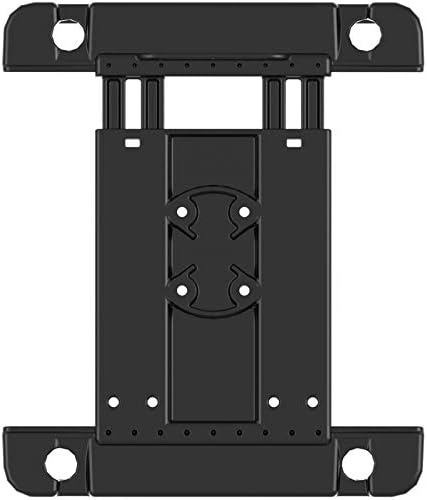 Тасвир: Қафо view of the RAM Tab-Tite holder, illustrating the universal AMPS hole pattern for attachment.
Насб ва насб
Attaching the Holder to a RAM Mount System:
- Identify the universal AMPS hole pattern on your desired RAM mounting component (e.g., a RAM B or C size round ball base).
- Align the four pre-drilled holes on the back of the Tab-Tite holder with the AMPS pattern on your RAM component.
- Use the provided four nuts and bolts to securely fasten the holder to the RAM component. Ensure all connections are tightened to prevent movement during use.
- Connect the assembled holder to a compatible RAM double socket arm and ball base system. The ball and socket technology allows for extensive adjustability.
 Тасвир: кунҷӣ view of the RAM Tab-Tite holder, ready for integration with a RAM mounting system.
Амалиёт
Ворид кардани планшети шумо:
- Gently pull back the spring-loaded arm of the Tab-Tite holder.
- Carefully position your tablet into the holder, ensuring it sits flush against the fixed end cups.
- Release the spring-loaded arm, allowing it to securely grip your tablet. Verify that the tablet is firmly held in place and cannot easily shift.
Removing Your Tablet:
- While holding the tablet, gently pull back the spring-loaded arm.
- Carefully lift the tablet out of the holder.
Танзими Viewкунҷи ангушт:
If your Tab-Tite holder is connected to a RAM ball and socket system, loosen the knob on the double socket arm to adjust the tablet's position and viewing angle. Tighten the knob firmly once the desired angle is achieved.
 Тасвир: Пеш view of the RAM Tab-Tite holder with an iPad, demonstrating secure placement.
Нигоҳдорӣ
To ensure the longevity and optimal performance of your RAM Mounts Tab-Tite Tablet Holder:
- Regularly inspect the holder for any signs of wear or damage, especially the spring mechanism and end cups.
- Keep the holder clean by wiping it with a damp матоъ. Аз маводи кимиёвии сахт ё тозакунандаи абразивӣ худдорӣ намоед.
- Periodically check that all nuts and bolts securing the holder to your RAM mounting system are tight.
- For use in off-road environments or open cockpits, it is recommended to use a tether (not included) to provide additional security for your device.
Мушкилкушо
Tablet Does Not Fit Securely:
- Ensure your tablet is within the specified dimensions for the RAM-HOL-TAB3U holder. Refer to the "Compatible Devices" section.
- Verify that the spring-loaded mechanism is fully engaging and holding the tablet firmly.
- If using a tablet case, confirm that the case does not interfere with the holder's grip. Some thicker cases may not be compatible.
Holder Feels Loose:
- Check all connection points, including the nuts and bolts attaching the holder to the RAM component and the double socket arm's knob. Tighten as necessary.
- Ensure the RAM ball bases are properly secured to their mounting surface.
Мушаххасоти
| Хусусият | Тафсилот |
|---|---|
| Бренд | RAM васл мекунанд |
| Рақами модел | RAM-HOL-TAB3U |
| Вазни ашё | 7.8 унция |
| Андозаҳои маҳсулот | 6 x 2 x 12 инч |
| Материал | High-strength Composites |
| Compatible RAM Ball Sizes | B and C size |
| Намунаи васлкунӣ | универсалӣ AMPS |
| Ранги | Сиёҳ |
Кафолат ва дастгирӣ
Маълумот дар бораи кафолат:
The RAM Mounts Tab-Tite Tablet Holder (RAM-HOL-TAB3U) is backed by a lifetime warranty, ensuring quality and durability.
Дастгирии муштариён:
For technical assistance, warranty claims, or product inquiries, please contact RAM MOUNTS customer support. Visit the official RAM MOUNTS webсайт барои маълумот барои тамос.


