1. Муқаддима
The Mastech MS6612 is a digital luxmeter designed for measuring illuminance. It features a large LCD display with backlight and a bar graph for easy reading. This device offers automatic and manual range switching, data hold, peak value measurement, relative value measurement, and zero calibration functions. It is capable of measuring up to 200,000 Lux or 20,000 Foot-Candles (Fc).
2. Маълумот оид ба бехатарӣ
Please read and understand all safety instructions before operating the device. Failure to follow these instructions may result in injury or damage to the meter.
- Do not operate the meter in environments with explosive gas, vapor, or dust.
- Avoid exposing the meter to extreme temperatures or high humidity.
- Remove batteries if the meter is not used for an extended period to prevent leakage.
- Do not attempt to repair or modify the meter. Refer all servicing to qualified personnel.
- Ҳисобкунакро тоза ва хушк нигоҳ доред.
3. Маҳсулот ба охир расидview
The Mastech MS6612 Digital Luxmeter consists of a main unit with an LCD display and control buttons, and a silicon photoelectric diode sensor for light detection.
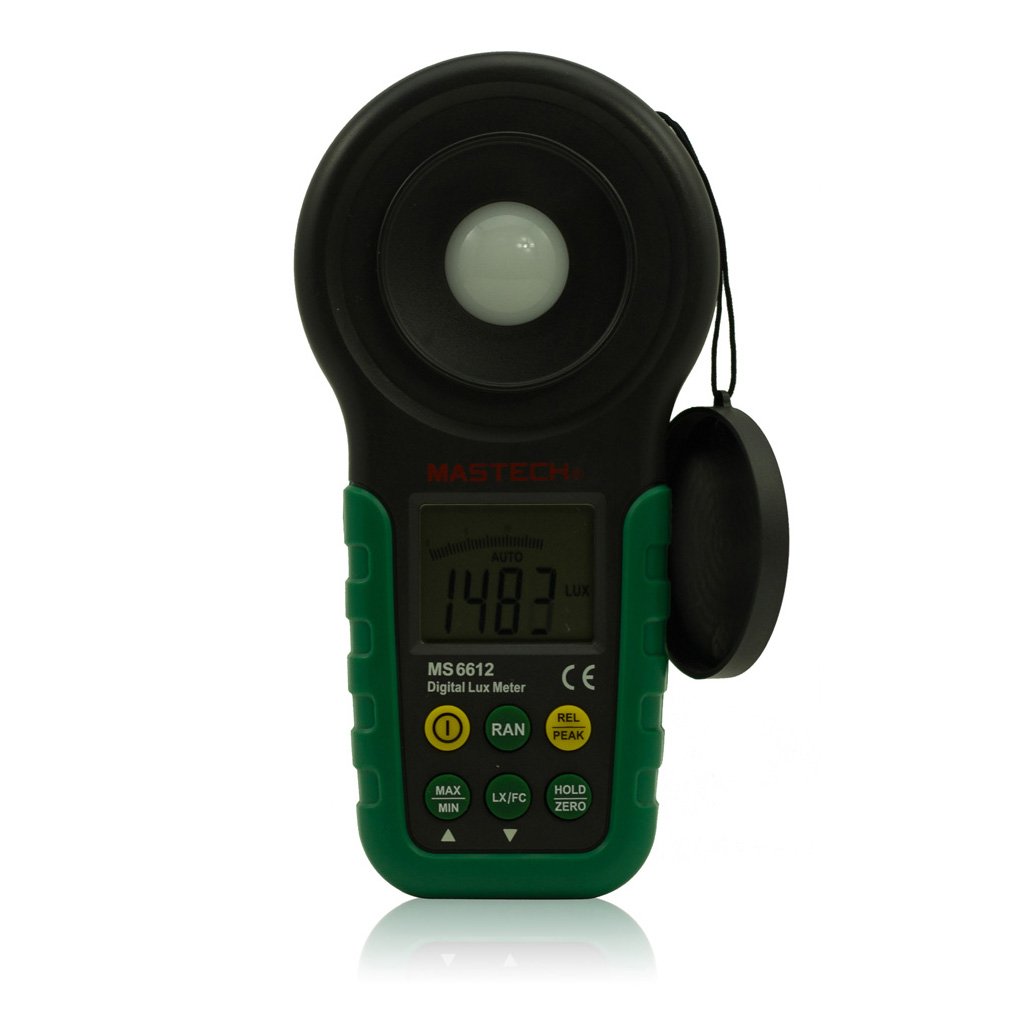
Расми 1: Пеш view of the Mastech MS6612 Digital Luxmeter. This image shows the main body of the device, including the large LCD screen, control buttons, and the light sensor located at the top.
Компонентҳои асосӣ:
- Намоиши LCD: 3½ digits with analog bar display for clear readings.
- Тугмаҳои назорат: For various functions such as power, range, hold, peak, relative, zero, unit conversion, and mute.
- Сенсори нур: Silicon photoelectric diode for accurate light measurement.
- Бахши батарея: Located at the rear for a 9V battery.
4. Танзимот
4.1 Насби батарея
- Сарпӯши қисмати батареяро дар қафои ҳисобкунак ҷойгир кунед.
- Use a screwdriver (if necessary) to open the battery compartment.
- Insert one 9V (IEC 6LR61) battery, observing the correct polarity (+/-).
- Сарпӯши қисмати батареяро иваз кунед ва онро маҳкам кунед.
Эзоҳ: Вақте ки батареяро иваз кардан лозим аст, дар экран нишондиҳандаи кам будани батарея пайдо мешавад.
5. Дастурҳои истифодабарӣ
5.1 Фаъол кардан/хомӯш кардан
- -ро пахш кунед КУВВА тугма барои фаъол кардани ҳисобкунак.
- -ро пахш кунед КУВВА button again to turn the meter off.
- The meter features an automatic power-off function, which will turn off the device if no keys are operated for more than 10 minutes.
5.2 Андозагирии асосӣ
- Ҳисобкунакро даргиронед.
- Point the light sensor towards the light source to be measured.
- The illuminance value will be displayed on the LCD. The meter automatically selects the appropriate range.
5.3 Range Switching (Auto/Manual)
The MS6612 supports both automatic and manual range switching.
- In auto-ranging mode, the meter automatically selects the best measurement range.
- -ро пахш кунед РАНГ button to switch between auto and manual ranging modes. In manual mode, you can cycle through available ranges.
- If the measured value exceeds the current range in manual mode, the LCD will display "OL" (Overload).
5.4 Функсияи нигоҳдории маълумот
Барои ях кардани хониши ҷорӣ дар экран:
- -ро пахш кунед ДОРЕД button. The "HOLD" indicator will appear on the display.
- -ро пахш кунед ДОРЕД button again to release the data hold and resume live measurement.
5.5 Maximum/Minimum Value Measurement
Ба view the maximum or minimum illuminance recorded during a measurement session:
- -ро пахш кунед МАКС/MIN button. The display will show the maximum recorded value.
- пахш кунед МАКС/MIN again to cycle to the minimum recorded value.
- пахш кунед МАКС/MIN a third time to exit this mode and return to live measurement.
5.6 Peak Value Measurement
This function captures the highest instantaneous illuminance value.
- -ро пахш кунед ҚУЛЛА button to activate peak measurement. The "PEAK" indicator will appear.
- The display will show the highest illuminance detected since activating the function.
- пахш кунед ҚУЛЛА боз барои баромадан аз ин режим.
5.7 Relative Value Measurement
This function allows you to set a reference point and measure the difference from that point.
- In a stable light environment, press the REL button. The current reading becomes the reference, and the display will show "0".
- Subsequent measurements will show the difference (positive or negative) from this reference value.
- пахш кунед REL again to exit relative measurement mode.
5.8 Zero Calibration Function
To ensure accuracy, especially in low light conditions, perform a zero calibration.
- Place the light sensor in a completely dark environment (e.g., cover it with an opaque cap).
- -ро пахш кунед СУЛ button. The display should read "0.00".
- This calibrates the meter to account for any residual sensor output in darkness.
5.9 Unit Conversion (Fc/Lux)
The meter can display measurements in Lux or Foot-Candles (Fc).
- -ро пахш кунед ВУД button to toggle between Lux and Fc units.
- The selected unit will be indicated on the LCD.
- Табдилдиҳӣ: 1 Fc = 10.764 Lux; 1 Lux = 0.09290 Fc.
5.10 Touch Tone and Mute Function
The meter may emit a touch tone when buttons are pressed. This can be muted.
- Refer to the specific button on your device for muting the touch tone.
6. Нигоҳдорӣ
6.1 Тозакунӣ
- Ҳисобкунакро пок кунед вasing бо нарм, гamp матоъ. Тозакунанда ё ҳалкунандаҳои абразивиро истифода набаред.
- Keep the light sensor clean and free from dust or smudges to ensure accurate readings. Use a soft, lint-free cloth.
6.2 Иваз кардани батарея
Replace the 9V battery when the low battery indicator appears on the display. Follow the steps in Section 4.1 for battery installation.
6.3 Нигоҳдорӣ
- If storing the meter for an extended period, remove the battery to prevent leakage and potential damage.
- Дастгоҳи ҳисобкунакро дар ҷои хунук ва хушк, дур аз нури бевоситаи офтоб ва ҳарорати аз ҳад зиёд нигоҳ доред.
7. Баррасии мушкилот
| Мушкилот | Сабаби эҳтимолӣ | Ҳалли |
|---|---|---|
| Метр фаъол нест. | Батареяи мурда ё нодуруст насбшуда. | Check battery polarity, replace battery. |
| "OL" дар экран нишон дода мешавад. | Measurement value exceeds current range (manual mode). | Switch to a higher range or enable auto-ranging. |
| Хониши нодуруст. | Dirty sensor, uncalibrated zero, or incorrect range. | Clean sensor, perform zero calibration, ensure correct range. |
| Нишондиҳандаи пасти батарея. | Қувваи батарея кам аст. | Батареяи 9V -ро иваз кунед. |
8. Мушаххасоти
| Параметр | Арзиш |
|---|---|
| Диапазони андозагирӣ | 20, 200, 2000, 20000, 200000 Люкс 20, 200, 2000, 20000 Fc |
| Намоиш | 3½ digits, max reading of 1999, with analog bar display |
| Сенсор | Диоди фотоэлектрикии кремний |
| Measured Spectral Range | 320 ~ 730нм |
| SampLing Rate | ≥2 times/s |
| Ҳарорати корӣ | -10~50 °C, max 80% RH (Non-Condensed) |
| Ҳарорати нигоҳдорӣ | -10~50 °C, max 80% RH (Non-Condensed, removing batteries) |
| Муҳити амалиётӣ | Истифодаи дохилӣ |
| Баландӣ | Баландтарин 2000 м |
| Таъмини нерӯ | 1 x 9V, IEC 6LR61 battery |
| Муҳлати батарея | тахминан. 200 соат |
| Андозаҳо (HxWxD) | 190 мм x 89 мм x 42.5 мм (7.48 x 3.50 x 1.67 инч) |
| Вазн (бе батарея) | Тақрибан. 360 г (12.7 унс) |
| Вазн (бо батареяҳо) | Тақрибан. 420 г (14.8 унс) |
Табдилдиҳии воҳиди равшанӣ:
- 1 Foot-Candle (Fc) = 10.764 Lux
- 1 Lux = 0.09290 Foot-Candle (Fc)
9. Кафолат ва дастгирӣ
Mastech products are designed for reliability and performance. For specific warranty information, please refer to the warranty card included with your purchase or visit the official Mastech webсомона. Барои гирифтани маълумоти иловагӣ ё дархостҳо барои хидматрасонӣ, лутфан бо хидматрасонии муштариёни Mastech тавассути каналҳои расмии онҳо тамос гиред.
Лутфан квитансияи хариди худро ҳамчун далели харид барои даъвоҳои кафолат нигоҳ доред.


