1. Муқаддима
The Intel NUC DE3815TYKHE is a compact, fanless mini PC designed for various applications, including thin clients, digital signage, and embedded solutions. This kit provides a flexible platform with support for a 2.5-inch storage drive, offering a customizable computing experience in a small form factor.
2. Мундариҷаи баста
Боварӣ ҳосил кунед, ки ҳама ашё дар бастаи шумо мавҷуданд:
- Intel NUC DE3815TYKHE Unit
- Адаптери барқии AC
- VESA Mounting Bracket (with screws)
- Дастури оғози зуд (агар дохил карда шуда бошад)
3. Ба охир расидани ҷисмонӣview
3.1 Панели Асосӣ
The front panel provides essential connectivity and controls.

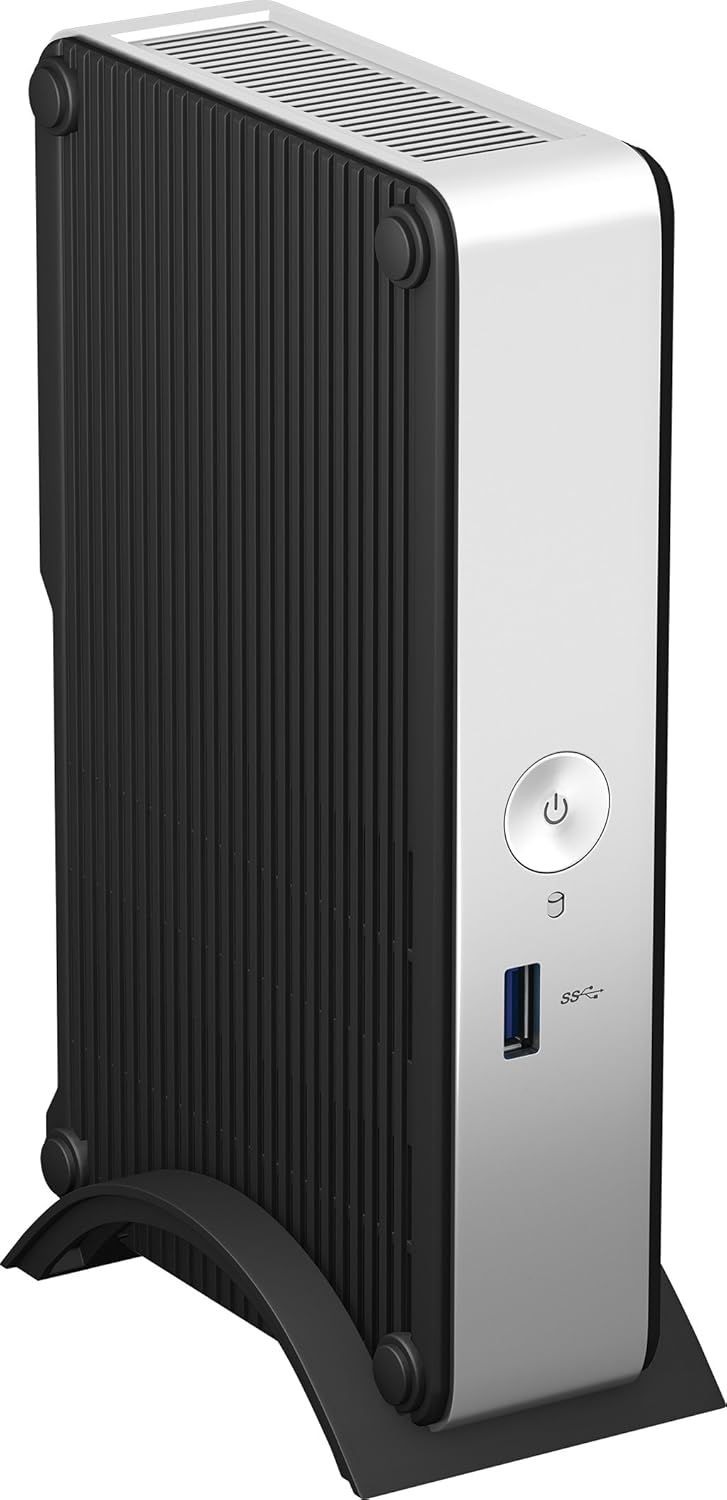
Тасвири 1: Пеш view of the Intel NUC DE3815TYKHE. This image displays the compact, fanless design of the unit, highlighting the power button and a single blue USB 3.0 port on the front for easy access.
- Тугмаи барқ: Барои фурӯзон ё хомӯш кардани дастгоҳ истифода мешавад.
- USB 3.0 порт: Барои пайваст кардани дастгоҳҳои USB бо суръати баланд.
3.2 Панели пушти
The rear panel houses various ports for display, network, and peripherals.

Тасвири 2: Қафо view of the Intel NUC DE3815TYKHE. This image details the available rear ports, including VGA, HDMI, two USB ports, an Ethernet port, and a headphone/microphone jack, along with the power input.
- Порти VGA: Барои пайваст шудан ба мониторҳо ё проекторҳои кӯҳна.
- Порти HDMI: For connecting to modern displays with audio support.
- Портҳои USB 2.0 (x2): Барои пайваст кардани дастгоҳҳои стандартии USB.
- Порти Ethernet (RJ-45): Барои пайвасти шабакаи симӣ.
- Ҷеки гӯшмонак/микрофон: Барои вуруд ва баромади аудио.
- Вуруди қувваи DC: Барои пайваст кардани адаптери барқи AC.
3.3 Унсурҳои дохилӣ
Accessing the internal components is necessary for memory and storage installation.
Тасвири 3: Intel NUC DE3815TYKHE unit displayed alongside its internal motherboard. This view illustrates the compact size of the main unit and the layout of the internal components, including the processor, memory slot, and connectors for storage.
- DDR3L SODIMM Slot: For installing system memory.
- 2.5-inch Drive Bay: For installing a SATA HDD or SSD.
- Антеннаҳои бесим: Built-in for wireless connectivity.
- eMMC Storage: 4GB embedded storage for operating system or data.
4. Танзимот
Follow these steps to prepare your Intel NUC for operation.
4.1 Насби хотира (RAM)
- Unscrew and remove the bottom cover of the NUC unit.
- Locate the DDR3L SODIMM slot on the motherboard.
- Align the notch on the SODIMM module with the notch in the slot.
- Insert the module at a 45-degree angle and press down until the retaining clips snap into place.
4.2 Installing a 2.5-inch Storage Drive
- With the bottom cover removed, locate the 2.5-inch drive bay.
- Connect the SATA data and power cables from the NUC to your 2.5-inch HDD or SSD.
- Secure the drive within the bay using the provided screws (if applicable).
- Replace the bottom cover and secure it with screws.
4.3 Пайваст кардани дастгоҳҳои периферӣ
- Намоиш: Connect your monitor to the HDMI or VGA port.
- Клавиатура ва муш: Connect USB keyboard and mouse to any available USB ports.
- Шабака: For wired internet, connect an Ethernet cable to the RJ-45 port. For wireless, ensure antennas are clear.
- Аудио: Connect headphones or speakers to the audio jack if needed.
4.4 Фаъолсозии барқ
- Connect the AC power adapter to the DC power input on the rear panel.
- Адаптери барқро ба васлаки деворӣ пайваст кунед.
- Press the power button on the front panel to turn on the NUC.
5. Насби системаи оператсионӣ
The Intel NUC DE3815TYKHE supports multiple operating systems. You will need to install your preferred OS onto the internal eMMC storage or the 2.5-inch drive you installed.
- Prepare a bootable USB drive with your chosen operating system (e.g., Windows, Linux).
- Connect the USB drive to a USB port on the NUC.
- Power on the NUC and enter the BIOS/UEFI setup (usually by pressing F2 during boot) to configure the boot order.
- Барои насб кардани системаи оператсионӣ дастурҳои дар экран буда амал кунед.
6. Нигоҳдорӣ
The fanless design of the Intel NUC DE3815TYKHE minimizes maintenance requirements.
- Тозакунӣ: Periodically wipe the exterior with a soft, dry cloth. Avoid using liquid cleaners directly on the unit.
- Вентилятсия: Ensure the ventilation slots are not obstructed to allow for proper passive cooling.
- Навсозии нармафзор: Барои самаранокӣ ва амнияти беҳтарин, системаи оператсионӣ ва драйверҳои худро навсозӣ кунед.
7. Баррасии мушкилот
If you encounter issues, refer to the following common troubleshooting steps.
- Не қудрат: Ensure the power adapter is securely connected to both the NUC and a working power outlet. Test the outlet with another device.
- Намоиши: Verify that the monitor is powered on and correctly connected to the NUC's HDMI or VGA port. Try a different cable or monitor if possible.
- Системаи оператсионӣ пурбор намешавад: Check the boot order in the BIOS/UEFI settings. Ensure the installed storage drive is detected and contains a valid operating system.
- Периферӣ ошкор нашудааст: Ensure USB devices are properly seated in the ports. Try a different USB port or device.
- Пайвастшавӣ ба шабака вуҷуд надорад: For wired connections, check the Ethernet cable and router. For wireless, ensure Wi-Fi is enabled in the OS and the NUC is within range of a network.
8. Мушаххасоти
| Хусусият | Тафсилот |
|---|---|
| Номи модел | DE3815TYKHE |
| Протсессор | Intel Atom Processor (e.g., E3815) |
| RAM | 4 GB DDR3L 1333 (SODIMM slot for expansion) |
| Захираи дохилӣ | 4GB eMMC (embedded MultiMediaCard) |
| Тавсеаи нигаҳдорӣ | Internal 2.5-inch SATA HDD/SSD bay |
| Графика | Графикаи ҳамгирошудаи Intel |
| Натиҷаи видео | hdmi, vga |
| Портҳои USB | 1x USB 3.0 (пеш), 2x USB 2.0 (қафо) |
| Аудио | Наушник/микрофон Combo Jack |
| Шабака | Ethernet (RJ-45), Built-in Wireless Antennas |
| Тарҳрезӣ | Бе мухлис |
| Дастгирии системаи оператсионӣ | Multiple OS options (e.g., Windows, Linux) |
| Ранги | Metallic gray plastic ring with black sides |
9. Кафолат ва дастгирӣ
Барои гирифтани маълумот дар бораи кафолат ва дастгирии техникӣ, лутфан ба ширкати расмии Intel муроҷиат кунед webсомона ё ба нуқтаи хариди худ муроҷиат кунед. Барои даъвоҳои кафолат далели хариди худро нигоҳ доред.
- Дастгирии онлайн: Ташриф Intel Support for DE3815TYKHE for drivers, downloads, and troubleshooting resources.
- Тамос: Refer to the Intel support page for contact options.


