1. Муқаддима
The Bogen 1126-BG-UTI1 is a single-zone paging controller designed to integrate a paging system with a telephone system. It provides a reliable interface for making announcements over a public address system from a telephone. This manual provides detailed instructions for the proper installation, operation, and maintenance of your Bogen paging controller.
2. Маълумоти муҳим оид ба бехатарӣ
Лутфан, пеш аз истифодаи ин дастгоҳ ҳамаи дастурҳои бехатариро хонед ва дарк кунед. Ин дастурро барои истифода дар оянда нигоҳ доред.
- Манбаи нерӯ: Дастгоҳро танҳо ба қувваи барқи муқарраршуда пайваст кунедtage.
- Рутубат: Дастгоҳро ба борон ё намӣ нагузоред.
- Вентилятсия: Вентилятсияи дурустро таъмин кунед. Кушодани вентилятсияро манъ накунед.
- Хизматрасонӣ: Ҳама хидматрасониро ба кормандони соҳибихтисос муроҷиат кунед. Худатон кӯшиш накунед, ки ба ин маҳсулот хидмат расонад.
- Тозакунӣ: Танҳо бо матои хушк тоза кунед.
3. Мундариҷаи баста
Боварӣ ҳосил кунед, ки ҳама ашё дар баста мавҷуд аст:
- Bogen 1126-BG-UTI1 Single Zone Paging Controller Unit
- Адаптери барқ
- Дастури корбар (ин ҳуҷҷат)
- Таҷҳизоти васлкунӣ (агар лозим бошад)
4. Маҳсулот ба охир расидview
The Bogen 1126-BG-UTI1 features various ports and indicators for seamless integration and operation. Familiarize yourself with the unit's components before installation.
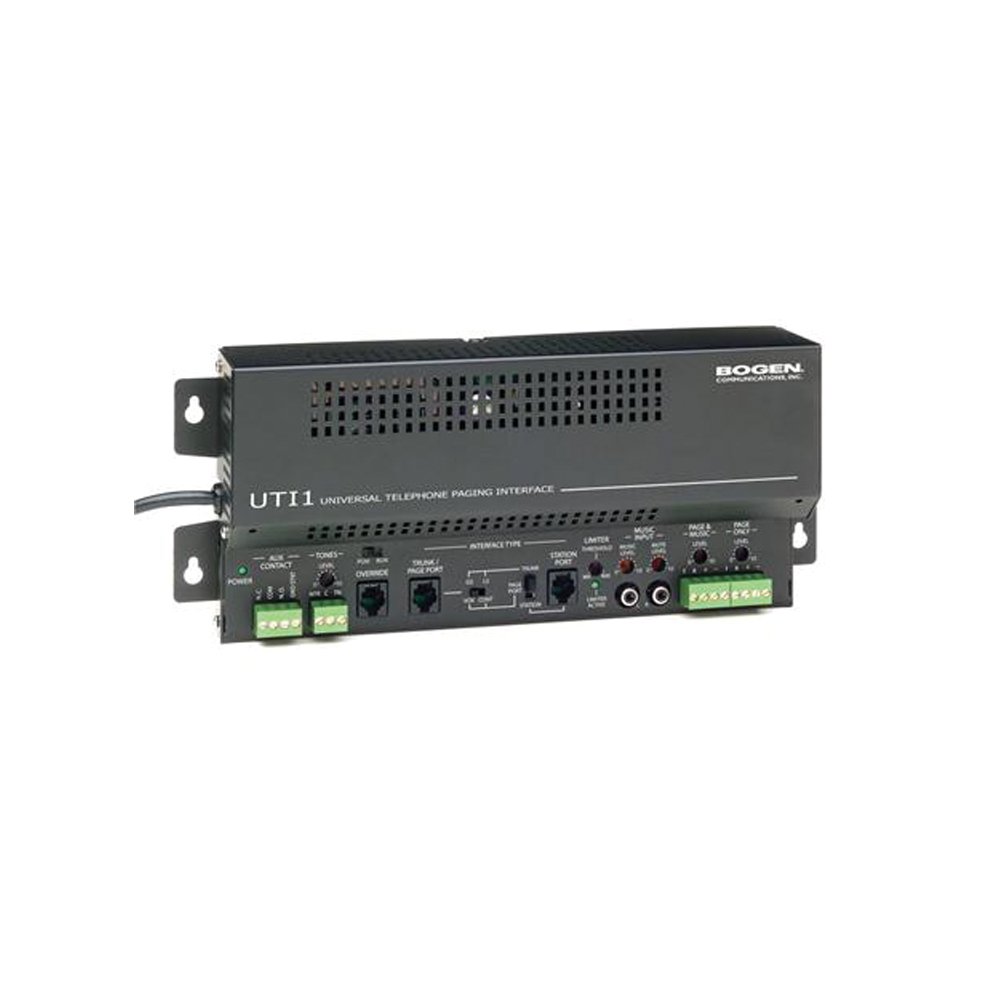
Расми 1: Пеш view of the Bogen Single Zone Paging Controller. This image displays the main unit, highlighting its compact design and essential connection points for audio input and output, as well as power. The various ports and indicators are visible, crucial for understanding the device's functionality and connectivity.
4.1 Панели Асосӣ
- LED барқ: Ҳолати қудратро нишон медиҳад.
- Назорати сатҳи вуруд: Adjusts the audio input sensitivity.
- Назорати сатҳи баромад: Баландии овози баромади аудиоро танзим мекунад.
4.2 Панели пушти
- Telephone Line Input: RJ-11 jack for connecting to the telephone system.
- Натиҷаи аудио: RCA or screw terminal connections for connecting to an ampлифер.
- Вуруди барқ: Jack for connecting the power adapter.
- MOH Output: Music On Hold output (if applicable).
5. Танзим ва насб
Follow these steps to properly install your paging controller:
- Монтаж: Choose a suitable location for the controller, away from excessive heat or moisture. Secure the unit using appropriate mounting hardware if desired.
- Connect to Telephone System: Connect an RJ-11 cable from your telephone system's paging port or a suitable analog extension to the "Telephone Line Input" on the controller. Consult your telephone system's manual for specific paging port details.
- Ба Ampумр: Connect the "Audio Output" of the paging controller to an available input on your paging amplifier. Ensure correct polarity if using screw terminals.
- Пайваст кардани барқ: Plug the provided power adapter into the "Power Input" jack on the controller, then plug the adapter into a standard electrical outlet. The Power LED should illuminate.
- Initial Level Adjustment: Start with the Input Level and Output Level controls set to their minimum positions.
6. Дастурҳои истифодабарӣ
Once installed, the Bogen 1126-BG-UTI1 is ready for operation.
6.1 Making a Page
- From a telephone connected to the system, dial the designated paging access code or extension.
- Wait for the confirmation tone or voice prompt from the paging controller.
- Speak clearly into the telephone handset to make your announcement.
- Hang up the telephone when finished.
6.2 Adjusting Audio Levels
- Сатҳи вуруд: Slowly increase the "Input Level Control" until the paging audio is clear and distortion-free. If the audio is too loud or distorted, decrease this level.
- Сатҳи баромад: Adjust the "Output Level Control" to achieve the desired volume through the paging speakers. This should be done in conjunction with the ampназорати баландии овоз.
7. Нигоҳдорӣ
The Bogen 1126-BG-UTI1 is designed for reliable operation with minimal maintenance.
- Тозакунӣ: Periodically wipe the unit with a soft, dry cloth. Do not use liquid cleaners or aerosols.
- Вентилятсия: Ensure that ventilation openings remain clear of dust and debris.
- Пайвастшавӣ: Occasionally check all cable connections to ensure they are secure.
8. Баррасии мушкилот
Агар шумо бо мушкилот дучор шавед, ба дастури зерин оид ба ҳалли мушкилот муроҷиат кунед:
| Мушкилот | Сабаби эҳтимолӣ | Ҳалли |
|---|---|---|
| Нишондиҳандаи барқ надоред. | Power adapter not connected or faulty; no power at outlet. | Check power adapter connection. Verify outlet has power. Test with another adapter if available. |
| No paging audio. | Incorrect telephone system connection; amplifier off or muted; audio levels too low. | Verify telephone line and audio output connections. Ensure amplifier is on and not muted. Adjust Input and Output Level controls. |
| Paging audio is distorted. | Input or output levels set too high. | Reduce Input Level and/or Output Level controls. |
| Cannot access paging from telephone. | Incorrect paging access code; telephone system not configured correctly. | Confirm the correct paging access code with your telephone system administrator. Verify telephone system programming. |
If the problem persists after attempting these solutions, contact Bogen technical support.
9. Мушаххасоти
| Хусусият | Тафсилот |
|---|---|
| Рақами модел | 1126-BG-UTI1 |
| Бренд | Боген |
| Андозаҳои бастаҳо | 15 x 9 x 7 инч |
| Вазни ашё | 6.7 фунт |
| ASIN | B00P1AOL2C |
| Истеҳсолкунанда | Боген |
| Paging Zones | Минтақаи ягона |
| Мутобиқати | Telephone systems with analog paging port or extension |
10. Кафолат ва дастгирӣ
Bogen products are designed for durability and performance. For specific warranty information, please refer to the warranty card included with your product or visit the official Bogen website. Technical support is available to assist with any questions or issues you may encounter.
- Дастгирии онлайн: Ташриф www.bogen.com/support for FAQs, documentation, and contact information.
- Маълумот барои тамос: Refer to the Bogen website for current telephone numbers and email addresses for technical assistance.


