1. Муқаддима
Thank you for choosing the Orion HCCA5000.1DSPLX High Performance Class-D Monoblock Ampбаландкунанда. Ин amplifier is engineered for exceptional power and sound quality in car audio systems, designed to drive low impedances with high output levels. This manual provides essential information for proper installation, operation, and maintenance to ensure optimal performance and longevity of your ampлифер.
2. Маълумот оид ба бехатарӣ
Please read all safety instructions carefully before installing and operating the amplifier. Failure to follow these guidelines may result in injury or damage to the ampлифт ё мошин.
- Насбкунии касбӣ тавсия дода мешавад: Installation of car audio equipment can be complex. If you are unsure about any part of the installation process, seek assistance from a qualified professional.
- Қатъи барқ: Always disconnect the vehicle's battery negative terminal before starting any electrical work to prevent short circuits and electrical shock.
- Ноқилҳои дуруст: Use appropriate gauge wiring for power, ground, and speaker connections as specified in this manual. Incorrect wiring can lead to overheating, fire, or damage to components.
- Вентилятсия: Таъмин кунед amplifier is mounted in a location with adequate ventilation to prevent overheating. Do not block cooling fins or air vents.
- Таъсири намӣ: Аз насб кардан худдорӣ намоед amplifier in locations where it may be exposed to moisture or excessive humidity.
- Монтажи бехатар: Монтед amplifier securely to prevent it from coming loose during vehicle operation, which could cause injury or damage.
- Муҳофизати шунавоӣ: Гӯшдории тӯлонӣ ба сатҳи баланди фишори садо метавонад боиси осеби доимии шунавоӣ гардад. Ҳангоми танзими сатҳи садо эҳтиёткор бошед.
3. Хусусиятҳои маҳсулот
The Orion HCCA5000.1DSPLX amplifier incorporates advanced features for superior audio performance and system protection:
- Истеҳсоли нерӯи баланд: Delivers 5000W RMS, designed for competition-level sound pressure.
- Class-D Topology: Ensures high efficiency and powerful output with minimal heat generation.
- 1 Ом устувор: Capable of driving low impedance loads for maximum power delivery to subwoofers.
- Филтри гузариш паст (LPF): Adjustable 40Hz - 300Hz for precise subwoofer frequency control.
- Назорати баланд бардоштани басс: Вокуниши басомади пастро тақвият медиҳад.
- Таъминоти барқи MOSFET: Интиқоли устувор ва самараноки барқро таъмин мекунад.
- Fault and Protection Monitoring: Муҳофизат мекунад amplifier and connected components from electrical issues.
- Тугмаи бассҳои дурдаст: Танзими қулайи сатҳи басс аз курсии ронанда имкон медиҳад.
4. Мундариҷаи баста
Боварӣ ҳосил кунед, ки ҳама ашё дар баста мавҷуд аст:
- Orion HCCA5000.1DSPLX Monoblock Ampзиндатар
- Тугмаи идоракунии басси дурдаст бо кабел
- Дастури корбар (ин ҳуҷҷат)
- Mounting Hardware (screws, etc.) - (Typically included, verify upon unboxing)
5. Насб ва насб
Насби дуруст барои самаранокӣ ва бехатарии дастгоҳи шумо муҳим аст ampбаландкунанда. Ин қадамҳоро бодиққат иҷро кунед.
5.1. Ҷойгоҳи васлкунӣ
Choose a mounting location that provides:
- Adequate ventilation for heat dissipation.
- Protection from moisture and direct sunlight.
- Secure attachment to a solid surface.
- Accessibility for wiring and adjustments.
Common locations include the trunk, under seats, or behind rear seats.
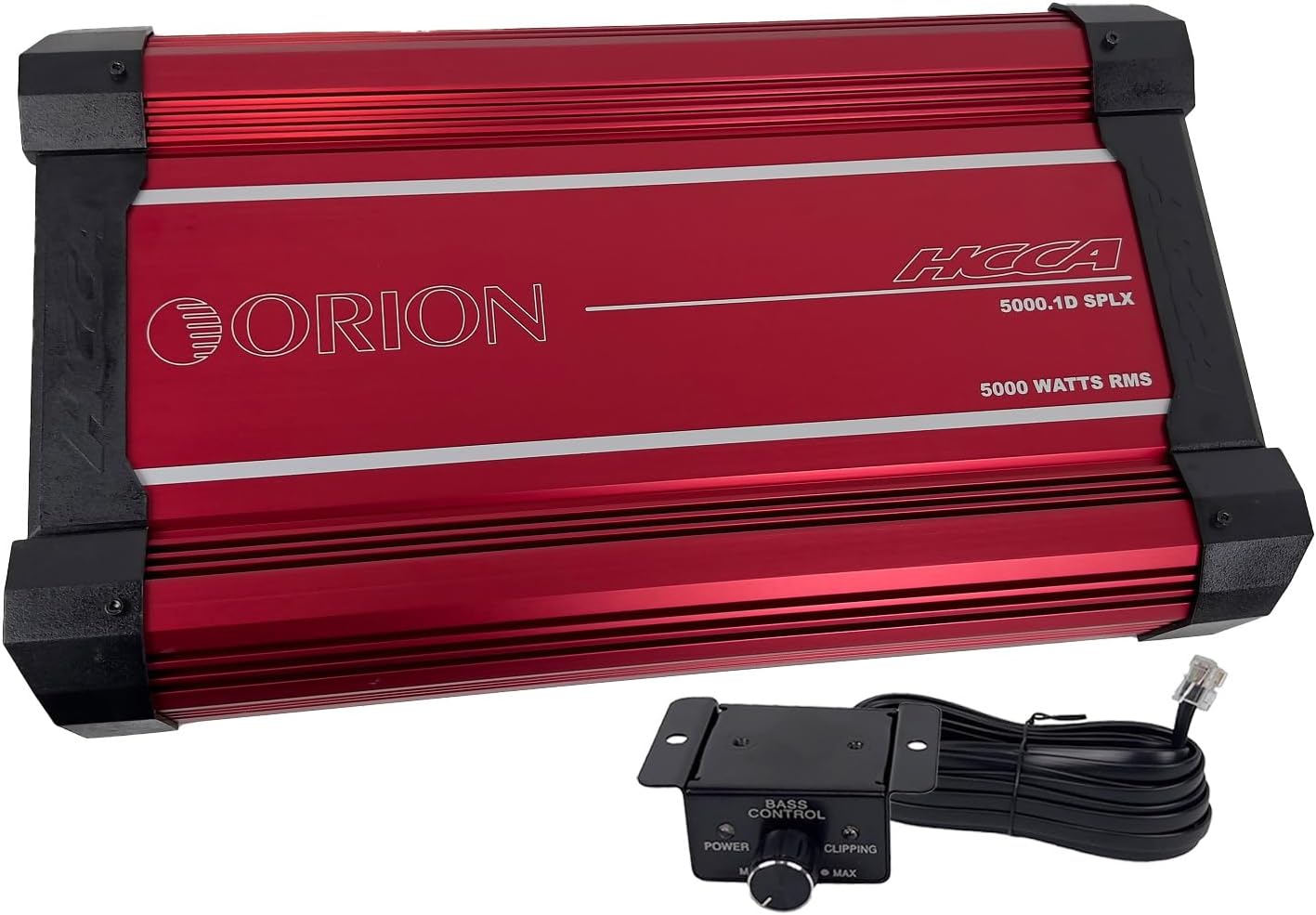
Ин тасвир қисми болоиро нишон медиҳад view of the red Orion HCCA5000.1DSPLX amplifier along with its wired remote bass control knob. The amplifier features the "ORION" logo and "HCCA 5000.1D SPLX 5000 WATTS RMS" text. The remote knob has "BASS CONTROL" and "POWER" and "CLIPPING" indicators.
5.2. Пайвастҳои ноқилӣ
Боварӣ ҳосил кунед, ки ҳамаи пайвастҳо бехатар ва дуруст изолятсия карда шудаанд.
5.2.1. Power and Ground Wiring
- Қувваи (B+): Connect a heavy-gauge power cable (e.g., 0-gauge or 4-gauge, depending on total system power requirements) directly from the positive terminal of the vehicle's battery to the amplifier's B+ terminal. Install an appropriate fuse holder (ANL or Mini-ANL) within 18 inches (45 cm) of the battery.
- Замин (GND): Сими заминии ғафси андозааш якхела бо сими барқро аз васлкунак пайваст кунед. amplifier's GND terminal to a clean, unpainted metal surface of the vehicle chassis. Ensure a solid electrical connection. The ground cable should be as short as possible, ideally less than 3 feet (1 meter).
- дурдаст (REM): Connect a smaller gauge wire (e.g., 18-gauge) from the ampтерминали REM-и лифт ба баромади дурдасти дастгоҳи саратон. Ин сим гардиш мекунад ampлифтро бо стерео худ фурӯзон ва хомӯш кунед.

This image shows the power and speaker connection side of the Orion HCCA5000.1DSPLX amplifier. Clearly visible are the large terminals labeled "POWER" for battery positive, ground, and remote, and "SPEAKERS" for connecting subwoofers.
5.2.2. Audio Input and Output
- Вуруди RCA: Connect RCA cables from the subwoofer pre-out of your head unit to the amplifier's RCA input terminals (L-CH Input, R-CH Input).
- RCA Output (Optional): If daisy-chaining multiple amplifiers, connect RCA cables from the amplifier's RCA output terminals (L-CH Output, R-CH Output) to the input of the next ampлифер.

This image displays the audio input and control panel side of the Orion HCCA5000.1DSPLX amplifier. It features RCA input and output jacks, along with various control knobs for gain, low pass filter, bass boost, and phase adjustment.
5.2.3. Пайвастҳои баландгӯяк
Сабвуфер(ҳо)-и худро ба amplifier's speaker terminals. Ensure the total impedance of the connected speakers is within the amplifier's stable operating range (1 Ohm minimum for this model).
- For a single subwoofer, connect its positive terminal to the amplifier's positive speaker terminal and its negative terminal to the amplifier's negative speaker terminal.
- For multiple subwoofers, refer to a wiring diagram to achieve the desired impedance (series, parallel, or series-parallel).
5.3. Remote Bass Knob Connection
Connect the provided remote bass control knob to the "Remote Gain" port on the amplifier using the supplied cable. Mount the knob in a convenient location for easy access.

This image shows the remote bass control knob with its attached cable. The knob allows for convenient adjustment of bass levels and includes power and clipping indicator lights.
6. Дастурҳои истифодабарӣ
Боре ба amplifier is installed and wired, follow these steps to configure and operate it.
6.1. Таъмини ибтидоӣ
- Боварӣ ҳосил кунед, ки ҳама пайвастҳо дуруст ва бехатар мебошанд.
- Назорати даромадро ба тугмаи amplifier to its minimum setting (fully counter-clockwise).
- Терминали манфии батареяи мошинро аз нав пайваст кунед.
- Воҳиди сариро фаъол созед. Дар amplifier should power on, indicated by its power LED.
6.2. Танзими идоракунӣ
Дар amplifier features several controls to fine-tune its performance:
- Gain (Level): Ин назорат мувофиқат мекунад ampҳассосияти вуруди liifier ба ҳаҷми баромадtage of your head unit. Start with the gain at minimum. Play a familiar track at about 75% of your head unit's maximum volume. Slowly increase the amplifier's gain until you hear distortion, then back off slightly. The remote bass knob also has a clipping indicator to assist in setting the gain.
- Филтри гузариш паст (LPF): This filter allows only frequencies below the set point to pass through to the subwoofer. Adjust the LPF (40Hz - 300Hz) to blend the subwoofer's output seamlessly with your main speakers. A common starting point is 80Hz-100Hz.
- Басс баланд бардоштани: This control provides an increase in output at a specific low frequency. Use sparingly, as excessive bass boost can lead to distortion and potential damage to subwoofers.
- Марҳила: The phase control (0°/180°) helps to align the subwoofer's output with the main speakers. Experiment with both settings to find the one that provides the most impactful and coherent bass response.
7. Нигоҳдорӣ
Нигоҳубини мунтазам дарозумрӣ ва фаъолияти оптималии шуморо таъмин мекунад ampлифер.
- Тозакунӣ: Давра ба давра тоза кунед amplifier's exterior with a soft, dry cloth. Do not use harsh chemicals or abrasive cleaners. Ensure cooling fins are free of dust and debris.
- Санҷишҳои пайвастшавӣ: Annually, inspect all power, ground, remote, and speaker connections for tightness and corrosion. Loose connections can cause power loss, overheating, or intermittent operation.
- Вентилятсия: Боварӣ ҳосил кунед, ки amplifier's mounting location remains clear of obstructions to maintain proper airflow.
8. Баррасии мушкилот
Агар шумо бо мушкилоти худ дучор шавед amplifier, consult the following table before contacting technical support.
| Мушкилот | Сабаби эҳтимолӣ | Ҳалли |
|---|---|---|
| Не қудрат / Ampлифт ба кор намеояд |
|
|
| Не баромади садо |
|
|
| Овози таҳрифшуда |
|
|
| Amplifier Overheats / Goes into Protection |
|
|
9. Мушаххасоти
Key technical specifications for the Orion HCCA5000.1DSPLX Monoblock Ampумр:
| Хусусият | Мушаххасоти |
|---|---|
| Рақами модел | HCCA5000.1D |
| Бренд | ОРИОН |
| Шумораи каналҳо | 1 (Монаблок) |
| Қувваи баромад (RMS) | 5000 Ватт |
| Minimum Stable Impedance | 1 Ом |
| Ҷавоби басомад | 15Гц - 250Гц |
| Филтрҳои пасти гузариш (LPF) | 40Гц - 300Гц |
| Ҷилдиtage | 12 вольт (корӣ) |
| Ҳаҷми максималии таъминотtage | 16 вольт |
| Андозаҳо (L x W x H) | 21.3 x 11.7 x 2.8 инч (541.02 мм x 297.18 мм x 71.12 мм) |
| Вазни ашё | 31.2 фунт |
| Материал | Aluminum, MOSFET |
| Навъи васлкунӣ | Монтажи рӯизаминӣ |
| Ҳарорати корӣ | 660 дарача гарм (Note: This value seems unusually high and likely refers to a component's maximum junction temperature, not ambient operating temperature. Operate within reasonable vehicle interior temperatures.) |
| Сертификатсия | FCC |
10. Кафолат ва дастгирӣ
Orion products are designed for reliability and performance. For specific warranty terms and conditions, please refer to the warranty card included with your product or visit the official Orion Car Audio webсайт. Барои даъвоҳои кафолат далели хариди худро нигоҳ доред.
For technical assistance, troubleshooting beyond this manual, or warranty inquiries, please contact Orion Car Audio customer support through their official channels. Contact information can typically be found on their webсайт ё бастабандии маҳсулот.
Webсайт: www.orioncaraudio.com (Хурampпайванд, тасдиқи воқеӣ webсайт)


