1. Муқаддима
Thank you for choosing the EDM 03006 Compact Daily Programmable Timer. This device is designed to automatically control the power supply to your electrical appliances, helping you save energy and manage your daily routines efficiently. Please read this manual carefully before use to ensure proper operation and safety.
Маълумот оид ба бехатарӣ
- Do not exceed the maximum load capacity of 3500W (16A, 250V).
- This timer is intended for indoor use only.
- Вақтсанҷро ба об нагузоред ё онро ба намии аз ҳад зиёд нагузоред.
- Ensure the timer is securely plugged into a grounded wall socket.
- Do not attempt to disassemble or repair the timer yourself. Contact qualified personnel for service.
2. Маҳсулот ба охир расидview
The EDM 03006 timer features a mechanical dial for setting daily programs. Familiarize yourself with its components:
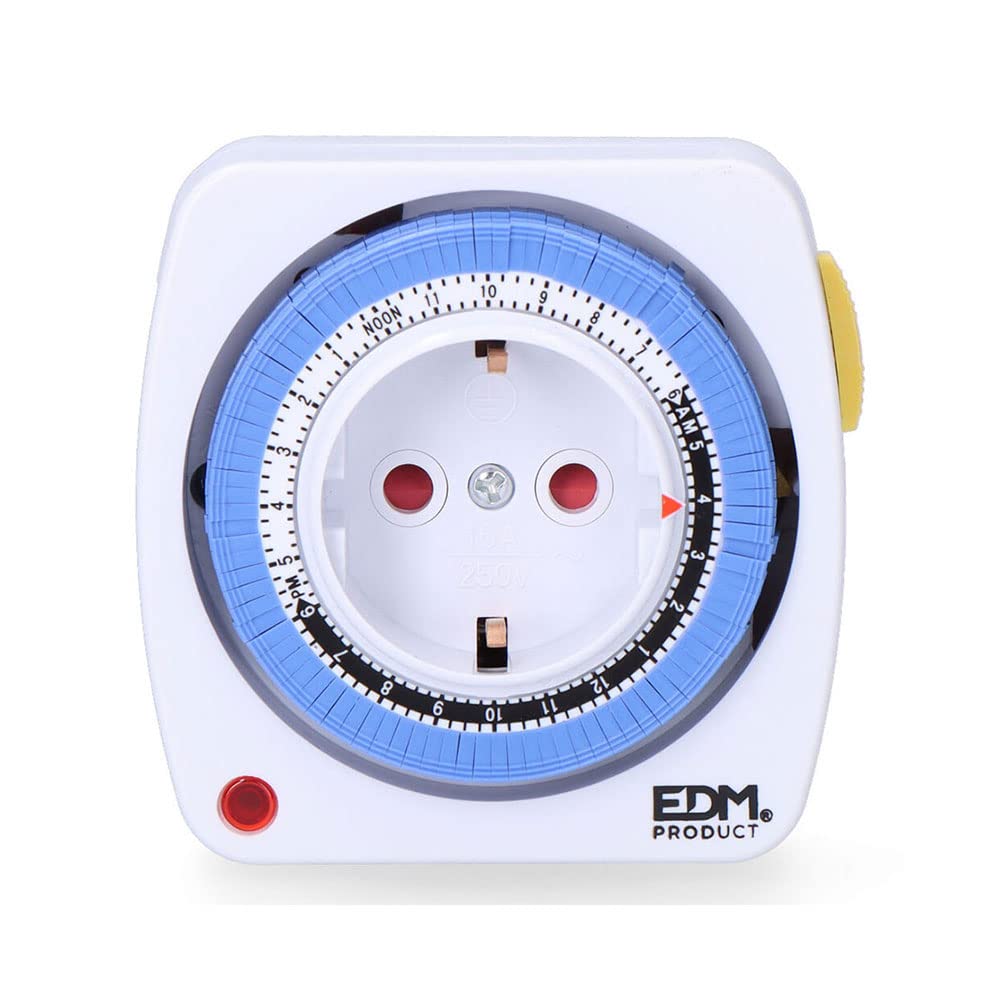
This image displays the EDM 03006 daily programmable timer. Key features visible include the central European Type F socket, a rotating dial with hour markings (AM/PM, NOON), and blue segments for setting program times. A red triangle indicates the current time, and a red LED light signifies power status.
- Central Socket: European Type F socket for connecting your appliance.
- Рақами даврзананда: Marked with 24 hours (1-12 AM, NOON, 1-12 PM).
- Blue Segments: Each segment represents a 15-minute interval. These are pushed in or pulled out to set ON/OFF times.
- Red Triangle Indicator: Shows the current time on the dial.
- Нури сурхи LED: Illuminates when the timer is receiving power and the connected appliance is in an 'ON' state according to the program.
3. Танзимот
- Кушодани: Таймерро аз бастабандиаш бодиққат берун кунед.
- Ҳолати ибтидоӣ: Ensure all blue segments around the dial are in the 'OUT' position. This means the timer is initially set to OFF for all intervals.
- Вақти ҷорӣ таъин кунед: Rotate the entire dial clockwise until the red triangle indicator points to the current time. For example, if it is 3:00 PM, align the red triangle with '3 PM'.
- Васлкун: Insert the timer into a standard 250V AC wall socket. The red LED light should illuminate if the timer is currently in an 'ON' period or if the internal clock is running.
4. Дастурҳои истифодабарӣ
Муқаррар кардани вақти барнома
The timer allows you to set multiple ON/OFF periods throughout a 24-hour cycle using the blue segments.
- Each blue segment represents a 15-minute interval.
- To set an 'ON' period, push the corresponding blue segments inwards towards the center of the dial.
- To set an 'OFF' period, leave the corresponding blue segments in the outwards мавқеъ.
- Барои мисолample, to have an appliance turn ON from 6:00 PM to 7:00 PM, push in the four blue segments that correspond to 6:00 PM, 6:15 PM, 6:30 PM, and 6:45 PM.
- Once programmed, the timer will automatically switch the connected appliance ON and OFF according to your settings as the dial rotates with the current time.
Connecting an Appliance
Plug the appliance you wish to control into the central socket of the timer. Ensure the appliance's power switch is set to the 'ON' position if it has one, so the timer can control its power supply.
5. Нигоҳдорӣ
- Пеш аз тоза кардан, ҳамеша таймерро аз розеткаи деворӣ ҷудо кунед.
- Wipe the exterior of the timer with a soft, dry cloth.
- Do not use abrasive cleaners, solvents, or immerse the timer in water.
- Keep the timer free from dust and debris to ensure proper ventilation and operation.
6. Баррасии мушкилот
| Мушкилот | Сабаби эҳтимолӣ | Ҳалли |
|---|---|---|
| Дастгоҳ мувофиқи барномарезӣ фурӯзон/хомӯш намешавад. | Incorrect program settings (blue segments). Вақти ҷорӣ дуруст таъин карда нашудааст. Appliance switch is OFF. | Ensure blue segments are pushed IN for ON times and OUT for OFF times. Verify the red triangle indicator is aligned with the current time. Check that the appliance's power switch is in the 'ON' position. |
| Timer is not receiving power (Red LED is off). | Wall socket is not active. Timer is in an 'OFF' period. | Test the wall socket with another appliance. Check the blue segments around the current time; if they are all 'OUT', the timer is in an OFF state. |
| Timer makes a slight humming noise. | Normal operation of mechanical timers. | This is typically normal for mechanical timers and indicates the internal clock mechanism is functioning. |
7. Мушаххасоти
- Бренд: EDM
- Модели: 03006
- Рейтинги нерӯ: 3500W (Max), 16A, 250V AC
- Андозаҳо (Баста): 17.3 х 9.4 х 7.9 см
- Вазни ашё: 180 гр
- Манбаи нерӯ: AC (Ҷараёни алтернативӣ)
- Programmable Intervals: дақиқа 15
- Daily Cycles: 24 соат
- Навъи розетка: European Type F
8. Кафолат ва дастгирӣ
Барои маълумоти кафолат ё дастгирии техникӣ, лутфан ба ҳуҷҷатҳое, ки ҳангоми хариди шумо пешниҳод шудаанд, муроҷиат кунед ё бо фурӯшандаи худ тамос гиред. Барои ҳама даъвоҳои кафолат далели хариди худро нигоҳ доред.


