Муқаддима
This manual provides detailed instructions for the installation, operation, and maintenance of the UHPPOTE UT0111-08X Wiegand 26-bit 125KHz RFID Proximity Card Reader. This device is designed for use in various access control applications, including parking systems, elevators, and logistics.
Эзоҳ муҳим: This RFID reader functions as a component of an access control system and cannot operate independently. It requires connection to a compatible access controller.
Маҳсулот ба охир расидview
The UHPPOTE UT0111-08X is a middle-range RFID proximity card reader operating at 125KHz. It supports EM-ID cards and outputs data in Wiegand 26-bit format. The reading distance varies based on the card type and thickness.
Хусусиятҳои асосӣ:
- Data Output Format: Wiegand 26-Bit.
- Card Type Support: 125KHz EM-ID Cards (EM4100/TK4100 compatible). Does not support encrypted cards such as HID, Indala, Cobra, APCiK, Paradox, Radio, or Honeywell.
- Proximity Range: Varies from 30cm to 100cm (11.8 inches to 39.4 inches) depending on card quality and thickness.
- Барномаҳо: Primarily used for parking, elevator, and logistics access control systems.
- Сохтмон: Пластмасса вasing with epoxy saturation, built-in antenna and buzzer.
Reading Distance Information:
The term "Middle Range" refers to the unit's capability when used with specific long-range cards (typically 2mm thickness). For standard EM cards, the reading range is as follows:
- Special Long Range Card (2mm thickness): Up to 80-100cm (31.5-39.4 inches).
- Normal 2mm/0.08" Thickness Card: Up to 60cm (23.6 inches).
- 0.8mm/0.03" Thickness Card: Up to 40cm (15.7 inches).
- Тугмача: Approximately 30cm (11.8 inches).
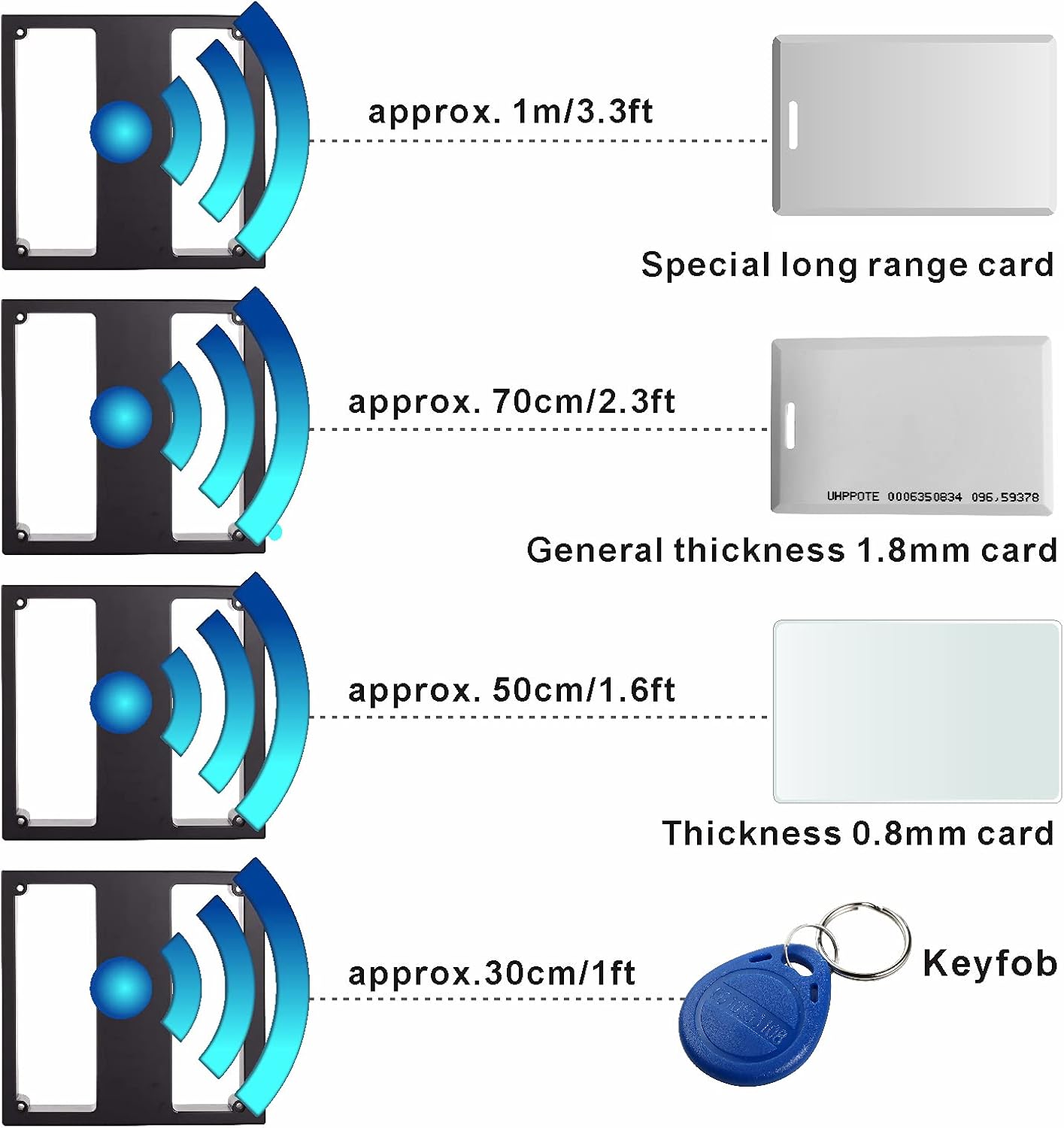
Тасвир: This diagram illustrates the approximate reading distances for various card types and keyfobs with the UHPPOTE RFID reader. Distances range from approximately 1 meter for special long-range cards down to 30cm for keyfobs.
Мушаххасоти
| Decode Time | <0.2с |
| Муошират | Wiegand 26 каме |
| Навъи корт | EM card, EM compatible card, EM4100/TK4100 |
| Басомад | 125кГц |
| Масофаи индуксия | Common Card: 30-40cm (11.8-15.7 inches) Long Range Proximity Card: 80-100cm (31.5-39.4 inches) |
| Таъмини нерӯ | 12VDC |
| Истеъмоли ҷорӣ | Data transfer range: max. 80mA Ҷараёни корӣ: <200mA |
| Ҳарорати корӣ | 0°C ~ 70°C (32°F ~ 158°F) |
| Рутубати кор | Камтар аз 80% |
| Андозаҳо (LxWxH) | 230x230x35mm (9.06x9.06x1.38 inches) |
| Материал | Пластмасса вasing & epoxy saturated |
| Хусусиятҳои дарунсохт | Antenna, Buzzer |
| Вазни ашё | 3.08 фунт |
| Рақами модел | UT0111-08X |
| UPC | 701385687977 |
Насб ва насб
Proper installation is crucial for the optimal performance of the RFID reader. This device is designed to be integrated into an existing access control system.
Дастурҳои пайвастшавӣ:
Connect the reader to your access controller using the provided wiring. Ensure all connections are secure and follow the color-coded scheme below. The reader requires a 12VDC power supply.
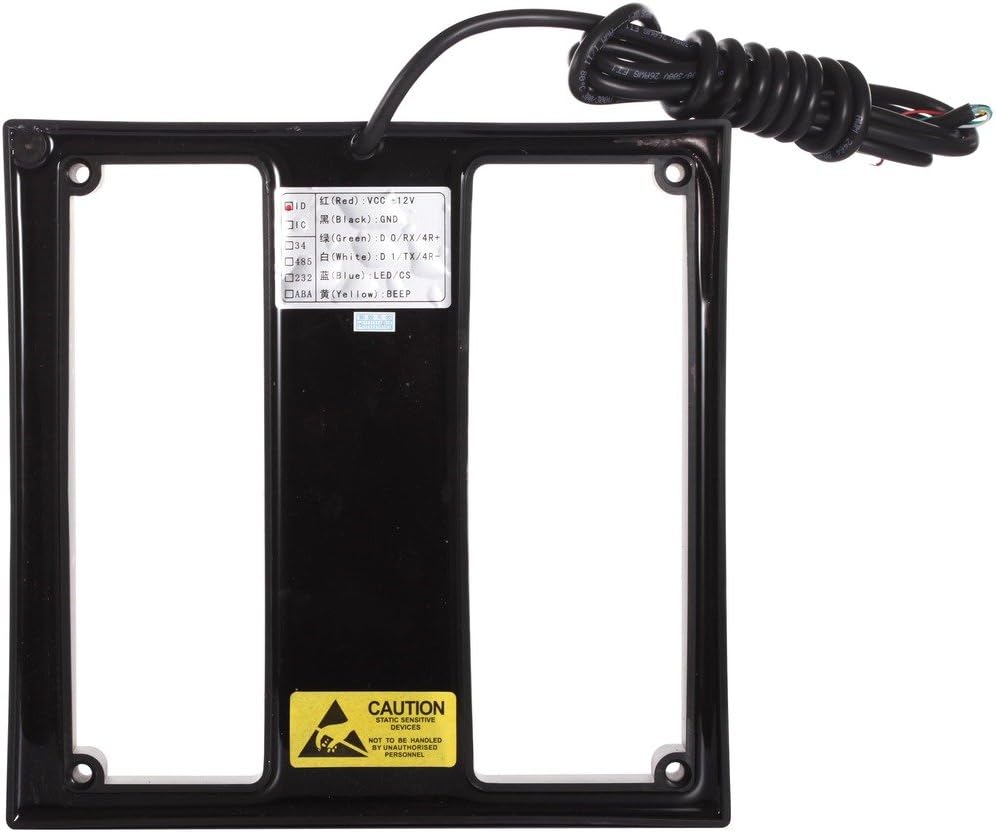
Тасвир: Қафо view of the RFID reader with clearly labeled wiring connections. The labels indicate Red for VCC +12V, Black for GND, Green for D0/RX/4R+, White for D1/TX/4R-, and Blue for LED/CS, Yellow for BEEP.
- Сурх: VCC +12V (Power Supply)
- Сиёҳ: GND (замин)
- Сабз: D0 / RX / 4R+ (Wiegand Data 0)
- Сафед: D1 / TX / 4R- (Wiegand Data 1)
- Кабуд: LED / CS (LED Control / Chip Select)
- Зард: BEEP (Buzzer Control)
Диаграммаи пайвастшавӣ:
Refer to the following diagram for connecting the RFID reader to an access controller. This diagram illustrates a typical setup for a single door access control system.

Тасвир: A detailed wiring diagram showing how to connect the RFID reader (both 'Card Reader In' and 'Card Reader Out' sections) to an access controller, including power supply, data lines (D0, D1), LED, and an exit button. It also includes an explanation of LED status indicators.
LED Status Explanation (as per diagram):
- ДАР: Light blink, valid card
- SYS: Light blink, CPU runs normally
- ХАТО: Light off, apparatus run normally
- LINK: Green light flashes, the device already connect
- ACT: Orange light flashes, the device is processing data
- POW: Red light on, go through the device
- DRV: Yellow light on, door is open
Огоҳӣ: This device is static sensitive. Handle with care and ensure proper grounding during installation to prevent damage.
Дастурҳои амалиётӣ
Once properly installed and connected to an access controller, the UHPPOTE UT0111-08X reader operates by detecting compatible 125KHz EM-ID cards or keyfobs.
- Фаъол: Ensure the reader is powered by a stable 12VDC source. The LED indicator on the reader should show a status indicating normal operation (refer to the LED Status Explanation in the Setup section).
- Present Card: Hold a compatible 125KHz EM-ID card or keyfob within the reader's proximity range. The optimal reading distance varies by card type and thickness (see "Reading Distance Information" in Product Overview).
- Access Granted/Denied: The reader will transmit the card's data to the connected access controller. The controller will then process this information and determine whether to grant or deny access. The reader's buzzer may sound, and the LED indicator may change to signal a successful read or access event.
- System Response: The access controller will activate the connected lock or gate mechanism if access is granted.
The decode time for a card read is typically less than 0.2 seconds, providing quick authentication.
Нигоҳдорӣ
The UHPPOTE UT0111-08X RFID reader is designed for durability and requires minimal maintenance. Follow these guidelines to ensure its longevity and reliable performance:
- Тозакунӣ: Gently wipe the reader's surface with a soft, dry cloth. Avoid using abrasive cleaners, solvents, or excessive moisture, which can damage the casing ё ҷузъҳои дохилӣ.
- Шароити экологӣ: Ensure the reader operates within the specified working temperature (0°C ~ 70°C) and humidity (less than 80%). Avoid exposing the device to extreme temperatures, direct sunlight for prolonged periods, or high humidity environments.
- Муҳофизати ҷисмонӣ: Protect the reader from physical impact or excessive vibration. The epoxy-saturated casing provides some protection, but severe impacts can still cause damage.
- Беайбии ноқилҳо: Periodically inspect the wiring connections for any signs of wear, corrosion, or loose connections. Ensure all cables are securely fastened and protected from environmental elements if installed outdoors.
- Қувваи барқи статикӣ: As a static-sensitive device, avoid touching internal components without proper anti-static precautions.
Мушкилкушо
If you encounter issues with your UHPPOTE UT0111-08X RFID reader, refer to the following common problems and solutions:
| Мушкилот | Сабаби эҳтимолӣ | Ҳалли |
|---|---|---|
| Reader is unresponsive / No power. | Манбаи барқ нест, ҳаҷми нодурустtage, or loose wiring. |
|
| Reader does not read cards. | Incompatible card type, card presented out of range, or interference. |
|
| Access is denied despite a successful card read. | Issue with the access controller or card programming. |
|
| Reduced reading distance. | Interference, card quality, or mounting location. |
|
Кафолат ва дастгирӣ
For warranty information and technical support regarding your UHPPOTE UT0111-08X RFID Proximity Card Reader, please contact UHPPOTE customer service directly or refer to the official UHPPOTE webсайт. Шартҳои мушаххаси кафолат метавонанд вобаста ба минтақа ва санаи харид фарқ кунанд.
When contacting support, please have your model number (UT0111-08X) and purchase details readily available.


