1. Муқаддима
The Edifier P180 is a stereo earbud headset designed for clear audio and convenient communication. Featuring an inline microphone and control, it offers a comfortable listening experience for various devices.

Figure 1: Edifier P180 Wired Earbud Headset
2. Дар қуттӣ чӣ мавҷуд аст
- Edifier P180 Earbud Headset
- Кабел
3. Хусусиятҳои асосӣ
- Classic Comfort: Ergonomic design for comfortable wear without irritating the ear canal.
- Сифати садои олӣ: Equipped with 16mm neodymium magnetic monomers for high-fidelity audio playback.
- Integrated Microphone and Control: 3.5mm stereo earphones with a built-in microphone and remote button for mobile phone communication.
- Функсия: Single button control for picking up/hanging up calls and skipping songs (device dependent for iOS/Android).
- Тарҳрезии устувор: Constructed with quality materials for longevity.

Figure 2: Ergonomic design for comfortable fit.
4. Танзимот
- Кушодани: Carefully remove the Edifier P180 headset from its packaging.
- Тафтиш: Check the earbuds and cable for any visible damage.
- Пайвастшавӣ: Insert the 3.5mm audio jack into the headphone port of your compatible device (smartphone, tablet, computer, etc.). Ensure the jack is fully inserted for proper audio and microphone function.
- Вазифа: Place the earbuds comfortably in your ears. The ergonomic design is intended to rest well without causing irritation.
5. Дастурҳои истифодабарӣ
The Edifier P180 features an inline control button for easy management of calls and music playback.
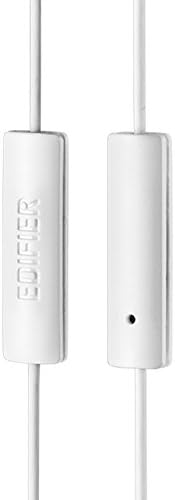
Figure 3: Inline microphone and control button.
- Ҷавоб додан/қатъи зангҳо: Press the control button once to answer an incoming call. Press it again to end an active call.
- Навозиш/таваффақ кардани мусиқӣ: Press the control button once to play or pause audio playback.
- Гузаронидани трекҳо: Double-press the control button to skip to the next track. Triple-press to go to the previous track (functionality may vary by device and operating system).
- Ёвари овоз: Long-press the control button to activate your device's voice assistant (e.g., Siri, Google Assistant).
Видео 1: Маҳсулоти расмӣ ба охир расидview of the Edifier P180 Classic Earbud Headsets, demonstrating features and usage.
6. Нигоҳдорӣ
- Тозакунӣ: Гӯшмонакҳо ва симро бо матои нарм ва хушк нарм пок кунед. Аз истифодаи маводи кимиёвии сахт ё маводҳои абразивӣ худдорӣ кунед.
- Нигоҳдорӣ: Ҳангоми истифода нашудан, гӯшмонакро дар ҷои тоза ва хушк, дур аз ҳарорати аз ҳад зиёд ва нурҳои бевоситаи офтоб нигоҳ доред. Аз печидагии кабел худдорӣ намоед.
- Аз намӣ канорагирӣ кунед: Do not expose the headset to water or excessive moisture, as this can damage the internal components.
7. Баррасии мушкилот
- Овоз нест:
- Боварӣ ҳосил кунед, ки ҷеки 3.5 мм пурра ба порти аудиоии дастгоҳи шумо ворид карда шудааст.
- Танзимоти баландии овози дастгоҳи худро санҷед.
- Гӯшмонакҳоро бо дастгоҳи дигар санҷед, то мушкили мушаххаси дастгоҳро истисно кунед.
- Микрофон кор намекунад:
- Боварӣ ҳосил кунед, ки ҷеки 3.5 мм пурра ворид карда шудааст.
- Танзимоти вуруди микрофони дастгоҳи худро санҷед.
- Микрофонро бо дастгоҳ ё барномаи дигар санҷед.
- Аудио фосилавӣ:
- Check the cable for any kinks or damage.
- Боварӣ ҳосил кунед, ки сурохии аудио тоза ва аз партовҳо холӣ аст.
8. Мушаххасоти
| Хусусият | Мушаххасоти |
|---|---|
| Рақами модел | P180 |
| Ҷавоби басомад | 20 Гц - 20,000 Гц |
| Гӯшмонакҳо Jack | Ҷек 3.5 мм |
| Технологияи пайвастшавӣ | Симдор |
| Вазни ашё | 1.76 унсия (50 Грам) |
| Андозаҳои маҳсулот | 2.01 x 5.59 x 0.91 инч |
| Материал | Неодим |
| Навъи назорат | Inline Control Button |
| Импеданс | 32 Ом |
| Назорати садо | Изолятсияи садо |
9. Кафолат ва дастгирӣ
The Edifier P180 headset is backed by a Кафолати 1 сол. For any support inquiries or warranty claims, please refer to the contact information provided with your purchase or visit the official Edifier webсайт.