Муқаддима
The ASTRO Gaming A40 TR Headset and MixAmp Pro TR are designed to provide a high-fidelity audio experience for gaming on PlayStation 4 and PC. The A40 TR headset offers user customization, allowing transformation from an open-back to a closed-back noise-canceling headset with optional Mod Kits. The MixAmp Pro TR features all-digital components for clear, interference-free audio and voice communication, with customizable settings via the ASTRO Command Center software.

Image: The ASTRO Gaming A40 TR Headset and MixAmp Pro TR, showcasing both components together. The headset is black with gold accents, and the MixAmp is a compact black unit with control dials.
Мундариҷаи баста
Боварӣ ҳосил кунед, ки ҳамаи ҷузъҳои дар поён номбаршуда ба бастаи маҳсулоти шумо дохил карда шудаанд:
- ASTRO A40 TR Headset
- ASTRO MixAmp Pro TR
- A40 TR Inline Mute Cable (2.0m)
- TOSlink Optical Cable (3.0m)
- Micro-USB Cable (3.0m)
- Digital Daisy Chain Cable (0.5m)
- Swappable Microphone
Ташкил кардан
Connecting to PlayStation 4 (PS4)
- Пайваст кунед TOSlink Optical Cable from the MixAmp Pro TR's OPTICAL port to the PS4's Optical Out port.
- Пайваст кунед Кабели Micro-USB from the MixAmp Pro TR's USB port to an available USB port on the PS4.
- Пайваст кунед A40 TR Inline Mute Cable from your A40 TR Headset to the headset port on the front of the MixAmp Pro TR.
- On your PS4, navigate to Settings > Sound and Screen > Audio Output Settings.
- Танзим Порт -баромади ибтидоӣ ба Баромади рақамӣ (оптикӣ).
- Интихоб кунед Dolby Digital (Bitstream) for the audio format.
- Ба Танзимотҳо> Дастгоҳҳо> Дастгоҳҳои аудиоӣ.
- Танзим Дастгоҳи вуруд ба USB Headset (ASTRO MixAmp Pro TR).
- Танзим Дастгоҳи баромад ба USB Headset (ASTRO MixAmp Pro TR).
- Танзим кардан Назорати баландии овоз (наушникҳо) ба ҳадди аксар.
- Танзим Баромад ба гӯшмонакҳо ба Чат Аудио or Ҳама аудио as preferred.
Пайвастшавӣ ба компютер
- Пайваст кунед Кабели Micro-USB from the MixAmp Pro TR's USB port to an available USB port on your PC.
- Пайваст кунед A40 TR Inline Mute Cable from your A40 TR Headset to the headset port on the front of the MixAmp Pro TR.
- On your PC, ensure the MixAmp Pro TR is selected as the default playback and recording device in your sound settings.
- -ро зеркашӣ ва насб кунед ASTRO Command Center software from the official ASTRO Gaming website to customize settings, update firmware, and manage EQ presets.
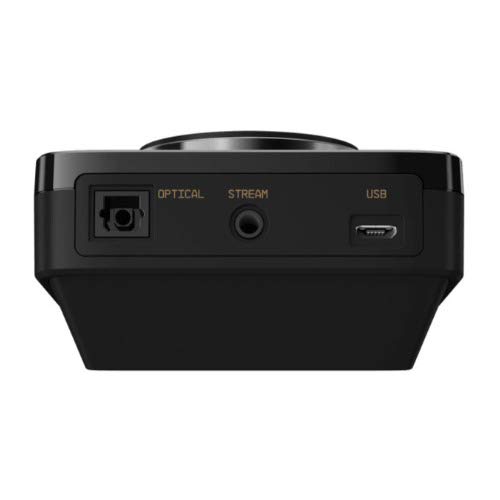
Тасвир: Қафо view of the ASTRO MixAmp Pro TR, highlighting the Optical, USB, AUX, and Stream ports for various connections.
Operating the MixAmp Pro TR
МиксAmp Pro TR provides intuitive controls for managing your audio experience:
- Рақами баландии овоз: The large dial on the left controls the overall volume of your headset. Rotate clockwise to increase volume, counter-clockwise to decrease.
- Game/Voice Balance Dial: The smaller dial on the right allows you to adjust the balance between game audio and voice chat.
- Rotate towards "GAME" to prioritize game audio.
- Rotate towards "VOICE" to prioritize voice chat.
- EQ Presets Button: Located in the center, this button cycles through four customizable equalizer presets. The active preset is indicated by the illuminated icon (star, headphone, etc.). These presets can be configured using the ASTRO Command Center software.
- Dolby Button: Activates or deactivates Dolby Surround Sound. When active, the Dolby logo will illuminate.
- Тугмаи хомӯш кардани микрофон: Located on the A40 TR Inline Mute Cable, this switch mutes or unmutes your microphone. When muted, the MixAmp's volume dials will typically glow red.
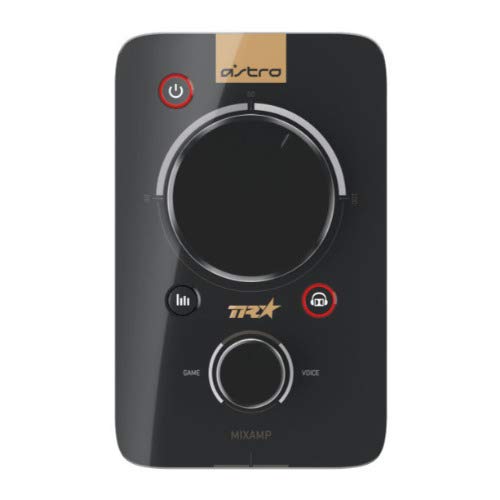
Тасвир: боло view of the ASTRO MixAmp Pro TR, showing the large master volume dial, the smaller game/voice balance dial, and the EQ preset buttons.
Нигоҳдорӣ
- Тозакунӣ: Use a soft, dry cloth to clean the headset and MixAmp. Avoid abrasive cleaners or solvents.
- Нигоҳдорӣ: Store the headset and MixAmp дар ҷои хунук ва хушк дур аз нури бевоситаи офтоб ва ҳарорати аз ҳад зиёд.
- Нигоҳубини кабел: Барои пешгирӣ аз осеб дидан, бо симҳо эҳтиёткорона муносибат кунед. Аз хамшавии тез ё кашидани аз ҳад зиёд худдорӣ намоед.
- болиштҳои гӯш: Periodically check ear cushions for wear and tear. Replacement cushions are available from ASTRO Gaming.
Мушкилкушо
If you encounter issues with your ASTRO Gaming A40 TR Headset or MixAmp Pro TR, try the following solutions:
| Мушкилот | Ҳалли |
|---|---|
| Аз гӯшмонак аудио нест. |
|
| Микрофон кор намекунад. |
|
| Сифати пасти аудио ё таҳрифшуда. |
|
For more detailed troubleshooting, please refer to the official ASTRO Gaming support resources.
Мушаххасоти
- Рақами модел: 939-001511
- Ҷавоби басомад: 20 - 20,000 Гц
- Импеданси номиналӣ: 48 Ом
- Фишори сар: 2.6Н
- Андозаҳои маҳсулот: 9.06 x 13.87 x 4.33 инч
- Вазни ашё: 1.06 фунт
- Пайвастшавӣ: Оптикӣ, USB
- Мутобиқат: PlayStation 4, компютер
Кафолат ва дастгирӣ
For detailed warranty information and product support, please visit the official ASTRO Gaming webба сайт муроҷиат кунед ё ба ҳуҷҷатҳои пешниҳодшуда муроҷиат кунед:
Ensure you register your product on the ASTRO Gaming website for the latest updates and support.


