Муқаддима
Ташаккур ба шумо барои харидasing the SENTRY HPXBT150 Bluetooth Flat Cord Earbuds. This manual provides detailed instructions on how to set up, operate, and maintain your new wireless earbuds. Please read this manual thoroughly before use to ensure optimal performance and longevity of your device.
Мундариҷаи баста
- SENTRY HPXBT150 Bluetooth Flat Cord Earbuds
- Парвандаи муҳофизатӣ
- USB Charging Cable (Micro-USB)
- Removable Ear Hooks
- Дастури корбар
Маҳсулот ба охир расидview
The SENTRY HPXBT150 earbuds feature Bluetooth wireless technology, allowing for a cord-free listening experience. They include an in-line microphone for hands-free calls and media control buttons for easy operation. Removable ear hooks provide a secure fit, especially during physical activity.
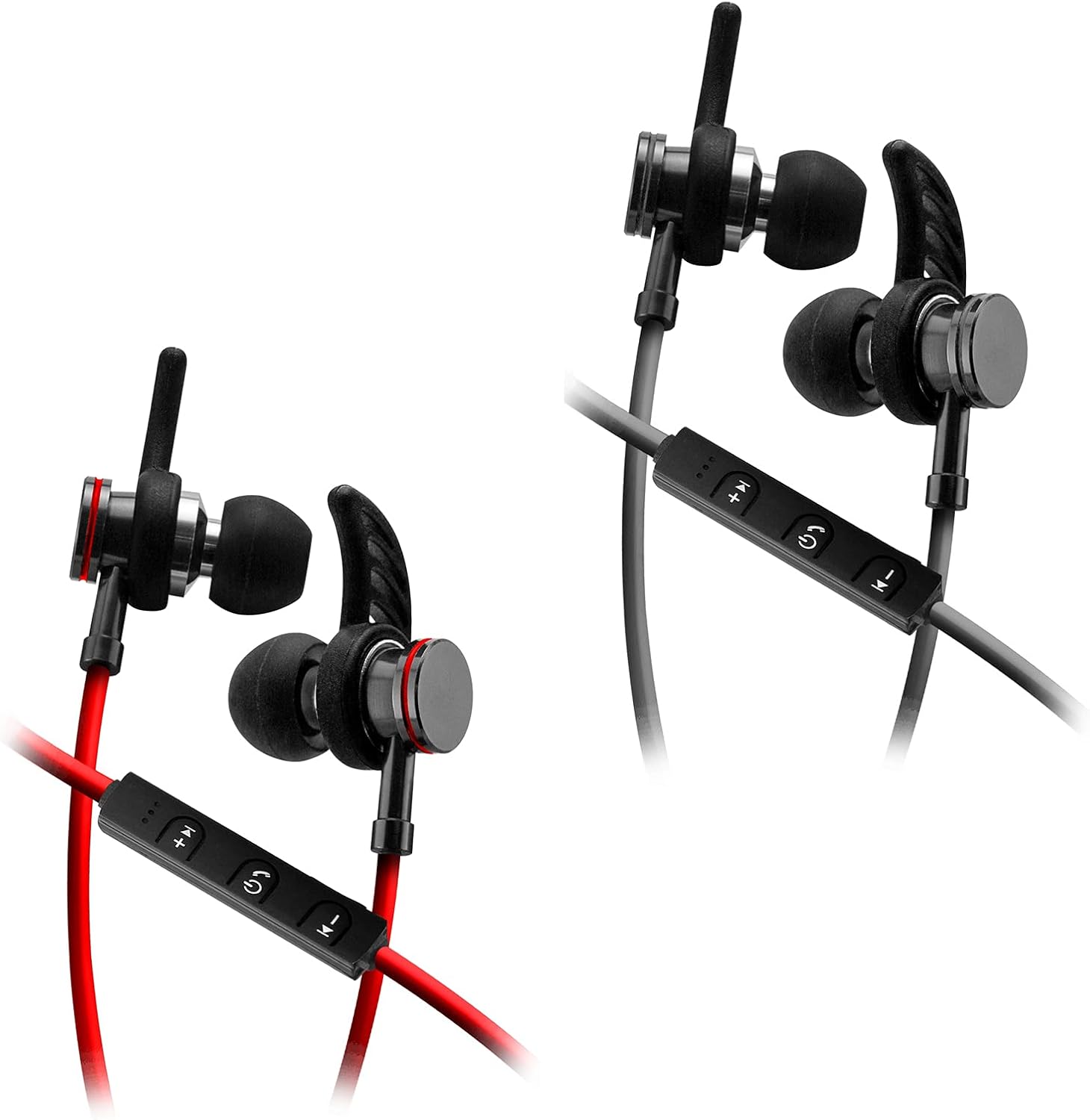
Image: SENTRY HPXBT150 Bluetooth Earbuds showing the in-line control panel and ear hooks. The control panel features volume up/next track, power/multifunction, and volume down/previous track buttons.
Ташкил кардан
1. Пур кардани гӯшмонакҳо
- Locate the Micro-USB charging port on the in-line control unit.
- Сими пуркунандаи USB-и додашударо ба порти пуркунии гӯшмонакҳо пайваст кунед.
- Нӯги дигари сими USB-ро ба манбаи мувофиқи қувваи барқи USB пайваст кунед (масалан, порти USB-и компютер, адаптери девории USB).
- The LED indicator light will illuminate during charging. It will change color or turn off once charging is complete. A full charge typically takes approximately 1-2 hours.
2. Ҷуфти Bluetooth
- Ensure the earbuds are fully charged before initial pairing.
- Press and hold the multi-function button (usually the center button on the in-line control) for approximately 5-7 seconds until the LED indicator light flashes red and blue alternately. This indicates the earbuds are in pairing mode.
- On your Bluetooth-enabled device (smartphone, tablet, computer), go to the Bluetooth settings menu.
- Bluetooth-ро фаъол созед ва дастгоҳҳои дастрасро ҷустуҷӯ кунед.
- Select "HPXBT150" or a similar name from the list of found devices.
- Once successfully paired, the LED indicator on the earbuds will typically flash blue slowly or turn off, and you will hear an audible confirmation.
- Агар парол талаб карда шавад, "0000" ворид кунед.
Дастурҳои амалиётӣ
Фаъол/хомӯш
- Фаъол: Тугмаи бисёрфунксионалиро тақрибан 3 сония пахш карда нигоҳ доред, то он даме ки нишондиҳандаи LED бо ранги кабуд медурахшад ва шумо садои фурӯзон шуданро мешунавед.
- Хомӯш: Press and hold the multi-function button for approximately 3-5 seconds until the LED indicator flashes red and you hear a power-off tone.
Навозиши мусиқӣ
- Бозӣ/Таваққуф: Тугмаи бисёрфунксионалиро як маротиба пахш кунед.
- Баланд бардоштани овоз: Тугмаи '+'-ро пахш кунед.
- Ҷилди поён: Тугмаи '-' -ро пахш кунед.
- Треки навбатӣ: Тугмаи '+'-ро пахш карда нигоҳ доред.
- Track гузашта: Тугмаи '-'-ро пахш карда нигоҳ доред.
Идоракунии зангҳо
- Ҷавоб додан/Занги хотимавӣ: Тугмаи бисёрфунксионалиро як маротиба пахш кунед.
- Рад кардани занг: Тугмаи бисёрфунксияро тақрибан 2 сония пахш карда нигоҳ доред.
- Рақами охирини такрорӣ: Тугмаи бисёрфунксияро ду маротиба пахш кунед.
Нигоҳдорӣ
- Тозакунӣ: Use a soft, dry cloth to clean the earbuds. Do not use harsh chemicals or abrasive materials.
- Нигоҳдорӣ: When not in use, store the earbuds in the provided protective case to prevent damage.
- Нигоҳубини батарея: Барои нигоҳ доштани мӯҳлати хизмати батарея, гӯшмонакҳоро зуд-зуд аз холӣ кардани пурраи онҳо худдорӣ кунед. Онҳоро мунтазам пур кунед, ҳатто агар онҳо муддати тӯлонӣ истифода нашаванд ҳам.
- Аз намӣ канорагирӣ кунед: Keep the earbuds away from water and excessive moisture.
Мушкилкушо
| Мушкилот | Ҳалли имконпазир |
|---|---|
| Гӯшмонакҳо фаъол нестанд. | Ensure the earbuds are fully charged. Connect to a power source and allow time to charge. |
| Бо дастгоҳ пайваст карда намешавад. | Ensure earbuds are in pairing mode (flashing red/blue). Turn off and on Bluetooth on your device. Move earbuds closer to your device. Forget previous pairings on your device and try again. |
| Овоз нест ё садои паст. | Check volume levels on both the earbuds and your connected device. Ensure earbuds are properly paired. Try re-pairing the earbuds. |
| Пайвастагии фосилавӣ. | Ensure there are no obstructions between the earbuds and your device. Move closer to your device. Avoid environments with strong Wi-Fi or other wireless interference. |
Мушаххасоти
- Модели: HPXBT150
- Технологияи пайвастшавӣ: Бесимӣ (Bluetooth)
- Шӯъбаи ронандагӣ: 10мм
- Импеданс: 32+/-3 Ohms
- Ҳассосият: 103дБ+/-3дБ
- Ҷавоби басомад: 20Гц - 20кГц
- Дастгоҳҳои мувофиқ: Phones, Tablets, MP3 Players, Computers, Gaming Consoles
- Навъи назорат: Назорати ВАО
- Хусусиятҳои махсус: Microphone Included, USB Connectivity, Removable Ear Hooks
- Вазни ашё: 2.08 унция
Маълумот оид ба бехатарӣ
- Do not expose the earbuds to extreme temperatures, direct sunlight, or fire.
- Do not disassemble or modify the earbuds. This may void the warranty and cause damage.
- Барои пешгирӣ кардани осеби шунавоӣ аз гӯш кардани садои баланд ба муддати тӯлонӣ худдорӣ кунед.
- Аз дастрасии кӯдакон ва ҳайвонот дур нигоҳ доред.
- Маҳсулотро мувофиқи қоидаҳои маҳаллӣ ба таври масъулиятнок партов кунед.
Кафолат ва дастгирӣ
For warranty information and technical support, please refer to the documentation included with your purchase or contact SENTRY customer service directly. Keep your proof of purchase for warranty claims.


