1. Муқаддима
This manual provides detailed instructions for the safe and effective operation of the Extech EX355 True RMS Multimeter. The EX355 is a professional digital multimeter designed for a wide range of electrical measurements, including AC/DC voltage, current, resistance, capacitance, frequency, duty cycle, and temperature. It features True RMS for accurate readings of non-sinusoidal waveforms, Non-Contact Voltage (NCV) detection for enhanced safety, Low Impedance (LoZ) mode to prevent ghost voltage readings, and a Low Pass Filter (LPF) for noise reduction in electrical environments.
Please read this manual thoroughly before using the device to ensure proper function and to prevent potential hazards.
2. Маълумот оид ба бехатарӣ
Always adhere to the following safety precautions to avoid personal injury or damage to the multimeter:
- Ҳама дастурҳоро хонед: Familiarize yourself with the operation and safety features before use.
- Observe all warnings: Pay close attention to all warnings and cautions marked on the meter and in this manual.
- Use proper range: Always select the correct function and range for your measurement.
- Inspect test leads: Before each use, check test leads for damaged insulation or exposed metal. Replace if damaged.
- Do not exceed maximum input limits: Ҳеҷ гоҳ ҷилдиtage or current that exceeds the specified maximum limits for the meter.
- Avoid live circuits: Do not measure resistance, continuity, or diode on live circuits.
- Эҳтиёткор бо ҳаҷми баланд истифода баредtages: Be extremely careful when working with voltagаз 60V DC ё 30V AC RMS баландтар аст, зеро онҳо хатари зарба доранд.
- Do not operate if damaged: If the meter appears damaged or is not operating properly, discontinue use immediately.
- Иваз кардани батарея: Ҳамин ки нишондиҳандаи камии батарея пайдо мешавад, батареяҳоро иваз кунед, то ки хониши дақиқро таъмин кунед.
- CAT III 600V: This meter is designed for measurements in CAT III 600V environments.
3. Маҳсулот ба охир расидview
The Extech EX355 is a versatile True RMS Multimeter equipped with several advanced features for accurate and safe electrical testing.
Хусусиятҳои асосӣ:
- 12 Measurement Functions: Includes AC/DC voltage, current, resistance, capacitance, frequency, duty cycle, and temperature.
- True RMS Accuracy: Ensures precise readings for both standard and distorted electrical waveforms.
- Ҷилди ғайри тамосtage (NCV) ошкор: Allows for quick and safe detection of AC voltagд бе алокаи бевосита.
- Low Impedance (LoZ) Mode: Prevents false readings caused by ghost voltages in circuits.
- Филтри гузариш паст (LPF): Reduces high-frequency noise for stable and accurate measurements in noisy environments.
- Намоиш: 4000 count LCD display with backlight.
- Data Hold, Min/Max, Relative Mode: For capturing and analyzing measurements.
- Хомӯш кардани худкор: Муҳлати батареяро сарфа мекунад.
- Санҷиши давомнокӣ ва диод: Барои ташхиси схемаҳо муҳим аст.

Figure 1: The Extech EX355 True RMS Multimeter. This image shows the front view of the multimeter, highlighting its display, rotary dial, function buttons, and input jacks.
4. Танзимот
4.1 Насби батарея
The Extech EX355 requires two (2) AA batteries for operation. These are typically included with the device.
- Боварӣ ҳосил кунед, ки мултиметр хомӯш аст.
- Сарпӯши батареяро дар қафои дастгоҳ пайдо кунед.
- Unscrew the retaining screw(s) and carefully remove the cover.
- Insert two AA batteries, observing the correct polarity (+ and -) as indicated inside the compartment.
- Сарпӯши қисмати батареяро иваз кунед ва онро бо винт(ҳо) маҳкам кунед.
Шарҳ: Replace batteries immediately when the low battery indicator appears on the display to maintain measurement accuracy.
4.2 Пайваст кардани рахҳои санҷишӣ
Always connect the test leads correctly for the desired measurement function.
- Барои аксари ҳаҷмҳоtage, resistance, continuity, diode, capacitance, and frequency measurements, insert the red test lead into the VΩHzCAP jack and the black test lead into the COM Jack.
- Барои андозагирии ҷараён то 10А, сими санҷишии сурхро ба 10А jack and the black test lead into the COM Jack.
- Барои андозагирии ҷараён то 400 мА, сими санҷишии сурхро ба мАмА jack and the black test lead into the COM Jack.
- Ensure test leads are fully inserted into the jacks.
5. Дастурҳои истифодабарӣ
This section details how to perform various measurements using the Extech EX355 multimeter.
5.1 AC/DC ҷилдtage андозагирӣ
- Рақами гардишгарро ба V~ (AC ҷилдиtagд) ё V- (Ҷилди DCtagд) мавқеъ.
- Нишони санҷиши сурхро ба VΩHzCAP jack and the black test lead to the COM Jack.
- Touch the test probes to the circuit points where voltagд бояд чен карда шавад.
- Ҷилди хонедtagарзиши e дар экран.
5.2 Андозаи ҷорӣ AC/DC
Огоҳӣ: Ҳеҷ гоҳ мультиметрро ба муҳаррики volt мувозӣ пайваст накунедtagҳангоми чен кардани ҷараён манбаи электронӣ. Ҳамеша бо бор пай дар пай пайваст кунед.
- Set the rotary dial to the appropriate A~ (Ҷараёни AC) ё A- (DC Current) range (e.g., 10A or mAµA).
- Нишони санҷиши сурхро ба 10А or мАмА jack and the black test lead to the COM Jack.
- Open the circuit where current is to be measured and connect the test probes in series.
- Арзиши ҷорӣро дар экран хонед.
5.3 Андозаи муқовимат
Огоҳӣ: Пеш аз чен кардани муқовимат, боварӣ ҳосил кунед, ки схемаи барқ хомуш карда шудааст.
- Рақами гардишгарро ба Ω Мавқеи (муқовимат).
- Нишони санҷиши сурхро ба VΩHzCAP jack and the black test lead to the COM Jack.
- Touch the test probes across the component or circuit segment to be measured.
- Арзиши муқовиматро дар экран хонед.
5.4 Андозагирии иқтидор
Огоҳӣ: Discharge capacitors before measuring to prevent damage to the meter.
- Рақами гардишгарро ба CAP Мавқеи (иқтидори) .
- Нишони санҷиши сурхро ба VΩHzCAP jack and the black test lead to the COM Jack.
- Touch the test probes across the capacitor terminals.
- Арзиши иқтидорро дар экран хонед.
5.5 Андозагирии басомад ва сикли вазифа
- Рақами гардишгарро ба Гц/% Мавқеи (басомад/сикли вазифа).
- Нишони санҷиши сурхро ба VΩHzCAP jack and the black test lead to the COM Jack.
- Touch the test probes to the signal source.
- -ро пахш кунед Гц/% button to toggle between frequency and duty cycle readings.
5.6 Андозагирии ҳарорат
The EX355 includes a general purpose bead wire temperature probe.
- Рақами гардишгарро ба Ҳарорат Мавқеи (ҳарорат).
- Insert the temperature probe into the VΩHzCAP (positive) and COM (negative) jacks, observing polarity.
- Place the tip of the temperature probe on or in the object to be measured.
- Read the temperature value on the display. The unit can display in Celsius or Fahrenheit.

Figure 2: Using the Extech EX355 to measure temperature in an HVAC vent. The image shows a person holding the multimeter and inserting the temperature probe into an air conditioning vent.
5.7 Non-contact Ҷилдиtage (NCV) ошкор
NCV mode allows for quick detection of AC voltagбидуни тамос мустақим, ки бехатариро беҳтар мекунад.
- Рақами гардишгарро ба NCV мавқеъ.
- Move the top of the multimeter near a conductor or outlet.
- The NCV indicator light will illuminate and an audible beep will sound if AC voltage is detected. The intensity of the beep and light may increase with stronger fields.
5.8 Low Impedance (LoZ) Mode
LoZ mode helps eliminate false readings caused by ghost voltages.
- Рақами гардишгарро ба LoZ V мавқеъ.
- Connect the test leads as for standard voltage андозагирӣ.
- The meter will present a low impedance load to the circuit, dissipating ghost voltages and providing a more accurate reading of actual voltage.
5.9 Филтри Pass Pass (LPF)
The LPF function is used to filter out high-frequency noise, providing stable readings in variable frequency drive (VFD) applications or other noisy electrical environments.
- Set the rotary dial to an AC Voltagд (V~) or AC Current (A~) диапазон.
- -ро пахш кунед LPF button to activate the low pass filter. The LPF icon will appear on the display.
- Perform your measurement as usual. The meter will now display readings with high-frequency noise attenuated.
- -ро пахш кунед LPF button again to deactivate the filter.
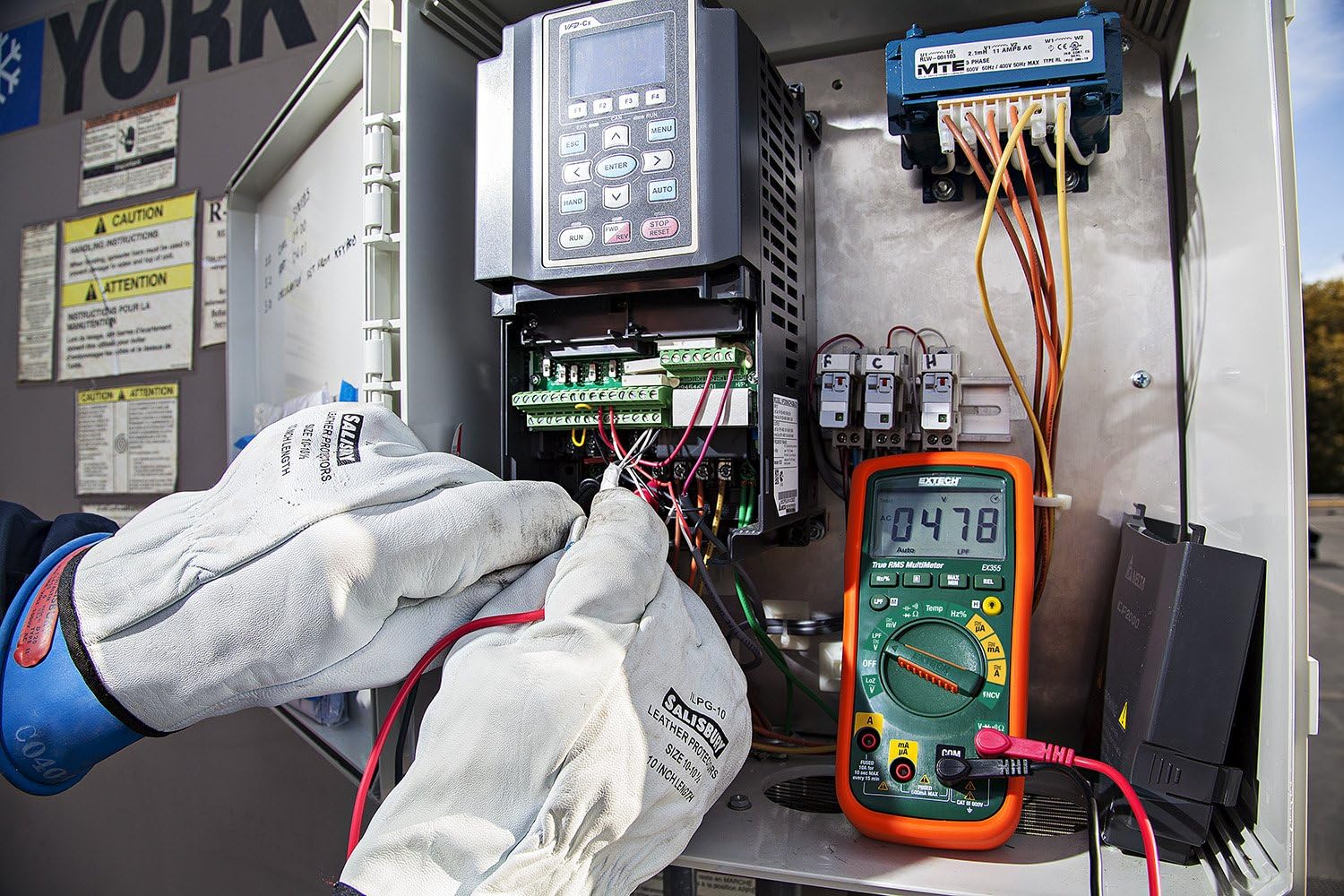
Figure 3: The Extech EX355 Multimeter in use, connected to an electrical control panel. This image demonstrates the multimeter's application in industrial or commercial electrical diagnostics.

Figure 4: The Extech EX355 Multimeter connected to a fuse box. This image illustrates the multimeter being used for testing within a residential or commercial electrical distribution system.
5.10 Data Hold, Min/Max, Relative Mode
- Нигоҳ доштани маълумот: -ро пахш кунед ДОРЕД тугмаи барои ях кардани хониши ҷорӣ дар экран. Барои озод кардан бори дигар пахш кунед.
- Ҳадди ақал/макс: -ро пахш кунед MIN / MAX button to enter Min/Max recording mode. The meter will display the maximum reading. Press again to cycle through minimum and average readings. Hold the button to exit.
- Ҳолати нисбӣ: -ро пахш кунед REL button to store the current reading as a reference value. Subsequent measurements will be displayed as a difference from this reference. Press again to exit.
5.11 Continuity and Diode Test
Огоҳӣ: Ensure the circuit is de-energized before performing continuity or diode tests.
- Давомнокӣ: Рақами гардишгарро ба Ом (Resistance) position and press the ИНТИХОБ button until the continuity symbol (♫) appears. A continuous beep indicates a low resistance path (continuity).
- Санҷиши диод: Рақами гардишгарро ба Ом (Resistance) position and press the ИНТИХОБ button until the diode symbol (→|) appears. Connect the red lead to the anode and black lead to the cathode for forward bias voltage drop. Reverse leads for reverse bias.
6. Нигоҳдорӣ
6.1 Иваз кардани батарея
Refer to section 4.1 for detailed instructions on replacing the two AA batteries. Always use fresh, high-quality AA batteries.
6.2 Иваз кардани сӯзишворӣ
If the current measurement functions cease to work, the fuse may need replacement. This procedure should only be performed by qualified personnel.
- Ensure the multimeter is powered off and all test leads are disconnected.
- Remove the battery compartment cover and batteries.
- Unscrew the case screws and carefully separate the two halves of the meter casing.
- Locate the blown fuse(s). The EX355 typically uses two fuses: a 0.5A/600V fast-blow fuse for the mA/µA input and a 10A/600V fast-blow fuse for the 10A input.
- Replace the fuse(s) with fuses of the exact same type and rating. Never use a fuse with a different rating.
- Carefully reassemble the meter casing, ensuring all screws are tightened. Reinstall batteries and the battery cover.
6.3 Тоза кардан ва нигоҳдорӣ
- Clean the meter regularly with a damp матоъ ва шустушӯи мулоим. Аз абразивҳо ё ҳалкунандаҳо истифода набаред.
- Пеш аз истифода, боварӣ ҳосил кунед, ки метр пурра хушк аст.
- When storing the meter for extended periods, remove the batteries to prevent leakage.
- Дастгоҳи ҳисобкунакро дар ҷои хунук ва хушк, дур аз нури бевоситаи офтоб ва ҳарорати аз ҳад зиёд нигоҳ доред.
7. Баррасии мушкилот
| Мушкилот | Сабаби эҳтимолӣ | Ҳалли |
|---|---|---|
| Намоиш ё намоиши суст | Батареяҳои мурда ё кам | Батареяҳоро иваз кунед (ниг. ба фасли 4.1). |
| Хониши нодуруст | Incorrect function/range selected; Damaged test leads; External interference; Blown fuse (for current) | Verify function/range; Inspect/replace test leads; Move away from strong electromagnetic fields; Check/replace fuses (refer to Section 6.2). |
| Бе садои давомдор | Open circuit; High resistance; Incorrect mode | Ensure circuit is closed; Check for high resistance; Verify continuity mode is selected. |
| Андозаи ҷорӣ кор намекунад | Нигоҳдорандаи сӯхта; Пайвасти нодурусти сим | Check and replace appropriate fuse (refer to Section 6.2); Ensure leads are in the correct current jacks. |
| NCV ҷилди муайян намекунадtage | Ҳаҷми AC нестtage present; Weak field; Incorrect mode | Ҳаҷми AC-ро тасдиқ кунедtage with direct contact method; Ensure NCV mode is selected; Move closer to the conductor. |
8. Мушаххасоти
The following table outlines the key specifications for the Extech EX355 True RMS Multimeter:
| Параметр | Арзиш |
|---|---|
| Рақами модел | EX355 |
| Функсияҳои андозагирӣ | Ҷилди AC/DCtage, AC/DC Current, Resistance, Capacitance, Frequency, Duty Cycle, Temperature, Diode, Continuity |
| RMS ҳақиқӣ | Бале |
| Ҷилди ғайри тамосtagд (NCV) | Бале |
| Low Impedance (LoZ) | Бале |
| Филтрҳои пасти гузариш (LPF) | Бале |
| Ҳаҷми максималии амалиётӣtage | 600 вольт |
| Дурустии андозагирӣ | +/-0.5% (typical, varies by function/range) |
| Намоиш | 4000 Count LCD |
| Манбаи нерӯ | 2 x Батареяҳои АА (дохил) |
| Андозаҳо (L x W x H) | 8.1 x 4.8 x 17 см (3.2 x 1.9 x 6.7 инч) |
| Вазни ашё | 372 г (0.82 фунт) |
| Материал | ABS |
| Сертификатсия | IEC 61010-1, CE, CAT III 600V |
| Компонентҳои дохилшуда | Test leads, two AA batteries, general purpose bead wire temperature probe |
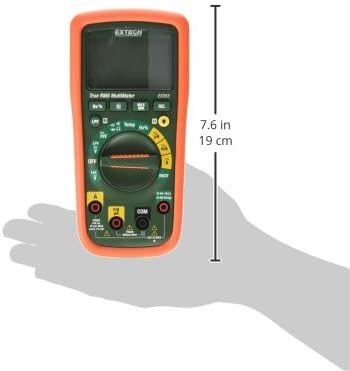
Figure 5: Extech EX355 Multimeter with approximate dimensions shown in inches and centimeters. This image provides a visual reference for the physical size of the device.
9. Маълумот дар бораи кафолат
Extech provides a warranty for its products. Specific warranty terms and conditions, including duration and coverage, may vary by region and product. For detailed warranty information, please refer to the warranty card included with your product or visit the official Extech webсайт. Квитансияи хариди худро ҳамчун далели харид барои ҳама даъвоҳои кафолат нигоҳ доред.
10. Дастгирии муштариён
For technical assistance, troubleshooting, or service inquiries regarding your Extech EX355 Multimeter, please contact Extech customer support. You can typically find contact information, including phone numbers and email addresses, on the official Extech webсайт ё ҳуҷҷатҳое, ки бо маҳсулоти шумо пешниҳод шудаанд.
Манбаъҳои онлайн: Visit the official Extech website for FAQs, product downloads, and additional support resources.


