1. Муқаддима
This user manual provides detailed instructions for the setup, operation, maintenance, and troubleshooting of your Telefunken MC1003N DAB+ Music System. Please read this manual thoroughly before using the device to ensure proper functionality and to maximize your listening experience. Keep this manual for future reference.
2. Дастурҳои муҳим оид ба бехатарӣ
- Манбаи нерӯ: Дастгоҳро танҳо ба васлаки барқи AC бо ҳаҷми муқарраршуда пайваст кунедtage.
- Вентилятсия: Вентилятсияи мувофиқро таъмин кунед. Кушодани вентилятсияро манъ накунед.
- Об ва намӣ: Дастгоҳро ба борон, намӣ ё моеъҳои қатрагӣ/пошиданӣ нагузоред. Ба болои дастгоҳ ашёҳои пур аз моеъ нагузоред.
- Гармӣ: Дастгоҳро аз манбаъҳои гармӣ ба монанди радиаторҳо, регистрҳои гармидиҳӣ, плитаҳо ё дигар дастгоҳҳо (аз ҷумла аз он ҷумла) дур нигоҳ доред. ampлифтҳо), ки гармӣ истеҳсол мекунанд.
- Тозакунӣ: Пеш аз тоза кардан, дастгоҳро аз васлаки деворӣ ҷудо кунед. Аз матои мулоим ва хушк истифода баред. Тозакунакҳои моеъ ё тозакунандаи аэрозолро истифода набаред.
- Хизматрасонӣ: Худатон кӯшиш накунед, ки ба ин маҳсулот хидмат расонад. Ҳама хидматрасониро ба кормандони соҳибихтисос муроҷиат кунед.
3. Мундариҷаи баста
Боварӣ ҳосил кунед, ки ҳамаи ҷузъҳои дар поён овардашуда ба бастаи шумо дохил карда шудаанд:
- Telefunken MC1003N Compact Music System
- Назорати дурдаст
- Адаптери барқ
- Дастури корбар (ин ҳуҷҷат)
4. Маҳсулот ба охир расидview
Familiarize yourself with the various parts and controls of your Telefunken MC1003N music system.
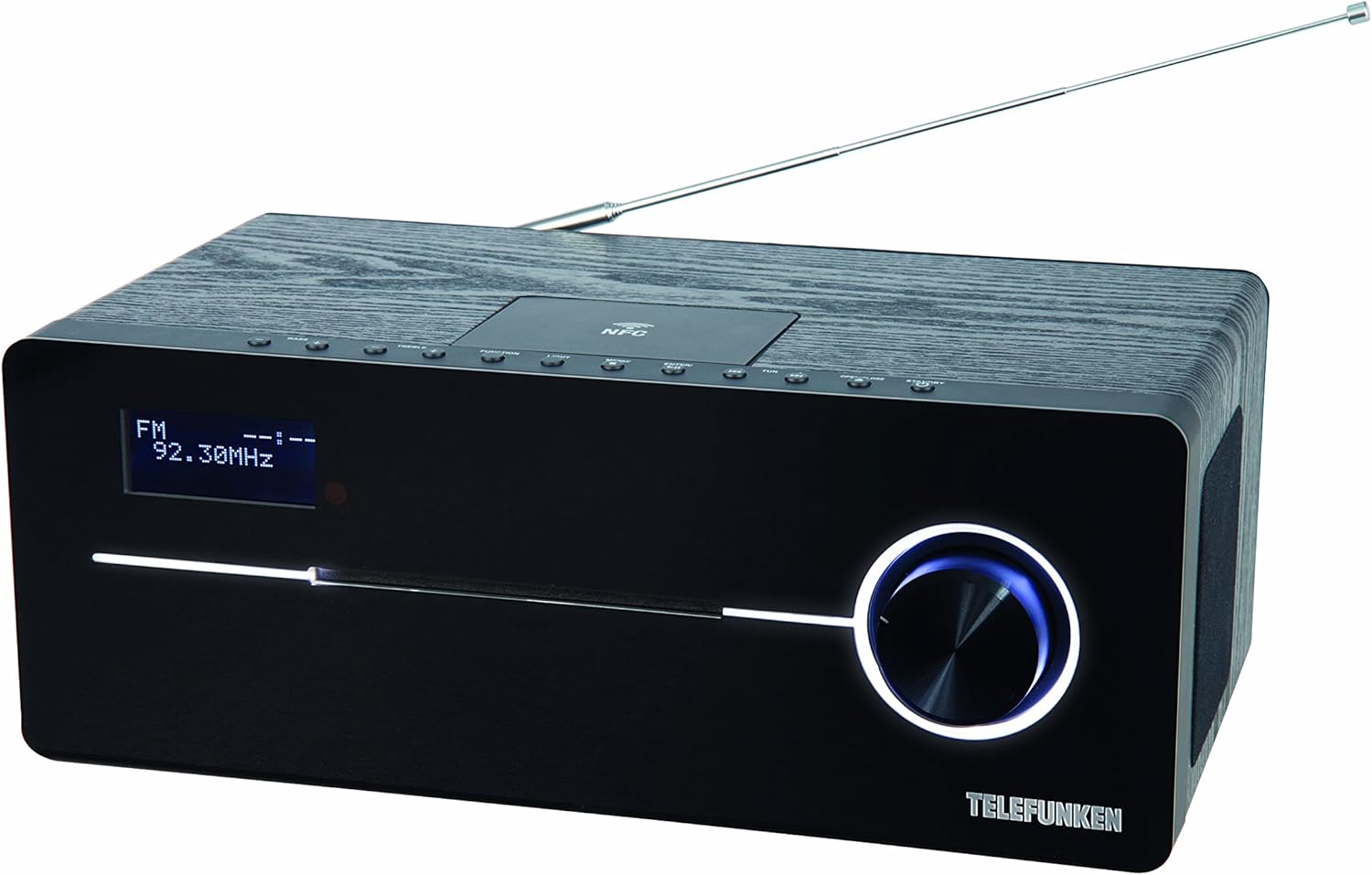
This image displays the Telefunken MC1003N compact music system. The front panel features a digital display showing 'FM 92.30MHz', a large illuminated control knob on the right, and a CD tray slot. The top panel includes several small control buttons and an NFC tag area. A telescopic antenna extends from the rear top of the unit.
4.1 Панели Асосӣ
- Намоиши рақамӣ: Shows current mode, frequency, track information, and menu options.
- CD Tray Slot: For inserting and ejecting audio CDs.
- Тугмаи идоракунӣ: Multi-functional knob for volume adjustment, menu navigation, and selection.
4.2 Панели боло
- Тугмаи фурӯзон/интизорӣ: Дастгоҳро фурӯзон ё хомӯш мекунад.
- Тугмаи Функсия: Switches between input modes (DAB+, FM, CD, Bluetooth, USB, AUX-in).
- Тугмаи нур: Controls display backlight or illumination.
- Тугмаи меню: Танзимотҳо ва имконоти системаро дастрас мекунад.
- Enter/Pair Button: Confirms selections or initiates Bluetooth pairing.
- TUN+/- Buttons: Tunes radio frequencies or navigates tracks/folders.
- Тугмаи Кушодан/Бастан: Opens and closes the CD tray.
- NFC Tag Майдон: Барои пайвастшавии зуд бо дастгоҳҳои дорои NFC.
4.3 Rear Panel / Side Connections
- Антеннаи телескопӣ: For DAB+ and FM radio reception.
- Вуруди барқ: Адаптери барқро пайваст мекунад.
- AUX-in (3.5mm): Дастгоҳҳои аудиоии берунаро пайваст мекунад.
- Порти USB: Connects USB storage devices for MP3 playback.
- Ҷойи гӯшмонак (3.5 мм): Барои гӯш кардани хусусӣ.
5. Танзимоти ибтидоӣ
5.1 Ҷойгиркунӣ
Place the music system on a stable, flat surface. Ensure there is sufficient space around the unit for proper ventilation. Avoid placing it near strong magnetic fields or direct sunlight.
5.2 Пайвастшавӣ ба антенна
Extend the telescopic antenna fully for optimal DAB+ and FM radio reception. Adjust its position to improve signal strength if needed.
5.3 Пайвастшавии барқ
Connect the supplied power adapter to the DC IN socket on the rear of the unit, then plug the adapter into a standard wall outlet.
6. Дастурҳои истифодабарӣ
6.1 Фаъол кардан/хомӯш кардан
- -ро пахш кунед Ҳокимият/Интизорӣ button on the top panel or remote control to turn the unit on or off.
6.2 Интихоби режим
- -ро пахш кунед Функсия button repeatedly to cycle through available modes: DAB+, FM, CD, Bluetooth, USB, AUX-in.
6.3 Фаъолияти радиоии DAB+
6.3.1 Automatic Scan
- Дар ҳолати DAB+, -ро пахш кунед Меню button, then use the control knob or TUN+/- buttons to select 'Full Scan'. Press Ворид кунед to start scanning for available DAB+ stations.
6.3.2 Танзими дастӣ
- -ро истифода баред TUN+/- buttons to manually browse through available DAB+ ensembles.
6.3.3 Storing and Recalling Presets
- To store a station, press and hold the Пешакӣ button (if available, or refer to manual for specific preset steps).
- Барои бозхонд кардани истгоҳи захирашуда, -ро пахш кунед Пешакӣ тугма ва истифода TUN+/- барои интихоб кардани рақами пешакии дилхоҳ.
6.4 Фаъолияти радиои FM
6.4.1 Automatic Scan
- Дар ҳолати FM, -ро пахш карда нигоҳ доред TUN+/- button for a few seconds to automatically scan for the next available station.
6.4.2 Танзими дастӣ
- -ро пахш кунед TUN+/- button briefly to adjust the frequency step by step.
6.4.3 Storing and Recalling Presets
- Similar to DAB+ presets, use the Пешакӣ function to store and recall your favorite FM stations. The system supports 30 station memories.
6.5 Бозии CD
6.5.1 Loading a CD
- -ро пахш кунед Кушодан/Пӯшидан тугмаи барои кушодани табақи CD.
- Place a CD (CD/CD-R) with the label side up into the tray.
- -ро пахш кунед Кушодан/Пӯшидан барои пӯшидани табақча тугмаро бори дигар пахш кунед. Навозиш ба таври худкор оғоз меёбад.
6.5.2 Назорати бозикунии
- Use the control knob or remote for Play/Pause, Skip Track, and Fast Forward/Rewind functions.
6.6 Пайвасткунии Bluetooth
6.6.1 Activating Bluetooth
- Switch the unit to Bluetooth mode using the Функсия button. The display will show 'BT' or 'Bluetooth' and indicate pairing mode.
6.6.2 Пайвастшавӣ бо дастгоҳ
- Дар смартфон ё планшетатон Bluetooth-ро фаъол созед ва дастгоҳҳои дастрасро ҷустуҷӯ кунед.
- Select 'Telefunken MC1003N' from the list.
- Once paired, you can stream audio from your device to the music system.
6.7 Ҷуфти NFC
6.7.1 Using NFC
- Ensure NFC is enabled on your compatible smartphone or tablet.
- Tap your device gently on the NFC tag area on the top panel of the music system.
- Дархости ҷуфткуниро дар дастгоҳи худ тасдиқ кунед.
6.8 Бозии USB
6.8.1 Пайваст кардани дастгоҳи USB
- Insert a USB storage device containing MP3 fileс ба порти USB.
- Switch the unit to USB mode using the Функсия тугма.
6.8.2 File Навигатсия
- Use the control knob or remote to navigate through folders and select MP3 tracks.
6.9 AUX-in Connection
6.9.1 Connecting External Audio Devices
- Дастгоҳи аудиоии берунаро (масалан, плеери MP3) ба он пайваст кунед AUX-дар бо истифода аз кабели аудиоии 3.5 мм ба порт пайваст кунед.
- Switch the unit to AUX-in mode using the Функсия тугма.
- Навозишро аз дастгоҳи берунии худ идора кунед.
6.10 Танзимоти садо
6.10.1 Танзимоти пешакӣ эквалайзер
- -ро пахш кунед EQ button (if available, or navigate via Меню) to cycle through sound modes: Flat, Classic, Pop, Rock, Jazz.
7. Нигоҳдорӣ
7.1 Нигоҳубин ва тозакунӣ
- Пеш аз тоза кардан ҳамеша дастгоҳро аз розетка ҷудо кунед.
- Барои тоза кардани сатҳҳои берунӣ аз матои мулоим, хушк ва бепахта истифода баред.
- Тозакунакҳои абразивӣ, мумҳо ё маҳлулҳоро истифода набаред, зеро онҳо метавонанд ба қабат зарар расонанд.
- Барои линзаи CD, диски махсуси тозакунандаи линзаи CD-ро истифода баред.
8. Баррасии мушкилот
If you encounter any issues with your Telefunken MC1003N, refer to the table below for common problems and solutions.
| Мушкилот | Ҳалли |
|---|---|
| Не қудрат | Check if the power adapter is securely connected to the unit and the wall outlet. Try a different outlet. |
| Садо нест | Adjust the volume. Check if headphones are connected. Ensure the correct input mode is selected. |
| Кабули радио бад | Extend and adjust the telescopic antenna. Move the unit to a location with better signal. Perform a full scan for DAB+ stations. |
| Пайвасткунии Bluetooth ноком мешавад | Ensure the unit is in Bluetooth pairing mode. Make sure Bluetooth is enabled on your device and it's within range. Forget previous pairings on your device and try again. |
| CD бозӣ намекунад | Ensure the CD is clean and inserted correctly (label side up). Check if the CD is scratched or damaged. Try a different CD. |
| USB эътироф нашудааст | Ensure the USB device is formatted correctly (FAT32) and contains supported MP3 fileс. Дастгоҳи дигари USB-ро санҷед. |
9. Мушаххасоти техникӣ
- Модели: MC1003N
- Бренд: Telefunken
- Қувваи баромад: 100 Watts (50 Watts per speaker)
- Пайвастшавӣ: Bluetooth 3.0, NFC, USB, AUX-in (3.5mm), Headphone Jack (3.5mm)
- Танзимкунанда: Digital PLL-tuner (DAB+, FM)
- Пойгоҳҳои пешакӣ муқарраршуда: 30 (for FM/DAB+)
- Мутобиқати CD: CD, CD-R
- Форматҳои аудиои дастгирӣшаванда: MP3, CD-DA, DAB
- Назорати садо: Equalizer presets (Flat, Classic, Pop, Rock, Jazz)
- Манбаи нерӯ: Электрикӣ бо сим
- Андозаҳо (L x W x H): 35.1 х 13.6 х 21.4 см
- Вазн: 3.65 кг
10. Кафолат ва дастгирӣ
Your Telefunken MC1003N DAB+ Music System is covered by a manufacturer's warranty. Please refer to the warranty card included in your package for specific terms and conditions. For technical support, service, or warranty claims, please contact your retailer or the authorized Telefunken service center in your region.


