1. Муқаддима
This manual provides essential information for the safe and efficient installation, operation, and maintenance of your FANTECH prioAir 8 Inline Mixed Flow Duct Fan. Please read these instructions thoroughly before installation and retain this manual for future reference.
The FANTECH prioAir 8 is an 8-inch inline mixed flow duct fan designed for ventilation applications. It features a compact design, high efficiency, and quiet operation, making it suitable for various residential and light commercial settings. Constructed from a special composite material, the fan is lightweight and durable.
2. Дастурҳои муҳим оид ба бехатарӣ
Огоҳӣ: Барои кам кардани хатари сӯхтор, зарбаи барқ ё осеб дидани одамон, ба чизҳои зерин риоя кунед:
- Read all instructions before installing or servicing this fan.
- Насбкунӣ бояд аз ҷониби электрики соҳибихтисос мувофиқи тамоми кодексҳои барқии маҳаллӣ ва миллӣ анҷом дода шавад.
- Always disconnect power at the service panel before wiring, cleaning, or servicing the unit.
- Боварӣ ҳосил кунед, ки вентилятор ба таври дуруст ба замин пайваст карда шудааст.
- Do not use this fan with any solid-state speed control device unless specifically designed for this fan.
- Do not use this fan in potentially explosive atmospheres.
- Keep fingers and foreign objects away from the fan blades during operation.
- This fan is for general ventilating use only. Do not use to exhaust hazardous or explosive materials and vapors.
3. Дар қуттӣ чӣ мавҷуд аст
Ҳангоми кушодан, лутфан тафтиш кунед, ки ҳамаи ҷузъҳо мавҷуд ва осеб надидаанд:
- FANTECH prioAir 8 Inline Mixed Flow Duct Fan unit
- Mounting hardware (e.g., screws, brackets) - (Specific hardware may vary, refer to packaging)
- Дастури корбар (ин ҳуҷҷат)

Figure 1: FANTECH prioAir 8 Inline Mixed Flow Duct Fan unit.
4. Мушаххасоти техникӣ
| Хусусият | Мушаххасоти |
|---|---|
| Рақами модел | prioAir 8 |
| Андозаҳои маҳсулот | 6 x 5 x 7 инч |
| Вазн | 8 фунт |
| Бренд | ФАНТЕХ |
| Ҷилдиtage | 120 вольт |
| Ватtage | 35 ватт |
| Усули хунуккунӣ | Ҳавои маҷбурӣ |
| Сатҳи садо | 45 децибел |
| Материал | Композитсия |
| Суръати максималии гардиш | 2400 чархзании |
| Иқтидори ҷараёни ҳаво | 647 фут мукааб дар як дақиқа (CFM) |
| Намуди пайвасткунандаи барқ | 3-Пин |
5. Насб ва насб
5.1 Рӯйхати санҷиши пеш аз насб
- Ensure the installation location is suitable for an 8-inch duct fan.
- Verify that the power supply matches the fan's requirements (120V).
- Gather necessary tools: screwdriver, wire strippers, drill, duct tape/clamps.
5.2 Насби вентилятор
The prioAir 8 fan is designed for inline installation within ductwork. It can be mounted at any angle.
- Select a secure location in your duct system where the fan can be easily accessed for maintenance.
- Cut a section of the ductwork to accommodate the fan's length. Ensure the cut is clean and straight.
- Insert the fan into the ductwork. The fan can be oriented to push or pull air, depending on your ventilation needs. Observe the airflow direction arrow on the fan housing.
- Secure the fan to the ductwork using appropriate duct clamps or heavy-duty duct tape to ensure an airtight seal.
- If additional support is needed, use the provided mounting brackets to secure the fan to a joist or other structural element.
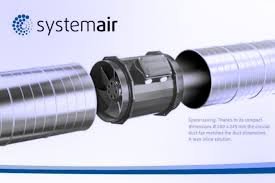
Расми 2: Мисample of the prioAir 8 fan installed inline with ductwork.
5.3 Пайвастшавӣ ба барқ
CAUTION: Ensure power is disconnected at the circuit breaker before proceeding with electrical wiring.
- Locate the electrical connection box on the fan housing.
- Open the cover of the connection box.
- Connect the power supply wires to the fan's terminals according to the wiring diagram provided inside the connection box cover. Typically, this involves connecting Live (L), Neutral (N), and Ground (G) wires. The fan uses a 3-pin power connector type.
- Боварӣ ҳосил кунед, ки ҳамаи пайвастҳо бехатар ва дуруст изолятсия карда шудаанд.
- Close the connection box cover securely.

Расми 3: Таркид view illustrating the internal structure and location of the electrical connection box.

Расми 4: Муфассал view of the fan's internal components, including the impeller and motor housing.
6. Дастурҳои истифодабарӣ
Once the FANTECH prioAir 8 fan is properly installed and wired, operation is straightforward:
- Restore power to the circuit at the service panel.
- If connected to a wall switch or thermostat, activate the switch or set the thermostat to the desired operating conditions.
- The fan will begin to operate, moving air through the duct system.
The prioAir 8 is designed for continuous operation. Monitor the airflow and noise level to ensure proper function.
7. Нигоҳдорӣ
WARNING: Always disconnect power to the fan at the service panel before performing any maintenance or cleaning.
Нигоҳдории мунтазам иҷрои беҳтаринро таъмин мекунад ва мӯҳлати кори мухлиси шуморо дароз мекунад.
7.1 Cleaning the Fan Blades and Housing
Dust and debris can accumulate on the fan blades and inside the housing, reducing efficiency. Clean the fan periodically, depending on the operating environment.
- Disconnect power to the fan.
- Carefully remove the fan from the ductwork or access the internal components if possible.
- Use a soft brush or a vacuum cleaner with a brush attachment to remove dust and debris from the fan blades and the interior of the housing.
- For stubborn dirt, a damp cloth with mild detergent can be used, ensuring no moisture enters the motor or electrical components.
- Allow all parts to dry completely before reassembling or restoring power.

Расми 5: Наздик view of the fan's impeller, highlighting the blades that require periodic cleaning.
7.2 Молидани мотор
The fan motor is permanently lubricated and does not require additional lubrication.
8. Баррасии мушкилот
Before contacting technical support, please review масъалаҳои умумӣ ва роҳҳои ҳалли зерин:
| Мушкилот | Сабаби эҳтимолӣ | Ҳалли |
|---|---|---|
| Фан оғоз намекунад | Не таъминоти барқ Пайвасти ноқилҳои ноқил Faulty switch/thermostat | Check circuit breaker and power source Verify all electrical connections are secure (with power off) Test or replace switch/thermostat |
| Камшавии ҷараёни ҳаво | Clogged fan blades/housing Ductwork obstruction Самти нодурусти вентилятор | Майдонҳои вентилятор ва корпусро тоза кунед Inspect ductwork for blockages Ensure fan is oriented for desired airflow direction |
| Садо ё ларзиши ғайриоддӣ | Монтажи фуҷур Хошок дар вентилятор Корпуси вайроншуда | Таҷҳизоти васлкуниро сахт кунед Disconnect power and remove any debris Contact FANTECH support if impeller is damaged |
9. Кафолат ва дастгирӣ
FANTECH products are manufactured to high-quality standards and are backed by a manufacturer's warranty. For specific warranty terms and conditions, please refer to the warranty card included with your product or visit the official FANTECH webсайт.
For technical assistance, replacement parts, or warranty claims, please contact FANTECH customer support:
- Webсайт: www.fantech.net
- Телефон: Refer to the FANTECH webсайт барои рақамҳои тамоси минтақавӣ.
When contacting support, please have your product model number (prioAir 8) and purchase date available.


