Муқаддима
This manual provides detailed instructions for the setup, operation, and maintenance of your Acer R271 bid 27-inch IPS Full HD (1920 x 1080) Display. Please read this manual thoroughly before using your monitor to ensure proper functionality and to maximize your viewтаҷрибаи ғанӣ.

Пеш view of the Acer R271 bid 27-inch IPS Full HD Display.
Ташкил кардан
Мундариҷаи баста
Боварӣ ҳосил кунед, ки ҳама ҷузъҳо дар баста мавҷуданд:
- Acer R271 bid 27-inch Display
- Истгоҳи монитор
- Сими барқ
- Кабели HDMI (метавонад вобаста ба минтақа фарқ кунад)
- Кабели VGA (метавонад вобаста ба минтақа фарқ кунад)
Ассамблеяи мониторинг
To assemble the monitor, carefully attach the stand to the back of the display panel. Ensure it clicks securely into place. Place the monitor on a stable, flat surface.
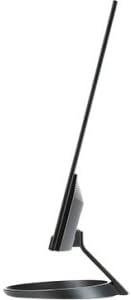
Тараф view illustrating the slim design of the Acer R271 bid monitor.
Пайваст кардани монитор
The Acer R271 bid monitor supports multiple input options. Connect the appropriate cable from your computer or device to the corresponding port on the monitor.
- HDMI: Барои видео ва аудиои рақамии баландсифат.
- DVI (w/HDCP): For digital video connection.
- VGA: Барои пайвасти видеоии аналогӣ.
Пас аз пайваст кардани сими видеоӣ, сими барқро ба монитор ва сипас ба розетка пайваст кунед.
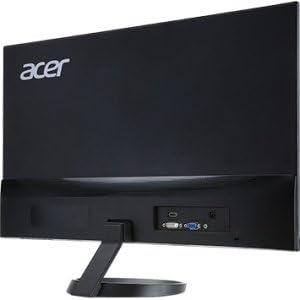
Қафо view of the Acer R271 bid monitor, highlighting the HDMI, DVI, and VGA input ports.
Фаъолкунӣ
Press the power button, usually located on the bottom right side of the monitor, to turn on the display. The monitor will automatically detect the active input source.
Дастурҳои амалиётӣ
Функсияҳои асосӣ
Use the buttons located on the bottom bezel of the monitor to navigate the On-Screen Display (OSD) menu. These buttons typically allow you to:
- Power On/Off the monitor.
- Select input source (HDMI, DVI, VGA).
- Adjust volume (if applicable).
- Access the OSD menu for advanced settings.
Танзимоти намоиш
The OSD menu provides options to customize your display. Common adjustments include:
- Равшанӣ: Равшании умумии экранро танзим кунед.
- Баръакси: Modify the difference between light and dark areas.
- Танзимоти ранг: Ҳарорати ранг, гамма ва сатҳҳои инфиродии RGB-ро дуруст танзим кунед.
- Ҳолати тасвир: Ҳолати пешакӣ муқарраршударо барои намудҳои гуногуни мундариҷа интихоб кунед (масалан, Стандарт, Филм, Бозӣ).
Хусусиятҳои асосӣ
The Acer R271 bid monitor incorporates several features designed to enhance your viewтаҷрибаи:
- Технологияи IPS: Provides clear and bright colors from wide viewing angles (up to 178 degrees).
- Тарҳрезии ZeroFrame: An edge-to-edge display that minimizes bezels, ideal for multi-monitor setups.
- Технологияи муҳофизати чашм: Includes features like Blue Light Filter, Flicker-less, and ComfyView барои кам кардани шиддати чашм ҳангоми истифодаи дарозмуддат.
Намоиши видеои расмии маҳсулотasing the Acer R1 Series monitor's features, including ZeroFrame design, Full HD resolution, IPS technology for wide viewing angles, and Eye Protect technology for user comfort.
Нигоҳдорӣ ва нигоҳубин
Тоза кардани монитор
Барои тоза кардани экран, онро бо матои мулоим ва бе пахта нарм тоза кунед. Барои аломатҳои якрав, гampen the cloth with a mild, non-abrasive screen cleaner. Avoid using alcohol-based cleaners or spraying liquid directly onto the screen.
Нигоҳубини умумӣ
Keep the monitor away from direct sunlight, excessive heat, and moisture. Do not block the ventilation openings. Avoid placing heavy objects on the monitor or its cables.
Мушкилкушо
No Display or "No Signal" Message
- Боварӣ ҳосил кунед, ки сими барқ ҳам ба монитор ва ҳам ба васлаки барқ пайваст шудааст.
- Verify that the video cable (HDMI, DVI, or VGA) is firmly connected to both the monitor and your computer.
- Check if the correct input source is selected on the monitor using the OSD menu.
- Тасдиқ кунед, ки компютери шумо фаъол аст ва дар ҳолати хоб нест.
Сифати тасвири паст
- Adjust the brightness, contrast, and color settings through the OSD menu.
- Боварӣ ҳосил кунед, ки қарори экрани компютери шумо ба қарори аслии монитор (1920 x 1080) муқаррар шудааст.
- Барои ягон осеби ҷисмонӣ дар сими видео ё портҳо санҷед.
Мушаххасоти
| Хусусият | Мушаххасоти |
|---|---|
| Андозаи экран | 27 инч |
| Ҳалли экран | 1920 x 1080 (HD Full) |
| Навъи панел | IPS |
| Вақти ҷавоб | 4ms |
| Pixel Pitch | 0.311мм |
| Равшанӣ | 250 нит |
| Воридоти сигнал | 1 x HDMI, 1 x DVI (w/HDCP), 1 x VGA |
| Таносуби тараф | 16:9 |
| Вазни ашё | 8.05 фунт |
| Андозаҳои маҳсулот (LxWxH) | 24.8 x 18.1 x 9.4 инч |
| Ранги | Сиёҳ |

Detailed dimensions of the Acer R271 bid monitor.
Маълумот дар бораи кафолат
The Acer R271 bid monitor typically comes with a 3-year limited warranty. Please refer to the warranty card included with your product or visit the official Acer website for specific terms and conditions, as warranty details may vary by region and retailer.
Дастгирии муштариён
Барои кӯмаки иловагӣ, дастгирии техникӣ ё зеркашӣ кардани драйверҳо ва нармафзори навтарин, лутфан ба дастгирии расмии Acer муроҷиат кунед webсайт:
You may also contact Acer customer service directly for personalized support.