Муқаддима
The Motorola T260 Talkabout 2-Way Radio is designed for reliable communication in various outdoor and indoor environments. With a range of up to 25 miles under optimal conditions, it allows users to stay connected with family and friends. This lightweight and durable radio includes essential features such as NOAA weather channels and alerts, and iVOX/VOX hands-free communication.

Image: Motorola T260 Talkabout Two-Way Radios banner highlighting the 'Go Further' capability.
Дар қуттӣ чӣ ҳаст
Your Motorola T260 package includes the following items:
- 2 Радиоҳо
- 2 Клипи камарбанд
- 2 NiMH Battery Packs
- 1 "Y" Cable Charging Adapter with dual-micro-USB connectors
- 1 Дастури корбар
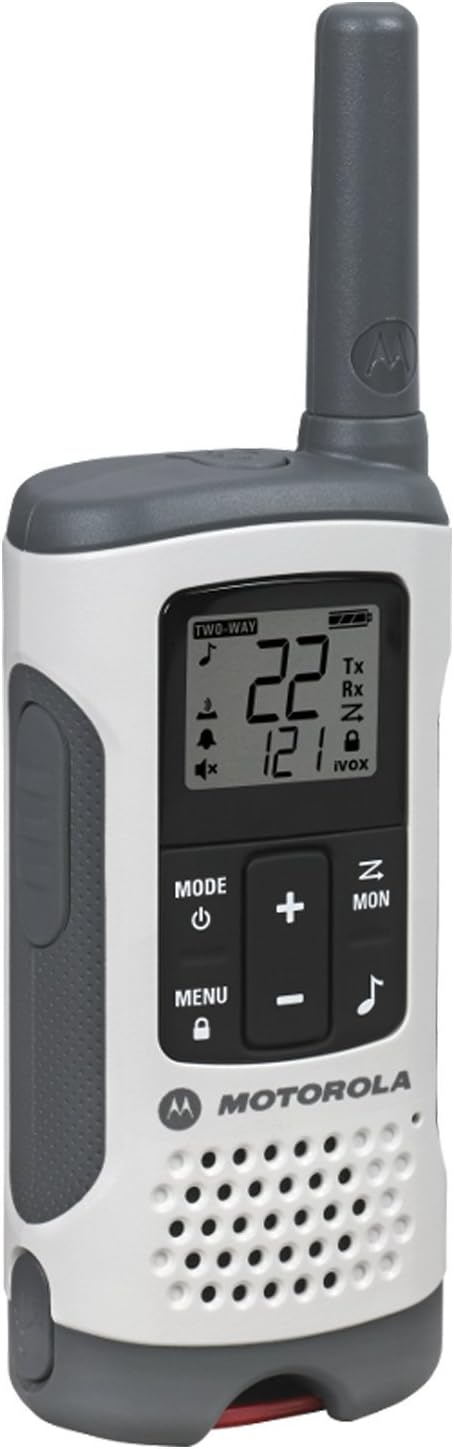
Image: A single Motorola T260 Talkabout 2-Way Radio, showcasing its design and display.
Дастурҳои насб
1. Насб ва пуркунии батарея
The T260 radios can be powered using the included NiMH rechargeable battery packs or 3 AA alkaline batteries (not included for AA). For initial use, install the NiMH battery packs and charge the radios.
- Боварӣ ҳосил кунед, ки радио хомӯш аст.
- Сарпӯши батареяро, ки дар қафои радио ҷойгир аст, кушоед.
- Insert the NiMH battery pack, ensuring correct polarity.
- Сарпӯши қисмати батареяро бехатар пӯшед.
- Connect the "Y" cable charging adapter to a power source and then to the micro-USB ports on both radios.
- Charge the radios for approximately 10 hours for a full charge. The battery indicator on the display will show charging status.
2. Замима кардани клипи камарбандӣ
To attach the belt clip, align the clip with the slots on the back of the radio and slide it down until it clicks into place.
Дастурҳои амалиётӣ
1. Фурӯзон/хомӯшкунӣ
-ро пахш карда нигоҳ доред Ҳокимият/Меню button until the display lights up to turn the radio on. Repeat to turn off.
2. Channel and Privacy Code Selection
The T260 offers 22 channels and 121 privacy codes, totaling 2,662 combinations for clear communication.
- -ро пахш кунед Меню button until the channel number flashes.
- -ро истифода баред Up or Поён тугмаҳоро барои интихоби канали дилхоҳатон пахш кунед.
- пахш кунед Меню again until the privacy code flashes.
- -ро истифода баред Up or Поён buttons to select your desired privacy code.
- пахш кунед Меню ё ПТТ тугмаи барои тасдиқи интихоби худ.
3. Пуш-ба-Баҳс (PTT)
Барои интиқол, пахш кунед ва доред ПТТ button and speak clearly into the microphone. Release the ПТТ тугма барои гӯш кардан.
4. Range Considerations
The maximum communication range is up to 25 miles under ideal, unobstructed conditions. Actual range will vary based on terrain, weather, electromagnetic interference, and obstructions.
5. NOAA Weather Channels and Alerts
Stay informed about real-time weather conditions by accessing one of 11 NOAA weather channels or initiating weather alerts. NOAA radio service availability may vary by area.
6. iVOX/VOX Hands-Free Communication
The iVOX/VOX feature allows for hands-free operation. When activated, the radio transmits automatically when it detects your voice, eliminating the need to press the PTT button.
7. Scanning Feature
Use the scanning feature to quickly find active channels. This helps identify channels currently in use for communication.
8. Ҳушдори батареяи паст
The radio will provide an audible alert and/or a visual indicator on the display when the battery level is low, reminding you to recharge or replace batteries.


Images: Icons representing various outdoor activities like hiking, driving, camping, and biking, where the T260 radios can be utilized.
Видео: Намоиши видеоии расмии маҳсулотasing the Motorola T260 Talkabout Radio, highlighting its features and ease of use in various scenarios.
Нигоҳдорӣ
To ensure optimal performance and longevity of your Motorola T260 radios, follow these maintenance guidelines:
- Тозакунӣ: нармро истифода баред, гamp cloth to clean the exterior of the radio. Do not use abrasive cleaners or solvents.
- Нигоҳубини батарея: Fully charge NiMH battery packs before long periods of storage. Store batteries in a cool, dry place.
- Нигоҳдорӣ: Store radios in a dry, dust-free environment when not in use.
- Таъсири об: While durable, the T260 is not water resistant. Avoid submerging the radio in water.
Мушкилкушо
If you encounter issues with your Motorola T260 radio, refer to the following common troubleshooting tips:
- Не қудрат: Ensure batteries are correctly installed and fully charged. Check if the radio is turned on.
- Poor Range/Static: Verify both radios are on the same channel and privacy code. Move to an area with fewer obstructions.
- Интиқол/қабул карда наметавонад: Check if the PTT button is being pressed correctly. Ensure the radio is not in scan mode or iVOX/VOX mode if manual transmission is desired.
- Огоҳии ками батарея: Recharge or replace the batteries promptly.
Мушаххасоти
| Хусусият | Тафсилот |
|---|---|
| Рақами модел | T260 |
| Андозаҳои маҳсулот | 1.24 x 2.13 x 6.42 инч |
| Вазни ашё | 6.4 унция |
| Шумораи каналҳо | 22 |
| Рамзҳои махфият | 121 |
| Диапазони басомад | FRS/GMRS 462 - 467 МГц |
| Масофаи ҳадди аксар | 25 мил (шароити беҳтарин) |
| Манбаи нерӯ | 2 NiMH Battery Packs (included) or 3 AA batteries (not included) |
| Ҷилдиtage | 4.5 Вольт (ДС) |
| Хусусиятҳои махсус | Lightweight, NOAA Weather Channels/Alerts, iVOX/VOX Hands-Free |
| Сатҳи муқовимат ба об | Ба об тобовар нест |
| Ранги | Сафед |
Кафолат ва дастгирӣ
Specific warranty details and customer support contact information are typically provided in the user guide included with your product. Please refer to the physical user guide for the most accurate and up-to-date information regarding warranty coverage and technical support.


