1. Муқаддима
This manual provides essential instructions for the safe and efficient operation of your Hytera PD365LF Digital Portable Radio. Please read this manual thoroughly before using the product to ensure proper functionality and to prevent damage.
2. Мундариҷаи баста
Upon unpacking, please verify that all items listed below are present and in good condition. If any item is missing or damaged, contact your dealer immediately.
- Hytera PD365LF Digital Portable Radio
- Батареяи литий-ион
- Адаптери барқ
- Клипи камарбанд
- Тасмаро
- Дастури корбар (ин ҳуҷҷат)
3. Маҳсулот ба охир расидview
The Hytera PD365LF is a compact and robust digital portable radio designed for reliable communication. Familiarize yourself with the radio's components.
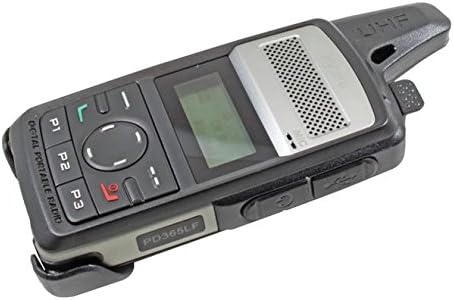
Figure 1: Hytera PD365LF Digital Portable Radio. This image displays the radio from an angled perspective, highlighting its compact form factor. Visible features include the speaker grille, LCD screen, navigation buttons (P1, P2, P3, and a central directional pad), and the UHF antenna. The model number "PD365LF" is clearly visible on the front casing.
Компонентҳои асосӣ:
- Антенна: Барои интиқол ва қабули сигналҳо.
- Маърузачй: Аудио мебарорад.
- Микрофон: Inputs audio.
- Намоиши LCD: Shows channel information, battery status, and menu options.
- Navigation Buttons (P1, P2, P3, Directional Pad): For menu navigation and quick access functions.
- Тугмаи пахш ба гуфтугӯ (PTT): Интиқолро фаъол мекунад.
- Тугмаи барқ/ҳаҷм: Радиоро фурӯзон/хомӯш мекунад ва баландии овозро танзим мекунад.
- Порти лавозимот: For connecting audio accessories or programming cable.
4. Танзимот
4.1 Насби батарея
- Боварӣ ҳосил кунед, ки радио хомӯш аст.
- Батареяро бо қисмати батарея дар қафои радио мувофиқ кунед.
- Батареяро бодиққат ба ҷои худ пахш кунед, то он даме, ки он бехатар пахш шавад.
- To remove, slide the battery release latch and lift the battery out.
4.2 Пур кардани батарея
Before initial use, fully charge the battery. A fully discharged battery typically takes approximately 3-4 hours to charge.
- Адаптери барқро ба васлаки мувофиқ пайваст кунед.
- Connect the charging cable to the radio's accessory port.
- The charging indicator on the radio will illuminate (e.g., red for charging, green for fully charged).
- Пас аз пур кардани барқ, пуркунандаи барқро ҷудо кунед.
5. Дастурҳои истифодабарӣ
5.1 Фурӯзон/хомӯш кардан
- Барои фаъол кардан: Rotate the Power/Volume knob clockwise until a click is heard and the display illuminates.
- Барои хомӯш кардани барқ: Rotate the Power/Volume knob counter-clockwise until a click is heard and the display turns off.
5.2 Танзими овоз
After powering on, rotate the Power/Volume knob clockwise to increase volume or counter-clockwise to decrease volume.
5.3 Интихоби канал
Use the navigation buttons (e.g., up/down arrows on the directional pad) to scroll through available channels. The selected channel will be displayed on the LCD screen.
5.4 Интиқол ва қабул
- Барои интиқол: Press and hold the Push-to-Talk (PTT) button. Speak clearly into the microphone. Release the PTT button to stop transmitting.
- Барои гирифтани: Боварӣ ҳосил кунед, ки тугмаи PTT пахш нашудааст. Радио ба таври худкор сигналҳоро дар канали интихобшуда қабул мекунад.
5.5 Programmable Buttons (P1, P2, P3)
The P1, P2, and P3 buttons can be programmed for various functions (e.g., zone switch, scan, emergency call) by your dealer or through programming software. Refer to your dealer for specific configurations.
6. Нигоҳдорӣ
6.1 Нигоҳубини умумӣ
- Радиоро хушк нигоҳ доред. Аз таъсири борон, намӣ ё моеъ худдорӣ кунед.
- Радиоро ба ҳарорати аз ҳад зиёд нагузоред.
- Handle the radio with care. Avoid dropping or subjecting it to strong impacts.
6.2 Тозакунӣ
Сатҳи радиоро бо нарм тоза кунед, гamp cloth. Do not use harsh chemicals, cleaning solvents, or strong detergents, as these may damage the casing ё ҷузъҳои дохилӣ.
7. Баррасии мушкилот
| Мушкилот | Сабаби эҳтимолӣ | Ҳалли |
|---|---|---|
| Радио фаъол нест. | Battery is discharged or improperly installed. | Батареяро пур кунед ё онро дуруст насб кунед. |
| Интиқол ё қабул карда наметавонад. | Incorrect channel selected; out of range; antenna not properly attached. | Verify channel; move closer to other radios; ensure antenna is secure. |
| Сифати аудиои паст. | Low battery; obstruction between radios; volume too low/high. | Charge battery; clear obstructions; adjust volume. |
If the problem persists after attempting these solutions, please contact your authorized Hytera dealer for assistance.
8. Мушаххасоти
The following are general specifications for the Hytera PD365LF. Specific performance may vary based on environmental conditions and configuration.
- Модели: PD365LF
- Бренд: Гитера
- Андозаҳо: Approximately 19 x 13.2 x 6.8 cm (Packaging)
- Вазн: Approximately 439.99 grams (Packaging)
- Навъи батарея: Lithium-Ion (1 зарур аст, дохил карда шудааст)
- Шумораи каналҳо: 32
- Муқовимат ба об: Обногузар
9. Кафолат ва дастгирӣ
Your Hytera PD365LF radio is covered by a limited warranty. For detailed warranty terms and conditions, please refer to the warranty card included with your product or contact your authorized Hytera dealer. For technical support, service, or spare parts, please contact your point of purchase or visit the official Hytera webсайт.
Note: Unauthorized repairs or modifications will void the product warranty.


