Муқаддима
Thank you for choosing the Divoom Onbeat 500 Portable Wireless Bluetooth Speaker. This device is designed to deliver powerful sound with convenient wireless connectivity. This manual will guide you through the setup, operation, and maintenance of your speaker to ensure optimal performance and longevity.
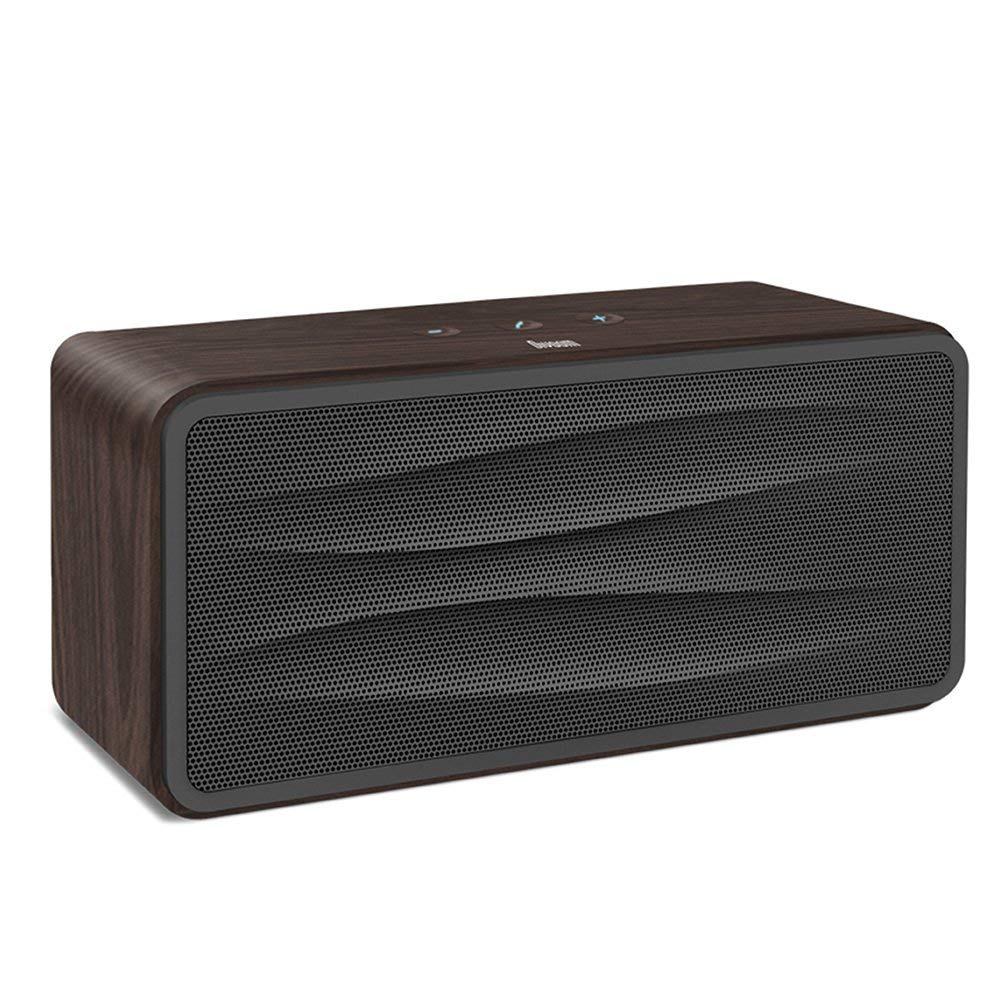
Расми 1: Пеш view of the Divoom Onbeat 500 speaker. This image displays the speaker's main grille and overall design.
Мундариҷаи баста
Лутфан бастаро барои ҷузъҳои зерин тафтиш кунед:
- Divoom Onbeat 500 Speaker
- Сими пуркунандаи Micro USB
- Кабели ёрирасон
- Дастури корбар (ин ҳуҷҷат)
- Корти кафолат
Хусусиятҳои маҳсулот
The Divoom Onbeat 500 speaker offers a range of features for an enhanced audio experience:
- Овози пурқувват: 2.1 channel design with a proprietary passive bass radiator for rich audio.
- Технологияи NFC: Tap-to-pair functionality for quick and easy Bluetooth connection.
- Пайвасти Bluetooth: Wirelessly play and control music from up to 33 feet (10 meters) away.
- Динамикҳои дарунсохт: Allows you to make and take calls directly from the speaker.
- Батареяи дарозмуддат: Integrated 5000mAh battery provides extended playback time.
- Вуруди ёрирасон: For wired connection to non-Bluetooth devices.
Ташкил кардан
1. Барқдиҳии баландгӯяк
Before initial use, fully charge your Divoom Onbeat 500 speaker. Use the provided Micro USB charging cable to connect the speaker to a USB power source (e.g., computer USB port, USB wall adapter). The charging indicator light will illuminate during charging and turn off or change color when fully charged. A full charge typically provides 8-10 hours of playback.
2. Фурӯзон/хомӯшкунӣ
- Барои фаъол кардан: Тугмаи барқро чанд сония пахш карда нигоҳ доред, то он даме, ки овози садоиро нашунавед ё чароғи индикатор фурӯзон мешавад.
- Барои хомӯш кардани барқ: Тугмаи барқро бори дигар барои чанд сония пахш карда нигоҳ доред, то он даме ки баландгӯяк хомӯш шавад.
3. Ҷуфти Bluetooth
The Onbeat 500 offers two methods for wireless connection:
NFC (Near Field Communication) Pairing:
If your device supports NFC, you can pair quickly:
- Боварӣ ҳосил кунед, ки NFC дар смартфон ё планшети худ фаъол аст.
- With the Onbeat 500 powered on, gently tap your NFC-enabled device against the NFC area on the speaker.
- Confirm the pairing request on your device. The speaker will indicate a successful connection.
Пайвасткунии стандартии Bluetooth:
For devices without NFC or for manual pairing:
- Power on the Divoom Onbeat 500 speaker. It will automatically enter Bluetooth pairing mode if no device is connected, or you may need to press a dedicated Bluetooth button (refer to speaker controls).
- On your audio device (smartphone, tablet, computer), go to the Bluetooth settings and enable Bluetooth.
- Ҷустуҷӯ available devices. You should see "Divoom Onbeat 500" in the list.
- Select "Divoom Onbeat 500" to connect. The speaker will confirm the connection with an audible prompt.
4. Пайвастшавӣ AUX
To connect a device using the auxiliary cable:
- Connect one end of the provided auxiliary cable to the AUX-in port on the Divoom Onbeat 500.
- Connect the other end of the auxiliary cable to the headphone jack or audio output of your device.
- The speaker will automatically switch to AUX mode, or you may need to select it manually (refer to speaker controls).

Расми 2: Тараф view of the Divoom Onbeat 500, illustrating the location of the charging port, AUX input, and control buttons.
Фаъолияти баландгӯяк
1. Бозикунии мусиқӣ
Once connected via Bluetooth or AUX, you can control music playback from your connected device. The speaker may also have integrated controls for volume adjustment, play/pause, and track skipping. Refer to the speaker's physical buttons for these functions.
2. Функсияи баландгӯяк
When connected to a smartphone via Bluetooth, the Divoom Onbeat 500 can be used as a speakerphone:
- Ҷавоб додан ба занг: Press the Call button (often indicated by a phone icon) on the speaker.
- Анҷом додани занг: Тугмаи Зангро бори дигар пахш кунед.
- Радди занг: Тугмаи Зангро пахш карда нигоҳ доред.

Расми 3: Қафо view of the Divoom Onbeat 500, highlighting the passive bass radiator for enhanced low-frequency sound.
Нигоҳдорӣ
1. Тозакунӣ
Барои нигоҳ доштани намуди зоҳирӣ ва функсияи баландгӯяки шумо:
- Қисми берунии дастгоҳро бо матои нарм, хушк ва бе пашм пок кунед.
- Тозакунакҳои абразивӣ, спирт, бензол ва дигар маҳлулҳои кимиёвиро истифода набаред, зеро онҳо метавонанд ба қабат зарар расонанд.
- Нагузоред, ки намӣ ба ҳама гуна сӯрохиҳо ворид шавад.
2. Нигоҳубини батарея
Барои дароз кардани мӯҳлати кори батареяи литий-ионии дарунсохт:
- Батареяро зуд-зуд пурра холӣ накунед.
- Динамикро дар ҷои хунук ва хушк нигоҳ доред, вақте ки барои муддати тӯлонӣ истифода намешаванд.
- Charge the speaker at least once every three months if stored for a long time to prevent deep discharge.
Мушкилкушо
If you encounter issues with your Divoom Onbeat 500, please refer to the following common solutions:
| Мушкилот | Ҳалли имконпазир |
|---|---|
| Баландгӯяк фаъол нест | Ensure the battery is charged. Connect the speaker to a power source using the Micro USB cable and try again. |
| Аз баландгӯяк садо нест | Check the volume level on both the speaker and your connected device. Ensure the speaker is correctly paired via Bluetooth or connected via AUX. Try re-pairing the Bluetooth device. |
| Пайвасткунии Bluetooth ноком мешавад | Ensure the speaker is in pairing mode. Turn off and on Bluetooth on your device. Move your device closer to the speaker. Clear previous Bluetooth connections on your device and try again. |
| Сифати садои паст | Ensure the speaker and connected device are within range (for Bluetooth). Check for interference from other wireless devices. Try a different audio source or cable. |
Мушаххасоти
Detailed technical specifications for the Divoom Onbeat 500 speaker:
- Номи модел: Divoom Onbeat 500
- Навъи баландгӯяк: Раиси компютер
- Технологияи пайвастшавӣ: блутуз
- Технологияи алоқаи бесим: блутуз
- Усули назорат: ламс кунед
- Манбаи нерӯ: Батареяе
- Батарея: 1 батареяи литий-ион (5000 мАч)
- Audio Wattage: 20 Ватт
- Иқтидори максималии баромади баландгӯяк: 100 Ватт
- Танзимоти канали садои атроф: 2.1
- Дастгоҳҳои мувофиқ: Android, Windows, iPhone (iOS)
- Навъи пайвасткунанда: USB (барои пур кардани барқ)
- Андозаҳои маҳсулот: 22.5 x 7.49 x 10.49 см (ЛхВХЯ)
- Вазни ашё: 1.55 кг
- Ранги: Ангишт
- Хусусиятҳои махсус: NFC, Built-in Speakerphone, Passive Bass Radiator
Кафолат ва дастгирӣ
Your Divoom Onbeat 500 speaker comes with a limited warranty. Please refer to the included Warranty Card for detailed terms and conditions, including warranty period and coverage.
For technical support, service inquiries, or further assistance, please visit the official Divoom website or contact their customer service department using the information provided on your Warranty Card or product packaging. Please have your model number (Onbeat 500) and purchase details ready when contacting support.


