1. Муқаддима
1.1 Маҳсулот ба охир расидview
The Panasonic SA-PM700MD-K is a versatile MD Stereo System designed for high-quality audio playback and recording. It features a 5-disc CD changer, MD player/recorder, auto-reverse cassette deck, and an FM/AM tuner. This system is equipped with a hybrid bi-amp for clear and powerful sound.
1.2 Тадбирҳои бехатарӣ
- Таъмини нерӯ: Use only the specified AC 100V (50Hz/60Hz) power supply.
- Вентилятсия: Дар атрофи дастгоҳ вентилятсияи мувофиқро таъмин кунед. Кушодани вентилятсияро манъ накунед.
- Рутубат: Keep the unit away from water or excessive moisture. Do not expose it to rain or splashes.
- Гармӣ: Дастгоҳро дар наздикии манбаъҳои гармӣ ё зери нури бевоситаи офтоб ҷойгир накунед.
- Хизматрасонӣ: Худатон кӯшиш накунед, ки ба дастгоҳ хидмат расонад. Ҳама хидматрасониро ба кормандони соҳибихтисос муроҷиат кунед.
2. Дастури насб
2.1 Кушодани баста
Carefully remove all components from the packaging. Verify that all accessories, including the remote control and necessary cables, are present.
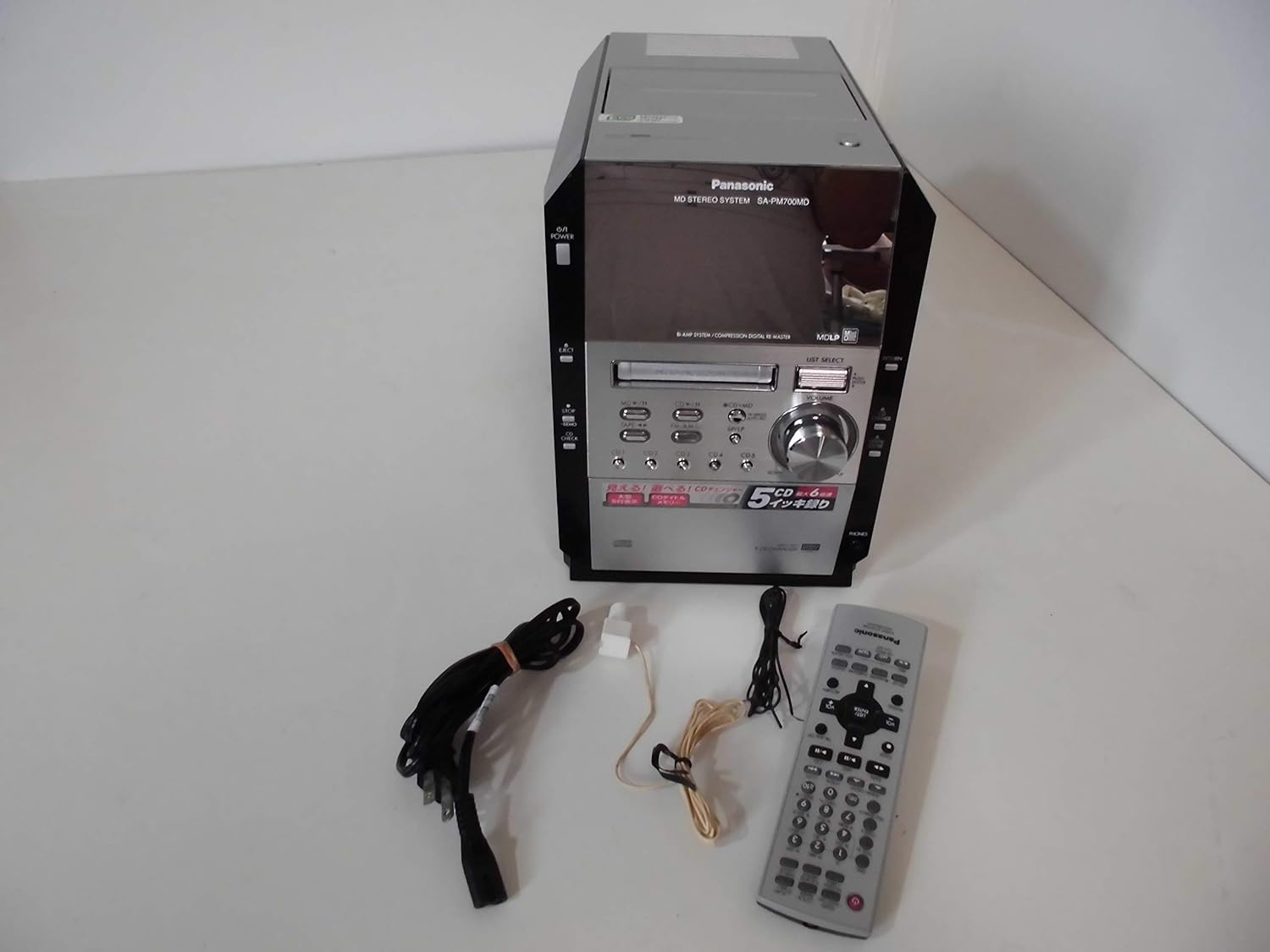
Image: The Panasonic SA-PM700MD-K MD Stereo System shown with its remote control and connecting cables.
2.2 Пайваст кардани баландгӯякҳо
Connect your speakers to the speaker terminals on the rear of the main unit. Ensure correct polarity (positive to positive, negative to negative) for optimal sound quality. This model does not include speakers (SB-PM910).
2.3 Пайвастшавӣ ба антенна
Connect the supplied FM and AM antennas to their respective jacks on the rear panel for radio reception. Position the antennas for best reception.
2.4 Пайвастшавии барқ
Plug the power cord into the AC inlet on the rear of the unit, then into a standard AC 100V wall outlet.

Image: Rear panel of the stereo system, illustrating speaker terminals, antenna inputs, and power inlet.
3. Амалиёт
3.1 Идоракунии асосӣ
The front panel and remote control provide access to all functions. The main unit features a power button, eject button, volume knob, and source selection buttons for MD, CD, Tape, and Tuner.

Тасвир: Пеш view of the stereo system, highlighting the display and primary control buttons.
3.2 Бозии CD
- -ро пахш кунед CD тугмаи барои интихоби манбаи CD.
- -ро пахш кунед БАРОРЕД тугмаи барои кушодани табақи CD.
- Place up to five CDs into the changer trays. The system supports CD-DA, WMA, and MP3 formats on CD-R/RW discs.
- пахш кунед БАРОРЕД боз барои пӯшидани табақа.
- -ро истифода баред CD1-CD5 buttons to select a disc, then press БОЗӢ.

Image: The 5-CD changer mechanism extended, ready for disc loading.

Image: The system's display during CD playback, showing disc and track information.
3.3 MD Playback and Recording
- -ро пахш кунед MD button to select the MD source.
- Insert an MD into the slot.
- пахш кунед БОЗӢ to begin playback. The system supports MDLP (MiniDisc Long Play).
- To record from CD to MD, select the CD source, then press the CD→MD button. High-speed recording up to 6x is available.

Image: The system's display during MD playback, showing track details.
3.4 Cassette Operation
- -ро пахш кунед ТАПЕ button to select the cassette source.
- Insert a normal type cassette tape into the deck.
- пахш кунед БОЗӢ for playback or REC for recording. The deck features auto-reverse functionality.
3.5 Фаъолияти танзимкунанда
- -ро пахш кунед FM/AM button to select the radio source.
- Use the tuning buttons to find your desired station.
- The FM reception band is 76.0-90.0MHz, and the AM reception band is 522-1629kHz.
3.6 Sound Adjustment (Equalizer)
The system includes a 2-way equalizer for sound customization:
- Эквалайзери пешакӣ муқарраршуда: Choose from predefined settings like Heavy, Clear, Soft, or Vocal.
- Manual Equalizer: Adjust bass and treble levels manually to suit your preference.
4. Нигоҳдорӣ
4.1 Тоза кардани дастгоҳ
Қисми берунии дастгоҳро бо матои мулоим ва хушк пок кунед. Барои лойи якрав матои сабукро истифода бурдан гampened with water, then wipe dry. Avoid using abrasive cleaners or solvents.
4.2 Cleaning Disc and Tape Heads
Regularly clean the CD lens with a commercially available CD lens cleaner. For the cassette deck, use a head cleaning cassette to maintain optimal sound quality and prevent tape damage.
5. Баррасии мушкилот
Агар шумо бо системаи худ бо мушкилот дучор шавед, ба мушкилот ва роҳҳои ҳалли маъмулии зерин муроҷиат кунед:
| Мушкилот | Сабаби эҳтимолӣ / Ҳалли |
|---|---|
| Не қудрат | Боварӣ ҳосил кунед, ки сими барқ ба дастгоҳ ва васлаки деворӣ боэътимод пайваст карда шудааст. |
| Садо нест | Пайвастшавии баландгӯякҳоро санҷед. Санҷед, ки сатҳи садо дар ҳадди ақал ё хомӯш нест. Боварӣ ҳосил кунед, ки манбаи дуруст интихоб шудааст. |
| CD/MD disc not playing | Disc may be dirty or scratched. Clean the disc. Ensure disc is inserted correctly. For MD, check if it's a blank or unfinalized disc. |
| Кабули радио бад аст | Adjust the position of the FM/AM antennas. Check for local interference. Note that FM/AM frequencies may vary by region. |
| Лентаи кассетӣ навохта намешавад/сабт намекунад | Ensure the tape is inserted correctly. Only normal type tapes are supported. Clean the tape heads. |
| Правленияи дурдаст кор намекунад | Check the batteries in the remote control. Ensure there are no obstructions between the remote and the unit. |
6. Мушаххасоти
| Хусусият | Тафсилот |
|---|---|
| Рақами модели маҳсулот | SA-PM700MD-K |
| Тағирдиҳандаи CD | 5 диск |
| Навозиш CD | CD-DA, WMA, MP3 (from CD-R/RW) |
| CD to MD Recording | Max 6x speed |
| MDLP Support | Бале |
| Девори кассета | Auto-reverse, Record/Playback (Normal tape only) |
| FM Reception Band | 76.0 – 90.0 МГс |
| AM Reception Band | 522 – 1629 кГц |
| Practical Max Output (JEITA) | 25W + 25W (Low: 13W+13W, High: 12W+12W) Hybrid Bi-amp |
| Таъмини нерӯ | AC 100V (50Hz/60Hz) |
| Истеъмоли қувваи барқ | 54W (Standby: approx. 0.2W) |
| Андозаҳои беруна (W × H × D) | 179 × 250 × 348 мм |
| Вазн | тахминан. 5.6 кг |
| Ранги | Сиёҳ |
| Навъи баландгӯяк | Stereo (Speakers not included) |
7. Кафолат ва дастгирӣ
For warranty information and customer support, please refer to the documentation provided at the time of purchase or visit the official Panasonic webсайт барои минтақаи шумо. Барои ҳама гуна даъвоҳои кафолатӣ далели хариди худро нигоҳ доред.
If you require technical assistance or have questions not covered in this manual, please contact Panasonic customer service.


