1. Муқаддима
Thank you for choosing the NTC V380 WiFi Smart Camera. This device is designed to provide reliable indoor security monitoring with advanced features such as remote access, two-way audio, and night vision. This manual will guide you through the setup, operation, and maintenance of your camera to ensure optimal performance.
2. Маҳсулот ба охир расидview
The NTC V380 WiFi Smart Camera is a compact, indoor surveillance camera featuring pan, tilt, and zoom capabilities. It connects wirelessly to your home network, allowing for remote viewing and control via a smartphone or desktop application.
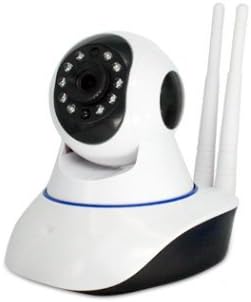
Расми 2.1: Пеш view of the NTC V380 WiFi Smart Camera, showing the lens, infrared LEDs, and microphone.
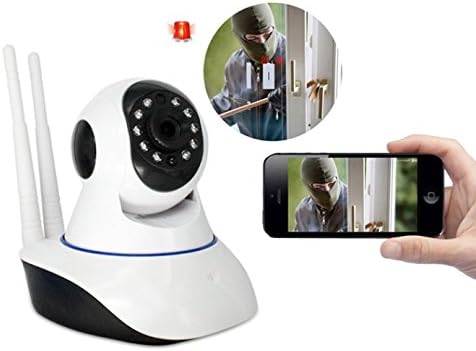
Figure 2.2: The NTC V380 camera demonstrating remote monitoring capabilities with a smartphone displaying the live video feed.
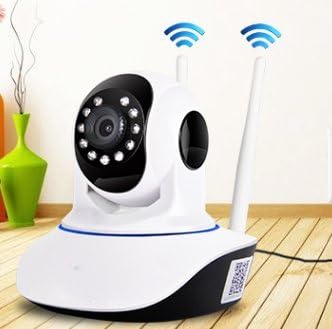
Figure 2.3: The NTC V380 camera positioned in an indoor environment, illustrating its wireless connectivity with WiFi signal indicators.
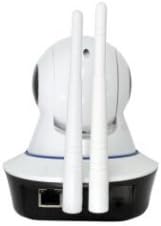
Расми 2.4: Қафо view of the NTC V380 camera, highlighting the dual antennas for enhanced WiFi reception and the Ethernet port for wired connection.
3. Хусусиятҳои асосӣ
- Аудио дутарафа: Тавассути камера бо микрофон ва баландгӯяки дарунсохт муошират кунед.
- Назорати PTZ: Pan (355° horizontal) and Tilt (120° vertical) functionality for comprehensive area coverage.
- Видеои баландсифат: Records video at 1080p resolution with a frame rate of up to 25 frames per second.
- Нигоҳи шабона: Equipped with 10 infrared LEDs, providing clear visibility up to 10 meters in low-light conditions.
- Муайянкунии ҳаракат: Receive alerts via email or FTP upload when motion is detected, with adjustable sensitivity.
- Пайвасти бесим: Supports Wi-Fi for flexible placement and easy integration into your network.
- Мониторинги дурдаст: Access live video and control camera functions from your smartphone (iOS/Android) or desktop via the V380 application.
- Захираи маҳаллӣ: Supports TF (microSD) card for local video recording.
4. Дастури насб
4.1 Мундариҷаи баста
Боварӣ ҳосил кунед, ки ҳама ашё мавҷуд аст:
- NTC V380 WiFi Smart Camera
- Адаптери барқ
- Mounting Accessories (screws, wall plug)
- Дастури корбар (ин ҳуҷҷат)
4.2 Фаъолсозии ибтидоӣ
- Connect the power adapter to the camera's power input port.
- Plug the adapter into a power outlet. The camera will power on and initiate its self-test sequence.
- Wait for the camera to indicate readiness (e.g., a voice prompt or LED indicator change).
4.3 Насби барнома ва пайвастшавӣ ба Wi-Fi
- -ро зеркашӣ кунед V380 application from your smartphone's app store (available for iOS and Android).
- Ҳисоби нав эҷод кунед ё агар шумо аллакай дошта бошед, ворид шавед.
- Follow the in-app instructions to add your camera. This typically involves scanning a QR code on the camera or using an AP hotspot connection method.
- Select your 2.4GHz Wi-Fi network and enter the password when prompted. The camera does not support 5GHz Wi-Fi networks.
- Once connected, the camera will confirm its network status, and you will see it listed in your app.
4.4 Ҷойгиркунии камера
The camera supports wall mounting for optimal positioning.
- Choose a suitable indoor location with a clear view and within Wi-Fi range.
- Қавси васлкунии додашударо ҳамчун қолаб барои қайд кардани сӯрохиҳои винт дар девор истифода баред.
- Drill pilot holes and insert wall plugs if necessary.
- Secure the mounting bracket to the wall using the screws.
- Камераро ба кронштейни васлкунӣ пайваст кунед ва боварӣ ҳосил кунед, ки он боэътимод мустаҳкам карда шудааст.
5. Дастурҳои истифодабарӣ
5.1 Зиндагӣ View ва назорати PTZ
- Open the V380 app and select your camera from the device list to access the live video feed.
- Use the on-screen joystick or swipe gestures to pan (move horizontally) and tilt (move vertically) the camera lens.
- Pinch-to-zoom on the live feed to digitally zoom in or out.
5.2 Аудио дуҷониба
- Ҳангоми зинда будан view, tap the microphone icon in the app to speak through the camera's speaker.
- Барои гӯш кардани аудио аз муҳити камера, нишонаи баландгӯякро ламс кунед.
5.3 Сабт ва бозикунии видео
- Insert a TF (microSD) card into the camera's card slot for continuous or event-based recording.
- In the app, navigate to the playback section to view foo сабт шудаастtage stored on the TF card.
- You can also manually record video or capture screenshots directly from the live view interface in the app.
5.4 Муайянкунии ҳаракат ва огоҳиҳо
- Access the camera settings in the V380 app to configure motion detection.
- Adjust sensitivity levels to minimize false alarms.
- Enable push notifications, email alerts, or FTP uploads for motion detection events.
6. Нигоҳдорӣ
- Тозакунӣ: Объективи камера ва баданро бо матои мулоим ва хушк мулоим тоза кунед. Аз истифодаи кимиёвии сахт ё маводи абразивӣ худдорӣ намоед.
- Навсозии нармафзор: Periodically check the V380 app for available firmware updates to ensure your camera has the latest features and security enhancements. Follow the in-app instructions for updating.
- Идоракунии корти TF: Regularly back up important recordings from your TF card. Format the TF card periodically within the app to maintain optimal recording performance.
7. Баррасии мушкилот
Мушкилот ва роҳҳои ҳалли умумӣ:
- Камера офлайн:
- Санҷед, ки оё камера фаъол аст.
- Боварӣ ҳосил кунед, ки шабакаи Wi-Fi-и шумо фаъол аст ва камера дар доираи таъсир қарор дорад.
- Камера ва роутери Wi-Fi-и худро аз нав фаъол созед.
- Боварӣ ҳосил кунед, ки камера ба шабакаи Wi-Fi 2.4 ГГц пайваст аст.
- Сифати пасти видео:
- Ensure a strong Wi-Fi signal. Move the camera closer to the router if necessary.
- Линзаи камераро тоза кунед.
- Суръати пайвасти интернети худро санҷед.
- Муайянкунии ҳаракат кор намекунад:
- Боварӣ ҳосил кунед, ки муайянкунии ҳаракат дар танзимоти барнома фаъол аст.
- Танзими сатҳи ҳассосият.
- Ensure notification permissions are granted for the V380 app on your smartphone.
- Ба барнома пайваст шуда наметавонад:
- Ensure you have the correct V380 app.
- Номи корбар ва пароли худро тафтиш кунед.
- If issues persist, try resetting the camera to factory defaults (refer to the camera's physical reset button, usually a small pinhole, and hold for 5-10 seconds while powered on) and re-add it to the app.
8. Мушаххасоти
| Хусусият | Тафсилот |
|---|---|
| Рақами модел | ICP-T3810-Q5 (T) V380 |
| Бренд | NTC |
| Қарори сабти видео | 1080p |
| Меъёри кадр | 25 кадр дар як сония |
| Технологияи пайвастшавӣ | Бесимӣ (Wi-Fi) |
| Протоколи пайвастшавӣ | Wi-Fi (танҳо 2.4 ГГц) |
| Масофаи биниши шабона | 10 метр |
| Хусусиятҳои махсус | Night Vision, Motion Sensor, PTZ Technology, Two-Way Audio |
| Дастгоҳҳои мувофиқ | Smartphone, Desktop |
| Навъи назораткунанда | Android (via V380 App) |
| Навъи васлкунӣ | Монтажи девор |
| Формаи форма | Turret (Dome Type) |
| Истифодаи тавсияшаванда | Амнияти дарунӣ |
| Истифодаи дарунӣ/берунӣ | Дарунӣ |
| Манбаи нерӯ | Corded Electric (No batteries required) |
9. Кафолат ва дастгирӣ
For warranty information and technical support, please refer to the documentation provided at the time of purchase or contact your retailer. Keep your purchase receipt as proof of purchase for any warranty claims.


