1. Муқаддима
The Turtle Beach Stealth 700 is a premium wireless gaming headset designed for an immersive audio experience on PlayStation 5 and PlayStation 4 consoles. This manual provides essential information on setting up, operating, and maintaining your headset, ensuring optimal performance and longevity.

Figure 1: Turtle Beach Stealth 700 Wireless Gaming Headset
2. Дар қуттӣ чӣ мавҷуд аст
Upon unboxing your Turtle Beach Stealth 700 headset, please ensure all the following components are present:
- Turtle Beach Stealth 700 Wireless Gaming Headset
- Интиқолдиҳандаи бесими USB
- Сими пуркунандаи USB-C
- Quick Start Guide / Documentation
Видео 1: Маҳсулоти расмӣ ба охир расидview and unboxing of the Turtle Beach Stealth 700 headset.
3. Маҳсулот ба охир расидview
Familiarize yourself with the physical components and controls of your Stealth 700 headset.
3.1 Қисмҳои гӯшмонак

Figure 2: User wearing the Stealth 700 headset, demonstrating its over-ear design.
- Сарбанди танзимшаванда: Features a synthetic leather-wrapped headband for comfort.
- болиштҳои гӯш: Premium synthetic leather-wrapped ear cushions with ProSpecs glasses-friendly design to relieve pressure.
- 50mm Over-Ear Speakers: Deliver immersive surround sound and chat audio.
- High-Sensitivity Flip-Up Mic: Integrated microphone that mutes when flipped up.
3.2 Назоратҳо
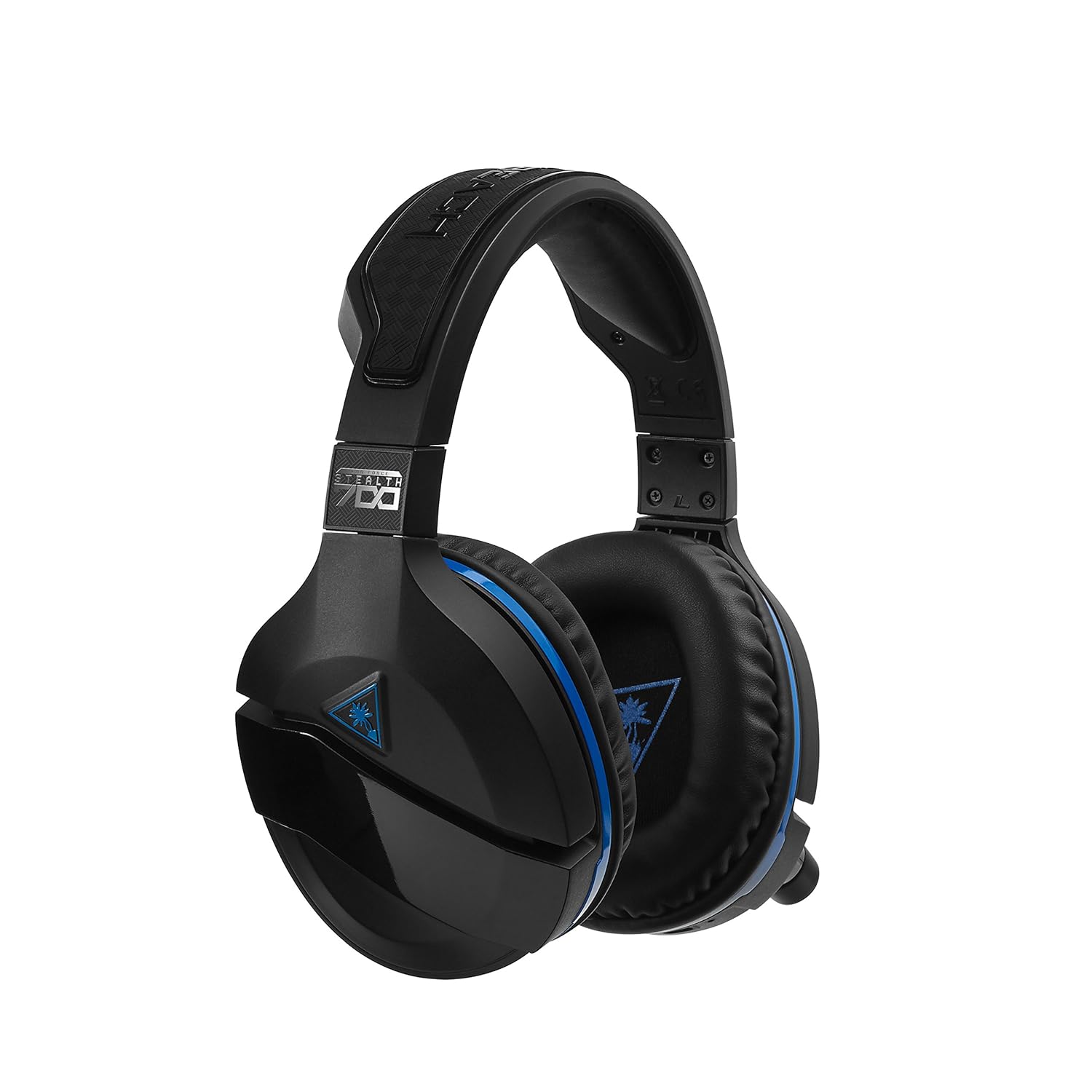
Figure 3: Right earcup controls and microphone in the down position.
- Тугмаи барқ: Гӯшмонакро фаъол/хомӯш мекунад.
- Тугмаи Bluetooth: Ҷуфтшавии Bluetooth-ро оғоз мекунад.
- Game Volume Dial: Adjusts the overall game audio volume.
- Chat Volume Dial: Adjusts the chat audio volume independently.
- Рақами мониторинги микрофон: Adjusts the level of your own voice heard in the headset.
- Superhuman Hearing Button: Activates/deactivates the Superhuman Hearing sound setting.
- Тугмаи режим: Cycles through DTS surround sound modes and audio presets.

Figure 4: Microphone in the flipped-up (muted) position.
4. Дастурамал оид ба насб
Follow these steps to set up your Turtle Beach Stealth 700 headset with your PlayStation console.
4.1 Пуркунии ибтидоӣ
- Connect the USB-C Charging Cable to the headset and a USB power source.
- Charge the headset fully before first use (approximately 5 hours). The LED indicator will change when fully charged.
4.2 Connecting to PlayStation (Wireless)
- Plug the Wireless USB Transmitter into an available USB port on your PlayStation console.
- Power on your Stealth 700 headset by pressing and holding the Power Button until the LED illuminates.
- The headset and transmitter should automatically pair. A solid LED on both indicates a successful connection.
- Дар PlayStation-и худ, ба ин ҷо равед Танзимотҳо> Дастгоҳҳо> Дастгоҳҳои аудиоӣ.
- Танзим Дастгоҳи вуруд ба Гӯшмонаки USB (Turtle Beach Stealth 700).
- Танзим Дастгоҳи баромад ба Гӯшмонаки USB (Turtle Beach Stealth 700).
- Танзим Баромад ба гӯшмонакҳо ба Ҳама аудио.
- Adjust your volume levels as desired.
4.3 Bluetooth Pairing (for Mobile Devices)
The Stealth 700 supports Bluetooth connectivity for calls, music, and the Turtle Beach Audio Hub app while gaming.
- With the headset powered on, press and hold the Тугмаи Bluetooth until the headset announces "Bluetooth Pairing" and the LED flashes blue.
- On your mobile device, go to Bluetooth settings and select "Stealth 700" from the list of available devices.
- The headset will announce "Bluetooth Paired" when the connection is successful.
5. Дастурҳои истифодабарӣ
5.1 Basic Audio Control
- Ҳаҷми бозӣ: Use the upper dial on the left earcup to adjust game audio.
- Chat Volume: Use the lower dial on the left earcup to adjust chat audio.
5.2 Истифодаи микрофон
- To Unmute: Flip the microphone down.
- Хомӯш кардан: Flip the microphone up. The headset will provide an audible cue.
- Variable Mic Monitoring: Adjust the lower dial to control how much of your own voice you hear in the headset.
5.3 Бекоркунии садои фаъол (ANC)
The Stealth 700 features active noise-cancellation to minimize external distractions.
- To Activate/Deactivate: Press the Power Button briefly while the headset is on. The headset will announce the status.
5.4 Superhuman Hearing
This exclusive Turtle Beach sound setting enhances critical in-game sounds like footsteps and weapon reloads.
- To Activate/Deactivate: Press the dedicated Superhuman Hearing button on the left earcup.
5.5 Audio Presets and DTS Surround Sound
Cycle through different audio presets and DTS surround sound modes for an optimized listening experience.
- To Cycle: -ро пахш кунед Тугмаи режим to switch between available presets (e.g., Bass Boost) and DTS Headphone:X 7.1 surround sound options.
6. Turtle Beach Audio Hub App
The Turtle Beach Audio Hub app (available for iOS and Android) allows you to customize various settings of your Stealth 700 headset via Bluetooth.
- Adjust mic monitoring levels.
- Select DTS surround sound modes.
- Choose from various audio presets, including Bass Boost.
- Enable/disable Dynamic Chat Boost.
- Пайвастҳои Bluetooth -ро идора кунед.
7. Нигоҳдорӣ
Нигоҳубини дуруст дарозумрӣ ва кори гӯшмонаки шуморо кафолат медиҳад.
- Тозакунӣ: нармро истифода баред, гamp cloth to clean the headset. Avoid harsh chemicals.
- Нигоҳдорӣ: Гӯшмонакро дар ҷои хунук ва хушк аз нурҳои бевоситаи офтоб ва ҳарорати аз ҳад зиёд дур нигоҳ доред.
- Нигоҳубини батарея: Барои истифодаи оптималии батарея, аз пурра холӣ кардани батарея зуд-зуд худдорӣ намоед. Мунтазам пур кунед.
8. Баррасии мушкилот
If you encounter issues with your Stealth 700 headset, try the following solutions:
8.1 No Audio / Disconnection
- Ensure the headset is fully charged and powered on.
- Verify the Wireless USB Transmitter is securely plugged into the console.
- Check PlayStation audio settings (Settings > Devices > Audio Devices) to ensure the headset is selected as input/output.
- Try re-pairing the headset and transmitter by powering both off and on.
8.2 Микрофон кор намекунад
- Боварӣ ҳосил кунед, ки микрофон барои хомӯш кардан ба поён гардонида шудааст.
- Check PlayStation audio settings to confirm the headset is selected as the input device.
- Adjust the Mic Monitoring dial to ensure it's not set to zero.
- Агар имкон бошад, микрофонро бо барнома ё дастгоҳи дигар санҷед.
8.3 Масъалаҳои пайвасткунии Bluetooth
- Ensure the headset is in Bluetooth pairing mode (LED flashing blue).
- Forget the "Stealth 700" device from your mobile device's Bluetooth settings and try pairing again.
- Боварӣ ҳосил кунед, ки ягон дастгоҳи дигари Bluetooth ба пайвастшавӣ халал намерасонад.
9. Мушаххасоти
| Хусусият | Тафсилот |
|---|---|
| Рақами модел | TBS-3770-01 |
| Пайвастшавӣ | Wireless (USB Transmitter), Bluetooth |
| Дастгоҳҳои мувофиқ | PlayStation 5, PlayStation 4 |
| Навъи драйвери аудио | Ронандаи динамикӣ |
| Андозаи баландгӯяк | 50мм |
| Муҳлати батарея | То 10 соат |
| Вақти пуркунии барқ | тахминан. 5 соат |
| Версияи Bluetooth | 5.0 |
| Диапазони Bluetooth | 10 метр |
| Хусусиятҳои махсус | DTS Headphone:X 7.1 Surround Sound, Active Noise Cancellation, Superhuman Hearing, ProSpecs Glasses Friendly Design, Dynamic Chat Boost, Variable Mic Monitoring |
| Материал | Faux Leather (ear cushions, headband) |
| Вазни ашё | 1.6 фунт |
10. Кафолат ва дастгирӣ
For detailed warranty information, product registration, and further technical support, please visit the official Turtle Beach webсайт дар www.turtlebeach.com. You can also find FAQs and additional resources there.


